Rocket League is one of the fastest, most mechanically demanding competitive titles online — which makes dealing with jitter, fluctuating ping, and connection instability even more infuriating. One moment your dodge cancels instantly, the next it takes half a second to register, breaking your rotations, your aerial precision, and your overall performance in ranked matches. Worse than simple high ping, jitter creates unpredictable spikes that make it impossible to time hits, challenges, or recoveries consistently.
To understand how widespread this issue is in many competitive games, check the list of supported titles on ExitLag at ExitLag supported games list.
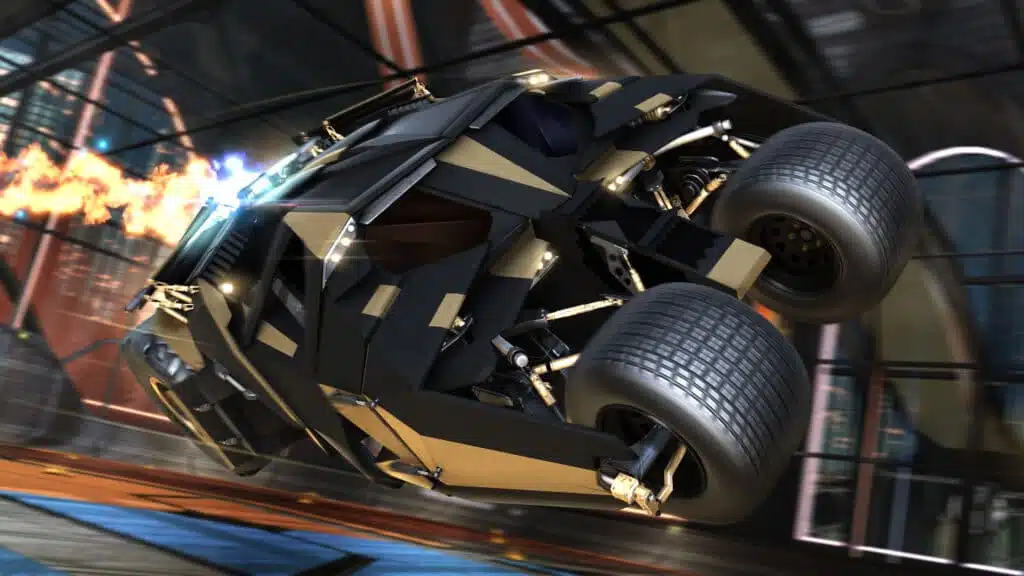
What is jitter in Rocket League?
Jitter refers to the irregular variation in your network latency — instead of maintaining a stable ping, your response time jumps unpredictably. Where high ping is a measurement of delay, jitter shows how inconsistent that delay is.
For example, if your connection moves from 50 ms to 120 ms, then back to 80 ms, then spikes to 150 ms, this instability generates significant timing issues in servers that expect predictable packet flow. The ideal experience is a stable ping that varies no more than 5–10 ms.
This means even a “low ping” connection can feel terrible if it is unstable. A player with 40 ms but constant spikes between 40–100 ms may experience worse gameplay than someone with a stable 90 ms.
How jitter affects your gameplay in Rocket League
Jitter creates precise, predictable symptoms in Rocket League — all of them extremely damaging to competitive play. Common issues include:
- Inconsistent command response: Sometimes your input registers instantly, other times the game delays your flip, jump, or boost.
- Unreliable dodges: Dodge timing becomes unpredictable, making challenges feel random instead of skill-based.
- Broken aerial combos: Any delay ruins sequences requiring perfect momentum control.
- Sudden position shifts: Opponents may rubberband or appear to teleport during 50/50s.
- Frustration in PvP: You simply cannot compete in ranked when the game’s reaction time changes every second.
- Resource mismanagement: Boost pickups may fail to register or register late.
- Hit registration issues: Sometimes your touch, bump, or demo registers; sometimes it doesn’t.
- Inconsistent aim and landing precision: Every micro-adjustment becomes harder when timing shifts constantly.
Main causes of jitter in Rocket League
Congestion in your network
When multiple devices are streaming, downloading, or consuming bandwidth simultaneously, your connection packets fight for priority. This creates unstable delivery, which directly increases jitter.
Unstable routing
Internet providers automatically route your packets using the paths they consider most efficient — but these routes often change in real time. If your packets continually switch paths, your travel time to the server fluctuates.
Wi-Fi instability
Wireless connections suffer interference from walls, devices, neighbors’ routers, and even microwaves. This natural instability often causes jitter even when your base speed is fast.
ISP-related problems
Some providers have overloaded infrastructure or poorly optimized routing tables. Even if your speed test looks fine, the route to Rocket League’s servers may be inconsistent.
Distance from Rocket League servers
The farther you are from the target server, the more routers (hops) your packets must cross. Each hop increases opportunities for variation and instability.
Game-specific routing sensitivity
Rocket League’s servers are sensitive to packet arrival timing because of their real-time physics engine. Any delay inconsistency directly impacts ball prediction, car movement, and 50/50 outcomes.
How to identify and measure jitter in Rocket League
Extended ping test
Use a terminal or command prompt to ping the game server or a stable host continuously (e.g., ping -t). If the values jump irregularly, your jitter is high.
Signs inside Rocket League
In-game symptoms are often easier to observe:
- The ping indicator fluctuates constantly.
- The game feels inconsistent — smooth at one moment, terrible the next.
- You experience intermittent rubberbanding.
- Command response feels inconsistent: one dodge is instant, the next is delayed.
- The match feels unstable even though your ping value may look low.
If these symptoms happen regularly, jitter — not simple latency — is your main issue.
Jitter levels and their impact
| Jitter Level | Ping Variation | Gameplay Impact |
| 0–5 ms | Minor variation | Ideal stability, perfect command timing |
| 5–15 ms | Small variation | Mostly stable, rare micro-delays |
| 15–30 ms | Noticeable variation | Inconsistent hits and aerial timing |
| 30–50 ms | High variation | Rubberbanding, delayed dodges, bad 50/50s |
| 50+ ms | Extreme variation | Game becomes unpredictable and unplayable |
Basic solutions to reduce jitter in Rocket League
Prioritize your connection
- Use an Ethernet cable to eliminate Wi-Fi issues.
- Close background applications that may consume bandwidth.
- Limit the number of active devices on the same network.
- Disable automatic updates on your PC and apps.
- Update your network drivers to ensure optimal stability.
- Adjust Rocket League’s performance settings to minimize load spikes.
Configure QoS on your router
Quality of Service (QoS) prioritizes Rocket League’s packet flow over other devices. This ensures your traffic receives top priority even when the network is busy. QoS can dramatically reduce jitter caused by local congestion.
Check with your ISP
If instability persists, contact your provider and request a line test. They can check for routing issues, faulty equipment, or noise on the line. In many cases, jitter originates outside your home network.
ExitLag: the definitive solution to eliminate jitter in Rocket League
What is ExitLag?
ExitLag is a specialized software designed exclusively for connection optimization in online games. Developed by gamers, for gamers, it acts as an intelligent stabilizer that ensures consistent packet delivery and stable routes to Rocket League servers. Learn more about the technology behind it at ExitLag connection optimization technology.
Unlike general connection tweaks, ExitLag focuses specifically on the paths your data takes to reach the server. It doesn’t just reduce ping — it eliminates jitter entirely by stabilizing packet travel time.
How ExitLag eliminates jitter in Rocket League
ExitLag uses its proprietary Multi-Internet technology to guarantee stability. You can read about how it works at ExitLag multi-route technology explained.
Here’s what happens behind the scenes:
- Multiple simultaneous routes
Your data travels through several optimized routes at the same time. If one route fluctuates, others maintain consistency. - Intelligent packet selection
ExitLag automatically selects the fastest-arriving packet and discards slower ones. - Real-time route optimization
The software constantly analyzes available routes and switches instantly to maintain consistent latency. - Hop reduction
It reduces the number of routers your packets cross, eliminating potential instability points. - Smart buffering
ExitLag delivers packets to Rocket League in a stable flow, even when your ISP suffers small fluctuations.
Advantages of ExitLag for Rocket League players
Complete ping stabilization
Your connection becomes predictable and consistent, allowing accurate timing on aerials, flicks, and recoveries.
Total jitter elimination
Multi-route packet delivery ensures that variations are minimized or removed entirely.
Improved timing
Every dodge, jump, rotation, and aerial responds exactly when you expect.
Competitive advantage
In ranked and high-level lobbies, stability is often the deciding factor between winning or losing 50/50s.
Works on all servers worldwide
Whether official or private, ExitLag optimizes your route globally.
Simple interface
Just pick your game, apply the routes, and play.
Is ExitLag worth using in Rocket League?
Yes — especially if you:
- Experience jitter or constant instability
- Play ranked where precision matters
- Use Wi-Fi or have suboptimal routing from your ISP
- Connect to distant servers or during peak hours
- Have lost matches because of unpredictable lag
- Want consistent timing on every move
Check prices and subscription options at ExitLag pricing and subscription options.
How to use ExitLag in Rocket League
The process is extremely simple:
Step 1 – Access the official ExitLag website and download the application. There’s a free trial period for new users.
Step 2 – Install and open the program. Log in with your account.
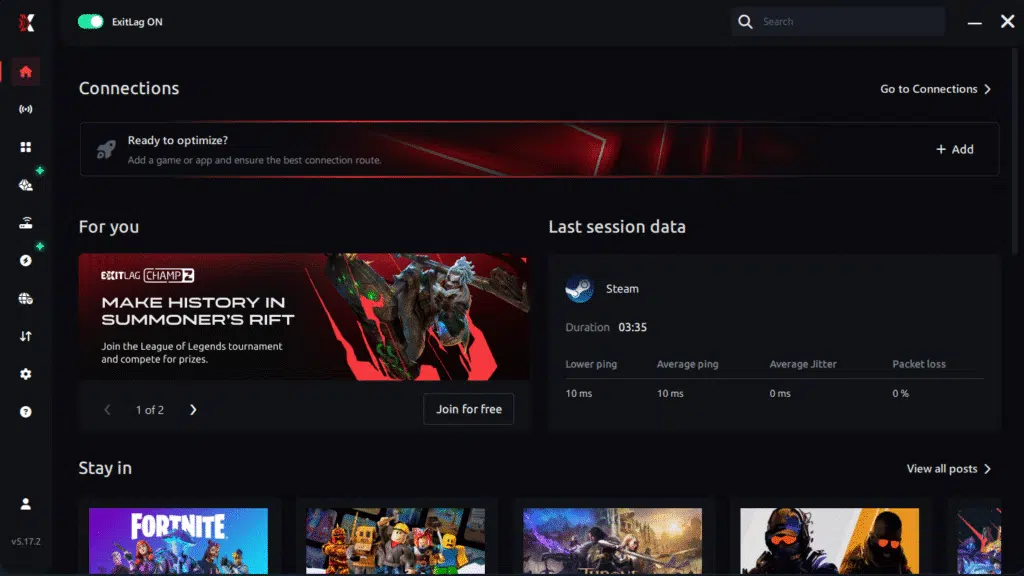
Step 3 – In the search bar, type “Rocket League” and select the game from the list.
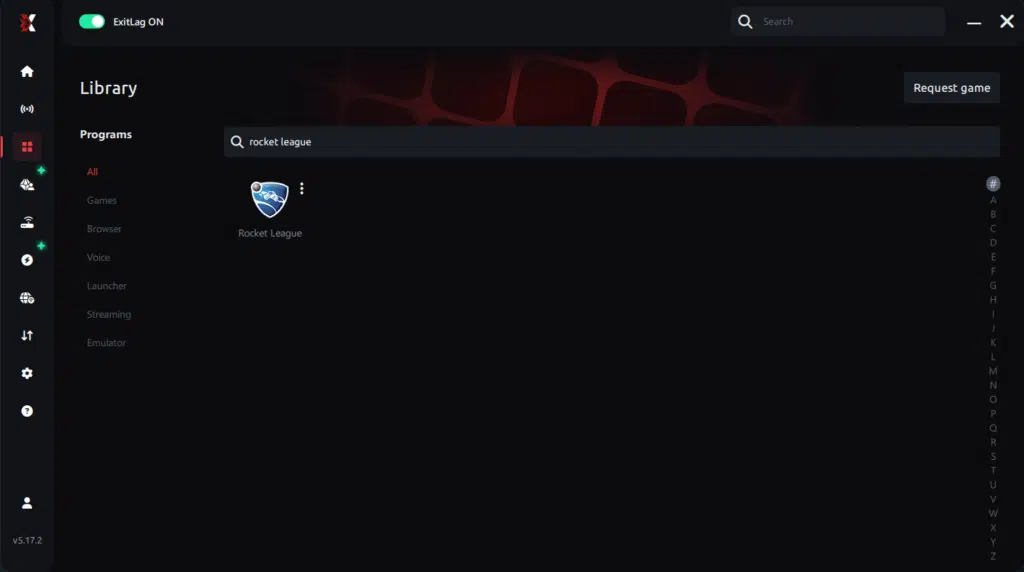
Step 4 – Choose between automated or manual route
Based on the results, you can let ExitLag automatically select the best route or manually choose the server that showed the lowest latency for your connection.
AI-optimized automated route
Based on the results, you can let ExitLag automatically select the best route through AI optimization. The system analyzes multiple connection paths in real time and automatically identifies the most efficient route for your connection, ensuring the lowest possible latency without requiring manual choices.
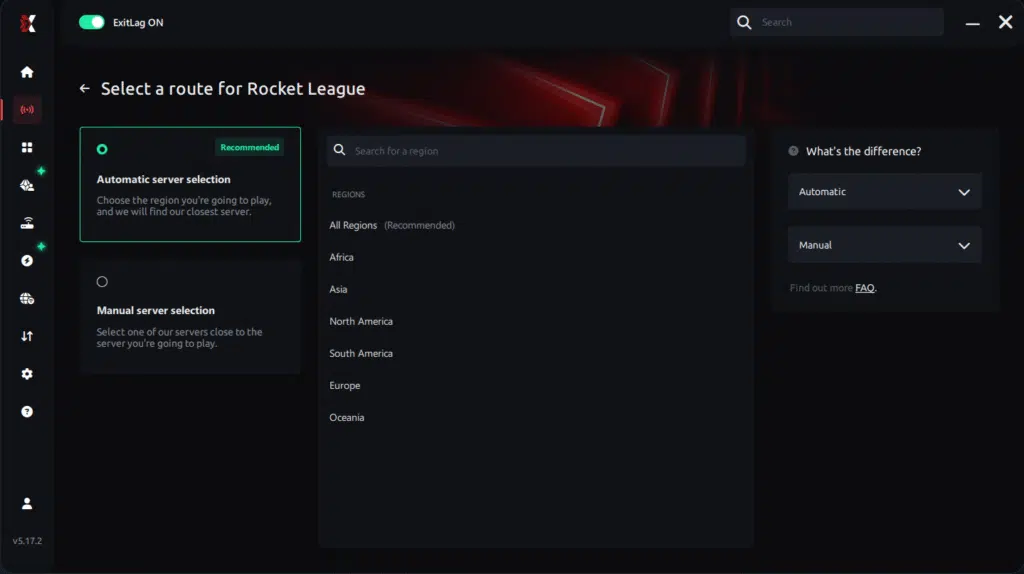
Manual route
If you prefer to have full control over your connection, you can manually choose the server based on the ping test results. Simply select the server that showed the lowest latency or the one that best meets your specific gaming needs, allowing complete customization of your experience.
Step 5 – Click “Rocket League” or the play button. ExitLag will begin optimizing your connection automatically.
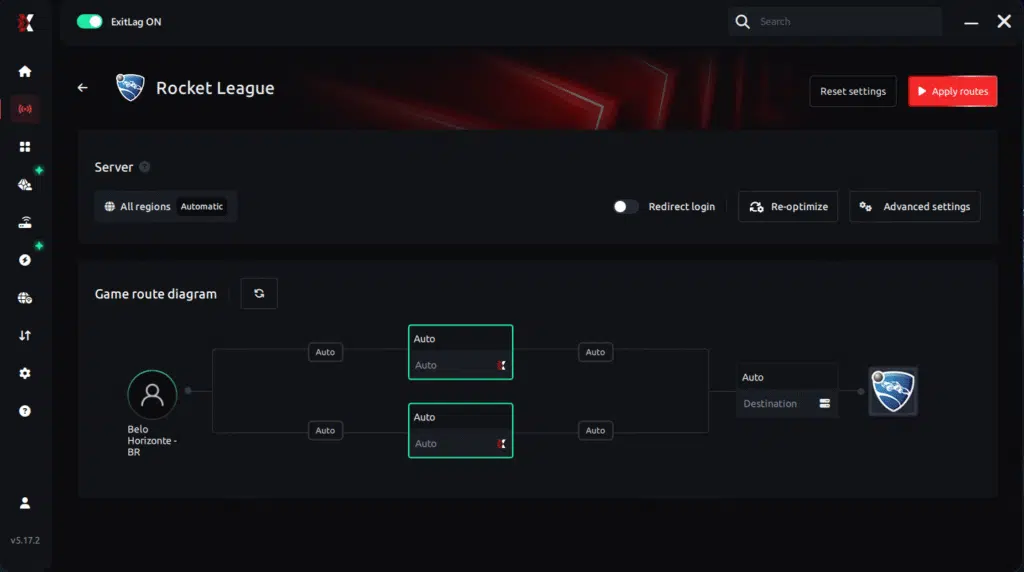
Step 6 – Wait a few seconds until optimization is complete. You’ll see ping indicators in the interface.
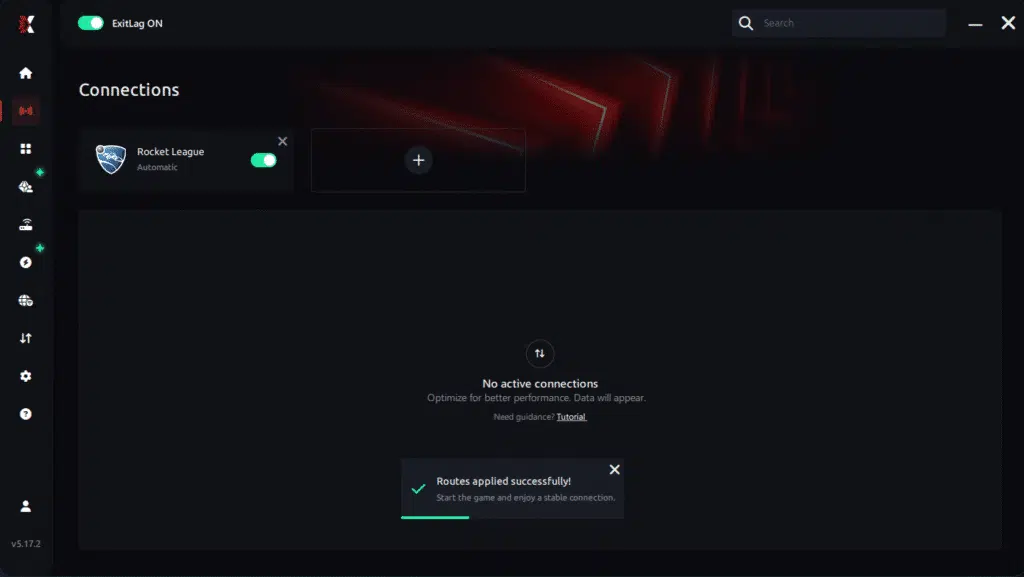
Step 7 – Launch Rocket League normally. The optimization will already be active.
ExitLag runs in the background while you play, constantly adjusting routes to maintain the best possible performance.
FAQ: frequently asked questions about jitter in Rocket League
What is the difference between jitter, lag, and packet loss?
Jitter refers to unstable ping variation, lag is the general delay caused by high ping, and packet loss is when data fails to reach the server. You can have low ping but high jitter, creating a terrible gameplay experience.
Why is my ping fluctuating in Rocket League?
Common causes include network congestion, unstable routing, Wi-Fi instability, multiple devices connected, or ISP-related issues. Distance to servers also plays a big role.
Is jitter worse than high ping?
Often yes. A stable 100 ms ping can be more playable than a fluctuating 40–150 ms ping, because consistency matters more for timing.
How do I know if I have jitter?
Run repeated ping tests and observe variation. In-game, if your actions sometimes feel instant and sometimes delayed, jitter is likely the cause.
Does Wi-Fi cause jitter?
Yes. Wireless signals are prone to interference. Ethernet is always the most stable option.
Does ExitLag fix more than just jitter?
Yes. ExitLag also reduces ping, prevents packet loss, and stabilizes routes across hundreds of supported games.
Do I need to keep ExitLag open while playing Rocket League?
Yes. The software must stay active to maintain optimized routing.
Is Rocket League more sensitive to jitter than other games?
Yes. Because of its physics-based engine, even minor timing inconsistencies affect challenges, aerial precision, and ball prediction.
Conclusion
Jitter can turn a smooth Rocket League session into pure frustration, ruining your timing, consistency, and competitive performance. But you don’t need to accept unstable gameplay as normal. By understanding the causes, optimizing your settings, and using the right tools, you can eliminate ping variation entirely and enjoy the game as it was meant to be played.
If you want stable, predictable, competitive-ready gameplay, ExitLag is the definitive solution. Learn more tips and connection guides at ExitLag connection guides and tips.
Ready to eliminate jitter and stabilize your Rocket League connection for good?
Start your free trial today at Start your free trial today
Got questions or want to connect with other players? Join the conversation at the ExitLag Forum!