If you play Where Winds Meet and notice your ping constantly fluctuating, causing unpredictable stuttering that ruins your martial arts combos, you’re experiencing jitter – one of the most frustrating connection issues in this action MMORPG. This instability is often worse than high ping because it makes it impossible to predict when your commands will execute, turning every PvP encounter and boss fight into a frustrating gamble rather than a test of skill.

What is jitter in Where Winds Meet?
Jitter is the irregular variation in response time (latency) between your computer and Where Winds Meet servers. While ping measures the time it takes for data to travel to the server and back, jitter measures the consistency of that time.
For example, if your ping constantly varies between 50ms, 120ms, 80ms, and 150ms within seconds, you have high jitter. This inconsistent behavior makes timing-based gameplay nearly impossible. Ideally, your ping should remain stable, varying at most 5-10ms regardless of the absolute value. A consistent 80ms ping is far more playable than ping that jumps unpredictably between 30ms and 120ms.
In Where Winds Meet, where precise timing is essential for executing martial arts combos, dodging attacks, and performing parkour sequences, jitter creates an unstable experience where identical inputs produce wildly different results. The game’s physics-based combat system requires predictable server communication, making it particularly vulnerable to latency variation.
How jitter affects your gameplay in Where Winds Meet
Jitter severely disrupts multiple aspects of Where Winds Meet gameplay:
- Command inconsistency: Sometimes your skills execute instantly, other times they delay for seconds with no pattern
- Impossible dodge timing: When response time varies unpredictably, dodging telegraphed attacks becomes a matter of luck rather than skill
- Broken combos: Carefully practiced ability sequences fail because the delay between inputs changes randomly
- Sudden deaths: Enemies appear to teleport due to instability, and you’re eliminated before you can react
- PvP frustration: Competing becomes impossible when you cannot predict how the game will respond to your inputs
- Wasted resources: Buffs, consumables, and cooldowns are squandered when abilities trigger at unexpected times
- Inconsistent hit registration: Your attacks connect sometimes but fail to register other times, creating confusion
- Unreliable movement: Parkour across rooftops and environmental navigation becomes dangerous when timing varies
Main causes of jitter in Where Winds Meet
1. Network congestion
When multiple devices or applications use your internet connection simultaneously, the priority of data packets varies, causing jitter. Streaming services, downloads, cloud backups, and other household internet usage compete with game traffic, creating inconsistent delivery times for game data.
Network traffic prioritization changes dynamically based on bandwidth availability, making your ping to Where Winds Meet servers fluctuate unpredictably.
2. Unstable routing
If your data packets pass through different routes at different moments, travel time varies constantly. Internet routing isn’t fixed – your ISP and intermediate networks continuously adjust paths based on network conditions, causing jitter when routes change during gameplay.
Each alternative route has different characteristics, hop counts, and congestion levels, producing the ping variation that defines jitter.
3. Unstable Wi-Fi
Wireless connections are naturally susceptible to interference, signal obstructions, and strength variations, resulting in jitter. Wi-Fi signals degrade with distance, penetrating walls, and competing with other wireless devices on similar frequencies.
The wireless medium introduces inherent instability that wired connections don’t experience, making jitter far more common on Wi-Fi.
4. ISP infrastructure problems
Internet service providers with overloaded infrastructure or poor configuration deliver unstable connections with high jitter. During peak usage hours, ISP networks become congested, causing variable packet delivery times.
Some ISPs also employ aggressive traffic shaping that deprioritizes gaming traffic, creating inconsistent latency even when bandwidth appears adequate.
5. Distance from servers
The farther you are from Where Winds Meet servers, the more routers your data traverses, increasing opportunities for variation. Each additional network hop introduces potential congestion points and routing decisions that can vary moment to moment.
International connections are particularly prone to jitter due to the complex, multi-provider routes required to span continents.
6. Server load fluctuations
During peak player populations or special events, Where Winds Meet servers may experience variable load, causing response time inconsistencies. While server-side factors are beyond player control, understanding this helps contextualize temporary jitter during busy periods.
How to identify and measure jitter in Where Winds Meet
Extended ping test
Open Command Prompt (Windows) or Terminal (Mac/Linux) and enter:
ping [Where_Winds_Meet_server_IP] -tObserve the time values returned. If there are large variations – differences greater than 20-30ms between consecutive responses – you have jitter. Consistent values indicate stable connection; erratic values confirm instability.
In-game signs
Monitor for these jitter symptoms during gameplay:
- Ping displayed in-game varies constantly rather than remaining steady
- The game feels “inconsistent” – sometimes responsive, sometimes laggy with no pattern
- Some gameplay moments are smooth while others have terrible lag for no apparent reason
- Rubberbanding occurs intermittently rather than constantly
- Skills and commands have variable delay – the same input produces different response times
- You experience instability even when your average ping appears low
Pay particular attention to whether problems occur randomly or follow patterns (like being worse during evening hours, suggesting network congestion).
Basic solutions to reduce jitter in Where Winds Meet
Prioritize your connection
- Use ethernet cable: Eliminate Wi-Fi instability by connecting directly via wired connection
- Close background applications: Disable downloads, streaming, and automatic updates that cause bandwidth variations
- Limit devices on network: Fewer active devices means more stable bandwidth allocation for gaming
- Disable automatic updates: Operating system and application updates consume bandwidth unpredictably, causing jitter
- Update network drivers: Outdated network adapter firmware can introduce latency variation
- Restart networking equipment: Power cycle your modem and router to clear potential configuration issues
Configure QoS on router
Quality of Service (QoS) settings allow you to prioritize Where Winds Meet traffic, ensuring game packets receive priority treatment even when your network is busy. Access your router’s administration interface and configure QoS rules to prioritize gaming traffic over other household internet usage.
This prevents other devices and applications from causing jitter by competing for bandwidth during critical gameplay moments.
Check with your ISP
Contact your internet service provider to report connection instability. Request a line quality check and verification that your connection meets advertised specifications. Ask specifically about jitter and whether traffic shaping policies affect gaming performance.
ISPs can sometimes identify and resolve infrastructure problems causing latency variation on their network.
ExitLag: the definitive solution to eliminate jitter in Where Winds Meet
What is ExitLag?
ExitLag is specialized connection optimization software developed exclusively for online gaming. Unlike generic solutions, this software acts as an intelligent connection stabilizer that eliminates jitter and provides consistent, predictable latency for Where Winds Meet.
Developed by gamers for gamers, ExitLag understands that stable connection quality matters more than raw speed. The software employs advanced routing technology specifically designed to eliminate the ping variations that make competitive gaming frustrating.
Think of ExitLag as a precision stabilizer for your game connection – it doesn’t just reduce ping, it ensures that ping remains consistent second after second, providing the predictable response times essential for Where Winds Meet’s demanding combat system.
How ExitLag eliminates jitter in Where Winds Meet
ExitLag operates through advanced Multi-Internet technology that fundamentally solves jitter problems:
1. Multiple simultaneous routes Your data is sent through several different routes at the same time. If one route experiences variation, others maintain stability, ensuring consistent delivery times.
2. Intelligent packet selection The system automatically selects packets that arrived fastest while discarding delayed ones. This eliminates jitter by ensuring the game only processes data that arrived via optimal paths.
3. Real-time route optimization The software constantly analyzes available routes and automatically adjusts to maintain stable latency. When conditions change on one path, ExitLag seamlessly shifts to alternatives.
4. Hop reduction By optimizing routing to minimize intermediate connection points, ExitLag reduces opportunities for variation to occur. Fewer router hops mean fewer points where jitter can be introduced.
5. Intelligent buffering ExitLag manages packet delivery to provide the game with a constant data flow, even when your internet connection experiences momentary instability. This smooths out variations before they affect gameplay.
Advantages of ExitLag for Where Winds Meet players
Complete ping stabilization The primary advantage is transforming an unstable connection into one with consistent and predictable latency. ExitLag eliminates the ping variations that make timing-based gameplay impossible.
Jitter elimination The multiple routes system ensures ping variations are minimized or completely eliminated. You’ll experience rock-solid connection stability even during network peak hours.
Improved timing precision With stable ping, you can predict exactly when your skills will execute and when you need to dodge. This transforms combat from unpredictable chaos into the skill-based experience the developers intended.
Competitive advantage In PvP and competitive content, having a stable connection makes all the difference between victory and defeat. When opponents experience jitter while you don’t, you gain a decisive edge.
Works on any server Whether you play on official servers or private implementations, in any region worldwide, ExitLag provides optimized, stable routing.
Simple interface No technical knowledge required – simply select Where Winds Meet from the games list and activate optimization. The software handles all complex routing decisions automatically.
Is ExitLag worth it for Where Winds Meet?
ExitLag is definitely worth it if you:
- Experience jitter and instability frequently during gameplay
- Play on international or distant servers from your geographic location
- Participate in competitive content like PvP, ranked matches, or tournaments
- Want consistency and stable performance you can rely on
- Play during peak hours when internet typically becomes unstable
- Use Wi-Fi or have an ISP with poor routing quality
- Have lost fights or important matches due to unpredictable lag
- Want perfect timing for combos and ability sequences
For players experiencing connection instability, ExitLag represents excellent value. The software costs less than most gaming peripherals while providing immediate, measurable improvement. With flexible pricing plans and a free trial, you can verify results before committing.
How to use ExitLag in Where Winds Meet
The process is extremely simple:
Step 1 – Access the official ExitLag website and download the application. There’s a free trial period for new users.
Step 2 – Install and open the program. Log in with your account.
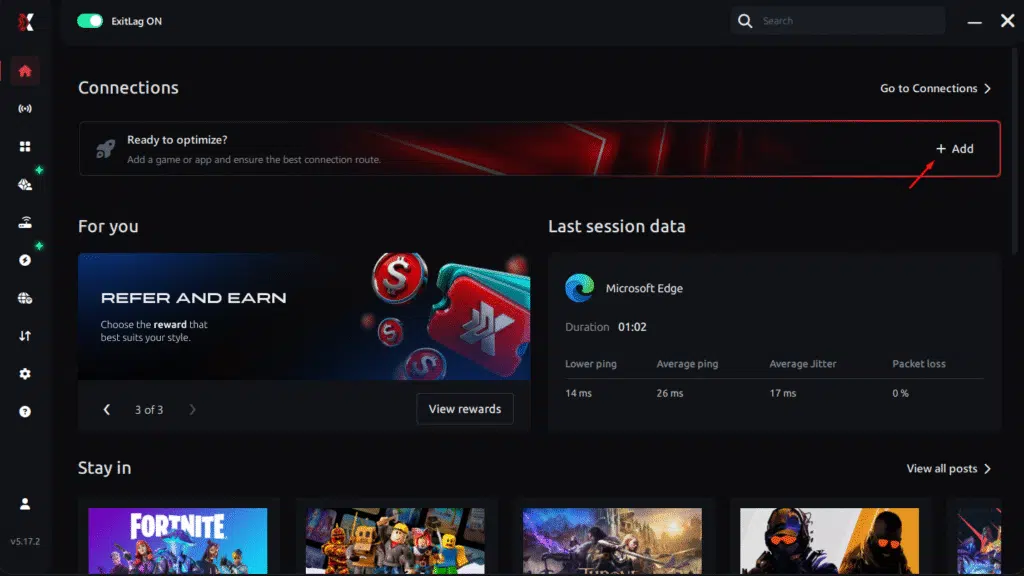
Step 3 – In the search bar, type “Where Winds Meet” and select the game from the list.
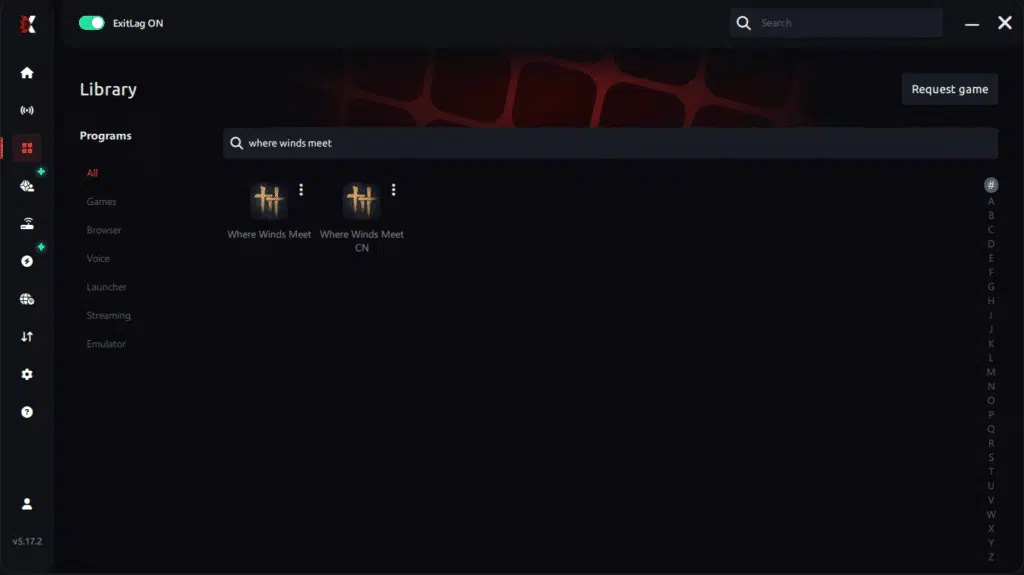
Step 4 – Choose between automated or manual route
Based on the results, you can let ExitLag automatically select the best route or manually choose the server that showed the lowest latency for your connection.
AI-optimized automated route
Based on the results, you can let ExitLag automatically select the best route through AI optimization. The system analyzes multiple connection paths in real time and automatically identifies the most efficient route for your connection, ensuring the lowest possible latency without requiring manual choices.
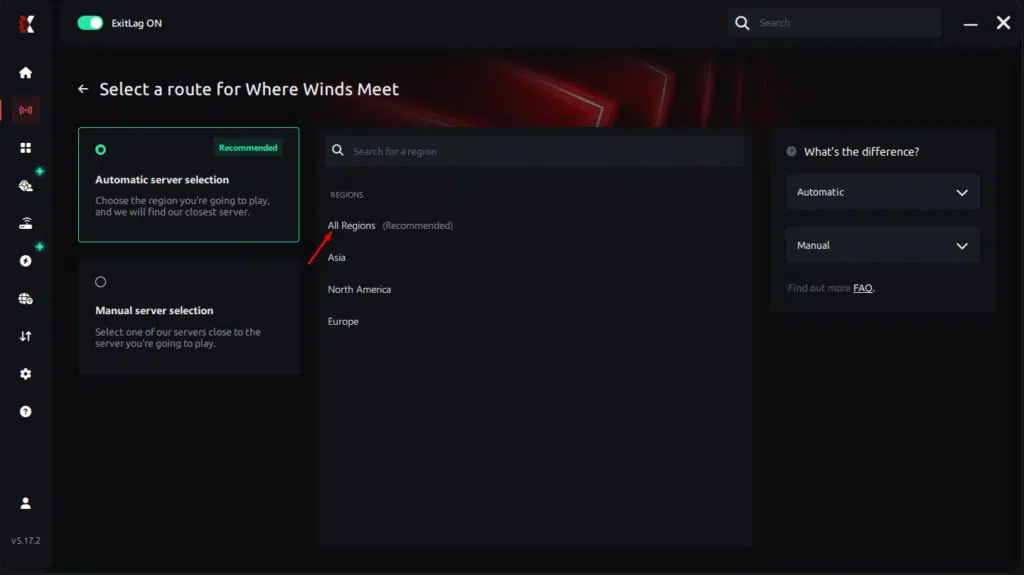
Manual route
If you prefer to have full control over your connection, you can manually choose the server based on the ping test results. Simply select the server that showed the lowest latency or the one that best meets your specific gaming needs, allowing complete customization of your experience.
Step 5 – Click “Where Winds Meet” or the play button. ExitLag will begin optimizing your connection automatically.
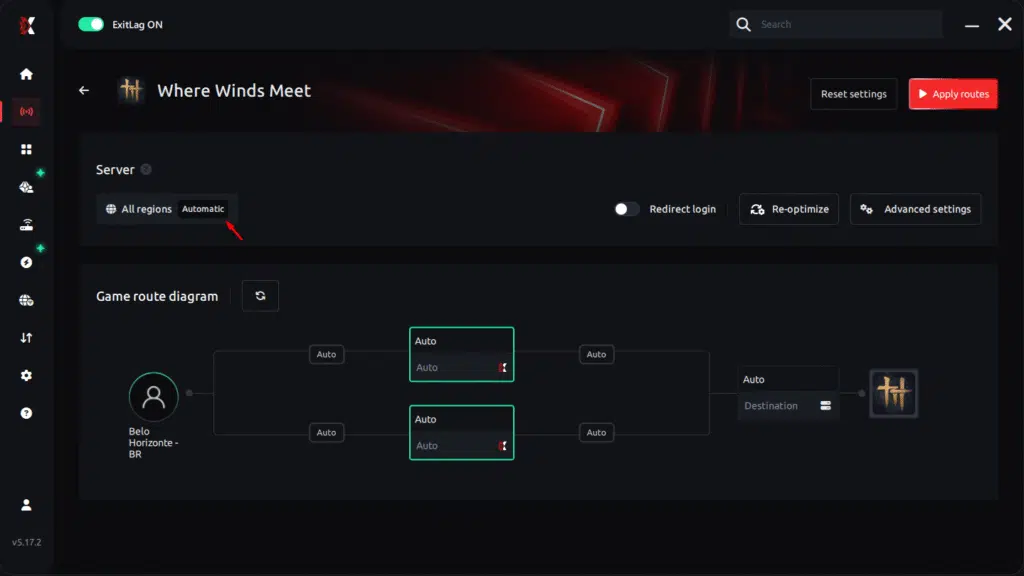
Step 6 – Wait a few seconds until optimization is complete. You’ll see ping indicators in the interface.
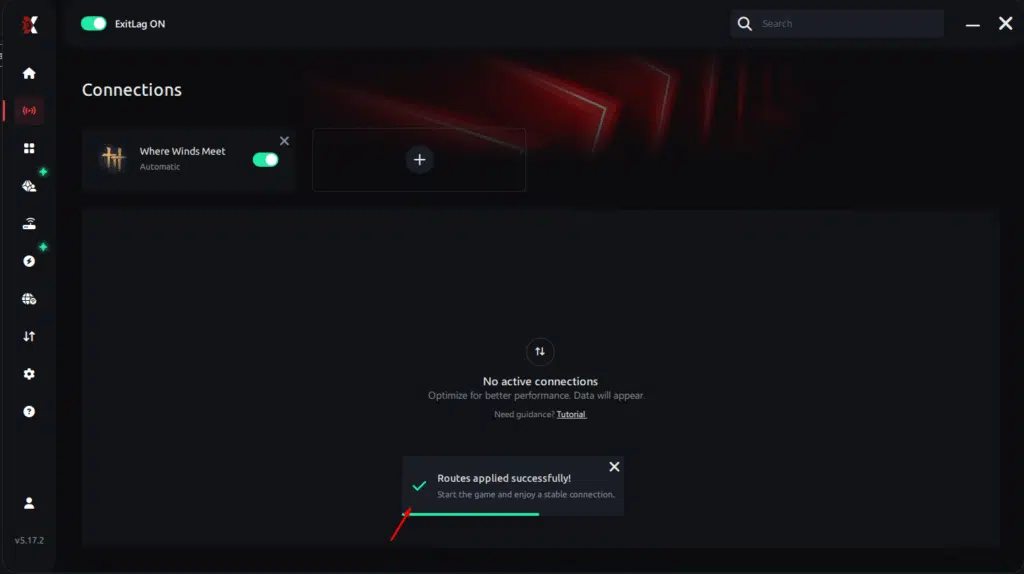
Step 7 – LaunchWhere Winds Meet normally. The optimization will already be active.
ExitLag runs in the background while you play, constantly adjusting routes to maintain the best possible performance.
How to use Ping for Games: step-by-step guide
Checking your connection quality before entering a match has never been easier. Here’s how to use Ping for Games in just a few steps:
1. Open the ExitLag software on your PC
Ensure the application is installed and open. The feature is integrated into the platform and available for free to all users.
2. Access the Network Analyzer tool
Locate the Network Analyzer in the software menu. This is where you’ll find Ping for Games along with other connection analysis features.
3. Select the game you want to test
Choose from the list the title you plan to play. The tool supports major online multiplayer games, including MOBAs, FPS, Battle Royales, MMORPGs, and more.
4. Choose the specific server
Now you select directly the server you want to test, instead of just a generic region. This ensures much more accurate results for your choice.
5. Start the ping test
With one click, the measurement is performed in real-time between your device and the chosen server, considering your current connection (cable or Wi-Fi).
6. Analyze the results
Results appear in milliseconds (ms), automatically sorted from best to worst ping. You can also reorganize the view alphabetically, if you prefer.
7. Choose the best server and play worry-free
With the information in hand, just select the server with the lowest latency and enter the match knowing your connection is optimized.
FAQ: frequently asked questions about jitter in Where Winds Meet
What’s the difference between jitter, lag, and packet loss?
Jitter is ping variation (instability), lag is delay caused by high ping, and packet loss is loss of data packets. You can have low average ping but with high jitter, resulting in a poor gaming experience. Lag is predictable; jitter is not. Packet loss causes different symptoms like teleporting, while jitter causes inconsistent response times.
Why does my ping keep fluctuating in Where Winds Meet?
The most common causes are network congestion from multiple devices or applications, unstable routing by your ISP, Wi-Fi interference, or server distance. During evening peak hours, network instability increases as more users compete for bandwidth. If you’re on Wi-Fi, signal strength variations also contribute significantly to ping fluctuation.
Is jitter worse than high ping?
In many cases, yes. A high but stable ping (for example, consistently 100ms) is more playable than ping varying between 30ms and 150ms because you can adapt to constant latency. With jitter, you never know whether your next input will respond immediately or after a significant delay, making strategic gameplay impossible. Predictability matters more than raw speed for competitive gaming.
How can I tell if I have jitter?
Run an extended ping test in terminal and observe whether values vary significantly. In-game, if you feel the response is inconsistent – sometimes fast, sometimes slow with no pattern – you probably have jitter. Watch your in-game ping display: if it jumps around constantly rather than staying steady, that’s jitter. Record your gameplay and watch for timing inconsistencies.
Does Wi-Fi cause jitter?
Yes. Wireless connections are naturally more susceptible to interference, signal obstructions, and strength variations, all resulting in jitter. Wi-Fi signals must compete with other wireless devices, penetrate walls, and maintain quality over distance. Ethernet cable connections are always more stable because they provide dedicated, interference-free paths for data transmission.
Does ExitLag work for other problems besides jitter?
Yes! ExitLag also reduces ping, eliminates packet loss, protects against DDoS attacks, and improves overall connection stability in hundreds of online games. The Multi-Internet technology addresses multiple connection problems simultaneously, providing comprehensive optimization rather than solving just one issue.
Do I need to keep ExitLag open while playing?
Yes, the software must remain active during your entire gaming session to maintain optimization. You can minimize it to the system tray, but closing the application will end the optimized routing. ExitLag continuously monitors and adjusts routes in real-time, requiring persistent operation to provide stable performance.
Can jitter be fixed permanently?
While you cannot control ISP infrastructure or server locations, ExitLag provides a permanent solution by continuously optimizing your connection. As long as the software runs, it actively eliminates jitter regardless of underlying network conditions. This makes instability problems effectively permanent solved for your gaming experience.
Conclusion: play Where Winds Meet with stable and predictable connection
Jitter can transform an enjoyable Where Winds Meet session into a frustrating, unpredictable experience where skill no longer determines outcomes. But you don’t need to accept this as normal. With the right optimization, particularly specialized software like ExitLag, you can completely eliminate ping variations and guarantee a stable, consistent, and competitive connection.
Don’t let connection instability ruin your gaming moments, cause you to lose important fights, or waste valuable resources. Invest in optimized connectivity and experience Where Winds Meet as it was designed to be played: with immediate response, perfect timing, and zero surprises caused by unpredictable network behavior.
Take control of your connection quality today. For more tips on optimizing online game performance and eliminating technical issues, visit the ExitLag blog for comprehensive guides and updates.
Tired of suffering from jitter in Where Winds Meet? Try ExitLag for free and feel the difference of playing with a truly stable connection. Test now and see results immediately!
Got questions or want to connect with other players? Join the conversation at the ExitLag Forum!