When you jump into World of Warcraft—whether exploring Azeroth in Retail or diving into nostalgic raids in Classic—nothing disrupts your session faster than jitter. That feeling when your fluctuating ping makes spells take longer than they should, interrupts your rotations, or turns PvP combat into a guessing game.
That instability ruins timing, breaks muscle memory, and creates an unpredictable gameplay experience where you can’t trust your own inputs. And while high ping is already frustrating, jitter is even worse because you can never predict when your command will execute, especially in PvP, Mythic+, raids, and arena battles that demand precision.
This instability is exactly why so many WoW players look for solutions on sites like the list of supported games on ExitLag, where they can see all optimized titles in one place: the list of supported games on ExitLag

What is jitter in World of Warcraft?
In World of Warcraft, jitter refers to the irregular variation in the time it takes for data to travel between your PC and the game’s servers. Instead of maintaining a stable latency, your connection experiences unpredictable spikes—even if your average ping looks fine. Jitter isn’t about how high your latency is, but how inconsistent it becomes.
Imagine your connection delivering response time results like 50ms → 120ms → 80ms → 150ms. This constant instability means your character’s actions don’t execute in rhythm with your inputs. Even a player with 200ms but stable latency can perform better than someone at 40ms with jitter.
Ideally, WoW players want a very small fluctuation—around 5–10ms—ensuring clean inputs and predictable rotations. When that consistency disappears, your character becomes desynced, opponents teleport, and your ability timing collapses.
How jitter affects your gameplay in World of Warcraft
World of Warcraft is extremely sensitive to timing—especially in Retail’s Mythic+ dungeons, high-end raiding, and Classic’s world PvP. High jitter disrupts your gameplay in many ways:
- Inconsistent command execution: Sometimes your ability fires instantly; other times it delays unpredictably due to unstable ping.
- Unreliable dodges: Your movement feels delayed, making dodges and repositioning inconsistent and often impossible.
- Broken rotations and combos: Ability chains depend on precise timing; jitter makes your rotation fall apart.
- Sudden deaths: Enemies appear to teleport or spike-damage you due to server desync.
- Frustrating PvP duels and arena matches: Reactive skills become unreliable because you can’t guess when they’ll register.
- Wasted cooldowns and buffs: Timing-sensitive abilities are activated at the wrong moment, becoming ineffective.
- Inconsistent hit registration: Attacks sometimes register late or not at all.
- Unstable targeting and aiming: High variation disrupts cast timing for projectiles, CC abilities, or interrupts.
For players pushing competitive content—especially Mythic+ and high arena ratings—this can be the deciding factor between winning and wiping.
Main causes of jitter in World of Warcraft
1. Network congestion
When multiple devices or applications consume bandwidth on your network, packet priority fluctuates. This causes your connection to the WoW servers to become unstable. Congestion often happens during peak hours, when family members stream, download, or video call simultaneously.
2. Unstable routing
Your provider’s automatic routing may send data through inconsistent paths. One second your packets travel the shortest route; the next, they take a longer and congested path. This variation creates constant ping spikes. In international servers—such as playing on NA from EU or vice versa—this gets even worse.
3. Unstable Wi-Fi
Wireless signals are vulnerable to interference, distance, and physical obstacles. Every small disruption in the wireless channel becomes a jitter spike. WoW requires real-time communication, and Wi-Fi simply doesn’t offer the stable environment the game needs.
4. ISP infrastructure problems
Some ISPs have overloaded networks, outdated equipment, or inconsistent traffic shaping. That leads to micro-interruptions in data delivery—each one translating into jitter in WoW. Even “fast” connections can still be unstable.
5. Server distance
The farther you are from a server—whether it’s WoW Retail realms like Illidan or Tarren Mill, or Classic realms like Benediction or Firemaw—the more routers your packet must cross. Each router adds potential variation. More distance equals more opportunities for instability.
6. Game-specific load and server conditions
During massive events such as WoW Retail launches, expansions, or Classic world PvP, server load spikes dramatically. Crowded zones like Valdrakken, Orgrimmar, Stormwind, or Classic battlegrounds (AV, WSG) often generate unpredictable latency behavior that transforms into jitter.
How to identify and measure jitter in World of Warcraft
Extended ping test
One method is running an extended command-line ping to your router or a stable IP. If the values swing wildly—like 10ms, 70ms, 25ms, 100ms—you’re experiencing jitter. Stable values should remain within a small window of 5–10ms.
In-game signals
You don’t need specialized tools to detect jitter. WoW shows the problem through unmistakable signs:
- Your in-game latency indicator constantly shifts.
- The game feels inconsistent even when the average ping seems fine.
- Some moments feel smooth; others have severe lag spikes.
- Rubberbanding occurs when moving in crowded areas.
- Spells feel like they have a variable delay, making rotations unpredictable.
- Gameplay feels unstable despite low ping values.
These symptoms indicate your packet delivery rhythm is irregular, not necessarily slow.
Jitter severity table
How to interpret jitter levels in World of Warcraft
| Jitter Level | Ping Variation | Gameplay Impact |
| Low | 0–10ms | Smooth gameplay; stable spellcasting |
| Medium | 10–30ms | Minor inconsistencies; small rotation delays |
| High | 30–60ms | Noticeable skill delay; PvP unreliable |
| Critical | 60ms+ | Severe instability; rubberbanding; unplayable |
This table helps you understand what your experience means. Many players mistakenly believe they have “server lag” or “random lag”—when in reality, they are suffering from jitter.
Basic solutions to reduce jitter in World of Warcraft
Prioritize your connection
- Use an ethernet cable
Wi-Fi causes micro-fluctuations. A wired connection eliminates signal instability. - Close background apps
Programs like Discord streaming, Twitch, game updates, and cloud sync consume bandwidth and generate variation. - Limit other devices
Fewer devices on your home network means fewer bandwidth conflicts. - Disable auto-updates
Windows, Steam, and Battle.net updates create sudden bandwidth spikes. - Update network drivers
Outdated drivers can cause packet handling inefficiency. - World of Warcraft-specific tip
Disable addons that monitor the auction house or parse combat logs in real time, as these can cause local performance fluctuations during heavy load.
Configure QoS on your router
Quality of Service lets you prioritize WoW traffic. When enabled, your router ensures game packets have higher priority than streaming or downloads. This helps maintain steady packet delivery even when the network is busy.
Check with your ISP
If jitter persists, your provider may need to inspect your line quality, replace old cables, or fix local segment congestion. ISPs often have tools to diagnose instability.
ExitLag: the definitive solution to eliminate jitter in World of Warcraft
What is ExitLag?
ExitLag is a specialized software designed exclusively for connection optimization in online games. Instead of depending on your ISP’s unstable routing, ExitLag recalculates and optimizes the path your data takes to the WoW servers. It works like a smart stabilizer that guarantees consistent and reliable packet delivery—essential for eliminating jitter.
Built by gamers, ExitLag understands the unique demands of WoW’s high-end content, such as Mythic+ keystone timing, complex raid mechanics, and PvP reaction windows. Its routing technology ensures you get the most stable possible connection every time you play.
Learn more about the underlying tech at: ExitLag underlying technology
How ExitLag eliminates jitter in World of Warcraft
ExitLag uses Multi-Internet technology to stabilize all packet delivery. Instead of sending your data through a single unpredictable path, it intelligently distributes and manages your traffic.
Learn how the system works at: how ExitLag works in practice
Here are the five pillars of its jitter-elimination technology:
- Multiple simultaneous routes
Data is sent through several optimized paths. If one route fluctuates, others maintain stability. - Intelligent packet selection
ExitLag automatically chooses the fastest-arriving packet and discards delayed ones, eliminating jitter at the root. - Real-time route optimization
Routes are constantly analyzed and adjusted, ensuring stable latency even during peak hours. - Hop reduction
Fewer routers between you and the server means fewer opportunities for latency variation. - Smart buffer management
ExitLag keeps packet flow consistent, smoothing out fluctuations caused by unstable ISPs or Wi-Fi interference.
Advantages of ExitLag for World of Warcraft players
- Complete ping stabilization
Your connection becomes predictable, your actions immediate, and your timing accurate. - Elimination of jitter
Multi-route technology ensures minimal ping variation, even across continents. - Improved timing and gameplay precision
Rotations feel smooth; interrupts and CC land exactly when intended. - Competitive advantage
In arenas and rated battlegrounds, stable latency often decides victory. - Works on any server worldwide
Whether you’re playing Retail or Classic, ExitLag supports all regions. - Simple interface
No technical expertise required; select WoW from the list and activate.
Is ExitLag worth using for World of Warcraft?
Absolutely—ExitLag is essential if you:
- Experience jitter or unstable ping
- Play on international or distant servers
- Participate in PvP, arenas, Mythic+, or high-end raiding
- Want consistent and reliable reaction timing
- Use Wi-Fi or have ISP routing problems
- Have ever lost an arena or wiped because of unpredictable latency
- Want your abilities to fire exactly when you press the key
Check pricing plans here: ExitLag pricing plans and options
Start now How to use ExitLag in World of Warcraft
The process is simple and straightforward:
Step 1 – Go to the official ExitLag website and download the software
Get the application from ExitLag’s official site. New users receive a free trial period to test the service.
Step 2 – Install and open the program
After installation, launch ExitLag and log in with your account.
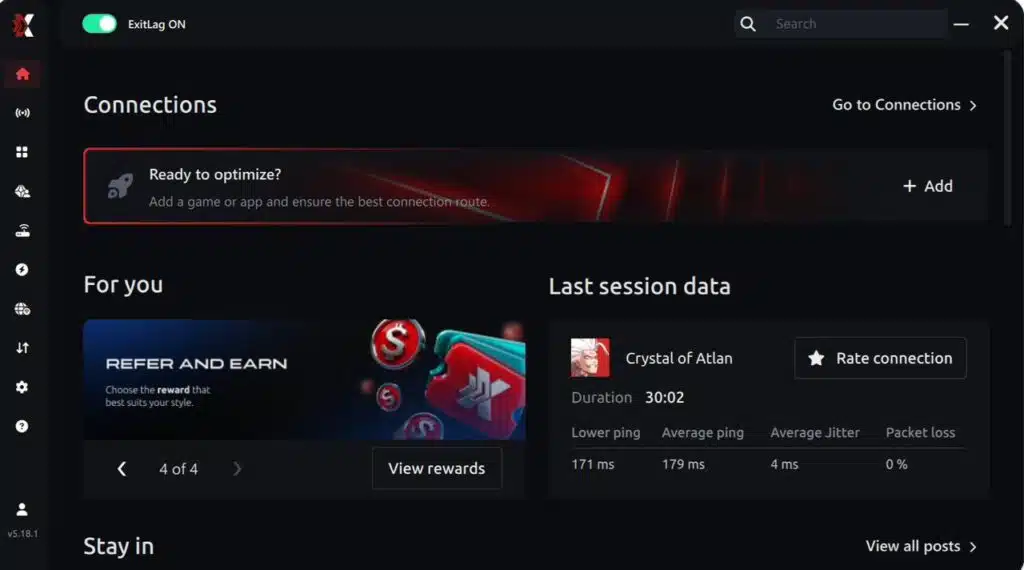
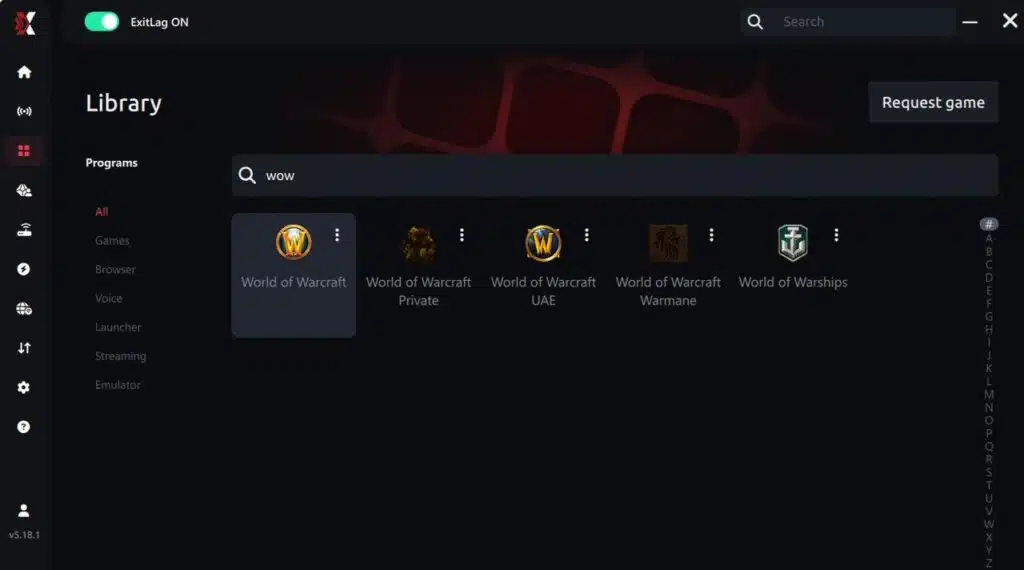
Step 3 – Search for “World of Warcraft”
Use the search bar inside ExitLag, type “World of Warcraft,” and select the correct game from the list.
Step 4 – Choose between automated or manual routing
AI-optimized automated route
ExitLag can automatically select the best route using its AI-driven optimization system. It analyzes several connection paths in real time and picks the most efficient route for WoW, ensuring the lowest possible latency without requiring any manual setup.
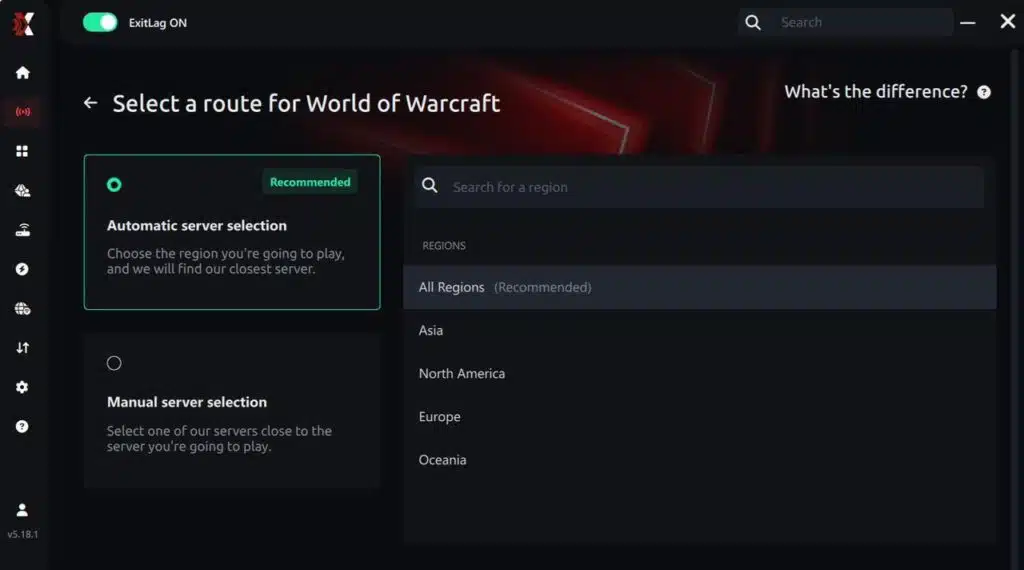
Manual route
If you prefer full control, you can manually choose a route based on the ping test results. Simply select the server that provides the lowest latency or the one that best suits your gameplay needs, whether you’re preparing for raids, arenas, or leveling.
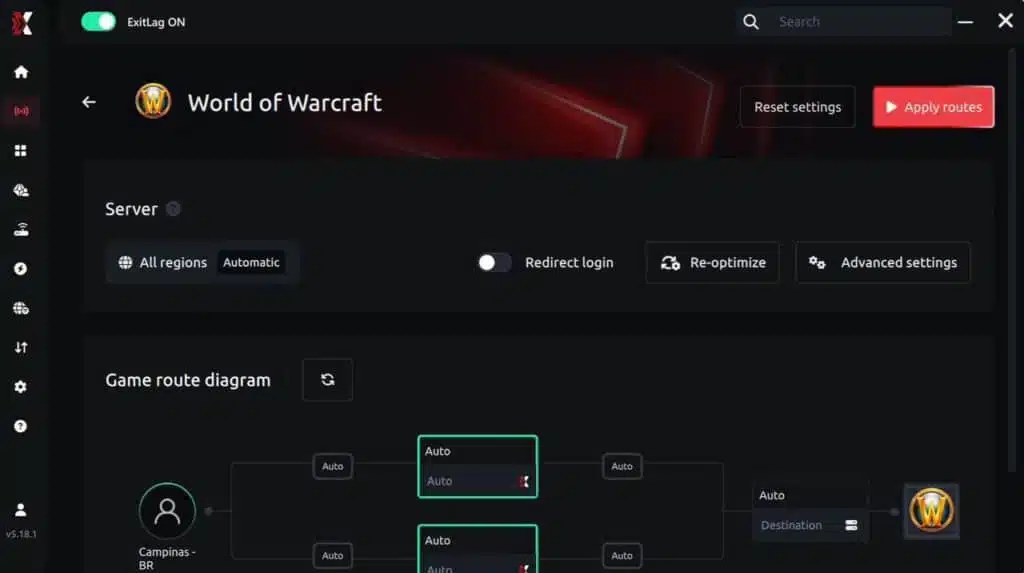
Step 5 – Click “Apply routes”
Once you’ve selected your route, click the Apply button or the play icon. ExitLag will begin optimizing your connection.
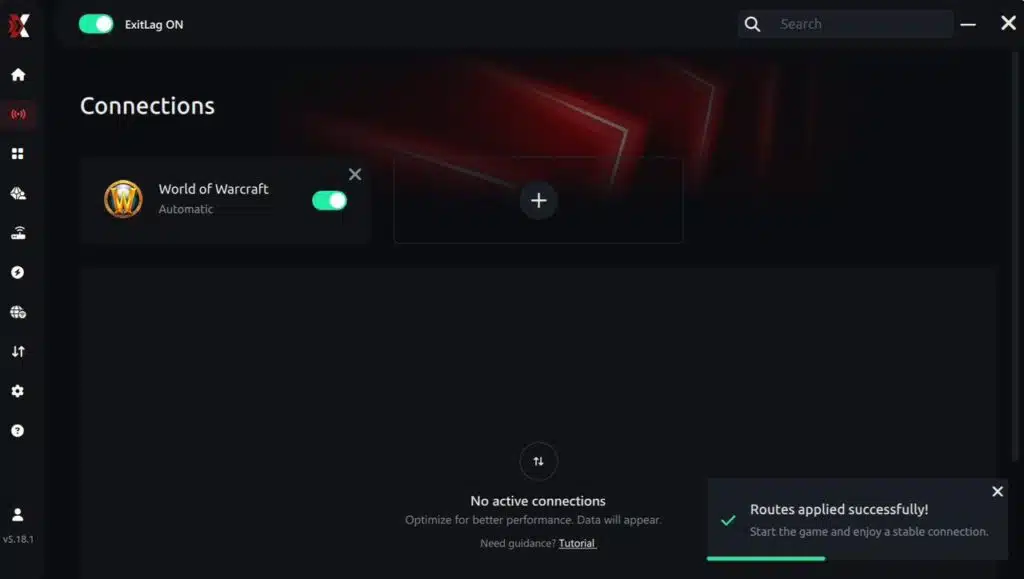
Step 6 – Wait a few seconds
Optimization completes within a few moments. You’ll see ping indicators displayed on the interface.
Step 7 – Launch World of Warcraft
Start WoW normally. ExitLag optimization will already be active.
ExitLag runs in the background while you play, continuously adjusting routes to maintain the best performance during raids, battlegrounds, dungeons, and open-world exploration.

FAQ: frequently asked questions about jitter in World of Warcraft
1. What is the difference between jitter, lag, and packet loss?
Jitter is the variation of your ping, causing unstable delivery timing.
Lag is the delay you feel when actions take too long to register.
Packet loss occurs when data fails to reach the server at all.
You can have low ping but still have jitter, resulting in a poor experience.
2. Why does my ping fluctuate in World of Warcraft?
Common causes include home network congestion, bad routing, Wi-Fi instability, ISP issues, and long distances to servers. All contribute to ping variation that destabilizes gameplay.
3. Is jitter worse than high ping?
Often, yes. A stable 120ms can be more playable than 40ms that jumps to 150ms unpredictably.
4. How do I know if I have jitter?
Perform an extended ping test or observe inconsistent input response, rubberbanding, or shifting latency in-game.
5. Does Wi-Fi cause jitter?
Yes. Wireless interference generates micro-spikes that translate directly into unstable latency. Wired ethernet is always better.
6. Does ExitLag fix other issues besides jitter?
Yes. ExitLag reduces ping, eliminates packet loss, improves routing, and protects against instability.
7. Do I need ExitLag open while I play?
Yes. The optimization must run continuously to maintain stability.
8. Does ExitLag work for both WoW Retail and WoW Classic?
Yes. ExitLag routes and stabilizes any WoW version or server region.
9. Why is WoW jitter worse during expansions or events?
Server load and zone congestion increase, adding extra network stress that affects packet timing.
10. Can addons cause jitter?
Some heavy addons can create local performance inconsistencies, which may feel like jitter.
Conclusion
Jitter transforms a smooth World of Warcraft session into a frustrating mess of unpredictable delays and broken timing. Whether pushing Mythic+ keys, fighting in arenas, raiding, or exploring Classic world PvP, your gameplay depends on stable, consistent latency. You don’t need to accept instability as “normal.” There are solutions—and the most reliable one is ExitLag.
With the right optimizations, your gameplay becomes fluid, responsive, and competitive. Stable timings mean fewer wipes, cleaner rotations, and fairer PvP engagements. To explore more technical insights and connection fixes, visit the ExitLag blog at: ExitLag blog technical insightsYou deserve the WoW experience Blizzard designed—smooth, responsive, and stable. Stop letting jitter decide your combat outcomes. Start your free trial now and enjoy the stability your gameplay deserves:
Start your ExitLag free trial now
Got questions or want to connect with other players? Join the conversation at the ExitLag Forum!