Nothing ruins a perfectly executed raid mechanic like a spell going off half a second late. One moment you are dodging a boss ability, the next you are staring at a death recap that makes no sense.
Latency Mode WoW issues are usually the culprit behind that frustrating gap between what you press and what actually happens on screen. Whether it is Home or World latency spiking, the effect on gameplay feels identical.
Fixing it typically comes down to understanding which type of latency is affecting you, adjusting a handful of client settings, and optimizing the route your connection takes to Blizzard’s servers.
This guide covers exactly how Latency Mode WoW settings work, what actually helps, and the network tools experienced raiders rely on. We will also flag the most common mistakes players make while troubleshooting.
What Is Latency Mode WoW And Why Does It Matter?
World of Warcraft splits your connection into two separate readings, labeled Home and World latency. Understanding the difference is essential before trying to fix anything.
Getting this distinction right saves a huge amount of wasted troubleshooting time when dealing with Latency Mode WoW settings.
Home Latency Vs World Latency Explained
Home latency measures the connection between your computer and your local network or ISP. World latency, on the other hand, measures the connection between your computer and Blizzard’s actual game server.
A high Home reading with a normal World reading usually points to a local network issue. However, a spike in World latency while Home stays low usually points to something happening further along the route or on the server side.
Where To Check Your Latency In Game
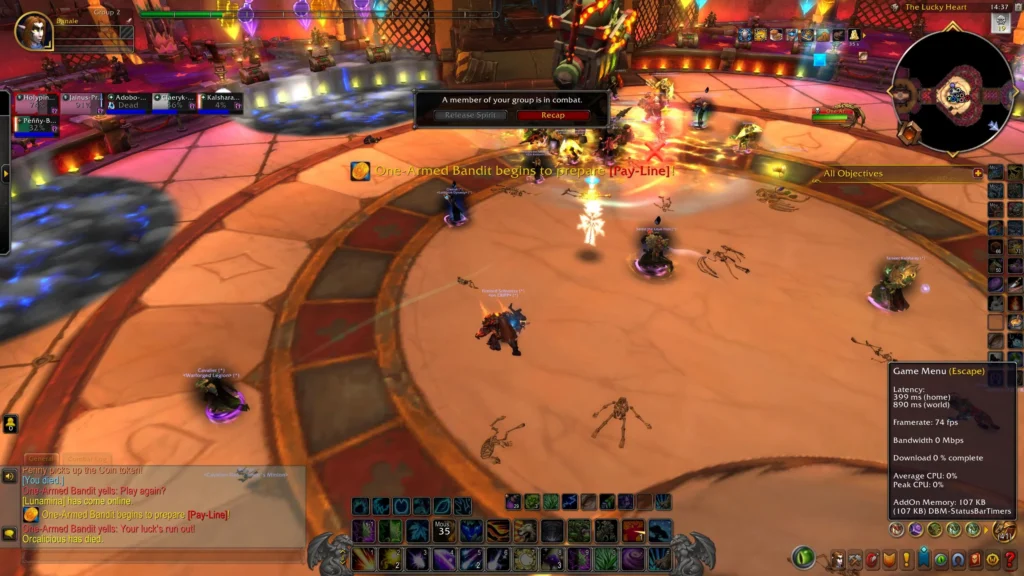
You can view both numbers by opening the game menu and heading to the System tab, then the Network section. This is also where the option to optimize network settings for speed lives.
Common signs that latency is affecting your gameplay include:
- Spells appearing to cast but not actually triggering on time
- Loot windows or interactions freezing briefly during busy moments
- Character movement stuttering or rubberbanding in crowded areas
- Combat log entries showing delayed damage compared to what you saw
- Voice callouts from your raid team not matching what is happening on screen
How Do You Fix Latency Mode WoW Problems At Home?
Most Latency Mode WoW issues start at home before they ever reach Blizzard’s servers. Therefore, ruling out local causes first saves time and often solves the problem entirely.
Basic Client And File Fixes
A surprisingly common fix involves clearing the Cache, Interface, and WTF folders, since corrupted files here can cause both latency spikes and related error messages. Renaming these folders temporarily rather than deleting them preserves your addon settings just in case.
Outdated or poorly optimized addons are another frequent cause of sudden spikes during combat. Disabling addons in batches during a dungeon or raid can help isolate which one is responsible.
Network And Router Adjustments
Switching from Wi-Fi to a wired Ethernet connection remains one of the most effective fixes available. Wireless connections introduce variability that a cable simply does not have.
Here is a simple troubleshooting sequence to follow when World Latency spikes unexpectedly:
- Run a traceroute or WinMTR tool toward your realm’s server address
- Identify which hop shows the largest jump in delay or packet loss
- Restart your router and modem to clear temporary congestion
- Test again during a quieter time of day to rule out ISP throttling
- If the issue persists at a specific hop, consider a route optimizer
The table below summarizes typical Home and World latency ranges and how they tend to feel in actual gameplay.
| Latency Range | Feel In Combat | Common Cause |
|---|---|---|
| 0-50ms | Instant response | Strong local connection, close server |
| 50-100ms | Slight delay | Normal for most regions, still playable |
| 100-200ms | Noticeable lag | Distance from server or network congestion |
| 200ms+ | Severe delay | ISP routing issues or local network problems |
World Latency And Spell Delay: What Raiders Should Know
Competitive raiders are particularly sensitive to World Latency, since even small delays can cause a missed interrupt or a failed mechanic dodge. Understanding how this connects to spell queuing helps explain the frustration.
How The Spell Queue Window Interacts With Latency
World of Warcraft includes a spell queue window that buffers inputs slightly to smooth out minor connection hiccups. However, this buffer has limits, and higher latency quickly overwhelms it during fast-paced encounters.
Why Raid Nights Often Feel Worse Than Solo Play
Server load increases significantly during peak raid hours, particularly on high population realms. Consequently, many players notice their Spell Delay getting worse specifically during prime time raiding windows compared to quiet daytime sessions.
Pro Tips: Latency Mode WoW
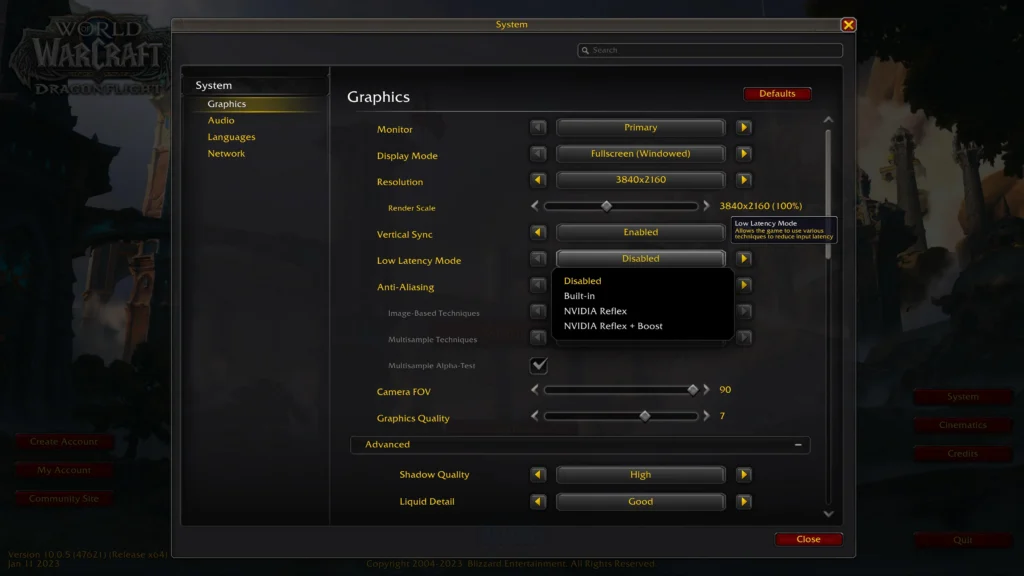
- Enable the network optimization setting under System. This tells the client to prioritize speed over other factors, which directly helps reduce perceived input delay.
- Avoid downloading updates during raid time. Background Battle.net downloads compete directly with your game traffic for the same bandwidth.
- Keep your addon list lean during progression content. Fewer active addons mean less local processing overhead, which indirectly reduces the chance of latency-related hitches.
- Run a route optimizer during peak hours. Since server congestion and ISP routing both worsen during busy times, a tool that actively finds a better path can meaningfully reduce spikes when it matters most.
Common Mistakes WoW Players Make With Latency Mode WoW
- Assuming Home and World latency are the same thing. This mix-up is one of the most common Latency Mode WoW misunderstandings among raiders. Fix: Check both numbers separately in the Network menu before deciding what to troubleshoot.
- Blaming the game immediately after a single lag spike. Fix: Monitor latency over several minutes or a full raid pull before concluding there is a persistent problem.
- Never checking for a bad hop along the route. Fix: Run a traceroute or WinMTR tool to see exactly where the delay is being introduced.
- Overloading the connection with unrelated downloads. Fix: Pause any updates, streaming, or large downloads on the network before starting a raid.
Improving Latency Mode WoW With ExitLag
ExitLag is not a VPN. It is a game connection optimizer that analyzes multiple network paths in real time and automatically selects the fastest, most stable route to your game server.
It does not encrypt traffic, does not mask your IP address, and does not affect applications outside supported games. That makes it a targeted solution for Latency Mode WoW issues without adding the overhead a VPN typically brings.
How ExitLag Reduces World Latency Spikes
Since World latency is heavily influenced by the actual internet route your data travels, ExitLag’s Multipath Technology constantly evaluates alternative paths and switches to whichever one performs best. This directly targets the jitter and rubberbanding that ruin precise raid mechanics.
With Multi-Internet support for up to four simultaneous connections, ExitLag can maintain stability even if one path degrades mid-fight. The Traffic Shaper feature also helps prioritize your game traffic over background downloads automatically, which is especially useful on raid night.
ExitLag supports over 4,000 titles across PC and Mobile, backed by more than 1,500 servers spread across 190+ countries. It is trusted by over 30 million users, running more than 18 million optimizations every week.
Is ExitLag Safe To Use With WoW?
ExitLag does not modify game files, inject code, or interact with anti-cheat systems, which makes it safe to run alongside World of Warcraft. It is best to avoid running it at the same time as a VPN, since the two can conflict and reduce overall effectiveness.
Raiders who want a consistent edge against Home and World latency spikes can grab the ExitLag Download and test it during their next progression night.
Final Thoughts On Latency Mode WoW
Latency problems in World of Warcraft almost always trace back to a specific, fixable cause, whether that is a local network issue, an outdated addon, or inefficient routing. Working through each possibility systematically leads to noticeably smoother raiding.
Key Takeaways
- Always check Home and World latency separately before troubleshooting
- Clear client files and manage addons to rule out local causes first
- A route optimizer can meaningfully reduce spikes during peak raid hours
Can Latency Mode WoW Issues Be Fully Solved?
While some baseline delay is unavoidable due to distance from the server, most players can reduce Latency Mode WoW problems to a level that no longer affects raid performance. Consistent monitoring and the right tools make the biggest difference over time.
All game images used in this blog post belong to Blizzard Entertainment. They are used for informational and educational purposes only and do not imply endorsement or affiliation with the rights holders.
Got questions or want to connect with other players? Join the conversation at the ExitLag Forum!