Legend of YMIR jitter devastates Nordic mythology MMORPG sessions instantly. Your ping fluctuates erratically between 35ms and 170ms without warning during intense boss raids.
Furthermore, unstable connections obliterate skill rotation timing completely. Viking combat becomes chaotic during crucial guild war moments.
Meanwhile, mythological creatures teleport unpredictably during competitive territory battles. Additionally, these ping variations squander hard-earned resources constantly in supported games like Legend of YMIR.

Moreover, jitter transforms epic adventures into technical frustrations. Thus, network consistency distinguishes legendary warriors from perpetually disadvantaged players.
What is jitter in Legend of YMIR?
First, comprehending jitter demands separating it from standard latency issues. Countless players mistakenly conflate these fundamentally different phenomena.
Jitter signifies erratic variation in communication delay (latency) between your system and Ragnarok servers. Rather than measuring pure speed like ping does, jitter evaluates connection inconsistency.
Consider train travel as practical comparison. Arriving consistently every 60 minutes allows perfect planning and preparation.
Conversely, trains arriving randomly between 30 and 120 minutes generates complete chaos. Similarly, ping swinging wildly between 40ms, 150ms, 70ms creates severe jitter.
Optimally, stable connection fluctuates merely 5-10ms between readings. Therefore, maintaining this steadiness enables dependable timing forecasts for abilities.
How jitter affects your gameplay in Legend of YMIR
Network volatility generates consequences transcending basic stutter. Certainly, understanding Legend of YMIR gameplay contextualizes how jitter undermines performance.
So, for you to know, devastating problems include:
- Erratic spell casting: Rune magic activates immediately sometimes, inexplicably delays seconds other instances
- Combat flow disruption: Weapon combo chains break randomly destroying damage optimization completely
- Boss mechanic failures: Dodging Fenrir's attacks becomes impossible when response timing varies unpredictably
- Warping adversaries: Enemy Vikings materialize at completely different coordinates making precise targeting futile
- Guild coordination collapse: Synchronized team abilities desynchronize catastrophically during territory sieges
- Resource squandering: Valuable consumables and buffs expire unused during random lag spikes
- Loot interaction problems: Treasure chest interactions register inconsistently causing item acquisition failures
Main causes of jitter in Legend of YMIR
Numerous elements trigger connectivity volatility. Pinpointing exact culprits facilitates surgical troubleshooting approaches.
Network congestion
Simultaneous bandwidth consumption across multiple devices creates priority conflicts. Traffic management fluctuates dramatically depending on household activity levels.
When relatives stream entertainment content, Legend of YMIR data competes for limited resources. Thus, this resource competition manifests as random connection delays.
Unstable routing
Digital information rarely travels direct paths toward destination servers. Meanwhile, dynamically changing pathways cause transmission duration to vary substantially.
Occasionally packets traverse optimized express routes efficiently. Therefore, this pathway volatility translates directly into jitter manifestation.
Wi-Fi instability
Wireless transmission inherently suffers from environmental vulnerability constantly. Furthermore, physical barriers and electromagnetic radiation corrupt data integrity substantially.
Unlike dependable wired connections, wireless signals oscillate continuously. Subsequently, these radio frequency fluctuations directly generate connection jitter.
ISP infrastructure problems
Internet providers demonstrate widely varying service consistency levels. Moreover, during high-traffic periods, network capacity becomes critically overwhelmed.
Overloaded systems cause packet processing times to fluctuate wildly. Consequently, equivalent data requests receive dramatically different response speeds.
Server distance
Expanding geographical separation exponentially multiplies required routing equipment. Additionally, connecting to distant Legend of YMIR servers significantly amplifies jitter probability.
How to identify and measure jitter in Legend of YMIR
Detecting connectivity anomalies requires methodical investigation approaches. Moreover, reviewing Legend of YMIR lag solutions provides additional diagnostic context.
Extended ping test
Terminal command utilities deliver quantifiable measurements. Then, initiate perpetual connectivity monitoring:
- ping -t legendofymir.com (Windows)
- ping legendofymir.com (Mac/Linux)
Healthy connections display minimal variance (45ms, 47ms, 44ms). Conversely, problematic jitter exhibits extreme oscillations (45ms, 165ms, 75ms).
In-game signs
Observable symptoms and behavioral patterns reveal jitter manifestation. Nevertheless, systematically monitor these unmistakable warning signals:
- Network indicator fluctuates continuously without achieving stability
- Gaming experience feels inherently unpredictable—responsive moments followed by sluggish periods
- Combat abilities execute with completely inconsistent activation delays
- Damage registration occurs sporadically despite accurate execution
Jitter levels and gameplay impact
| Jitter Level | Ping Variation | Connection Quality | Gameplay Impact | Raid Viability |
| Excellent | 0-10ms | Completely solid | Imperceptible | Perfect for endgame |
| Good | 10-20ms | Highly stable | Negligible issues | All content accessible |
| Acceptable | 20-40ms | Moderately stable | Noticeable delays | Difficult content risky |
| Poor | 40-70ms | Unreliable | Persistent problems | Boss fights impractical |
| Severe | 70-100ms | Highly volatile | Constant interruption | Virtually unplayable |
| Unplayable | 100ms+ | Completely chaotic | Total unpredictability | Impossible progression |
Basic solutions to reduce jitter in Legend of YMIR
Straightforward adjustments frequently resolve minor difficulties. Therefore, implementing these elementary measures addresses prevalent underlying causes.
Prioritize your connection
Domestic modifications dramatically enhance reliability. Implement these fundamental optimizations methodically:
- Utilize ethernet cabling: Completely eliminate wireless unpredictability through hardwired connectivity
- Terminate background processes: Shut down file transfers, media streaming consuming bandwidth
- Reduce active devices: Minimize competing network traffic from smartphones, tablets
- Deactivate automatic updates: Prevent operating systems from consuming bandwidth during gameplay
- Refresh network drivers: Obsolete software frequently introduces connectivity inconsistencies
Configure QoS on router
Quality of Service configurations establish traffic prioritization hierarchies. Furthermore, access administrative control panel (commonly 192.168.1.1) first.
Establish gaming traffic as supreme priority category. Thus, preventing competing applications from undermining stability during raids.
Check with your ISP
Contact service provider reporting ongoing reliability problems. Moreover, compile precise jitter documentation providing irrefutable evidence.
ExitLag: the definitive solution to fix Legend of YMIR jitter
Professional-grade stabilization necessitates dedicated technological solutions. Therefore, ExitLag delivers comprehensive resolution for serious Norse mythology enthusiasts.
What is ExitLag?
ExitLag represents gaming industry's most sophisticated connection stabilization platform available commercially. Furthermore, leveraging proprietary cutting-edge technology, it operates as intelligent network optimizer.
Standard utilities superficially camouflage symptoms temporarily. Additionally, this specialized software eradicates inconsistency at fundamental levels.
Tournament-quality reliability becomes universally accessible. Thus, dedicated warriors gain immediate competitive superiority during Norse battles.
How ExitLag eliminates jitter in Legend of YMIR
Multi-Internet architecture revolutionizes connectivity paradigms fundamentally. Moreover, investigating operational mechanics exposes remarkable engineering innovation.
Five interconnected mechanisms synergize eliminating jitter:
- Parallel route transmission: Information broadcasts simultaneously through multiple independent pathways. Therefore, built-in redundancy guarantees unwavering stability.
- Adaptive packet selection: Intelligent algorithms automatically prioritize fastest-arriving data packets. Thus, this filtering process eliminates jitter systematically.
- Dynamic route recalibration: Software perpetually evaluates available pathways without interruption. Furthermore, stability remains absolute priority throughout sessions.
- Intermediary reduction: Minimizing routing equipment decreases potential variation introduction points. Consequently, overall reliability improves exponentially.
- Intelligent buffering: Advanced packet management ensures steady data stream delivery. Moreover, functionality persists even during internet fluctuations.
Advantages of ExitLag for Legend of YMIR players
Comprehensive latency stabilization constitutes primary revolutionary achievement. Additionally, dependable timing calculations become suddenly achievable.
Complete jitter eradication: Multi-pathway architecture guarantees variation elimination. Therefore, mythological combat becomes fluid and predictable.
Enhanced timing precision: Stabilized ping enables accurate ability activation forecasting. Moreover, predictability proves invaluable during high-stakes boss encounters.
Decisive competitive edge: Reliability determines victory in challenging territory wars. Global server compatibility: Functions flawlessly across all Legend of YMIR servers worldwide.
Intuitive interface: Zero technical expertise required whatsoever. Simply select game and activate instantly.
Is ExitLag worth it for Legend of YMIR?
Moreover, ExitLag becomes indispensable when experiencing frequent instability or participating in competitive guild warfare through official platforms.
For committed Viking warriors, investment delivers immediate returns. Therefore, investigate current subscription offerings for budget-friendly options.
How to use ExitLag in Legend of YMIR
The process is extremely simple:
Step 1 – Access the official ExitLag website and download the application. There’s a free trial period for new users.
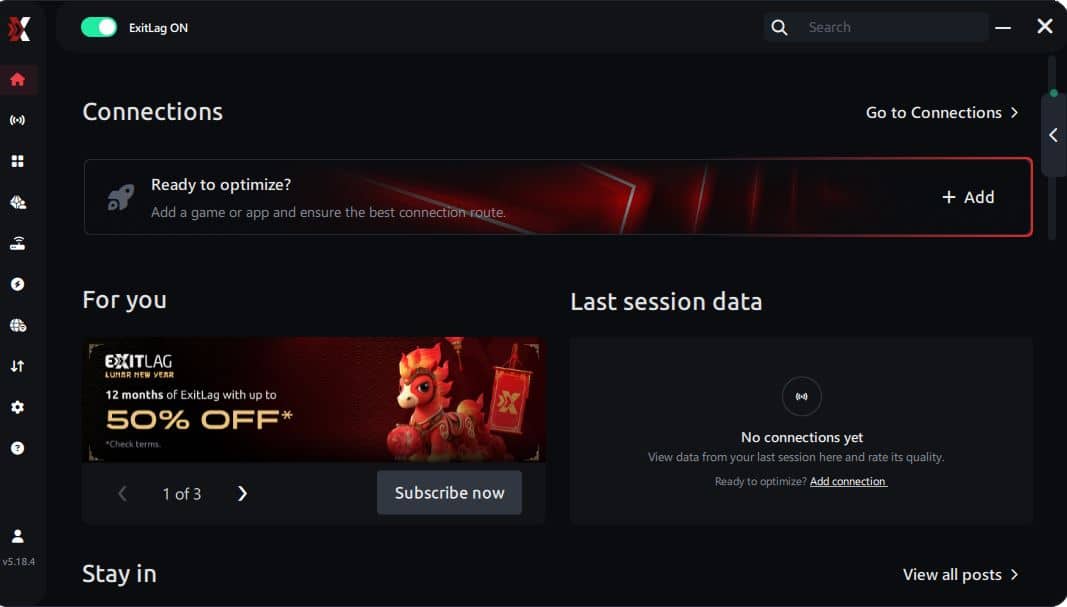
Step 2 – Install and open the program. Log in with your account.
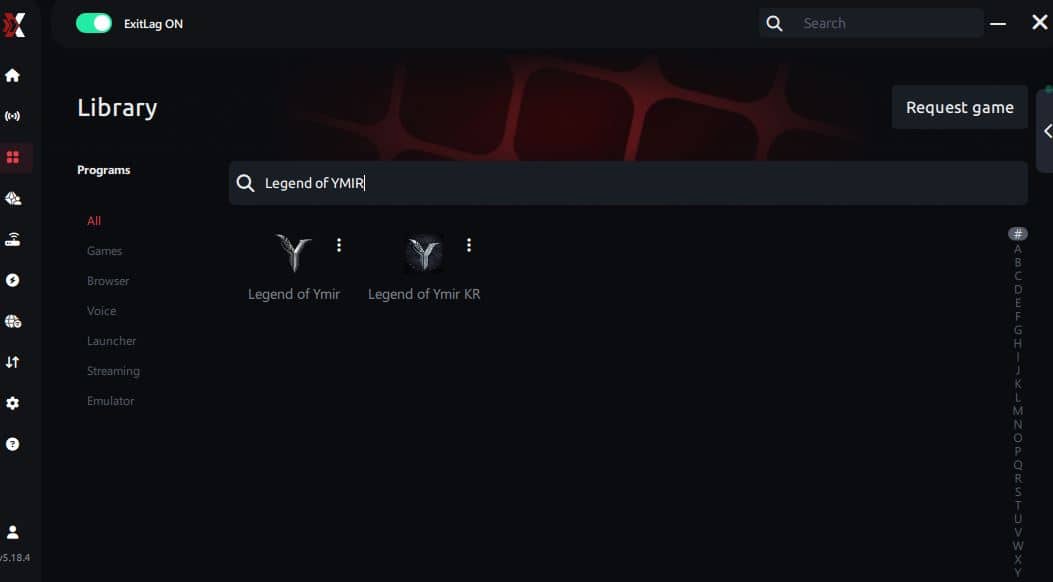
Step 3 – In the search bar, type “Legend of YMIR” and select the game from the list.
Step 4 – Choose between automated or manual route
Based on the results, you can let ExitLag automatically select the best route or manually choose the server that showed the lowest latency for your connection.
AI-optimized automated route
Based on the results, you can let ExitLag automatically select the best route through AI optimization. The system analyzes multiple connection paths in real time and automatically identifies the most efficient route for your connection, ensuring the lowest possible latency without requiring manual choices.
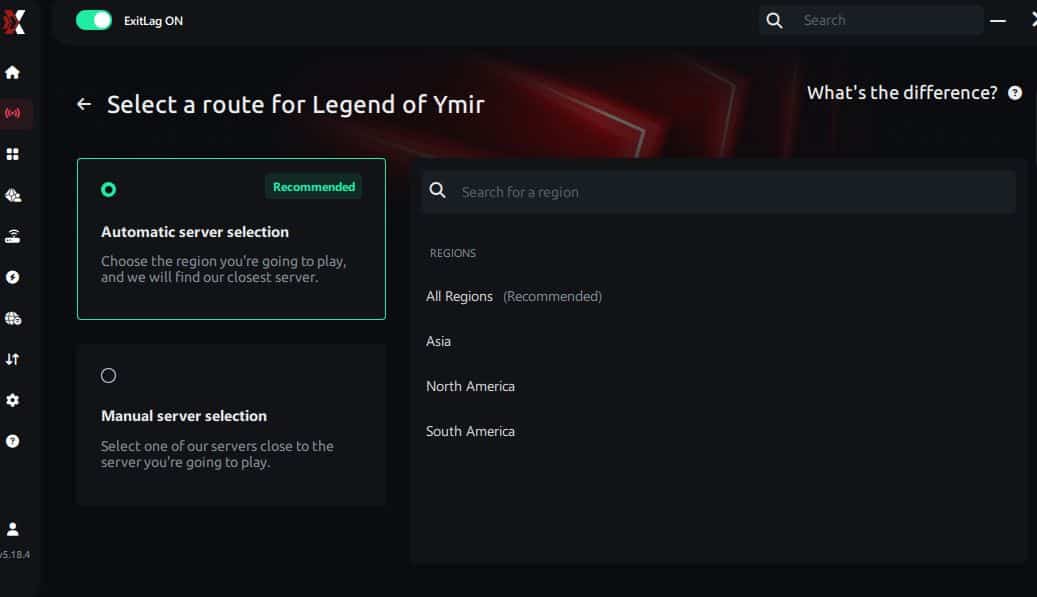
Manual route
If you prefer to have full control over your connection, you can manually choose the server based on the ping test results. Simply select the server that showed the lowest latency or the one that best meets your specific gaming needs, allowing complete customization of your experience.
Step 5 – Click “Legend of YMIR” or the play button. ExitLag will begin optimizing your connection automatically.
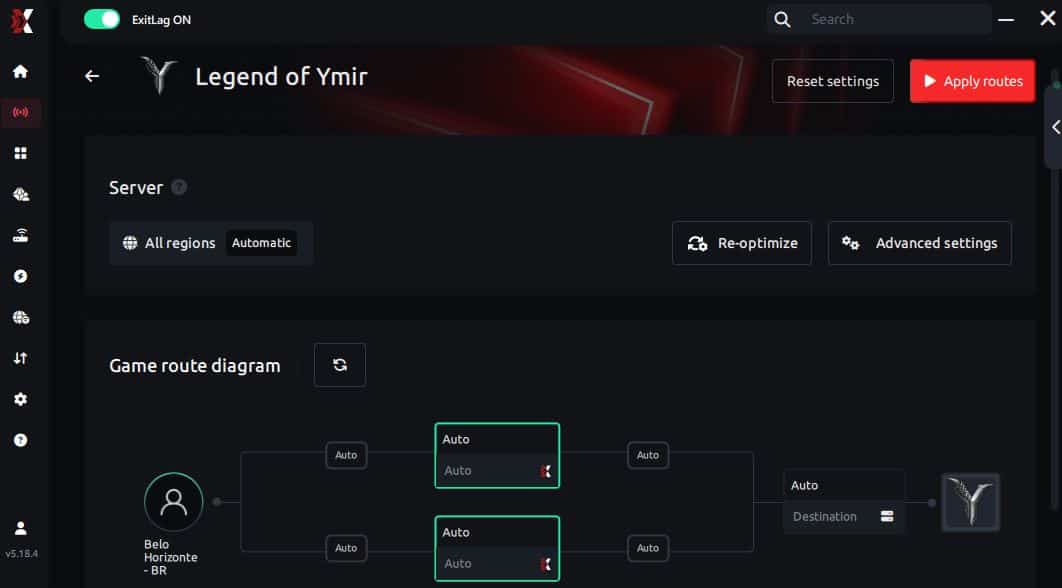
Step 6 – Wait a few seconds until optimization is complete. You’ll see ping indicators in the interface.
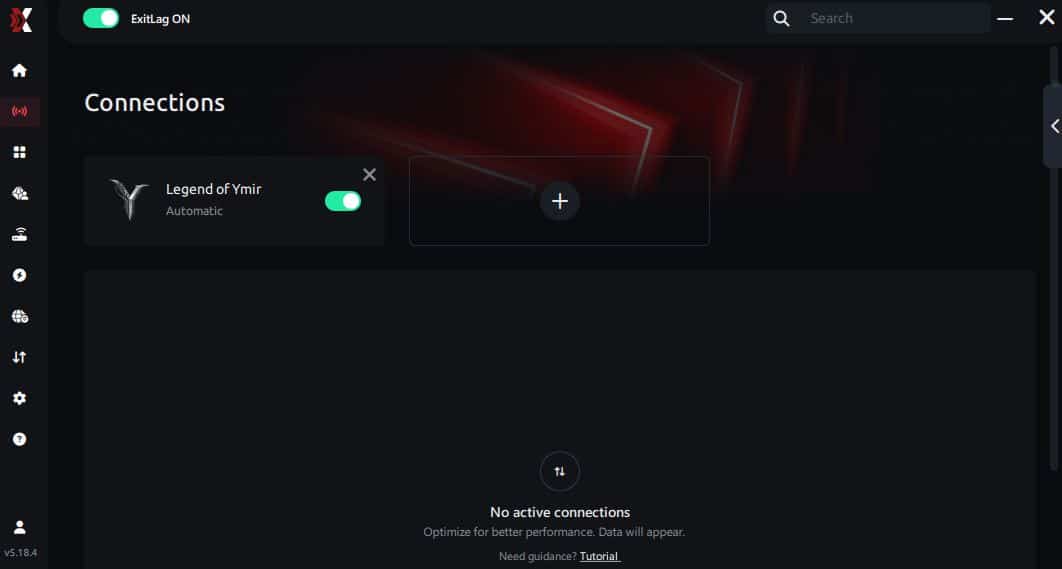
Step 7 – Launch Legend of YMIR normally. The optimization will already be active.
ExitLag runs in the background while you play, constantly adjusting routes to maintain the best possible performance.
FAQ: frequently asked questions about Legend of YMIR jitter
Frequently Asked Questions about Rainbow Six jitter help players understand why sudden lag spikes, unstable movement, and delayed actions happen during matches.
Many connection issues feel random, but jitter usually has specific causes related to network stability, routing, or local setup.
This FAQ will explain what Rainbow Six jitter is, what triggers it, and how to reduce its impact for smoother gameplay.
By addressing common doubts and practical fixes, you can improve consistency, reaction timing, and overall match performance.
What's the difference between jitter, lag and packet loss?
Jitter quantifies ping fluctuation indicating network instability. Furthermore, lag represents persistent delay from elevated ping.
Packet loss signifies data transmission failures. Therefore, combining low average ping with high jitter creates terrible experiences.
Why does my ping keep fluctuating?
Primary causes include network congestion predominantly. Moreover, wireless connectivity introduces inherent variability perpetually.
Is jitter worse than high ping?
Frequently yes, counterintuitively. Furthermore, unpredictable ping becomes completely unmanageable.
How can I tell if I have jitter?
Perform extended terminal ping testing initially. Moreover, inconsistent in-game responsiveness indicates jitter clearly.
Does Wi-Fi cause jitter?
Absolutely yes, fundamentally problematic. Furthermore, electromagnetic variations generate jitter directly.
Does ExitLag fix problems beyond jitter?
Yes, addressing multiple challenges comprehensively! Furthermore, packet loss elimination occurs simultaneously automatically.

Must I keep ExitLag open while playing?
Yes, absolutely mandatory for optimization. Furthermore, terminating application eliminates benefits immediately.
Conclusion: eliminate Legend of YMIR jitter permanently
Network instability shouldn't devastate Norse mythology adventures perpetually. Furthermore, entertaining sessions become frustrating nightmares avoidably.
Accepting this as inevitable remains unnecessary. Moreover, you deserve consistent, predictable, competitive quality always.
Don't allow unpredictable timing to sabotage epic victories anymore. Therefore, combat mechanics achieve complete reliability consistently.
Whether pursuing casual exploration or competitive domination, stability proves fundamental. Discover additional optimization strategies through the ExitLag blog for comprehensive enhancements.Ready to eliminate Legend of YMIR jitter forever and dominate with perfect timing? If the answer is yes, then try ExitLag risk-free and experience tournament-grade stabilization immediately.