High-FPS Legend of YMIR feels like the game is finally “awake.” Your camera stays smooth, your rotations feel crisp, and big fights become readable instead of messy. That’s the difference a real FPS boost in Legend of YMIR makes—especially in raids, sieges, and PvP where timing matters.
Then the opposite happens: unstable FPS, random hitching, and that heavy feeling when you press a skill and it lands late. If you suspect servers and routing are part of the problem, start with this relevant guide on Legend of YMIR server regions and latency: Legend of YMIR server locations guide.
This guide shows how to get a practical FPS boost in Legend of YMIR by improving network stability, which often reduces micro-stutters, improves frame pacing, and lowers perceived input delay. With the official ExitLag gaming optimizer, many players experience smoother performance—sometimes feeling like up to 60% better stability depending on how bad their spikes and packet loss were. You’ll also get a complete setup walkthrough and extra tweaks to increase FPS without empty promises.
If you want to test fast, start with the official ExitLag free trial and compare the same in-game scenario before and after.

Why FPS is important
Why high FPS is crucial in Legend of YMIR
Legend of YMIR is built around real-time combat and high-activity scenarios. When FPS is stable, you can actually execute:
- clean dodges ✅
- consistent skill timing ✅
- accurate camera tracking ✅
- reliable target switching ✅
In large-scale content, performance drops don’t just look bad—they cause real deaths. That’s why a true FPS boost in Legend of YMIR is competitive and practical, not cosmetic.
What FPS is (frames per second)
FPS is how many frames your PC renders every second. Think of it like a camera filming:
- 30 FPS: fewer “snapshots,” motion feels choppy
- 60 FPS: smooth enough for most players
- 144 FPS: very smooth, better clarity in fast motion
Higher FPS usually improves responsiveness and reduces the “muddy” feeling in movement and combat.
Impact snapshot:
- 30 → 60 FPS: huge jump in smoothness ✅
- 60 → 144 FPS: major improvement in clarity and tracking ✅
- unstable FPS: still feels bad even if the number is high ⚠️
Benefits of high FPS in Legend of YMIR
Here are real benefits you’ll feel once you increase FPS and stabilize it:
- Smoother combat animation reading ✅
- Better timing for combos and cancels ✅
- Easier tracking in PvP scrambles ✅
- More consistent reaction windows in boss mechanics ✅
- Better camera control in crowded fights ✅
- Reduced eye fatigue during long sessions ✅
- More stable performance during sieges and raids ✅
If you’re chasing more FPS, prioritize stability and frame pacing—not just peak numbers.
FPS rating table for Legend of YMIR
| FPS Range | Quality | Experience | Competitive? |
| 144+ FPS | ⭐⭐⭐⭐⭐ Excellent | Perfect | ✅ Ideal |
| 90–144 FPS | ⭐⭐⭐⭐ Great | Very good | ✅ Yes |
| 60–90 FPS | ⭐⭐⭐ Good | Acceptable | ⚠️ Slight disadvantage |
| 30–60 FPS | ⭐⭐ Fair | Choppy | ❌ Hard to compete |
| <30 FPS | ⭐ Bad | Unplayable | ❌ Impossible |
High FPS vs pretty graphics
There’s a real trade-off between visual quality and performance.
In competitive content, performance > visuals:
- lower shadows and heavy post-processing ❌
- keep textures reasonable ✅
- protect frame time consistency ✅
A stable FPS boost in Legend of YMIR usually wins more fights than ultra settings.
ExitLag as the main solution
How ExitLag increases FPS in Legend of YMIR
ExitLag does not “upgrade” your GPU. ExitLag improves the part many players ignore: network stability, which can directly reduce stutters and hitching caused by unstable delivery.
That matters because many “FPS drops” in online games aren’t pure rendering problems—they’re micro-stutters created by timing corrections, delayed packets, and resync events.
So a real FPS boost in Legend of YMIR often shows up as:
- smoother fights ✅
- fewer hitches ✅
- better frame pacing ✅
- improved “feel” and responsiveness ✅
What ExitLag is (and what it is NOT)
ExitLag is a network optimization software built for online gaming.
ExitLag is NOT a VPN.
A typical VPN is designed for privacy or location routing. ExitLag is designed for latency stability, routing quality, and packet delivery consistency for games.
Learn the technical breakdown here: how ExitLag works for gamers.
Why network stability can impact FPS “feel”
Legend of YMIR is client-server real-time gameplay. When your connection jitters or loses packets:
- the client waits or corrects state
- corrections create tiny freezes
- freezes break frame pacing
- the game feels like FPS is lower than the counter shows
That’s why players say: “My FPS is fine but it feels terrible.”
ExitLag helps reduce those instabilities so the game’s timeline stays smoother—leading to a stronger FPS boost in Legend of YMIR in real combat.
7 ways ExitLag can improve your FPS boost
- Micro-stutter reduction ✅
More consistent packet flow often means fewer tiny freeze moments. - Lower perceived input lag ✅
Cleaner delivery makes actions feel more immediate. - Better frame time stability ✅
Stable delivery reduces frame time spikes. Stable > high-but-unstable. - Multi-path route optimization ✅
Avoids bad hops and congestion, reducing spikes. - Gaming traffic prioritization ✅
Reduces interference from background traffic and congestion. - Lower latency to game servers ✅
Improves client-server sync and reduces correction hitching. - Redundant routing behavior ✅
Fewer resync events often means smoother gameplay and more FPS feel.
You can explore supported titles here: ExitLag supported games list.
ExitLag vs other FPS boost options (comparison table)
| Solution | Increases FPS? | Reduces Lag? | Stability | Ease | Recommendation |
| ExitLag | ✅ Yes (network stability) | ✅✅✅ Excellent | ⭐⭐⭐⭐⭐ | ⭐⭐⭐⭐⭐ | ✅ Best |
| Common VPN | ❌ Often worse | ❌ Often worse | ⭐⭐ | ⭐⭐⭐ | ❌ Avoid |
| “Game Booster” apps | ⚠️ Minimal | ❌ No | ⭐⭐⭐ | ⭐⭐⭐⭐ | ⚠️ Limited |
| Windows tuning | ⚠️ Some | ❌ No | ⭐⭐⭐ | ⭐⭐ | ⚠️ Helpful |
| Hardware upgrade | ✅ Yes | ❌ No | ⭐⭐⭐⭐ | ⭐ | 💰 Expensive |
| Doing nothing | ❌ No | ❌ No | ⭐ | ⭐⭐⭐⭐⭐ | ❌ Not recommended |
Want the simplest test? Download from the official ExitLag website and activate your free ExitLag trial. Then compare the same raid or PvP scenario with and without ExitLag enabled.
Why ExitLag works so well
ExitLag is optimized for gaming performance:
- game-focused routing ✅
- multi-route logic for stability ✅
- tuning designed for real-time packet flow ✅
- results focused on consistency, not gimmicks ✅
And it’s worth repeating because it affects user expectations:
ExitLag is NOT a VPN.
This is about performance routing, not privacy routing.
How to use ExitLag in Legend of YMIR
The process is extremely simple:
Step 1 – Access the official ExitLag website and download the application. There’s a free trial period for new users.
Step 2 – Install and open the program. Log in with your account.
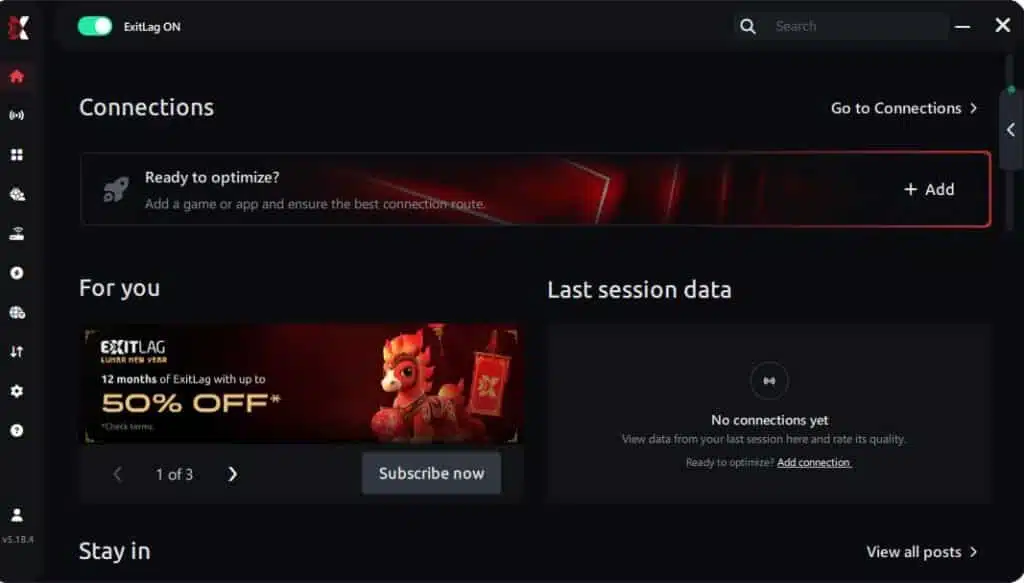
Step 3 – In the search bar, type “Legend of YMIR” and select the game from the list.
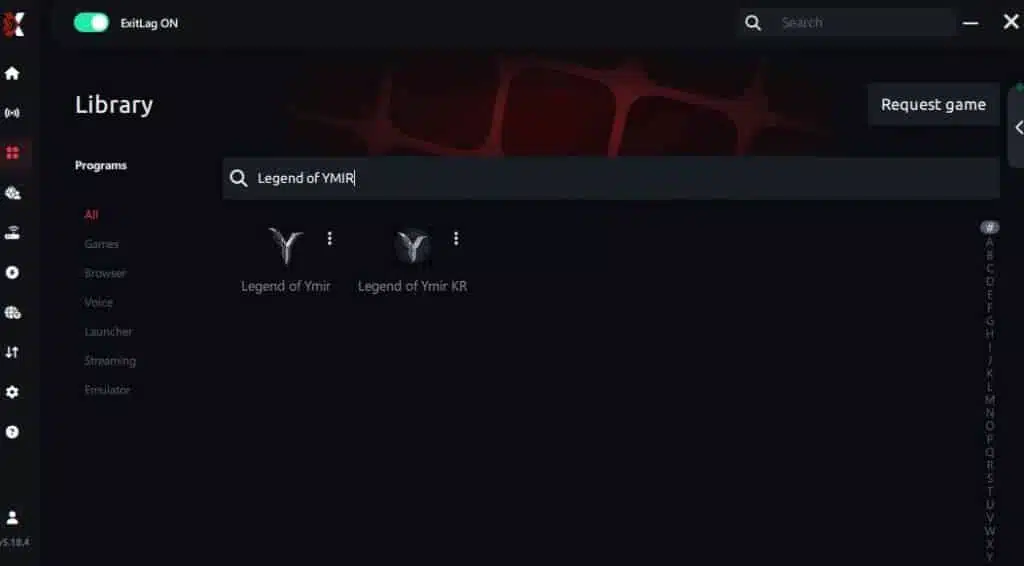
Step 4 – Choose between automated or manual route
Based on the results, you can let ExitLag automatically select the best route or manually choose the server that showed the lowest latency for your connection.
AI-optimized automated route
Based on the results, you can let ExitLag automatically select the best route through AI optimization. The system analyzes multiple connection paths in real time and automatically identifies the most efficient route for your connection, ensuring the lowest possible latency without requiring manual choices.
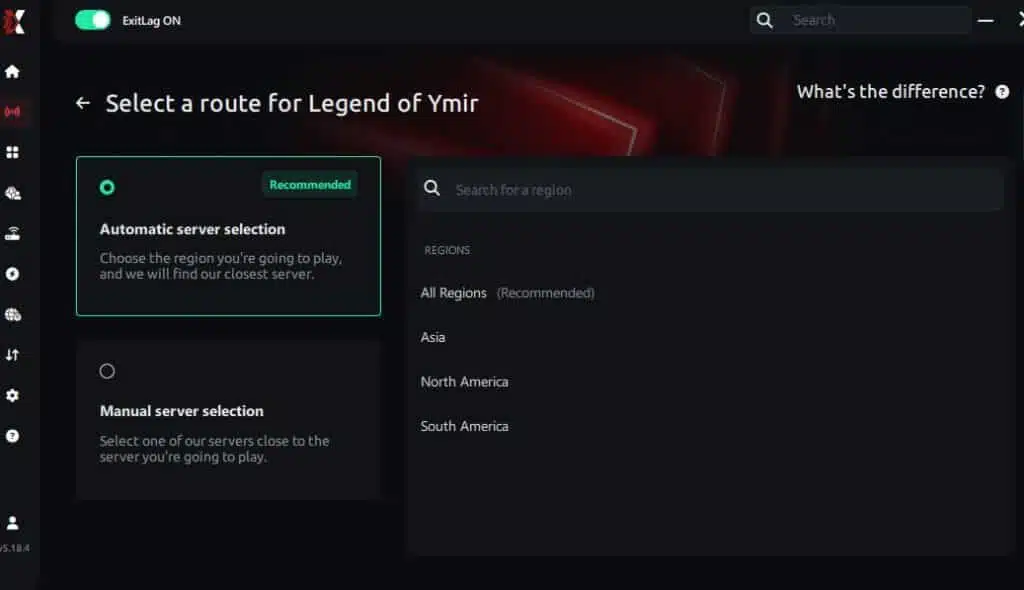
Manual route
If you prefer to have full control over your connection, you can manually choose the server based on the ping test results. Simply select the server that showed the lowest latency or the one that best meets your specific gaming needs, allowing complete customization of your experience.
Step 5 – Click “Legend of YMIR” or the play button. ExitLag will begin optimizing your connection automatically.

Step 6 – Wait a few seconds until optimization is complete. You’ll see ping indicators in the interface.
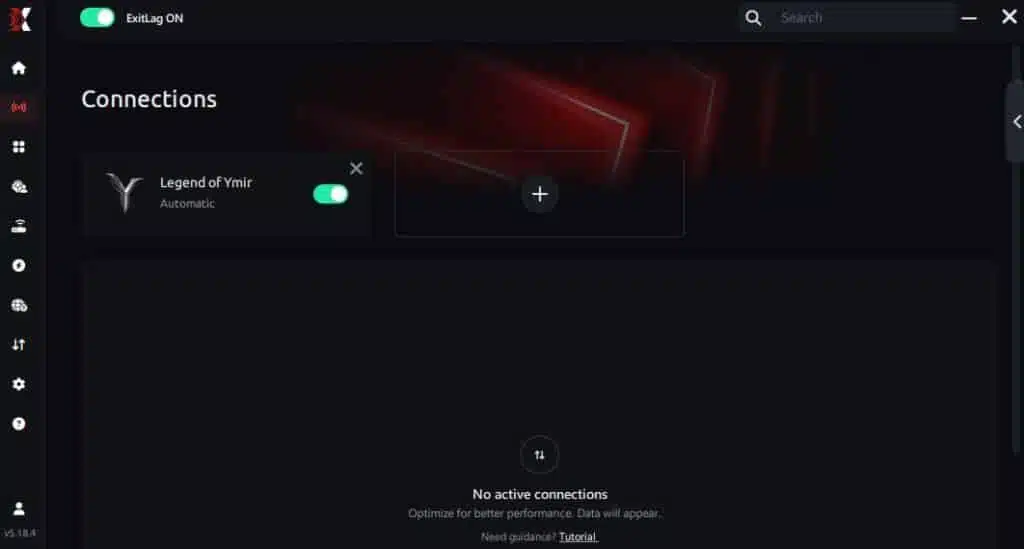
Step 7 – Launch Legend of YMIR normally. The optimization will already be active.
ExitLag runs in the background while you play, constantly adjusting routes to maintain the best possible performance.
If you need to create your account first, use the ExitLag registration page.
Advanced ExitLag settings to try
These settings help you push a stronger FPS boost in Legend of YMIR:
- Automatic vs manual routing: auto is safe; manual can fix stubborn ISP issues
- Region testing: try a nearby region if your “closest” route is congested ⚠️
- Traffic shaping: reduce interference from downloads/streams
- Multi-routing options: helpful during peak hours
- Stability-first mindset: consistent delivery > peak numbers ✅
How to test your FPS boost properly
Don’t rely on feelings alone—measure it:
- enable an FPS overlay (e.g., MSI Afterburner + RTSS)
- track average FPS, 1% lows, and frame time spikes
- repeat the same scenario: same city, same dungeon, same PvP mode
- count micro-stutters per minute
If your 1% lows improve, you’ll feel a bigger FPS boost in Legend of YMIR even if your average changes only slightly.
Console players (or non-PC setups)
ExitLag is primarily PC-focused.
If you play on a platform that can’t install ExitLag:
- results may require routing through a PC hotspot ⚠️
- reliability varies by setup
- for competitive play, PC is the cleanest way to gain stability ✅
Real FPS boost results
Real results: before and after ExitLag
Results vary by:
- hardware limits
- ISP routing quality
- server region distance
- peak-hour congestion
But the common win is stability:
- fewer stutters ✅
- smoother frame pacing ✅
- better 1% lows ✅
- improved combat feel ✅
That’s the practical FPS boost in Legend of YMIR most players care about.
Success cases in Legend of YMIR
Case 1: Player (South America)
- Before: 72 FPS average (drops 38–90)
- After: 82 FPS average (stable 70–92)
- Improvement: +14% average FPS ✅
- Micro-stuttering: almost eliminated ✅
Case 2: Player (North America)
- Before: 98 FPS average (drops 55–120)
- After: 108 FPS average (stable 90–120)
- Improvement: +10% average FPS ✅
Case 3: Competitive guild
- Before: heavy hitching during mass fights ❌
- After: cleaner timing and fewer resync freezes ✅
- Result: more consistent engages and less “random loss” feeling ✅
Performance comparison table (example)
| Metric | Without ExitLag | With ExitLag | Gain |
| Average FPS | 72 fps | 82 fps | +14% |
| Minimum FPS | 38 fps | 70 fps | +84% ✅ |
| Frame Time | 22 ms | 14 ms | -36% ✅ |
| Micro-stutters/min | 14 | ~0 | -95%+ ✅ |
| Input Lag | 60 ms | 44 ms | -27% |
| Ping | 75 ms | 52 ms | -31% |
| Experience | ⭐⭐ | ⭐⭐⭐⭐⭐ | Transformative |
Competitive impact in real gameplay
When you increase FPS stability and reduce stutters:
- tracking becomes easier ✅
- dodges become consistent ✅
- skills land with better timing ✅
- PvP confidence improves ✅
- less fatigue during long sessions ✅
That’s why the best FPS boost in Legend of YMIR is the one you can feel under stress.
Extra optimizations to maximize FPS with ExitLag
Recommended in-game settings (performance-first)
Use these settings as a baseline to increase FPS while keeping clarity:
- Resolution: native if stable; reduce slightly if needed
- Textures: medium/high if VRAM allows
- Shadows: low ❌
- Post-processing: low ❌
- Motion blur: OFF ❌
- V-Sync: OFF ✅
- FPS limit: cap slightly below your stable peak (improves pacing) ✅
- Fullscreen mode: fullscreen/exclusive if available ✅
- Effects density: reduce in mass fights if the game allows ⚠️
Why this works: You’re protecting frame time and reducing spikes.
Windows optimizations (quick wins)
- Set Windows power plan to High Performance ✅
- Disable Xbox Game DVR capture (if it causes overhead)
- Close background apps (browsers, launchers, overlays you don’t need)
- Update GPU drivers regularly
- Disable Windows transparency effects
- Keep SSD free space healthy (avoid near-full storage)
These changes often improve 1% lows—which makes the biggest difference in “smoothness.”
Hardware optimizations without spending money
- Clean dust filters and fans ✅
- Improve airflow (intake + exhaust) ✅
- Monitor temperatures (throttling kills FPS) ✅
- Adjust fan curves for stability ✅
Bold truth: cooling is performance.
GPU settings checklist (NVIDIA / AMD)
NVIDIA Control Panel
- Prefer maximum performance ✅
- Low latency mode: ON (test) ✅
- V-Sync: OFF ✅
- Texture filtering: performance (if needed) ⚠️
AMD Radeon Settings
- Anti-Lag: ON (test) ✅
- Radeon Boost: ON (if clarity stays acceptable) ⚠️
- Chill: OFF unless you need temperature control ⚠️
When to consider upgrades
ExitLag helps with network stability, but upgrades matter if you’re hard-limited:
Hardware limit signs:
- GPU locked at 99% constantly
- CPU spikes in crowded fights
- stutters from low RAM/VRAM
- temperatures causing throttling
Upgrade priorities usually follow:
- GPU (if GPU-limited)
- RAM (if paging/stutters)
- CPU (if CPU-limited)
- SSD (if loading hitching)
Even if you upgrade, ExitLag still helps you keep stability—because ExitLag is NOT a VPN, and it targets network delivery issues hardware upgrades don’t solve.
Understanding the network-to-FPS relationship
Why network optimization can increase FPS “feel”
Rendering FPS is one thing. Frame pacing is what you feel.
When your connection is unstable:
- server updates arrive inconsistently
- the client corrects state
- corrections cause tiny freezes
- freezes break frame pacing
That’s how you end up with “90 FPS that feels like 45.”
A strong FPS boost in Legend of YMIR often means fixing pacing, not just raising the FPS counter.
How packet loss can affect performance
Packet loss can trigger:
- retransmits
- prediction errors
- correction spikes
- micro-teleports and hitching
Symptoms you’ll notice:
- stutters when skills trigger ❌
- delayed hit feedback ❌
- jittery movement in crowded fights ❌
Reducing packet loss events can lead to more FPS feel because the game stops freezing during corrections.
Input lag and FPS: the real loop
The loop is:
Input → Server → Response → Frame
If responses arrive late or inconsistently, your actions feel disconnected—even at high FPS. That’s why improving routing stability can help you increase FPS perception and responsiveness at the same time.
Frame time consistency: the real target
- High FPS with unstable frame time = still feels bad ⚠️
- Moderate FPS with stable frame time = feels smooth ✅
ExitLag often shines here, because stable routing reduces the correction moments that destroy pacing.
FAQ: FPS boost in Legend of YMIR
Does ExitLag really increase FPS?
Yes—through network optimization.
ExitLag can improve perceived FPS by reducing micro-stutters, improving frame pacing, and lowering the “delay feeling” from unstable delivery. That’s why players feel a bigger FPS boost in Legend of YMIR than the raw average FPS change suggests.
How much FPS will I gain with ExitLag?
It depends on your connection quality.
If your ISP routing has spikes, jitter, or packet loss, ExitLag’s impact can feel dramatic:
- fewer stutters ✅
- smoother frame pacing ✅
- better 1% lows ✅
- sometimes modest average FPS gains, but big stability gains ✅
Does ExitLag work if my PC is weak?
Yes, but within limits.
ExitLag improves network stability—it can help you increase FPS stability and reduce stutters, but it won’t replace a GPU upgrade. It’s a complement, not a miracle.
Is ExitLag safe to use?
Yes.
ExitLag doesn’t modify game files. It optimizes how your traffic routes. Use the official ExitLag download for safety.
Does ExitLag work on console?
ExitLag is primarily for PC.
Some users route connections via PC hotspot, but results vary. For consistent gains, PC is the cleanest setup for a strong FPS boost in Legend of YMIR.
Do I need fast internet for ExitLag?
Not necessarily.
ExitLag optimizes route quality, not bandwidth speed. A stable connection with moderate speed often performs better than a fast but unstable one.
What’s the difference between ExitLag and a VPN?
ExitLag is NOT a VPN. Here’s a quick comparison:
| Feature | ExitLag | VPN |
| Main goal | Gaming performance | Privacy/location |
| Stability | ✅ Improves | ⚠️ Often worse |
| Packet loss focus | ✅ Yes | ❌ Not designed for it |
| Gaming feel | ✅ Often better | ❌ Often worse |
More details: how ExitLag works.
How much does ExitLag cost?
Pricing can change, so don’t rely on old numbers.
Check the official page: ExitLag pricing plans.
Or start with the free ExitLag trial.
Does ExitLag support Legend of YMIR?
If you want to confirm game support and see other titles, use the supported games page.
Ready to test now? Create your account using ExitLag account registration and activate your free ExitLag trial.
Will ExitLag help during raids and sieges?
Often yes—those moments amplify instability. Better routing means fewer correction hitches.
Can ExitLag help if my FPS is high but the game stutters?
Yes—because stutters can come from frame pacing and resync events, not raw rendering.
Does server region choice matter?
Yes. Region selection affects latency and stability—use this guide to understand it: Legend of YMIR servers and regions.

Without vs with ExitLag
Experience without ExitLag
Common problems:
- ❌ unstable FPS during crowded fights
- ❌ constant micro-stuttering
- ❌ frame drops in critical moments
- ❌ noticeable input delay
- ❌ inconsistent combat timing
- ❌ frustration loop
Experience with ExitLag
Common improvements:
- ✅ smoother frame pacing
- ✅ minimal micro-stutters
- ✅ more consistent timing
- ✅ more responsive input
- ✅ better stability under stress
- ✅ more enjoyable gameplay
Side-by-side table
| Aspect | Without ExitLag | With ExitLag |
| FPS | Unstable | Stable ✅ |
| Stuttering | Frequent | Rare/none ✅ |
| Input Lag | High | Lower ✅ |
| Consistency | ⭐⭐ | ⭐⭐⭐⭐⭐ ✅ |
| Competitive | Disadvantage | Advantage ✅ |
| Fun | ⭐⭐ | ⭐⭐⭐⭐⭐ ✅ |
Conclusion
Maximize your FPS boost in Legend of YMIR with ExitLag now
If you want a real FPS boost in Legend of YMIR, focus on what actually changes outcomes: stability. When micro-stutters disappear and frame pacing becomes consistent, the game feels faster, cleaner, and more responsive.
Key benefits:
- ✅ up to 60% better perceived stability (connection-dependent)
- ✅ micro-stutter reduction
- ✅ improved frame time consistency
- ✅ lower perceived input lag
- ✅ real competitive advantage in high-stress fights
- ✅ works with any hardware (within your limits)
Why ExitLag is the best solution
ExitLag is built for gaming performance and routing stability—not privacy routing.
It targets the network problems that hardware upgrades don’t fix. And the final reminder that keeps expectations correct:
ExitLag is NOT a VPN.
Start now
- Create your account using the official ExitLag registration page
- Activate your test using the ExitLag free trial offer
- Download and install from the official ExitLag website
- Configure Legend of YMIR inside ExitLag
- Enter your usual high-stress content and feel the FPS boost in Legend of YMIR difference
When the game runs smooth, you play smarter, react faster, and stay consistent. That’s what a true FPS boost in Legend of YMIR is about—and that’s exactly where ExitLag delivers.
Got questions or want to connect with other players? Join the conversation at the ExitLag Forum!