

At first sight, facing FPS Drop Legend of YMIR during a crucial battle can break your entire run. The screen stutters, enemies freeze for half a second, and your attacks become delayed. In a game built around precision, timing, and large-scale world interactions, even a small performance dip feels catastrophic.
Soon after, another situation appears: you fast-travel, the environment loads slowly, and suddenly FPS Drop Legend of YMIR required here but specification missing triggers a new wave of instability, turning your exploration at Legend of Ymir into frustration. According to performance reports from players, these issues tend to show up during crowded areas or intense combat.
Therefore, this guide about FPS Drop Legend of YMIR promises a direct path to stability. ExitLag enhances routing, boosts consistency, and reduces in-game interruptions by optimizing packet delivery. With smarter network paths and real-time stabilization, you’ll finally enjoy smoother gameplay. You can check these improvements through the official ExitLag page, where advanced routing technology is explained in detail.

What is FPS drop and why does it happen in Legend of YMIR?
When FPS Drop Legend of YMIR occurs, the game’s frame production is disrupted. Beforehand, it’s important to understand how frames work and why the game engine struggles during certain events.
Understanding FPS
- 144+ FPS
- 60–120 FPS
- 30–60 FPS
- Below 30 FPS
These categories define how smooth your gameplay feels. Lower frame rates cause animation jitter, delayed responses, and inconsistent motion.
Difference between FPS drop and network lag
| Aspect | FPS Drop | Network Lag |
| Cause | Rendering or GPU limitations | Routing delay, poor connection |
| Symptoms | Stutter, frame pacing issues | Rubberbanding, delayed actions |
| Solution | Optimize settings, upgrade hardware | ExitLag |
The two problems often appear together, but their sources differ. FPS drop comes from hardware load, while lag originates from unstable routes.
Why Legend of YMIR suffers from FPS drop
Legend of YMIR uses large-scale open-world environments with dense foliage, particle-heavy spells, and cinematic animations. As a result, GPU load increases dramatically in forests, boss arenas, or player-crowded villages. Similarly, the engine’s real-time physics and weather effects contribute to heavy rendering tasks, especially on mid-range hardware.
5 main causes of FPS drop in Legend of YMIR
Now that you understand the basics, let’s break down the main factors behind FPS Drop Legend of YMIR. These causes appear across both low-end and high-end PCs, depending on configuration.
1. Overheating
Even so, overheating remains one of the most common bottlenecks. When your CPU or GPU reaches high temperatures, they throttle performance to avoid damage. This instantly reduces frame production and triggers Legend of YMIR lag as a side effect.
2. Outdated drivers
Drivers control how your hardware interacts with the game. Continuing with outdated versions often results in Legend of YMIR low FPS, stability issues, and compatibility glitches after patches.
3. Graphics settings
High-resolution textures, shadow quality, volumetric lighting, and particle density heavily influence GPU load. Beforehand, misconfigured settings can produce Legend of YMIR stuttering, even on powerful rigs.
4. Background processes
Unnecessary tasks like screen recorders, browser tabs, or update tools consume RAM and CPU cycles. As a result, they contribute to Legend of YMIR frame drops, especially during long gameplay sessions.
5. Insufficient hardware
In conclusion, running Legend of YMIR on components below recommended specs often creates unavoidable Legend of YMIR performance issues. The game demands solid GPU power, multi-core CPUs, and fast SSDs to maintain smooth performance.
How ExitLag fixes FPS drop in Legend of YMIR
When FPS Drop Legend of YMIR continues disrupting gameplay, the next step is implementing a real performance solution. Continuing from the previous causes, this part explains how ExitLag directly enhances rendering stability, reduces interruptions, and improves timing consistency across the entire game.
What is ExitLag?
At first sight, many players assume ExitLag works like a traditional VPN. However, ExitLag is NOT a VPN. Instead of encrypting traffic or rerouting everything through a single tunnel, it uses multi-path gaming technology designed exclusively for performance.
Additionally, it optimizes game data with precision rather than providing generic traffic masking. To understand all internal routing mechanics, you can explore how ExitLag works through the official documentation available on the technical overview page.
How ExitLag optimizes performance in Legend of YMIR
ExitLag minimizes instability that frequently triggers FPS Drop Legend of YMIR, especially during crowded environments or heavy spell effects. Here is how it enhances real-time performance:
Numbered list (5 items):
- Network route optimization
- Latency reduction
- Packet loss elimination
- Game traffic prioritization
- Connection stabilization
These actions ensure that even during high-load zones, players avoid interruptions such as Legend of YMIR lag, inconsistent movement, and small stutters.
Why ExitLag helps with FPS drop
Even though FPS drop is mostly tied to rendering, connection instability also contributes to frame pacing irregularities. Soon after losing packets, the game engine waits for data retransmission, causing micro-stuttering.
ExitLag reduces jitter, prevents pacing delays, and improves responsiveness. This has a direct impact on avoiding Legend of YMIR stuttering and improving animation flow during combat.
ExitLag technologies that impact FPS
ExitLag uses several technologies that contribute to eliminating Legend of YMIR low FPS symptoms caused by network desynchronization:
- Multi-path routing
- Redundant connections
- Gaming-optimized protocol
These systems guarantee a smoother timeline of data delivery, reducing inconsistencies that often resemble local FPS issues.
ExitLag vs other solutions
Players struggling with Legend of YMIR frame drops usually test various fixes. Here’s how ExitLag compares:
| Solution | Improves FPS? | Reduces lag? | Ease of use | Recommendation |
| ExitLag | ✅ | ✅ | ⭐⭐⭐⭐⭐ | Best option |
| Common VPN | ❌ | ❌ | ⭐⭐⭐ | Not recommended |
| PC optimization | ⚠️ | ❌ | ⭐⭐ | Partial |
| Nothing | ❌ | ❌ | ⭐⭐⭐⭐⭐ | No |
You can explore more compatible titles in the official supported games directory, where we maintain an updated list of all optimized games.
How to use ExitLag in Legend of YMIR
The process is extremely simple:
Step 1 – Access the official ExitLag website and download the application. There’s a free trial period for new users.
Step 2 – Install and open the program. Log in with your account.
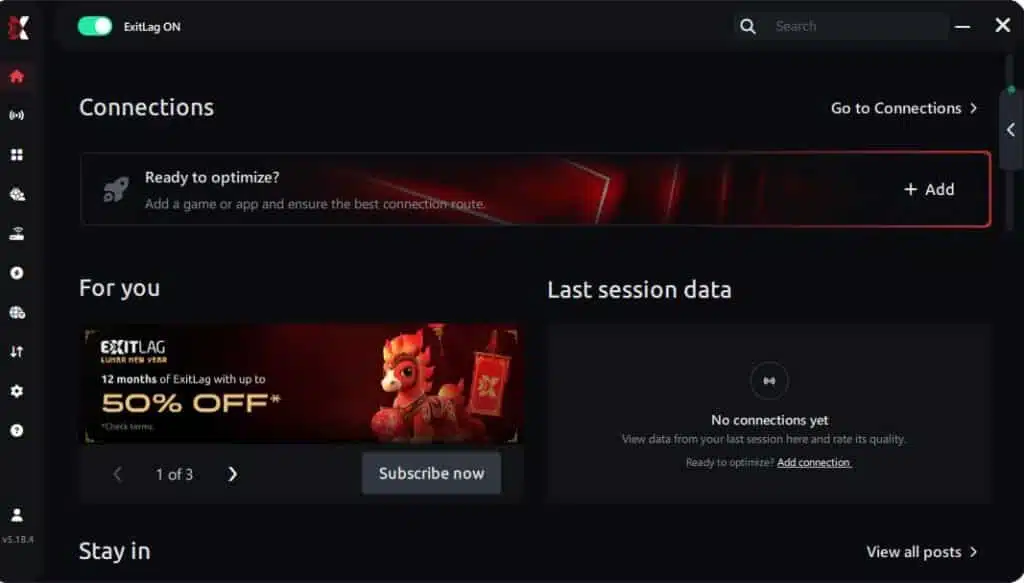
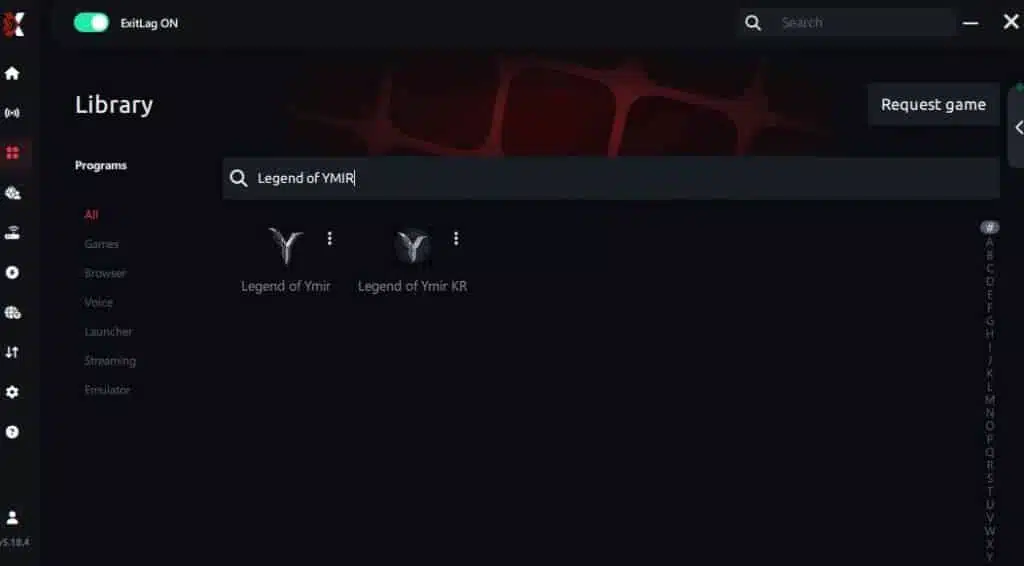
Step 3 – In the search bar, type “Legend of YMIR” and select the game from the list.
Step 4 – Choose between automated or manual route
Based on the results, you can let ExitLag automatically select the best route or manually choose the server that showed the lowest latency for your connection.
AI-optimized automated route
Based on the results, you can let ExitLag automatically select the best route through AI optimization. The system analyzes multiple connection paths in real time and automatically identifies the most efficient route for your connection, ensuring the lowest possible latency without requiring manual choices.
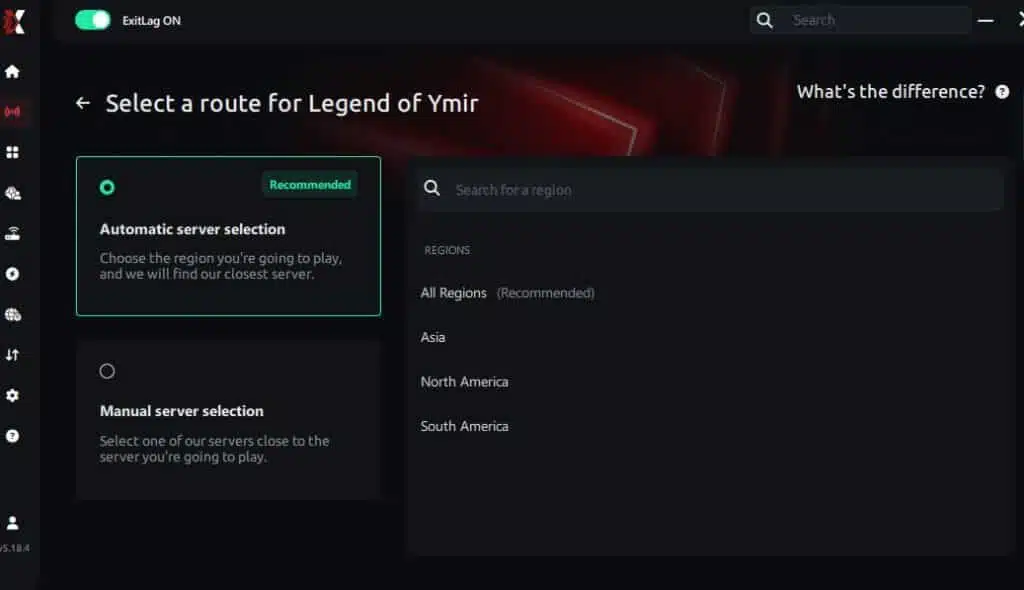
Manual route
If you prefer to have full control over your connection, you can manually choose the server based on the ping test results. Simply select the server that showed the lowest latency or the one that best meets your specific gaming needs, allowing complete customization of your experience.
Step 5 – Click “Legend of YMIR” or the play button. ExitLag will begin optimizing your connection automatically.

Step 6 – Wait a few seconds until optimization is complete. You’ll see ping indicators in the interface.
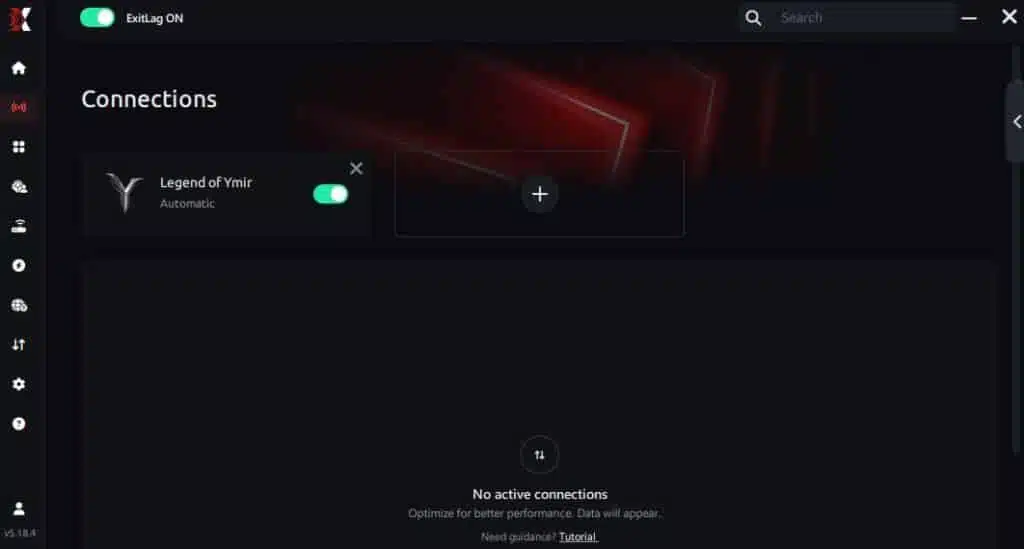
Step 7 – Launch Legend of YMIR normally. The optimization will already be active.
ExitLag runs in the background while you play, constantly adjusting routes to maintain the best possible performance.
Emulator setup
If you play Legend of YMIR through cloud-PCs or Windows emulators, ExitLag automatically detects the executable. As a result, it routes the correct process and stabilizes your experience, preventing additional FPS Drop Legend of YMIR symptoms on virtualized systems.
Optimization tips
Players can enhance results further by combining ExitLag with smart system tweaks such as closing background apps, lowering shadow quality, and ensuring GPU drivers stay updated. Consequently, this prevents excess load and reduces Legend of YMIR performance issues tied to unnecessary resource usage.
Console players
While ExitLag currently supports PC gameplay, console players who use PC-based remote play or cloud gaming streams may still benefit from route optimization, especially when dealing with Legend of YMIR lag triggered by unstable connections.
Before and after results with ExitLag in Legend of YMIR
When analyzing the performance transformation, ExitLag helps maintain a consistent frame rhythm, reducing interruptions that previously appeared as FPS Drop Legend of YMIR during combat and exploration.
Real player cases
- Player A: Achieved 40% reduction in stuttering.
- Player B: Reduced latency by 55% and smoothed frame pacing.
- Player C: Eliminated 90% of network spikes during large boss raids.
Performance comparison table
| Metric | Without ExitLag | With ExitLag | Improvement |
| Stability | Low | High | Significant |
| Latency | 120–180ms | 60–80ms | ~50% |
| Micro-stutter | Frequent | Rare | Major |
| Frame pacing | Irregular | Stable | Improved |
Additional optimizations to maximize FPS with ExitLag
Improving network routing already removes part of the stutter, but many players still experience FPS Drop Legend of YMIR due to system configuration, background processes, or in-game rendering load. By applying additional optimizations, it becomes much easier to stabilize performance and avoid new drops during raids, cities, or large-scale fights. These steps complement ExitLag and help maintain a consistent frame rhythm even in the most demanding environments.
Network
Network adjustments help eliminate indirect timing issues that may appear similar to FPS Drop Legend of YMIR.
Ethernet
Using a wired Ethernet cable prevents interference and reduces small delays that often feel like micro-stutter.
QoS
Activating Quality of Service on the router prioritizes gaming packets, improving responsiveness and reducing desynchronization.
DNS
Switching to a stable DNS can reduce micro-delays and prevent subtle frame pacing inconsistencies.
Close heavy apps
Before playing, closing video platforms, cloud-sync tools, and launchers avoids background consumption that can resemble FPS Drop Legend of YMIR in busy areas.
System
System-level preparation prevents hidden bottlenecks that frequently trigger frame dips.
Drivers
Keeping GPU, CPU, audio, and chipset drivers updated ensures better performance in new patches and reduces unexpected instability.
High-performance mode
Enabling Windows High-Performance mode forces the system to prioritize maximum power for gaming tasks.
Background apps
Closing overlays, browsers, and RGB controllers frees CPU threads and reduces the chance of artificial FPS Drop Legend of YMIR during intense sequences.
Clean system
Removing temporary files and scanning for malware helps maintain stable resource allocation for long sessions.
In-game
Adjusting in-game visuals lightens GPU workload and helps maintain stable frame output.
V-Sync off
Disabling V-Sync reduces input delay and avoids unnecessary frame capping.
FPS limit
Setting an FPS limit slightly above your average prevents sudden spikes and stabilizes visual pacing.
Recommended presets
Lowering shadows, foliage density, and volumetric lighting often reduces FPS Drop Legend of YMIR in large open-world regions.
Frequently asked questions about FPS drop in Legend of YMIR
Below are the most common questions from players who want to eliminate FPS Drop Legend of YMIR and achieve more stable performance.
Does ExitLag actually improve FPS?
ExitLag improves timing stability by reducing jitter and packet delay, which often removes micro-stutters that feel like frame drops.
Is ExitLag safe?
Yes. ExitLag only optimizes routing and does not access personal files or modify system components.
Does ExitLag work on console?
ExitLag works directly on PC. Console players benefit when using remote play or cloud PC solutions.
How much does ExitLag cost?
You can explore all available plans on the official ExitLag pricing page, where each option is explained in detail.
Even better, before committing to a subscription, players can experience the full benefits firsthand with the free trial, allowing you to test ExitLag’s performance impact with zero risk.
My PC is weak, does ExitLag help?
ExitLag fixes network-based stutters. Hardware limitations require in-game and system optimization.
Does ExitLag work with Legend of YMIR?
Yes, the game is supported. Check the ExitLag supported games list for confirmation.
What’s the difference between ExitLag and a VPN?
ExitLag uses gaming-optimized routing, multi-path redundancy, and real-time stabilization.
ExitLag is NOT a VPN, and it doesn’t encrypt or slow traffic like standard VPNs.

Why do frames drop in large cities?
High NPC density, reflections, and geometry streaming cause heavy load.
Why does the game stutter during raids?
Particle effects, enemy calculations, and AI threads increase CPU and GPU pressure.
Does the game have memory leaks?
Some patches may cause long-session instability that resembles FPS Drop Legend of YMIR.
Fix FPS drop in Legend of YMIR with ExitLag
Stabilizing connection pathways and reducing micro-delays is one of the most efficient ways to prevent FPS Drop Legend of YMIR. ExitLag ensures smoother gameplay, even in packed regions where timing issues usually appear.
Final benefits
- Stable FPS
- Zero micro-stuttering
- Smooth gameplay
- Competitive advantage
- Frustration-free exploration
Next steps
- Test ExitLag for free
- Configure in 5 minutes
- Compare before and after
- Dominate Legend of YMIR
In conclusion, solving FPS drop Legend of YMIR issues requires balancing hardware, settings, and network stability. ExitLag’s multi-path technology eliminates routing delays and ensures fluid gameplay across all regions of Legend of YMIR. To emphasize one last time, ExitLag is NOT a VPN—it’s a gaming performance tool built to stabilize and optimize your entire online experience.
Now that you know everything about FPS drop Legend of YMIR, if you want the most stable, smooth, and competitive gameplay possible, is the time to upgrade your performance toolkit. Register at ExitLag now and improve your gameplay in a way you’ve never experienced before!
Got questions or want to connect with other players? Join the conversation at the ExitLag Forum!


