If you’re diving into this new 6v6 Marvel shooter with a controller, you’re likely wondering about Marvel Rivals aim assist-does it exist, and if so, how can you optimize it?
The short answer is: yes, Marvel Rivals includes a form of aim assist for controllers, but the strength and effectiveness vary significantly across platforms-and much of what we know comes from community testing and user feedback.
This article will break down exactly what you need to know about enabling and adjusting controller aim assist in Marvel Rivals, which settings matter most, and what kind of gameplay advantages you can realistically expect across platforms.
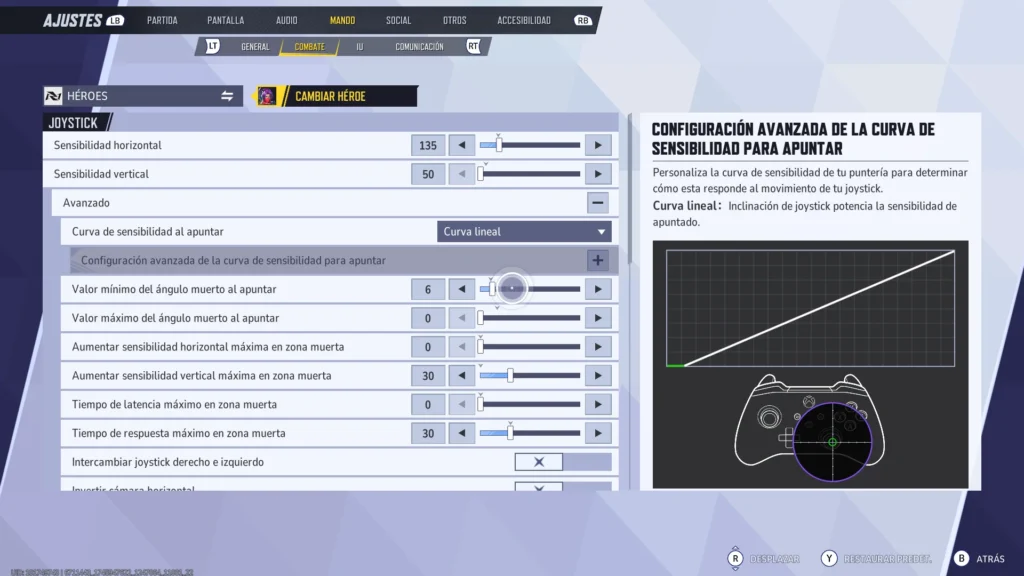
Is There Aim Assist in Marvel Rivals?
Yes, there appears to be aim assist in Marvel Rivals for players using controllers, but its implementation has sparked debate, especially among PC users.
- Console players (PlayStation and Xbox) report access to controller settings that include aim assist parameters, though there is no official confirmation from NetEase about the strength or behavior of the system. It does not seem to operate at the level of games like Call of Duty or Apex Legends.
- PC players using controllers often describe the aim assist as nonexistent or extremely subtle, even when options are visible in the settings menu.
This has been discussed extensively on platforms like Reddit and Steam forums, where players express frustration over the inconsistency or ineffectiveness of aim assist, particularly on PC.
Platform Differences in Aim Assist
| Platform | Aim Assist Support | Notes |
| PS5 / Xbox | Reported, unverified | Controller settings visible; no confirmation of strength |
| PC (Controller) | Extremely subtle | Settings exist, but aim assist effect widely debated |
| PC (M&K) | None | Native mouse aiming only, no assist options |
Where Can You Find Aim Assist Settings?
To access or adjust aim assist settings in Marvel Rivals, follow these steps:
- Open the Settings menu from the main lobby.
- Navigate to the Controller tab.
- Scroll to the Combat Settings section.
- Modify the following values (based on community guides):
- Aim Assist Strength
- Aim Assist Window Size
- Aim Assist Ease-In (per hero type: Hitscan, Projectile, Melee)
These settings are present in the UI, but their actual impact-especially on PC-remains unclear and may vary by platform or configuration. All listed variables come from community sources, not official patch notes.
Additional Controller Settings Worth Adjusting
- Deadzones: Tighten for quicker movement, especially with high-sensitivity builds.
- Response Curve: Choose linear or dynamic curves based on preference.
- Acceleration: Lower values provide more control for tracking.
Remember: changes won’t take effect properly unless you’re actively using a connected controller.
Suggested Community-Based Controller Settings
Based on user testing and gameplay experience, here are some popular settings to try:
- Horizontal Sensitivity: 200
- Vertical Sensitivity: 200
- Aim Assist Strength: 90
- Aim Assist Window Size: 40
- Hitscan Aim Assist Ease In: 40
- Projectile Aim Assist Ease In: 80
- Melee Aim Assist Ease In: 0
- Vibration: Off
These are community-recommended values, not official developer defaults. Use them as a starting point and adjust based on your own gameplay feel.
Does Marvel Rivals Have Controller Aim Assist on PC?
While settings are visible in the menu when using a controller on PC, the effectiveness of aim assist is not officially confirmed and is widely debated.
What the Community Says:
- Many Reddit users say they feel no assist at all, even with all values turned up.
- Steam discussions highlight the possibility that the system is implemented differently on PC to maintain competitive balance with keyboard users.
- Some video guides suggest minor reticle drag, but no strong correction.
So yes-the settings exist, and aim assist might be active in some form, but players should not expect strong assistance or automatic lock-ons. Performance will vary, and manual aim remains essential for controller users on PC.
How ExitLag Can Improve Controller Performance in Marvel Rivals
While ExitLag does not influence aim assist directly, it can optimize your overall input experience, on PC:
- Reduces input delay and network-related stutter
- Improves match stability and packet consistency
- Helps ensure smoother gameplay when using a controller in high-action moments
ExitLag does not increase or modify aim assist mechanics, but by stabilizing your connection and reducing lag, it may improve your ability to leverage what limited assistance the game provides.
Why This Matters in Competitive Play
Marvel Rivals is fast-paced, team-oriented, and ability-heavy. For controller players, having reliable settings and optimized input is crucial:
- Hitscan heroes benefit from precision, which subtle assist can enhance.
- Projectile users need smooth stick control to lead shots effectively.
- Tank roles need consistent inputs to land stuns or shield blocks.
With limited aim assist available-especially on PC-it’s even more important to master your control layout and sensitivity settings. Aim assist won’t win fights for you in Marvel Rivals, but a stable setup will give you the consistency needed to compete.
Have There Been Any Aim Assist Patch Updates?
As of October 2025, NetEase has not released patch notes specifically detailing aim assist as a separate system. However, the community has identified changes in controller aiming behavior across updates. For instance, one player noted: “This is very important for any controller players. A new linear has been added to the game.”
Community-Reported Observations:
- Some users believe Update 1.1 made aim assist more consistent during slow aim movements.
- There are claims that Update 1.3 improved sticky tracking, especially on consoles.
These are community observations and not officially confirmed changes. Players should treat them as anecdotal evidence rather than verified adjustments from NetEase.
What Devices Support Controller Play?
Marvel Rivals offers controller support across multiple platforms:
| Platform | Controller Support | Notes |
| PC | Yes | Controller support available; aim assist strength varies by platform |
| Xbox Series X | Yes | Native support; customizable sensitivity |
| PlayStation 5 | Yes | Full support; responsive control schemes |
Note: “Controller support” refers to the ability to use a controller. It does not guarantee identical aim assist behavior across platforms.
If you’re on PC, using a wired controller or a low-latency Bluetooth connection is strongly recommended.
How Does Aim Assist Work in Crossplay?
Crossplay introduces complexity to aim assist tuning, as controller users may face mouse and keyboard opponents. This dynamic often sparks balance debates.
Input-Based Speculations:
- Some players speculate that aim assist is scaled based on input method to maintain fairness.
- Certain matchmaking patterns suggest attempts to match similar input types.
- Reports imply that console users experience stronger aim assist than those on PC.
NetEase has not confirmed whether aim assist behavior is dynamically scaled. These are community interpretations, not official mechanics.
Best Practices for Competitive Controller Players
If you’re planning to play competitively with a controller in Marvel Rivals, consider these strategies:
1. Customize Your Setup
- Start with community-recommended settings, then refine based on your role and sensitivity preferences.
- Avoid over-reliance on aim assist. Instead, focus on maximizing comfort and stick accuracy.
2. Practice Without Relying on Assist
- Train in the Practice Range using free-aiming drills.
- Focus on flick precision, micro-corrections, and head-level tracking.
3. Minimize Input Lag
- Use a wired connection.
- Turn off controller vibration.
- Run ExitLag to maintain stable packet flow and reduce input inconsistencies.
4. Learn Hero Patterns
- Heroes like Iron Man require precise reticle placement.
- Others, like Storm or Groot, demand more mobility and less exact aiming.
Community Tools and Mods
Although Marvel Rivals doesn’t offer official controller presets, some community members have shared personalized configs for:
- SCUF Infinity 4PS / Instinct setups
- Xbox Elite controller profiles
- DualSense stick mapping optimizations
Caution: Hardware/software modifications may violate competition rules or user agreements (EULA). Always verify settings and avoid unfair advantages in ranked or official tournaments.
Will Aim Assist Be Improved?
Players are hoping for one or more of the following improvements:
- Dedicated toggles or sliders for stronger assist curves.
- Clearer input-specific balancing adjustments.
- An official response from NetEase outlining how controller aim is intended to function.
Until such improvements arrive, controller users will continue to experiment and share workarounds to remain competitive.
Final Thoughts
Aim assist in Marvel Rivals remains a debated mechanic. While console support feels more stable, the PC experience continues to divide opinion due to subtle or inconsistent assistance.
Still, by combining refined settings, low-latency tools like ExitLag, and strong gameplay fundamentals, controller players can thrive-even if the system doesn’t do the aiming for them.
All game images used in this blog belong to NetEase. They are used for informational/educational purposes only and do not imply endorsement or affiliation with the rights holders.
Got questions or want to connect with other players? Join the conversation at the ExitLag Forum!