

Few things ruin a ranked session faster than a login screen that refuses to budge. Marvel Rivals Error Code 10 is one of the most reported blockers players face before a match even starts.
It usually strikes without warning, right as queue times are shortest and the servers are busiest. Understanding why Marvel Rivals Error Code 10 happens is the first step toward a permanent fix.
In short, this error signals that the game client failed to complete its authentication or connection handshake with the servers. The cause can be server congestion, a firewall block, a corrupted cache file, or an unaccepted user agreement, and each scenario has a distinct fix. Once you identify which category applies to you, resolving Marvel Rivals Login Error Code 10 usually takes only a few minutes.
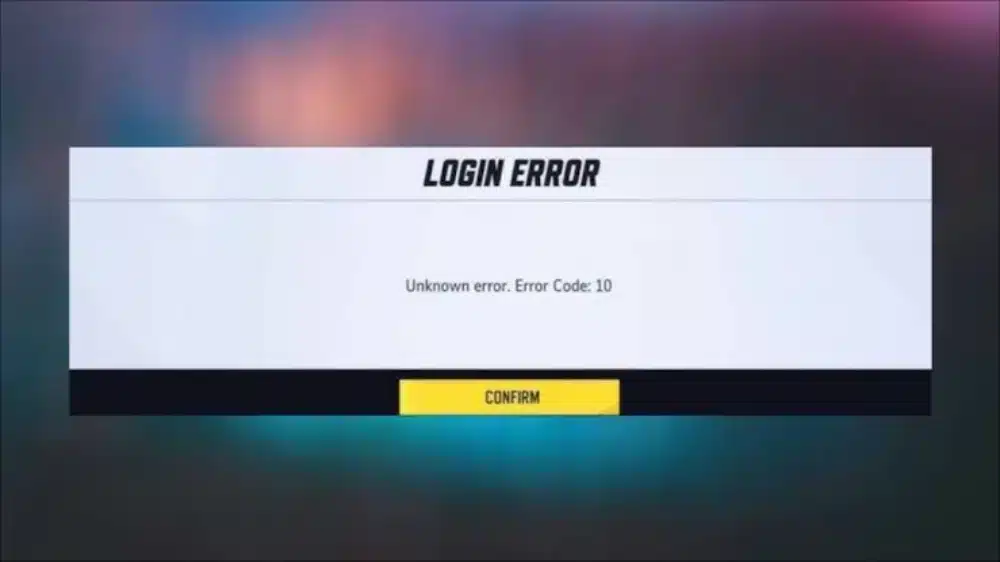
What Triggers Marvel Rivals Error Code 10?
Before jumping into fixes, it helps to understand what is actually happening behind the scenes. The game client and the server exchange several handshake requests during login, and if any step times out or gets rejected, the client throws this generic code.
Notably, the error is not always the same problem twice. Therefore, treating it as a single root cause wastes time and often leads players down the wrong troubleshooting path.
Why Does Marvel Rivals Show Error Code 10?
The most frequent trigger is network instability between your device and the authentication servers. However, it can also appear if the servers themselves are under heavy load during peak hours or right after a big patch rollout.
Furthermore, security software such as antivirus suites or overly strict firewalls can silently drop the game’s outbound connection requests. In that case, the client waits for a response that never arrives and eventually surfaces Error Code 10 Marvel Rivals as a generic failure.
Is It Always a Server-Side Problem?
Not at all. While server congestion accounts for a large share of reports, plenty of cases trace back to the player’s own setup. Common local culprits include:
- Corrupted local configuration or cache files from the launcher
- An outdated game client that has not applied the latest patch
- A router with stale cached routing tables
- NAT type conflicts that block certain incoming connections
- An unaccepted or expired User Agreement prompt hidden behind the login screen
Common Causes Behind Marvel Rivals Unknown Error Code 10
Because this code is intentionally broad, developers use it to catch a wide range of connection failures under one label. That is exactly why so many players search for Marvel Rivals Unknown Error Code 10 without finding one single explanation.
Consequently, the smartest approach is to work through causes systematically rather than guessing. The table below breaks down the most common triggers alongside their matching fixes.
| Cause | Symptom | Recommended Fix |
|---|---|---|
| Server overload during peak hours | Error appears for many players simultaneously | Wait and retry, check official status channels |
| Unaccepted User Agreement | Error triggers right after launch | Accept EULA prompt on title screen |
| Corrupted client cache | Error persists across restarts | Clear local configuration files |
| Firewall or antivirus block | Error only on this PC, not others | Add game as firewall exception |
| Outdated game version | Error after a new patch releases | Update through Steam or Epic launcher |
| Unstable NAT/router configuration | Error is intermittent, worse on Wi-Fi | Restart router, switch to Ethernet |
How Do Server Issues Cause This Error?
When thousands of players log in within the same short window, authentication queues can back up. As a result, some connection attempts time out before the server ever processes them, producing Marvel Rivals Error Code 10 on the client side.
This is more common right after maintenance windows, balance patches, or when a new hero or event launches. Indeed, checking official server status first can save you from troubleshooting a problem that resolves itself in minutes.
Network and Firewall Fixes for Marvel Rivals Login Error Code 10
Network misconfiguration is responsible for a large share of reported cases, which is why this section deserves the most attention. Fixing it usually resolves Marvel Rivals Login Error Code 10 permanently rather than temporarily.
What Router and NAT Settings Should You Check?
Routers accumulate cached routing information over time, and this buildup can quietly degrade connection quality. Restarting the router flushes that cache and often restores a clean path to the game servers.
Follow these steps in order:
- Power off your router and modem completely for at least 30 seconds.
- Power everything back on and wait for a full reconnect.
- Switch from Wi-Fi to a wired Ethernet connection if possible.
- Open your router settings and confirm NAT type is set to Open or Moderate.
- Disable any VPN or proxy service that might reroute your traffic unexpectedly.
How Do You Stop Your Firewall From Blocking the Game?
Security software occasionally treats the game’s connection attempts as suspicious traffic. Consequently, adding an exception is often all that’s needed.
- Open Windows Defender Firewall settings and locate “Allow an app through firewall.”
- Add the Marvel Rivals executable manually if it is missing from the list.
- Check third-party antivirus programs for a similar game mode or exception list.
- Temporarily disable the firewall to confirm it is the actual cause before making permanent changes.
Client Cache and Account Fixes for Error Code 10 Marvel Rivals
Sometimes the problem has nothing to do with your network at all. Instead, corrupted local files or account-side issues can trigger the exact same error message.
Should You Clear the Game’s Local Cache?
Clearing local configuration files removes stale data that may conflict with a fresh login attempt. This is particularly effective after major updates, since new patches sometimes leave behind incompatible cached files.
Here is a simple sequence to follow:
- Close the game completely, including any background launcher processes.
- Open the official launcher and look for a “Clear Local Configuration Files” or similar cache option.
- Confirm the action and restart the launcher.
- Verify game files through Steam or Epic Games to catch any corrupted installation data.
- Relaunch the game and attempt to log in again.
Could Your Account or Region Settings Be the Problem?
Region mismatches occasionally cause login handshakes to fail, especially if your account was created under a different regional server. Similarly, an unaccepted terms of service update can quietly block the login flow without a clear on-screen message.
- Double check that you accepted the latest User Agreement prompt, which sometimes appears behind other windows.
- Confirm your selected region matches the server cluster your account is registered under.
- Log out completely and log back in using fresh credentials rather than a cached session.
- Reset your password if repeated attempts continue failing after other fixes.
Pro Tips: Marvel Rivals Error Code 10
- Always check server status first: This saves time, since no local fix works if the servers are the actual problem during peak hours.
- Keep drivers updated: Outdated network adapter drivers can cause handshake timeouts that mimic authentication failures.
- Run the game as administrator: This prevents permission conflicts that sometimes interfere with the client’s connection attempts.
- Use a wired connection during major patch days: Wi-Fi interference is far more likely to cause dropped handshakes exactly when servers are already under heavy load.
- Restart your modem weekly: Clearing cached routing tables regularly reduces the odds of encountering intermittent connection errors altogether.
Common Mistakes Marvel Rivals Players Make
Switching regions randomly: Changing region settings without confirming account registration can create new login conflicts. Fix: verify your original registered region before making any changes.
Reinstalling the entire game immediately: Many players jump straight to a full reinstall, which wastes hours. Fix: clear local configuration files first, since this resolves most cache-related cases without a full reinstall.
Ignoring the User Agreement prompt: Some players assume the error is purely network-based and skip checking for a hidden EULA popup. Fix: alt-tab and check for any window waiting for confirmation behind the game.
Blaming the internet without testing it: Players often assume their connection is fine because other apps work. Fix: run a speed test and check for packet loss specifically during game launch hours.
Fixing Marvel Rivals Error Code 10 With Better Connection Routing
Once you have ruled out server outages, firewall blocks, and corrupted cache files, the remaining culprit is often plain connection instability. This is where a dedicated routing tool becomes genuinely useful.
ExitLag is not a VPN. Instead, it analyzes multiple network paths in real time and automatically selects the fastest, most stable route between your PC and the game’s servers, without encrypting your traffic or masking your IP address.
For a hero shooter like this one, stable routing directly translates into fewer disconnects, fewer authentication timeouts, and noticeably reduced packet loss during login and mid-match play. Since Marvel Rivals Error Code 10 frequently stems from unstable or congested routes rather than your local hardware, optimizing that path can prevent the error from recurring at all.
ExitLag supports over 4,000 titles across PC and mobile, backed by more than 1,500 servers spread across 190-plus countries. It is trusted by over 30 million users and handles more than 18 million optimizations every week, which speaks to how widely players rely on it for consistent connections.
Key features worth knowing:
- Real-time optimization: Actively reduces delay and packet loss so login handshakes complete faster and more reliably.
- Multipath technology: Routes data through several paths simultaneously, so a single failing route does not break your connection.
- Multi-Internet support: Combines up to four connections at once, automatically switching if one drops mid-session.
- AI-powered routing: Selects the most stable path with one click, while still allowing manual adjustments for advanced users.
If unstable routing has been behind your repeated login failures, grabbing the ExitLag Download is a practical next step toward smoother, more reliable sessions.
Final Thoughts on Marvel Rivals Error Code 10
Ultimately, Marvel Rivals Error Code 10 is rarely one single problem wearing different masks. It can stem from overloaded servers, a firewall silently blocking traffic, a corrupted cache, or a simple unaccepted agreement window.
Therefore, working through causes methodically, starting with server status and ending with account checks, gives you the best chance of a lasting fix. Most players resolve Marvel Rivals Error Code 10 within the first two or three steps outlined above.
Finally, if your connection itself is the recurring weak link, addressing routing stability directly can prevent the error from resurfacing during future sessions.
All game images used in this blog post belong to NetEase Games. They are used for informational and educational purposes only and do not imply endorsement or affiliation with the rights holders.
Got questions or want to connect with other players? Join the conversation at the ExitLag Forum!



