A Minecraft circle sounds impossible at first, because Minecraft is built from cubes, straight lines, and hard corners. Still, builders have been faking round shapes for years by using careful block spacing, mirrored quadrants, and pattern guides. Even Minecraft’s own official site has joked about how wild it is to make a circle in a game “entirely made of cubes,” which tells you everything about why this topic never dies.
Round builds also look much better when they are part of a complete structure instead of standing alone as a flat outline. This Minecraft house tutorial with practical building ideas is a useful reference if you want to turn a circle pattern into a tower base, roof design, or more polished survival build.
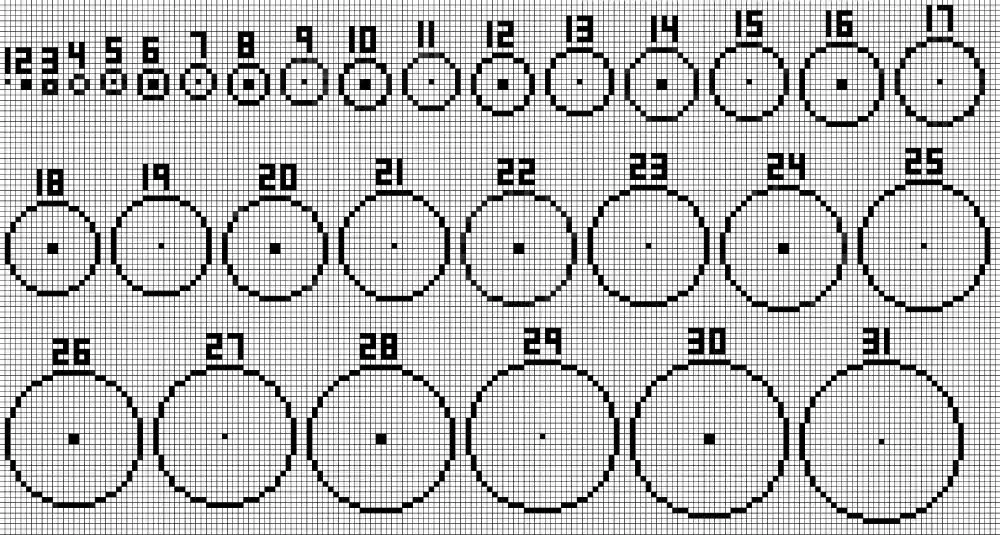
If you want to build a Minecraft circle that actually looks clean, the secret is not magic. It is proportion, symmetry, and knowing when to use a Minecraft circle generator, a Minecraft circle chart, or a simple manual pattern. Minecraft circle builds work because players use approximation, the same visual trick pixel art uses to make curves appear smooth on a square grid.
Once you understand that idea, a Minecraft circle becomes one of the most useful shapes in the game. It helps with towers, domes, fountains, arenas, roads, mosaics, and custom roofs. That is why so many players search for how to make a circle in Minecraft, how to make a Minecraft circle, and how do you make circles in Minecraft whenever they want a build to look less boxy and more polished.
Why should you build circles in Minecraft?
Round structures make Minecraft builds feel more intentional. A square tower works, but a circular tower often looks more realistic. A plain flat roof works, but a dome or ring pattern adds visual depth immediately. That is why circles in Minecraft show up so often in fantasy builds, sci-fi bases, and large decorative projects.
Best uses for a circle in Minecraft
A good circle in Minecraft is useful in more situations than many players expect. Some of the best applications are:
- watchtowers and wizard towers
- arenas and colosseums
- domes and observatories
- fountains and gardens
- round roads, plazas, and mosaics
- giant portals, vaults, and themed ceilings
These shapes work because a Minecraft circle diagram or generator pattern gives your eye something softer than endless right angles. On large builds, even a slightly rounded edge can make the whole structure feel more premium.
Why circles look better at larger sizes
Small circles are harder because every single block matters more. With a tiny radius, one extra block can make the whole shape look awkward. Larger circles are easier to smooth out because the curve has more room to breathe. That is one reason many builders prefer a circle creator Minecraft tool before starting anything medium or large.
Here is a simple rule:
| Diameter | Typical result |
| 5–7 blocks | Very rough, highly stylized |
| 9–13 blocks | Good for towers, wells, small domes |
| 15–25 blocks | Smooth enough for roofs and arenas |
| 27+ blocks | Best for large domes, plazas, mega builds |
How do you make a circle in Minecraft?
The easiest answer to how do you make circles in Minecraft is this: build one quarter of the shape, then mirror it three times. That is the foundation of almost every clean circle build. You do not need mods for that. You just need a center point, a diameter, and a pattern that keeps the left and right sides identical.
This is also the best answer to how to make a circle in Minecraft by hand. Start from the center, count outward carefully, and resist the urge to freehand the outer edge. Most ugly circles happen because players “eyeball it” instead of following a mirrored pattern.
Odd vs even circles
Before you place blocks, decide whether your diameter is odd or even. Omni’s guide points out an important distinction: even-sized circles have a 2×2 center area, while odd-sized circles have a single center block. That changes the whole symmetry of the build, especially for fountains, roads, and domes.
That means:
- odd diameters feel cleaner when you want one exact center block
- even diameters work better when you want a wider middle or larger doorway alignment
For many builders, odd diameters are easier to read visually, which is why how to make a Minecraft circle often starts with sizes like 7, 9, 11, or 13.
A simple 13-block pattern
If you want a practical starter pattern, a 13-diameter circle is a great size. Build one quarter, then mirror it. One common visual rhythm is:
- 3 blocks straight
- 2 blocks diagonal/up
- 1 block
- 1 block
- mirror back outward
This will not be a mathematically perfect geometric circle, because vanilla Minecraft cannot do that with full blocks alone, but it will look convincingly round. Omni’s calculator exists for exactly this reason: the game relies on approximation, not literal curves.
Here is a quick starter chart:
| Diameter | Good use | Notes |
| 7 | Well, fountain | Rough but charming |
| 9 | Small tower | Easy to memorize |
| 11 | Dome starter | Better visual curve |
| 13 | Medium tower | Great beginner size |
| 21 | Arena or roof | Smooth and flexible |
What is the best Minecraft circle generator?
If you do not want to count every block manually, use a Minecraft circle generator. These tools generate block-by-block templates for circles and ellipses, which is exactly what most builders need. Donat Studios offers a long-running Pixel Circle / Oval Generator, and Omni Calculator also provides a circle Minecraft generator with diameter and thickness controls plus reference charts.
That makes a Minecraft circle generator the best option for medium and large builds. It is faster, it reduces mistakes, and it helps you plan material counts before you start. If you are building a tower wall, giant plaza, or pixel-art ring, using a circles in Minecraft generator usually saves time and blocks.
Best tools to use
The most practical options from the sources reviewed here are:
- Donat Studios Pixel Circle / Oval Generator for quick circle and oval layouts, including very large builds and custom dimensions. Donat also explicitly states the circles are mathematically correct, which is useful when precision matters.
- Omni Calculator’s Minecraft Circle Generator for diameter, thickness, quick chart-style references, and odd-versus-even center guidance.
Both are useful, but they serve slightly different audiences. Donat feels more like a dedicated builder tool. Omni feels more like a guide plus calculator in one place.
How to use a circle generator well
A generator works best when you use it with a few basic habits:
- Pick your diameter first.
- Decide if you want a ring or a filled circle.
- Mark the center in-game.
- Build one quadrant first.
- Mirror the rest carefully.
- Use temporary blocks before placing final materials.
That is the safest workflow for circle creator Minecraft tools and for any Minecraft circle chart reference. If the shape looks wrong, the problem is often the center point, not the generator.
That is even more important if your setup is already unstable before you start testing larger layouts or building with mods. This Minecraft Error Code 1 troubleshooting guide is worth checking if launcher or client problems are getting in the way of opening the game consistently.
Can you make a perfect circle in Minecraft?
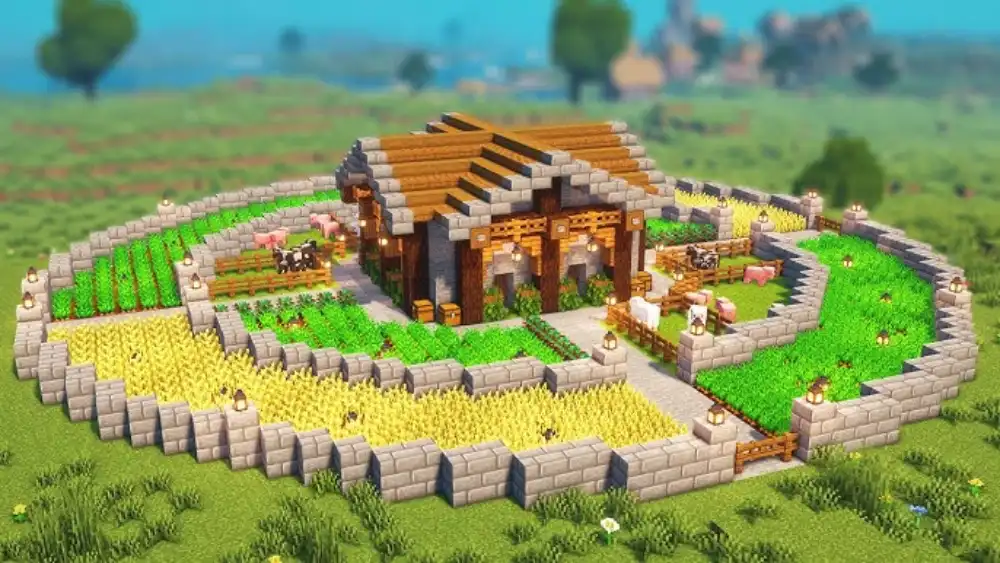
In normal vanilla building with full blocks, not really. Omni’s guide says directly that it is impossible to make a perfectly circular structure of arbitrary dimensions in vanilla Minecraft. What you are actually doing is approximating a curve on a square grid.
That does not mean you cannot make one that looks perfect to players. It just means the perfection is visual, not mathematical. This is the core idea behind every Minecraft circle, every Minecraft circle diagram, and every circle tutorial that has ever helped builders fake a smooth curve.
The official Minecraft joke about circles
Minecraft’s own site has leaned into the joke. In its “Build… A Circle?” article, the official post calls a circle in vanilla Minecraft “madness” and “an unholy creation,” then highlights a command-heavy method to make a truly round-looking form using armor stands and command blocks. That article is also a good reminder that the community obsession with circles is not new. Even Mojang knows it is one of Minecraft’s favorite long-running building jokes.
For broader official references on building features, game updates, and Java or Bedrock access, the official Minecraft website is still the best starting point. It is especially useful when you want to confirm game-wide information instead of relying only on community tools and pattern guides.
So if someone mentions the Minecraft we’ll never add circles spear meme, the underlying joke makes sense: Minecraft is iconic because it is blocky, and circles feel like the shape the game is always resisting. The official site does not use that exact meme wording, but it absolutely treats circles as a funny “this should not exist” kind of build challenge.
How to make circles feel more perfect anyway
If you want smoother-looking circles in Minecraft, use these tricks:
- build larger diameters
- avoid sudden 1-block “jumps” in the outline
- check the shape from above, not only from the ground
- use contrasting temporary blocks for the frame
- adjust one quadrant before mirroring all four
This is where circle Minecraft generator tools become more than a shortcut. They help you avoid the “lumpy” look that happens when you improvise too much.
How do you build spheres and domes in Minecraft?
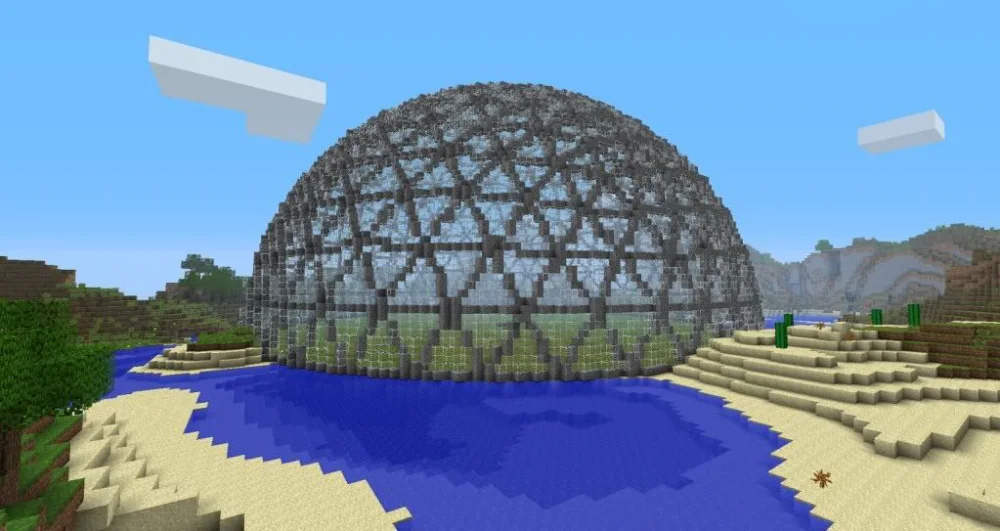
Once you understand a flat circle, the next step is stacking circles into layers. That is how domes, spheres, and curved roofs work. You are not building one impossible curve. You are building many horizontal circles, each slightly different in diameter, one on top of another.
This is why sphere building feels intimidating at first. A dome is really a sequence problem, not just a circle problem. You need to know which layer gets wider, which layer stays the same, and where the shape starts shrinking again.
Best way to build a dome
For a dome, start with the widest layer first. Then move upward using slightly smaller circles. Keep each ring centered correctly. This is much easier when you use a generator or a prepared layer chart.
Good dome uses include:
- observatories
- throne rooms
- nether hubs
- giant skylights
- sci-fi reactor rooms
- fantasy palace ceilings
This is also where builders stop asking only how to make a circle in Minecraft and start thinking in layers, symmetry, and vertical rhythm.
When to build manually and when to use tools
Manual building is fine for small circles, quick roads, and decorative details. For large domes, giant towers, and sphere-like shapes, a generator is almost always the smarter choice.
Use manual building when:
- the diameter is small
- the circle is decorative
- you are improvising a compact build
Use tools when:
- the build is 15+ blocks wide
- the shape needs to be mirrored exactly
- the build is multiplayer and expensive in resources
- you are layering circles into domes or spheres
That is the difference between a quick circle in Minecraft and a serious architectural shape.
What are the best practical tips for building circles in Minecraft?
A good circle is not only about the template. It is also about execution. Even the best Minecraft circle chart will not save a build if your terrain is uneven, your center point is wrong, or you rush the placement.
Here are the habits that make the biggest difference:
- flatten the build area first
- place the center before anything else
- count outward carefully on all sides
- build in one quadrant, then mirror
- step back often to check the outline
- use scaffolding or cheap blocks as a draft
- do not finalize materials until the frame looks right
These tips matter even more when you are building circles in Minecraft in survival, where every misplaced block costs time and materials.
Common mistakes to avoid
The most common circle mistakes are:
- choosing too small a diameter
- misplacing the center by one block
- mixing odd and even logic halfway through
- building freehand without mirroring
- forcing perfect math where visual balance matters more
That last one is important. In a block game, what looks right matters more than what looks “technically pure” on paper. Builders often improve faster when they focus on silhouette first.
Why screenshots help
Taking a screenshot from above can reveal problems immediately. A shape that looks fine from ground level can look crooked from the air. This is especially true for larger rings, plaza designs, and domes where one offset segment can throw off the whole structure.
That is one reason many players keep a saved Minecraft circle diagram or generator image open while building. It lets them compare the real structure to the intended pattern constantly.
Why use ExitLag when building large circular projects?
If you build on multiplayer servers, responsiveness matters more than people admit. Large circular projects often involve a lot of precise placement, chunk loading, flying, rotating around the build, and sometimes working with other players at the same time. When your connection stutters, checking symmetry becomes more annoying than it should be.
That kind of building workflow also depends on having the correct game version installed in a reliable way, especially on Windows systems. The official Minecraft Launcher page on Microsoft Store is a helpful direct source if you need to verify the launcher before starting a larger project.
ExitLag helps make that smoother. For builders working on mega domes, arenas, curved walls, or collaborative projects, a more stable connection can reduce frustration during repetitive placement and movement-heavy design work.
When ExitLag matters most for builders
ExitLag is most useful when:
- you build on busy multiplayer servers
- chunk loading feels inconsistent
- you are flying around large structures constantly
- you are collaborating with others in real time
- you want more stable movement during precise placement
Stable building also matters on competitive or crowded servers where chunk updates, player movement, and shared spaces can make precision work more annoying than it should be. This Minecraft PvP servers guide gives extra context on the kinds of multiplayer environments where responsiveness can affect even non-combat projects.
Why it pairs well with circle planning
Circle building already demands patience. A stable connection means less interruption while checking layouts, matching quadrants, and refining layered shapes. That is especially valuable when you are using a generator reference and trying to keep every segment aligned.
FAQ
The easiest answer to how to make a circle in Minecraft is to choose a diameter, mark the center, build one quarter of the shape, and mirror it across the other three sides. A Minecraft circle generator or Minecraft circle chart makes this much easier.
Build manually with quadrant symmetry. Start from the center, count carefully, and mirror one finished quarter three times.
Use a larger diameter whenever possible and check the outline from above. Larger circles usually look better than tiny ones.
For most players, Donat Studios and Omni Calculator are two of the most useful options. Donat is excellent for custom circle and oval layouts, while Omni combines generator functions with chart-style guidance and center-point explanations.
For medium and large builds, yes. It saves time, reduces mistakes, and improves symmetry.
Yes, especially if you use it layer by layer and stack circles carefully to create a curved roof or sphere-like form.
Not with standard full-block vanilla building. Official and calculator-based guides both explain that Minecraft circles are approximations built on a square grid, not mathematically perfect curves.
Because your eye reads the staggered outline as a curve, just like pixel art does on a screen.
The exact meme phrasing is community-driven, but Minecraft’s own site openly jokes about circles as “madness” and an “unholy creation,” so the spirit of the meme absolutely fits official Minecraft humor.
A Minecraft circle chart is a visual block guide that shows where each block should go for a chosen diameter. Omni’s guide includes chart-style references and explains how odd and even circle centers work.
Yes. It helps reduce wasted blocks and makes it easier to plan accurate shapes before committing expensive materials.
For small circles, memorizing can work. For anything larger, charts and generators are more reliable.
Mastering a Minecraft circle is one of the fastest ways to make your builds look smarter, smoother, and more intentional. Whether you use a Minecraft circle generator, a saved Minecraft circle chart, or manual quadrant symmetry, the goal is the same: create convincing curves in a square world. Minecraft circle skills are what separate “just a build” from something that feels designed, and if you want to shape towers, domes, roads, and arenas without lag getting in the way, try ExitLag and keep every placement responsive.
Got questions or want to connect with other players? Join the conversation at the ExitLag Forum!