Activision has revealed the Modern Warfare 4 PC requirements ahead of the game’s October 23, 2026 release. PC players can now check whether their systems are ready for the next Call of Duty.
The official specifications cover three performance tiers: Minimum, Recommended, and Ultra with ray tracing. Supported hardware ranges from older graphics cards, such as the GeForce GTX 970, to newer models like the RTX 5070 Ti.
This guide breaks down the Modern Warfare 4 PC requirements, explains what each performance tier means, and shows you how to check your hardware. You’ll also find graphics settings to help improve FPS in multiplayer.
Beyond the hardware, there are important security requirements. The game requires an SSD with 115 GB of free space, while TPM 2.0 and Secure Boot are mandatory for online modes. A broadband internet connection is also required.
Modern Warfare 4 PC Requirements: Official Specs
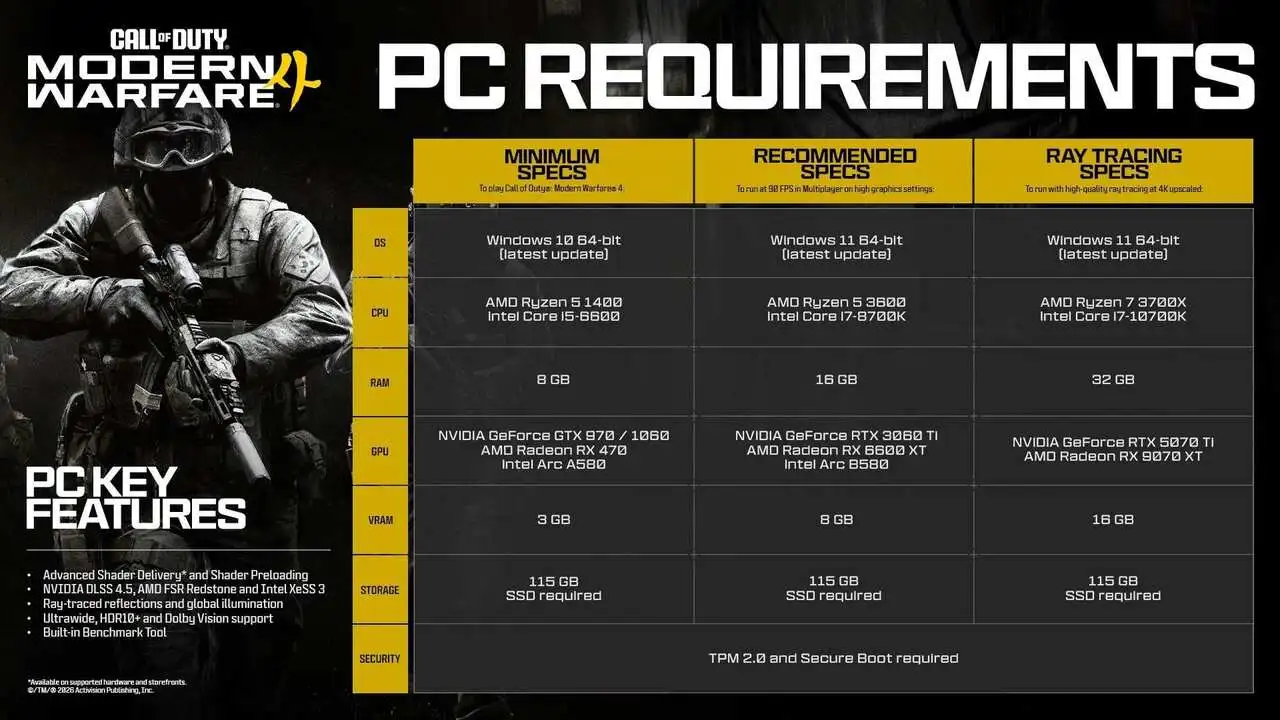
Activision has divided the Call of Duty Modern Warfare 4 system requirements into three categories. Each targets a different experience, from basic gameplay to 4K visuals with ray tracing and upscaling.
Minimum, Recommended, and Ultra Requirements
| Component | Minimum | Recommended (90 FPS on High) | Ultra (4K with Upscaling and Ray Tracing) |
| Operating System | Windows 10 64-bit | Windows 11 64-bit | Windows 11 64-bit |
| Processor | Ryzen 5 1400 / Core i5-6600 | Ryzen 5 3600 / Core i7-8700 | Ryzen 7 3700X / Core i7-10700K |
| RAM | 8 GB | 16 GB | 32 GB |
| Graphics Card | RX 470 / GTX 970 / GTX 1060 / Arc A580 | RX 6600 XT / RTX 3060 Ti / Arc B580 | RX 9070 XT / RTX 5070 Ti |
| VRAM | 3 GB | 8 GB | 16 GB |
| Storage | SSD with 115 GB free | SSD with 115 GB free | SSD with 115 GB free |
This table follows Activision’s support specifications published in October 2026.
There is one difference between the publisher’s official sources. The support page lists the Intel Core i7-8700 as a recommended processor, while Activision’s PC features blog lists the Core i7-8700K.
These specifications primarily reference desktop hardware. Gaming laptops with similarly named graphics cards may deliver different performance and should be evaluated individually.
Additional Requirements for Every Performance Tier
Hardware specifications aren’t the only things you need to check. Activision also lists several requirements that apply across all three tiers:
- SSD required: At least 115 GB of available storage for the initial installation. Future updates may require additional space.
- TPM 2.0 and Secure Boot: Security features required to access MW4’s online modes.
- DirectX 12: Your system must support this graphics technology.
- Broadband internet: Required across all configurations.
- AVX-compatible processor: Intel and AMD CPUs must currently support the AVX instruction set.
- Resizable BAR: Required for Intel Arc graphics cards.
Windows 10 users must also be running version 22H2 or later to meet the game’s security requirements.
Minimum vs. Recommended Specs: What Performance Can You Expect?
Knowing the hardware requirements is useful, but understanding their performance targets matters just as much.
After all, being able to launch a game doesn’t necessarily mean you’ll maintain high FPS throughout every match.
What to Expect From the Minimum Requirements
The minimum configuration supports older components, including the Core i5-6600 and GTX 970.
However, this tier is intended as a basic compatibility reference. Activision doesn’t guarantee high frame rates on minimum hardware.
If your PC is close to these specifications, start with lower graphics settings and monitor performance. Large maps, intense firefights, and scenes with multiple visual effects may require further adjustments.
Why the Recommended Requirements Matter
The recommended PC specs target 90 FPS in multiplayer with High graphics settings.
For competitive players, maintaining a high and consistent frame rate can make movement feel smoother and improve visual responsiveness during gunfights.
However, 90 FPS is an official performance target, not a guarantee across every map, game mode, or hardware combination.
Moving from 8 GB to 16 GB of RAM also gives Windows and background processes more breathing room.
That doesn’t automatically make RAM the best upgrade for every PC. Before spending money, identify whether your main bottleneck is memory, the processor, or the graphics card.
Ultra Requirements for 4K Ray Tracing
The Ultra tier targets players who prioritize visual quality. It requires 32 GB of RAM and graphics cards with 16 GB of VRAM, such as the RTX 5070 Ti or RX 9070 XT.
Ray tracing is confirmed for the campaign, multiplayer, and DMZ. However, enabling these effects increases GPU demand and can reduce FPS.
Players focused on competitive performance may prefer disabling ray tracing and using the available GPU resources to maintain more consistent frame rates.
Can My PC Run MW4? Here’s How to Check
If you’re wondering, “Can my PC run MW4?”, start by identifying the components installed in your system.
Windows includes tools that let you check most of this information without downloading additional software.
How to Check Your CPU, RAM, and GPU
- Press Windows + R, type dxdiag, and hit Enter.
- Open the System tab to check your processor, installed RAM, and Windows version.
- Under the Display tab, identify your graphics card. You can also use Task Manager to check dedicated GPU memory.
- Open File Explorer and check the available space on your installation drive. Make sure it’s an SSD.
- Compare your components against the official Minimum and Recommended requirements.
If you’re using a gaming laptop, check the exact GPU model. Laptop graphics cards can have different specifications and performance characteristics than the desktop versions listed by Activision.
How to Check TPM 2.0 and Secure Boot
These two security features deserve special attention. Even a powerful gaming PC may have compatibility issues that prevent access to online modes.
Here’s how to check them:
- Press Windows + R, type tpm.msc, and confirm that the Specification Version reads 2.0.
- Press Windows + R again, type msinfo32, and locate Secure Boot State.
- Confirm that Secure Boot is enabled and that the system uses UEFI mode.
- If either requirement isn’t met, consult your motherboard or PC manufacturer’s documentation.
Activision states that systems without TPM 2.0 and Secure Boot cannot access MW4’s online modes. This does not necessarily mean the entire application will be prevented from launching.
Important: Don’t change BIOS or UEFI settings without checking your hardware’s compatibility. Incorrect settings can prevent Windows from booting.
Older computers may also require a specific TPM solution or lack the necessary hardware support.
Best Modern Warfare 4 Graphics Settings for Higher FPS
Meeting the system requirements is only the beginning. The best graphics settings depend on your hardware, monitor resolution, and preferred game mode.
For competitive multiplayer, prioritize smooth performance, visibility, and consistency over maximum visual quality.
The settings below are starting points rather than an official configuration that works for everyone.
| Setting | Suggested Configuration | Purpose |
| Resolution | Native monitor resolution; lower if necessary | Balance image clarity and performance |
| Refresh Rate | Highest supported by your monitor | Take advantage of your display |
| Upscaling | DLSS, FSR, or XeSS, depending on compatibility | Improve performance through image reconstruction |
| Shadows and Effects | Low or Medium, depending on your PC | Reduce GPU workload |
| Ray Tracing | Off when prioritizing FPS | Free up GPU resources |
| FPS Limit | Adjust based on stability and monitor capabilities | Reduce frame-time fluctuations |
| VRAM Usage | Adjust according to available graphics memory | Avoid excessive VRAM pressure |
Modern Warfare 4 supports technologies such as NVIDIA DLSS 4.5, AMD FSR Redstone, and Intel XeSS 3.
The best option depends on your graphics card and which features are available for your hardware.
You can also test system latency reduction features, such as NVIDIA Reflex, when supported.
There is no universal VRAM allocation or FPS cap that works best for every computer. Compare performance before and after each adjustment.
Advanced Shader Delivery and the Built-In Benchmark
Modern Warfare 4 introduces Advanced Shader Delivery (ASD), an evolution of the traditional shader preloading process.
On compatible platforms, the technology uses precompiled shaders to reduce preparation time.
Activision identifies the Xbox app for PC as one way to take advantage of the system, including with compatible installations from other storefronts.
Another important addition is the game’s built-in benchmark tool.
It runs a multiplayer simulation and provides performance information, including average FPS, CPU and GPU usage, ping, and input latency.
After installing MW4, use the benchmark to identify potential bottlenecks before changing multiple graphics settings at once.
Tips to Improve Performance in MW4
- Update your graphics drivers: Check Activision’s recommended GPU driver versions before launch.
- Close unnecessary background applications: Other programs can consume valuable RAM and processing resources.
- Test your actual FPS: Use the built-in benchmark to compare different configurations.
- Prioritize consistency: Stable frame times can feel better than high FPS peaks followed by noticeable drops.
- Check your SSD space: Leave enough free storage for updates and temporary files.
Low FPS or Lag? How to Identify the Problem
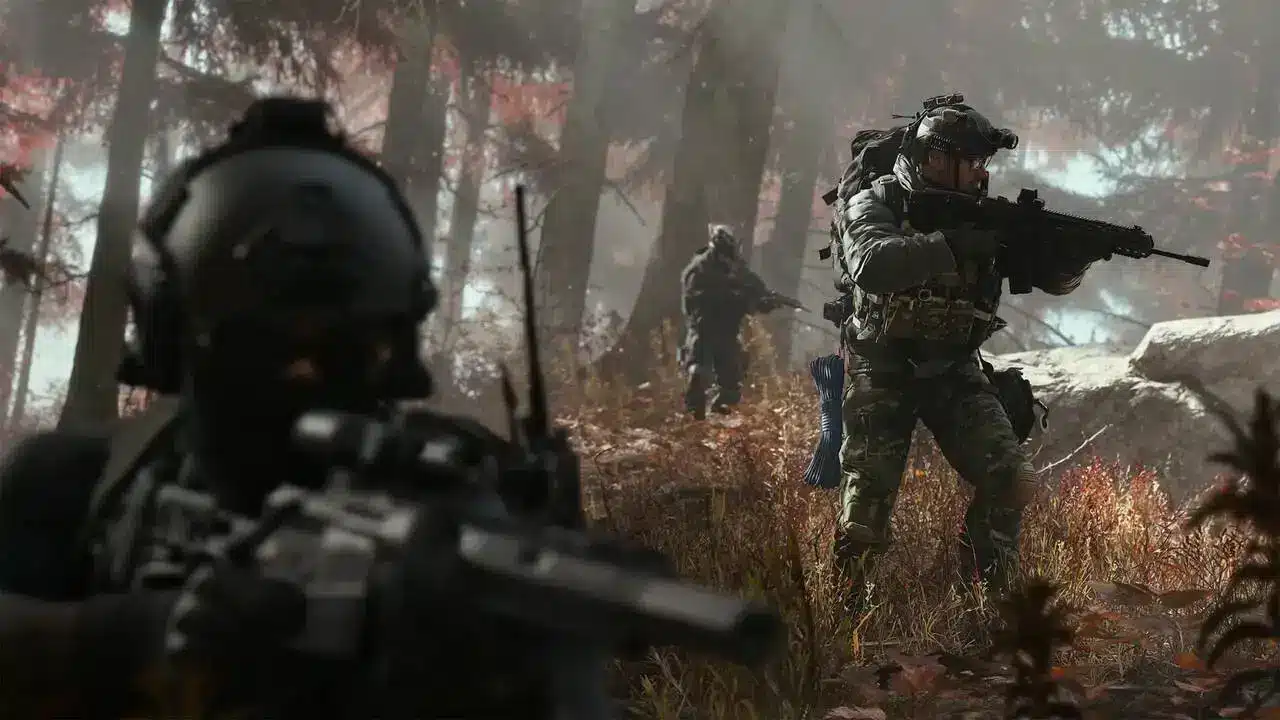
Not every stutter in Call of Duty Modern Warfare 4 has the same cause.
FPS drops are usually related to graphics processing, CPU performance, memory limitations, or other system workloads.
Meanwhile, enemies moving irregularly, delayed synchronization, and packet loss may indicate network problems.
These symptoms alone aren’t enough for a definitive diagnosis. You should check performance and network metrics before deciding what to change.
If your frame rate stays stable but your ping fluctuates or packet loss occurs, lowering graphics settings probably won’t fix the underlying issue.
Modern Warfare 4 PC Requirements and ExitLag: Optimize Your Experience
Meeting the Modern Warfare 4 PC requirements helps prepare your hardware, but local performance and network quality are two different parts of the gaming experience.
On Windows PCs, ExitLag provides tools designed to address both areas. Its features can help reduce interference from background processes and optimize network traffic during online matches.
These include:
- PC Boost: Works with nonessential processes, RAM usage, and system adjustments to help improve the environment in which games run.
- Multipath: Uses multiple network routes to help reduce the impact of connection instability.
- Real-Time Route Optimization: Searches for more efficient network paths between your connection and game servers.
- Traffic Shaper: Helps prioritize gaming traffic over other network activities.
PC Boost doesn’t replace the need for a compatible graphics card, processor, or sufficient memory.
Likewise, network route optimization doesn’t guarantee lower ping on every connection.
Results depend on your computer, internet provider, location, and the servers you’re connecting to.
Once you’ve checked the system requirements and optimized your graphics settings, explore ExitLag for Windows and evaluate your connection before jumping into Modern Warfare 4 multiplayer or DMZ.
Got questions or want to connect with other players? Join the conversation at the ExitLag Forum!