

Few genres reward timing, memory, and reflexes quite like Music Games. Whether you tap notes on a scrolling track or race to name a song in three seconds, these titles turn everyday listening into a competitive skill.
That mix of fun and challenge is exactly why Music Games keep climbing download charts across PC, console, and mobile. Players are not just pressing buttons anymore, they are training reaction time while having genuine fun with friends.
So what exactly counts as a Music Game? In short, it is any title where sound, rhythm, or musical knowledge drives the core gameplay loop. This guide breaks every major style down and shows how to play them without a laggy connection ruining the moment.

What Are Music Games? A Complete Overview
Music Games are titles where musical elements such as rhythm, pitch, melody, or song recognition form the main gameplay mechanic. Unlike games that simply use a soundtrack in the background, these games ask you to react to the music itself.
That could mean hitting notes on beat or naming a track before your rivals do. The category is broader than most players realize, spanning four main families with their own skill sets and audiences.
The Main Types of Music Games
Understanding the categories makes it easier to pick the right title for your mood or group size.
- Rhythm action games: Timing-based titles where you hit notes, buttons, or motion cues in sync with a beat.
- Music trivia and guessing games: Quiz formats that test how fast you can identify a song, artist, or lyric.
- Music theory and note-learning games: Educational titles that teach scales, notes, and reading music through play.
- Musical instrument simulators: Apps and games that let you practice piano, guitar, or drums in a gamified format.
Each category has grown its own dedicated audience. Many players enjoy more than one type depending on whether they want a solo challenge or a group activity.
Why Music Games Have Exploded In Popularity
Music-based titles have surged because they combine two things people already love: music streaming habits and competitive gaming. Furthermore, short-session formats fit easily into a lunch break or a party night.
Consequently, publishers keep expanding this space. Fortnite Festival added a full rhythm mode inside an existing battle royale, while VR rhythm titles like Beat Saber keep topping headset charts.
Music Game Types At A Glance
The table below summarizes the four main categories, which platforms suit them best, and what skill each one sharpens. Keep it handy when deciding which style to try next.
| Music Game Type | Primary Skill Tested | Best Platforms | Great For |
|---|---|---|---|
| Rhythm Action | Timing and reflexes | PC, VR, Console | Solo challenge and score chasing |
| Music Trivia and Guessing | Recall and speed | Browser, Mobile | Group game nights |
| Music Theory and Notes | Learning and memory | Mobile, Tablet | Beginners and students |
| Musical Instrument Simulators | Technique and accuracy | PC, Mobile, MIDI setups | Practicing a real instrument |
Best Music Rhythm Games To Play Right Now
The best Music Rhythm Games right now combine tight input timing with strong soundtracks, spanning VR, console, and free-to-play formats. Beat Saber remains a genre benchmark on headsets.
Fortnite Festival brings rhythm gameplay to a massive existing player base, while Hi-Fi Rush blends rhythm timing with full combat. These games reward practice because every note window is measured in milliseconds.
As a result, connection quality becomes just as important as your own reflexes when a chart gets demanding.
Top PC, Console, and VR Rhythm Picks
A few standout Music Rhythm Game experiences consistently show up on best-of lists this year:
- Beat Saber: The genre-defining VR title where players slice blocks to the beat with lightsabers.
- Fortnite Festival: A full rhythm mode built into Fortnite, featuring licensed tracks and a Jam Stage mode for freeform play.
- Hi-Fi Rush: An action game where every attack, dodge, and enemy pattern syncs to the soundtrack.
- Just Dance: A long-running dance and movement series built around camera or controller motion tracking.
- Thumper: A dark, fast rhythm racer that punishes even small mistimed inputs.
If you want a deeper breakdown of genre history and more picks, our full guide to the best rhythm games to play this year covers additional titles and platform notes.
Free Music Games You Can Play On Mobile
Mobile has become a major hub for Free Music Games, since touchscreens work well for tap-based note charts. Popular options let you play short sessions during a commute or between matches in other games.
- Look for apps with adjustable note speed, since default settings can feel too fast for beginners.
- Check whether the game supports custom songs, which extends replay value far beyond the built-in track list.
- Favor titles with offline modes if you want to avoid Online Music Games eating mobile data.
What Is The Best Music Guessing Game Online?
The best Music Guessing Game experiences play a short song clip, then challenge you to name the track, artist, or year before time runs out. Sites built for this format usually offer genre filters, difficulty levels, and multiplayer lobbies.
These formats work well because they need almost no setup. A browser, a speaker, and a few friends are enough to start.
How A Guess The Music Game Round Works
Most Guess The Music Game formats follow a simple loop: a short audio clip plays, players buzz in or type an answer, and points go to whoever answers fastest and most accurately.
Some versions reveal more of the song the longer nobody guesses correctly. That rewards players who can recognize a track from just the opening notes.
Common variations include:
- Speed rounds: Only the first correct answer scores points, favoring fast recall.
- Category rounds: Songs are pulled from a specific decade, genre, or artist.
- Lyric rounds: Players fill in a missing lyric instead of naming the full track.
Top Music Trivia Games Worth Trying
Music Trivia Games overlap heavily with guessing formats but often add broader question types, such as chart history or instrument facts.
If you enjoy quiz nights generally, our breakdown of how trivia games work across genres and platforms is worth a look. It explains hosting tools and scoring formats that also apply to music-themed rounds.
Music Party Games For Your Next Game Night
Music Party Games work best in groups of four or more, where quick rounds and shared laughter matter more than pure skill. The strongest picks mix trivia, guessing, and light performance challenges.
Unlike solo rhythm titles, party formats reward group energy over precision. That makes them ideal for mixed-skill friend groups.
Best Music Party Games For Groups
When picking a title for a game night, look for these traits:
- Low setup time: Browser-based lobbies get everyone playing within a minute.
- Adjustable difficulty: Casual and hardcore players can compete fairly with handicap options.
- Custom playlists: The ability to load your own songs keeps sessions fresh for repeat game nights.
- Cross-device support: Phones, tablets, and laptops should all be able to join the same lobby.
Hosting Tips For A Music Trivia Night
Running a smooth music trivia night takes a bit of planning beyond just picking a game. Consider these steps before your group logs on:
- Pick a platform that supports the group size and confirm everyone can join without an account.
- Test audio playback ahead of time, since a laggy or muted clip ruins a round instantly.
- Mix question difficulty so newcomers and music nerds both stay engaged.
- Set a clear scoring system upfront to avoid arguments mid-game.
Music Theory Games and Musical Instruments Game Picks
Music Theory Games teach note reading, scales, and rhythm notation through interactive challenges instead of textbook drills. A well-designed Musical Instruments Game turns repetition into something closer to play than homework.
Research on gamified music education backs this up. A peer-reviewed study on piano-based game learning found that elementary students who practiced through structured game formats showed measurable knowledge gains.
Those gains outpaced students who received traditional instruction alone.
Music Note Games For Absolute Beginners
A good Music Note Games app should start with staff basics before moving into rhythm reading. Look for apps that use call-and-response drills, since repeating a short pattern back builds recognition faster than passive listening.
- Start with treble clef note identification before adding rhythm timing.
- Use apps with adjustable tempo so beginners are not rushed past their comfort level.
- Track progress with built-in scoring so improvement is visible session to session.
Musical Instruments Game Apps Worth Downloading
Instrument simulators now cover piano, guitar, and drum kits with surprisingly responsive input detection. Many also connect to a real instrument through a microphone or MIDI cable, scoring your playing against a note chart.
If you also spend time inside Roblox, note that many music-themed experiences there rely on custom audio setups. Our guide to Roblox music codes, audio IDs, and boombox systems explains how those work.
Is Lag A Problem In Online Music Games?
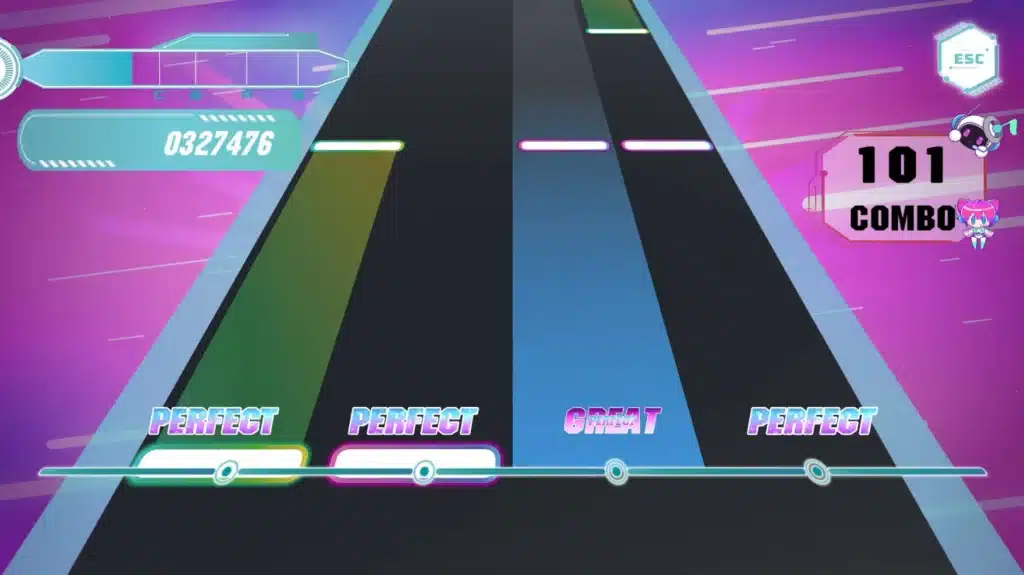
Yes, lag is a real problem in Online Music Games because note timing windows are often measured in fractions of a second. A delayed connection can make a perfectly timed input register late, costing combo streaks and buzzer races.
This is not a minor inconvenience for competitive players. It directly changes match outcomes.
Why Timing Windows Punish High Ping
Rhythm and trivia formats both depend on split-second responses, which is why unstable routing hurts more here than in slower-paced genres.
Notably, a Frontiers in Psychology mini-review on music and player performance found that regular musical beats actively recruit motor-timing brain networks.
When a note signal arrives late due to network jitter, the brain’s timing prediction and the game’s actual input window fall out of sync. Consequently, even skilled players start missing notes they would normally hit clean.
How To Fix Lag Before It Ruins Your Combo
Before blaming your reflexes, rule out the connection itself. A few quick checks can save an entire session:
- Close background downloads and streaming apps that compete for bandwidth.
- Switch from Wi-Fi to a wired connection whenever the game supports it.
- Test server region settings, since a distant server adds unavoidable delay.
- Use a dedicated route optimizer if your ISP path to the game server is inconsistent.
Pro Tips: Playing Music Games At Your Best
- Warm up with easy tracks first: Jumping straight into hard difficulty cold hurts accuracy. A short warm-up primes your timing before scores count.
- Use headphones, not speakers: Audio delay from external speakers can throw off note timing by dozens of milliseconds in fast rhythm charts.
- Calibrate audio offset settings: Most rhythm games let you adjust for your hardware’s audio latency. Skipping this step leaves free points on the table.
- Play trivia rounds with genre filters on: Sticking to genres you know well early builds confidence before mixing in unfamiliar categories.
Common Mistakes Music Games Players Make
- Ignoring audio latency settings: Many players never touch the calibration menu, so every note feels slightly off. Fix: run the built-in calibration test before your first competitive session.
- Playing on unstable Wi-Fi during timed rounds: A dropped packet during a buzzer round can cost the whole match. Fix: switch to a wired connection or stabilize your route before hosting trivia nights.
- Skipping easier difficulty tiers: Jumping to expert charts too early builds bad habits and frustration. Fix: clear a few songs on medium difficulty before pushing into harder note density.
- Using outdated song lists in fan-made content: Community-shared track lists for custom charts often go stale fast. Fix: pull songs directly from the game’s official library or current in-app store.
Play Music Games Without Lag: How ExitLag Helps
As someone who has lost more than one trivia buzzer race to a laggy connection, I get why stable routing matters in Music Games. ExitLag is not a VPN, it is a connection optimizer that scans multiple network paths in real time.
It picks the fastest, most stable route to the game server automatically. It supports more than 4,000 titles across PC and mobile, with over 1,500 servers spread across 190-plus countries.
That matters for music titles because even a small delay can push a well-timed note out of its scoring window.
Why Connection Stability Matters For Music Games
Rhythm charts, trivia buzzers, and multiplayer guessing lobbies all depend on split-second synchronization between your input and the server’s clock. ExitLag’s Multipath technology sends data through several routes at once.
If one path degrades, the others keep your connection steady instead of letting the whole session stutter. For mobile-based music trivia or rhythm apps, that same real-time optimization reduces the kind of stutter that throws off tap timing on a touchscreen.
It also does not modify game files or interact with anti-cheat systems, so it stays safe to use alongside the titles covered in this guide.
Getting Started With ExitLag
Setting up is straightforward for both desktop and mobile players:
- PC and console players can grab the ExitLag Download and select their target game before jumping into a session.
- Mobile players chasing smoother rhythm taps can install ExitLag for Android or ExitLag for iOS directly from their respective stores.
Whichever category fits your group best, the genre keeps growing with fresh licensed tracks, new trivia formats, and smarter instrument-learning apps.
Music Games reward both quick reflexes and genuine musical knowledge, which is part of why the genre keeps earning new fans across every platform.
All game images used in this blog post belong to their respective developers and publishers, including Beat Games, Epic Games, Tango Gameworks, and Ubisoft.
They are used for informational and educational purposes only and do not imply endorsement or affiliation with the rights holders.
Got questions or want to connect with other players? Join the conversation at the ExitLag Forum!



