Overwatch Drives have quickly become one of the most talked about features in Overwatch 2’s Competitive scene. They turn every ranked win into visible, trackable progress toward exclusive cosmetics and bonus currency. If you have ever wondered why your friends keep grinding Competitive Play during specific weeks, this system is usually the reason.
For newer players, Drives Overwatch content can feel confusing at first glance. There is a meter, checkpoints, Signatures, and a scoring formula that rewards wins far more than it punishes losses. Once you understand the mechanics, though, it becomes one of the easiest ways to earn extra Competitive Points.
This guide breaks down exactly how Overwatch Drives work, which rewards are worth chasing, and how to farm Drive Score efficiently without wasting matches. We will also cover common mistakes, pro tips from experienced ranked players, and a practical comparison table of every checkpoint tier.

What Are Overwatch Drives?
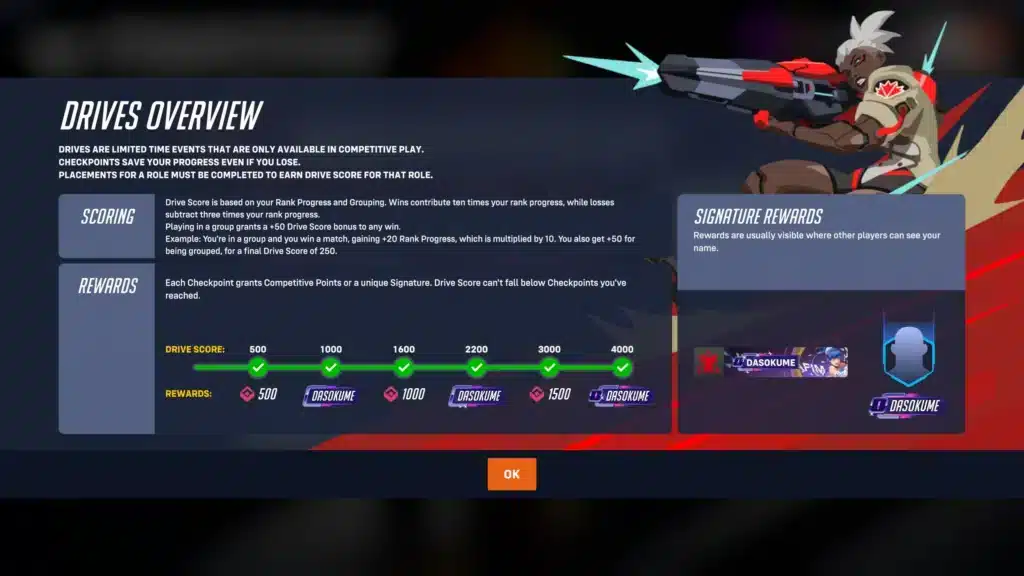
Overwatch Drives are limited-time Competitive Play events that reward players with bonus Competitive Points and exclusive cosmetics called Signatures. They typically appear during specific weeks of a season, encouraging players to queue into ranked matches more consistently.
Unlike the Battle Pass, which tracks XP from any mode, Drives Overwatch progress is tied specifically to Competitive Play performance. Every win and loss in Role Queue affects your Drive Score, and that score determines which checkpoint rewards you unlock.
The Core Mechanic
The system runs on a meter that fills as you play ranked matches. Instead of counting games played, it measures your actual Skill Rank movement, which means stronger performances translate into faster progress.
Here is the basic scoring logic:
- A win grants Drive Score equal to roughly ten times your Skill Rank percentage gained in that match.
- A loss deducts Drive Score equal to roughly five times your Skill Rank percentage lost, half the impact of a win.
- Once you cross a checkpoint, your score cannot drop below that threshold again, even after a losing streak.
Why Blizzard Added This System
The design goal behind Drives was simple: encourage more consistent Competitive Play engagement without forcing a grind based purely on volume. By tying rewards to Skill Rank changes rather than raw match count, the system naturally favors players who are actually winning and improving.
This also discourages queue dodging or stat padding in low-stakes modes, since only true ranked matches count. It is a smarter reward loop than older systems that just tracked total games played.
How Do Overwatch Drives Work In Practice?
Every Competitive Play match you finish, win or lose, updates your Drive meter automatically. There is no separate menu to activate, no special mode to queue into, and no manual opt-in step required.
Progress is shared across roles. This means Tank, Damage, and Support wins all feed into the same meter, so you are never locked out of progress just because you prefer a specific role that day.
Checkpoints And Locked Progress
Checkpoints act as safety nets. Once you reach one, your score is locked at that level permanently for the current cycle, protecting you from a bad losing streak wiping out your progress.
- Early checkpoints usually unlock smaller Competitive Points bundles.
- Middle checkpoints introduce the base Signature cosmetic.
- Later checkpoints unlock upgraded versions like Advanced and Elite Signatures.
Are Overwatch Drives Worth Completing?
Yes, for most Competitive Play regulars, Drives Overwatch content is absolutely worth completing. The Competitive Points alone can offset the cost of seasonal shop items, and Signatures are cosmetics you cannot obtain any other way.
Casual players who rarely touch ranked mode may find the grind less appealing. However, since progress never fully resets from losses (only pauses at checkpoints), even sporadic play sessions still contribute meaningfully over time.
Drives Overwatch Reward Tiers
Below is a general breakdown of how checkpoint tiers typically scale. Exact point requirements can shift between cycles, so always check the in-game event tab for the current numbers.
| Checkpoint Tier | Approx. Drive Score Needed | Typical Reward |
|---|---|---|
| Tier 1 | Low threshold | Competitive Points bundle |
| Tier 2 | Mid-low threshold | Base Signature |
| Tier 3 | Mid threshold | Larger Competitive Points bundle |
| Tier 4 | Mid-high threshold | Advanced Signature |
| Tier 5 | High threshold | Largest Competitive Points bundle |
| Tier 6 (Final) | Highest threshold | Elite Signature |
Signatures are stylized backings that show up behind your BattleTag across Name Cards, hero select, the scoreboard, and Play of the Game highlights. They reset with each new cycle, so the version you earn is tied to that specific event only.
Advanced Strategies To Progress Faster
Since wins are worth double what losses cost you, focusing on win rate matters more than sheer volume. A few smart adjustments to your play habits can meaningfully speed up your climb through the checkpoints.
- Queue during your peak focus hours instead of grinding late when your reaction time drops.
- Stick to two or three heroes you already perform well with rather than experimenting mid event.
- Track your Skill Rank percentage gains after each match to estimate how close you are to the next checkpoint.
- Take short breaks after two consecutive losses to avoid tilt-driven decision making.
Role Selection Matters
Because progress is shared across roles, you can strategically queue into whichever role currently has the shortest wait time or the matchups you feel strongest in. Flexible players often clear checkpoints faster simply because they queue more efficiently.
Consistency Beats Grinding
Long, high-volume sessions often lead to fatigue, and fatigue leads to losses that erase a chunk of your Drive Score gains. Shorter, focused sessions with a clear stopping point after a loss streak tend to outperform marathon grinding.
How Can You Maximize Overwatch Drives Rewards?
Maximizing rewards comes down to protecting your win rate and playing during stable network conditions. Skipping a checkpoint by even a few percentage points because of a lost match can cost you an entire tier of rewards.
- Warm up in the practice range or a quick game mode before jumping into ranked.
- Avoid queueing solo into unfamiliar role combinations during the event window.
- Communicate with teammates early instead of assuming call outs will happen naturally.
- Review replays of losses to spot patterns in your decision making.
Timing Your Sessions Around The Event Window
Drives Overwatch events run on a limited schedule each cycle, so pacing yourself across the available days is smarter than trying to finish everything in one sitting. Spreading sessions out also reduces fatigue-driven losses late in a cycle.
Pro Tips: Overwatch Drives
- Play your best role first. Starting sessions with your strongest role builds early Drive Score momentum, which makes locked checkpoints easier to protect for the rest of the cycle.
- Duo with a reliable teammate. Coordinated communication reduces avoidable losses, and since losses only cost half of what wins grant, protecting your win rate compounds quickly.
- Check the event timer daily. Overwatch Drives cycles are time limited, so tracking remaining days helps you pace your grinding instead of cramming matches inefficiently near the deadline.
- Prioritize stable connection quality. Desync or input lag during a close match can turn a winnable round into a loss, directly costing you Drive Score progress you worked hard to build.
Common Mistakes Overwatch Drives Players Make
- Ignoring checkpoint locks. Some players stop playing right before a checkpoint threshold, thinking they need to be exact. Fix: keep playing past the visible threshold since overflow score still counts toward the next tier.
- Tilt queueing after losses. Continuing to queue immediately after two or three losses in a row often compounds the damage. Fix: step away for fifteen to twenty minutes and reset mentally before your next match.
- Switching roles constantly mid event. Bouncing between Tank, Damage, and Support without settling into a strong pick lowers your overall win rate. Fix: commit to your best role for the majority of the event window and only switch when queue times are excessive.
- Forgetting Signatures are cycle-specific. Some players assume they can grab a missed Signature later. Fix: complete the checkpoint chain during the active window since past Signatures are typically not obtainable afterward.
Why Connection Quality Impacts Your Drive Score
Ranked matches during a Drives Overwatch cycle are exactly when you cannot afford a bad connection. A single desync moment, a missed critical ability, or rubberbanding during a team fight can turn a winnable match into a costly loss.
This is where ExitLag becomes genuinely useful for competitive grinding. It is not a VPN, it is a game connection optimizer that scans multiple real-time network routes and picks the fastest, most stable path between your PC and Overwatch 2’s servers. It does not encrypt your traffic, does not mask your IP, and does not touch any application outside the games it supports.
ExitLag supports more than 4,000 titles across PC and Mobile, backed by over 1,500 servers spread across 190-plus countries. More than 30 million players use it, and it processes over 18 million optimizations every week, which speaks to how widely competitive gamers rely on it during ranked grinding.
For a system built around win rate like Overwatch Drives, every advantage matters. Lower ping, fewer packet loss spikes, and more consistent inputs mean fewer matches lost to lag rather than to actual gameplay mistakes. Key features worth knowing about include:
- Real-time Optimization that continuously monitors your route quality mid session.
- Multipath Technology that tests several connection paths simultaneously.
- Traffic Shaper for prioritizing game data over background network noise.
- AI-powered routing that adapts automatically as conditions change.
It does not modify game files, does not inject code, and does not interact with anti-cheat systems, so it stays safe to use with supported titles like Overwatch 2. It is also not meant to be run alongside a VPN, since the two tools serve different purposes and can conflict.
If you are serious about clearing every checkpoint before the current cycle ends, grabbing the ExitLag Download before your next ranked session is a small step that can save you from lag-related losses during your Drive grind.
Final Thoughts On Overwatch Drives
Overwatch Drives reward consistent, focused Competitive Play more than raw grinding. Because wins count double against losses, protecting your win rate is the single most efficient path through every checkpoint tier.
Pace your sessions, pick roles you are confident in, and treat losses as a signal to pause rather than push harder. Combined with a stable connection, these habits make climbing through Overwatch Drives noticeably smoother.
Whether you are chasing the final Elite Signature or simply want the bonus Competitive Points, the strategies above apply at every rank. Approach each Overwatch Drives cycle with a plan, and the rewards will come naturally as your Skill Rank improves alongside it.
All game images used in this blog post belong to Blizzard Entertainment. They are used for informational and educational purposes only and do not imply endorsement or affiliation with the rights holders.
Got questions or want to connect with other players? Join the conversation at the ExitLag Forum!