

Minecraft players know how frustrating it can be when the world suddenly freezes, blocks fail to break, or your character teleports unpredictably. These problems often point to one core issue: packet loss Minecraft, a connectivity failure that interrupts the game’s data flow. Therefore, if you have been searching for ways to solve Minecraft connection issues or understand why your game feels inconsistent, you are in the right place.
Like this, the smallest delay between input and server response can completely break immersion, especially when trying to fix packet loss Minecraft or stabilize your gameplay. When data fails to reach the server, Minecraft behaves unpredictably, mobs teleport, blocks reappear after being mined, and your character becomes difficult to control. However, with the correct approach, you can address these issues and significantly reduce packet loss Minecraft, restoring smooth and responsive performance.
Finally, understanding what causes these slowdowns is essential before moving toward a final solution. If you’ve experienced rubberbanding, item delays, or sudden disconnections during intense gameplay, chances are high that packet loss Minecraft is affecting your connection. In this guide, we will walk through everything you need to solve the issue once and for all.
What is packet loss in Minecraft?
To fully understand packet loss, you first need to know how online communication works in Minecraft. When you interact with the game world, your device sends data packets, or data packets, to the servers responsible for processing your actions. These packets travel through multiple network points in a process known as transmission. If any of these packets fail to reach their destination, the game loses crucial data, creating gaps in gameplay.
Therefore, packet loss, packet loss, is essentially the failure of the server to receive the instructions your device attempted to send. Imagine writing multiple short messages and sending them to a friend, but some letters never reach their mailbox. The result is confusion, incomplete communication, and unpredictable responses. Minecraft reacts the same way when packet loss occurs.
How packet loss affects your Minecraft gameplay
Below are the most common problems caused by packet loss in the game:
- Delayed actions: Commands take seconds to register, making movement feel heavy.
- Rubberbanding: Your character snaps back to a previous position.
- Failed block updates: Blocks reappear after mining or placing them.
- Entity teleporting: Mobs and players jump between positions unnaturally.
- Skill or attack failures: Hits do not register in PvP or against mobs.
- Chunk loading delays: New areas load inconsistently or remain invisible.
- Sudden disconnections: The server kicks you out unexpectedly.
All these occur because the server receives incomplete or missing information.
Main causes of packet loss in Minecraft
Inefficient routing
Your data passes through multiple routers before reaching Minecraft servers. If any point along this path drops packets, your gameplay suffers. Inefficient routing often occurs when your ISP sends your connection through unnecessary detours, increasing instability.
Unstable connection
However, your local network can also be responsible. Faulty modems, weak Wi-Fi, outdated routers, or interference from walls and devices can cause constant instability. Even temporary fluctuations can interrupt your online experience.
Server distance
The farther you are from the Minecraft server, the more hops your pacotes de dados must cross. This increases the chance of packet loss and lag, especially in international servers or crowded multiplayer environments.
Network congestion
When several devices use the same network, such as streaming, downloads, or video calls, your bandwidth becomes limited. Like this, Minecraft receives lower priority and may experience severe instability.
Faulty hardware
Damaged network cables, old network cards, or overheating routers can also lead to packet loss. Replacing outdated components often helps solve intermittent connection issues.
Game-specific conditions
Some Minecraft servers, especially modded or overloaded ones, may experience performance drops. In these cases, even a good connection can feel unstable because the server itself struggles to process data.
How to identify packet loss in Minecraft
Detecting packet loss Minecraft often starts with observing gameplay. If you notice inconsistent latency, rubberbanding despite stable ping, or unpredictable player movement, packet loss is likely occurring. These symptoms indicate data packets are not reaching the server on time.
Finally, interpreting these results helps you understand the severity of your issue. Even small losses create noticeable interruptions in Minecraft, especially during combat or exploration. Regular tests can help identify whether the issue is internal or related to external routing.
Packet loss severity levels
| Packet loss level | Gameplay impact |
| 0% | Perfect, no issues |
| 1–2% | Minor delays, barely noticeable |
| 3–5% | Noticeable lag and rubberbanding |
| 6–10% | Severe instability |
| 10%+ | Unplayable connection |
Basic solutions to reduce packet loss in Minecraft
Optimize your local connection
- Use a wired connection instead of Wi-Fi to improve stability.
- Close background applications that consume bandwidth.
- Update your network drivers to avoid incompatibilities.
- Configure QoS on your router to prioritize game traffic.
- Test different cables to rule out physical damage.
- Adjust Minecraft video and chunk settings for lower load.
Contact your ISP
If local adjustments do not solve the issue, contacting your internet provider becomes necessary. Explain that you are experiencing packet loss and request a complete line check. Like this, they can detect noise, instability, or routing issues affecting your gameplay.
ExitLag: the definitive solution to eliminate packet loss in Minecraft
What is ExitLag?
ExitLag is a software specialized in connection optimization, designed exclusively for games. It offers advanced technology that stabilizes your path to the server, guaranteeing smooth and reliable gameplay. Therefore, it is not simply a tool, it is the definitive solution for eliminating packet loss and ensuring maximum performance. Learn more about its core technology at ExitLag.
Like this, ExitLag stands out because it focuses specifically on solving gaming issues, providing optimized routes that standard connections cannot achieve. By analyzing your network in real time, it ensures that your gameplay remains stable and responsive through every action.
How ExitLag works to reduce packet loss
Discover the full process:
- Real-time route analysis
- Multiple simultaneous connections
- Automatic route switching
- Hop optimization
- Connection stabilization
Advantages of ExitLag for Minecraft players
ExitLag drastically reduces or completely eliminates packet loss, giving you consistent performance. Its smart routing shortens your server path, reducing ping and lag spikes. It also ensures stability during peak hours and helps prevent disconnections.
Additionally, ExitLag is easy to use, supports a wide range of servers, and protects against connection failures. Each feature ensures you remain competitive, especially in PvP environments.
Is ExitLag worth it for Minecraft?
ExitLag is highly recommended if you play on distant servers, compete in PvP, or frequently encounter instability. It also benefits players dealing with ISP routing problems or overloaded networks. Discover all plans at https://www.exitlag.com/pricing.
Ultimately, ExitLag quickly pays for itself by preventing lost fights, failed raids, or unfair deaths caused by connection problems.
How to use ExitLag in Minecraft
The process is extremely simple:
Step 1 – Access the official ExitLag website and download the application. There’s a free trial period for new users.
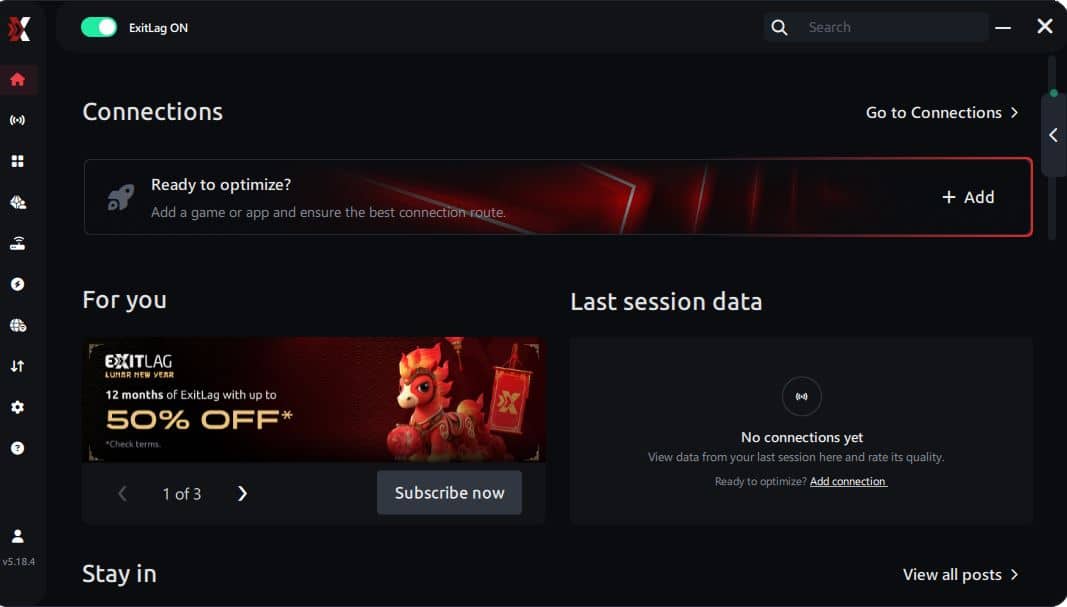
Step 2 – Install and open the program. Log in with your account.
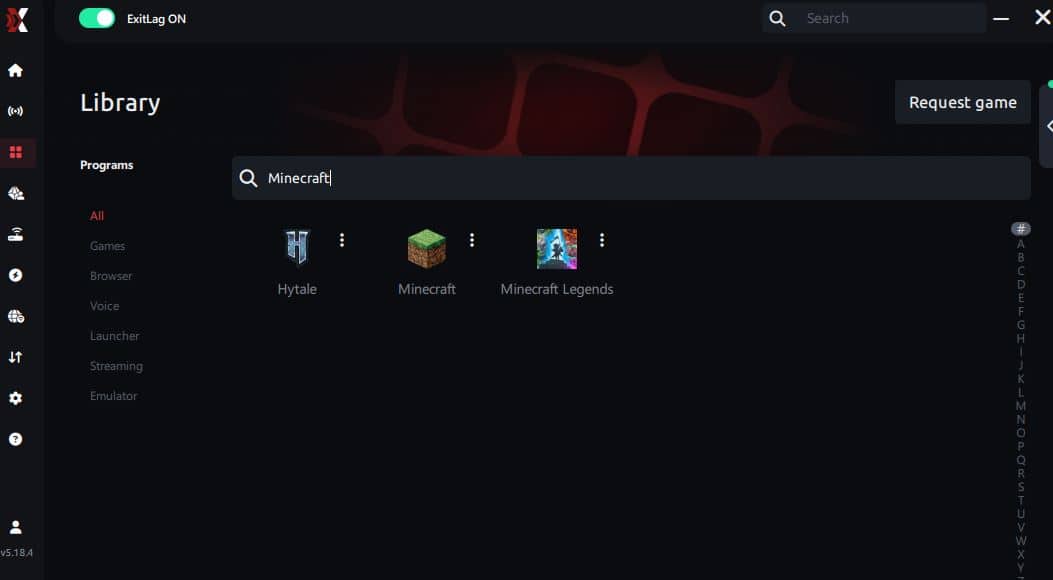
Step 3 – In the search bar, type “Minecraft” and select the game from the list.
Step 4 – Choose between automated or manual route
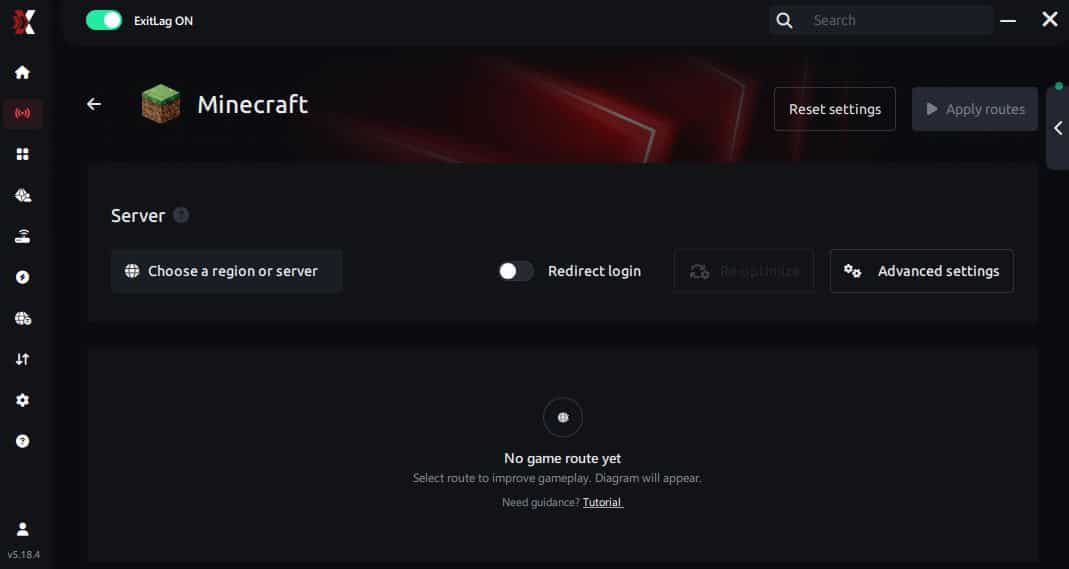
Based on the results, you can let ExitLag automatically select the best route or manually choose the server that showed the lowest latency for your connection.
AI-optimized automated route
Based on the results, you can let ExitLag automatically select the best route through AI optimization. The system analyzes multiple connection paths in real time and automatically identifies the most efficient route for your connection, ensuring the lowest possible latency without requiring manual choices.
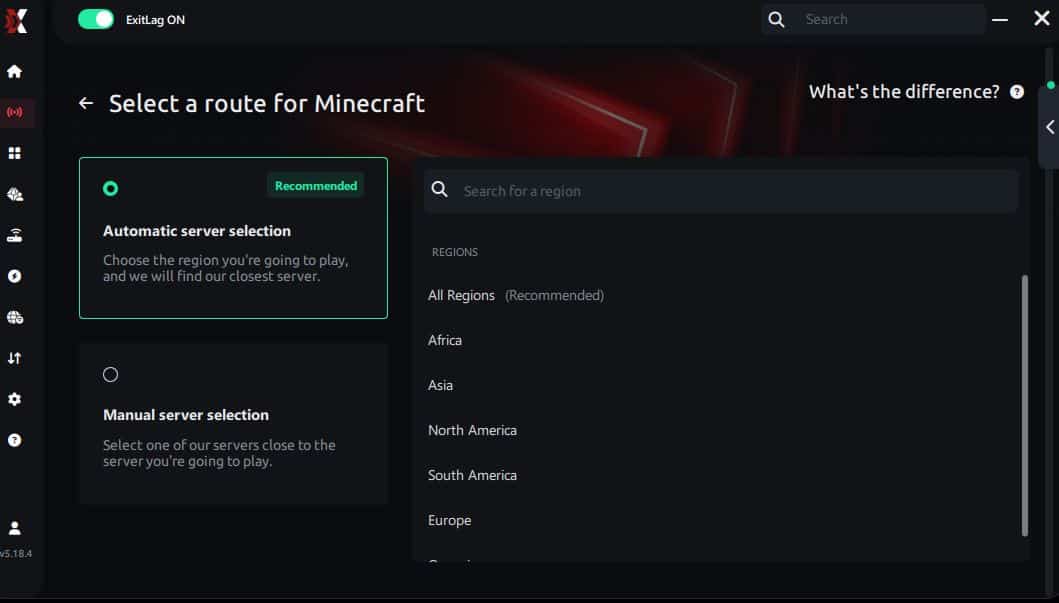
Manual route
If you prefer to have full control over your connection, you can manually choose the server based on the ping test results. Simply select the server that showed the lowest latency or the one that best meets your specific gaming needs, allowing complete customization of your experience.
Step 5 – Click “Minecraft” or the play button. ExitLag will begin optimizing your connection automatically.
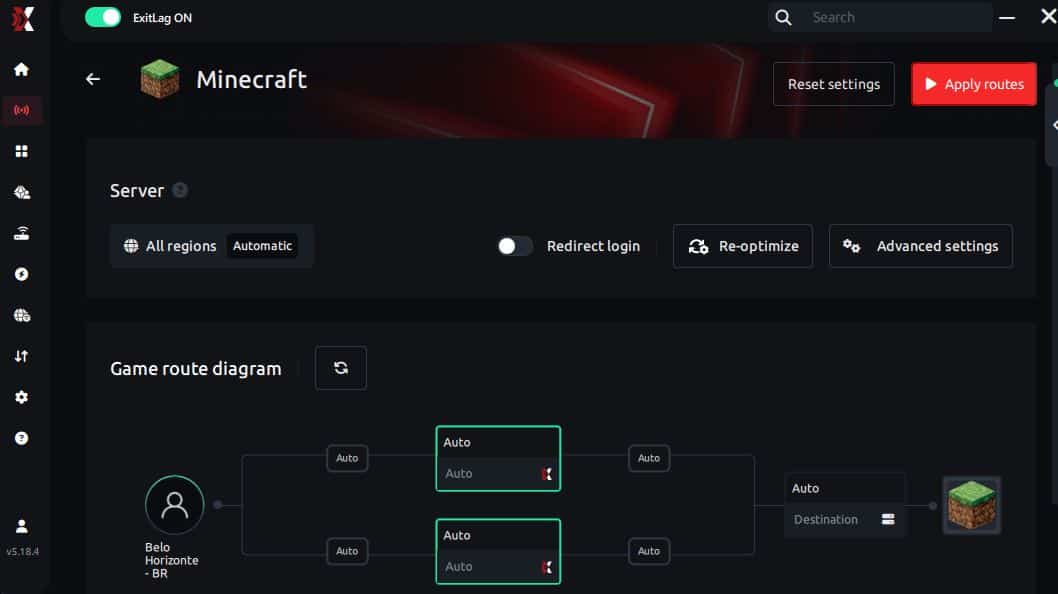
Step 6 – Wait a few seconds until optimization is complete. You’ll see ping indicators in the interface.
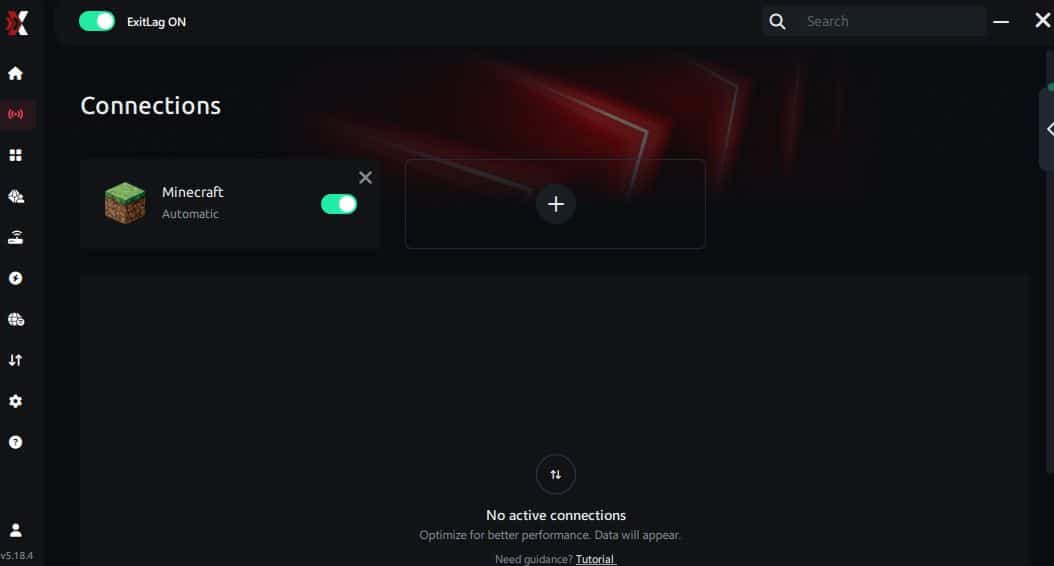
Step 7 – Launch Minecraft normally. The optimization will already be active.
ExitLag runs in the background while you play, constantly adjusting routes to maintain the best possible performance.
FAQ: common questions about packet loss in Minecraft
Is packet loss the same as lag? No. Lag refers to high ping, while packet loss indicates missing data. Therefore, you can experience packet loss even with low ping, causing unpredictable behavior.
Why do I have packet loss only in Minecraft? Different games use different server routes. Like this, Minecraft may send your traffic through unstable routing even if other games work normally.
Can packet loss cause bans? Generally no. Packet loss creates erratic movement that can resemble disruption, but servers rarely flag it as cheating. However, excessive instability may cause automatic disconnections.
How much packet loss is acceptable for competitive Minecraft? Ideally 0%. Up to 1% is manageable for casual play, but any amount affects PvP performance significantly.
Can hardware cause packet loss? Yes. Defective network cards, damaged cables, or overheating routers can create packet loss. Checking your equipment is always recommended.
Does ExitLag work on private Minecraft servers? Yes, as long as they appear in the routing options. ExitLag supports both official and private servers.
Do I need ExitLag active all the time? Only while playing Minecraft. However, keeping it active ensures optimal performance.
Does modded Minecraft increase packet loss? Sometimes. Heavy modpacks can overload servers, increasing delays and unstable behavior.
Eliminate packet loss and play Minecraft without interruptions
Minecraft should be smooth, enjoyable, and responsive. However, packet loss Minecraft often disrupts gameplay with rubberbanding, disconnections, and slow responses. Understanding its causes allows you to address the issue properly while improving your overall experience.
Finally, investing in a clean and optimized connection means unlocking your full potential. Whether you explore, build, or fight in PvP, avoiding packet loss helps you master the game and achieve your goals with confidence.


