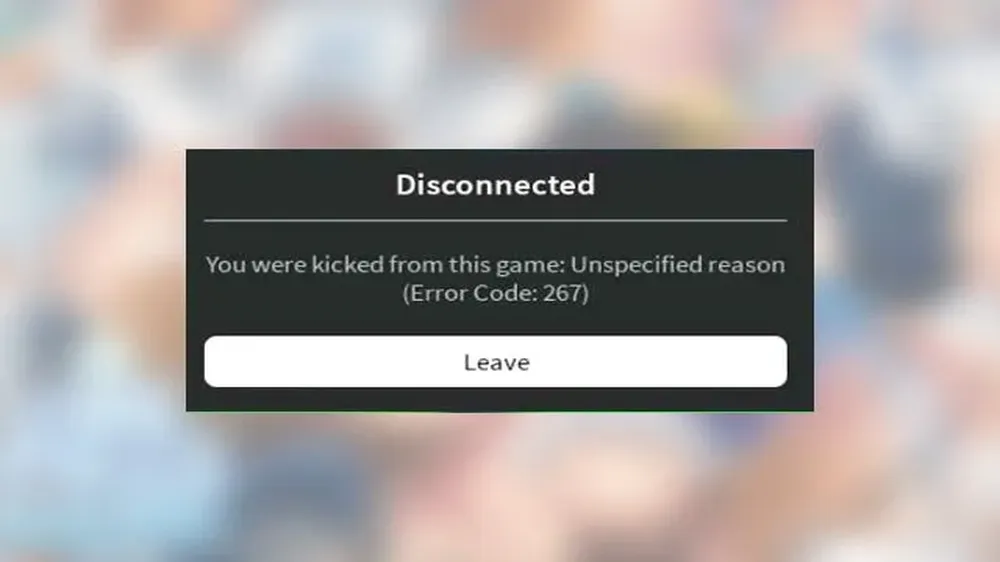
Roblox error code 267 is one of the most common issues players face when trying to join an experience. It usually appears with a message like “You were kicked from this experience,” which means the game removed you from the session instead of letting you continue playing.
Roblox error code 267 can happen because of account restrictions, game moderation, unstable connections, firewall conflicts, VPN interference, corrupted local files, or scripts detected by the experience. That is why the best fix depends on the exact message you see and where the problem happens.
Roblox error code 267 does not always mean your full Roblox account is banned. In official Roblox support pages, Error Code 267 is listed as “Banned from an Experience,” and Roblox explains that this type of ban can be issued by the experience creator, not necessarily by Roblox itself.
This guide explains what the error means, why it happens, and how to apply the right fix error code 267 Roblox steps on PC, mobile, and Xbox. It also shows when ExitLag can help reduce connection instability and when the issue must be handled by the game creator.
What does Roblox error code 267 mean?
Roblox error code 267 means the experience has kicked your account out of the game session. In many cases, the message appears because the game has a script, moderation rule, or anti-cheat system that blocks certain users from joining or staying in the server.
However, the meaning can change depending on the message. Sometimes, it points to a ban from one specific game. Other times, it can be triggered by connection problems, suspicious client behavior, strict firewall settings, or local Roblox data that fails to load correctly.
That is why Roblox error 267 troubleshooting should begin with one simple question: does the error happen in every Roblox experience or only in one game?
If it happens in only one experience, the issue is more likely related to that game’s rules, whitelist, anti-cheat, or moderation system. If it happens across many experiences, the issue is more likely connected to your device, Roblox installation, network, firewall, VPN, or account status.
Why does Roblox say “You were kicked from this experience”?
The “You were kicked from this experience” message usually means the game server actively removed your session. This is different from a generic crash or a simple lost connection.
Common reasons include:
- The game detected suspicious behavior.
- The game has an anti-cheat rule that blocked your client.
- Your account is too new for that experience.
- The experience requires whitelisting.
- The developer banned your account from that specific game.
- Your connection failed during the joining process.
- Roblox local files or cached data caused a loading issue.
This is why the Roblox kicked error 267 message can feel confusing. It looks like a ban, but the cause is not always punishment. Sometimes the game simply cannot verify your session correctly.
Is Roblox error code 267 always a ban?
No. Roblox error code 267 is not always a full platform ban.
Roblox’s official support page says Error Code 267 can indicate that your account has been banned by an experience creator for that specific experience. It also notes that Roblox Support cannot remove bans issued directly by experience creators.
That means you may still be able to:
- Log into Roblox normally.
- Play other experiences.
- Use your avatar and inventory.
- Chat or access platform features.
- Join other games without problems.
So, before assuming the worst, test other experiences. If only one game shows the error, your best error 267 Roblox solution may be contacting the game creator or waiting for a temporary restriction to expire.
Why am I getting Roblox error code 267?
Roblox error code 267 can come from several different causes. Some are related to your account. Others are related to the game itself. Some are caused by your internet connection or device setup.
The key is to identify the pattern. A one-game issue usually points to a game-specific restriction. A platform-wide issue usually points to your connection, device, Roblox client, or account security.
Here are the most common causes:
| Cause | What it means | Best first step |
| New account restriction | Some games block very new profiles | Wait, verify your account, or try another experience |
| Experience ban | The game creator blocked your account | Contact the creator or check the game community |
| Script or exploit detection | The game detected unauthorized behavior | Remove exploits and reinstall Roblox |
| VPN or firewall conflict | Roblox cannot connect correctly | Disable VPN or allow Roblox through firewall |
| Corrupted cache | Local files are causing errors | Clear cache or reinstall Roblox |
| Unstable connection | Your session fails while joining | Restart router or use a better route |
| Whitelist requirement | The game only allows approved users | Request access from the developer |
Account restrictions, new profiles, or experience bans
Some Roblox experiences limit access for brand-new accounts. This is often done to reduce spam, botting, or ban evasion. If your account is new and the error appears only in certain games, the restriction may disappear after your account gains more history.
You can try these steps:
- Verify your email address.
- Add a phone number if appropriate.
- Customize your account profile.
- Play other trusted experiences for a while.
- Avoid suspicious third-party tools.
- Return to the restricted game later.
If the error message says you are banned from the experience, the issue is different. In that case, the resolve Roblox error 267 path is not reinstalling the app. You need to check the game’s community page, Discord, group wall, or creator profile to understand the ban reason.
Roblox Support may not be able to remove a game-specific creator ban. So, the most realistic option is to contact the experience creator directly or wait if the ban is temporary.
Connection, cache, firewall, VPN, or client issues
Not every 267 error is caused by moderation. Sometimes the game kicks you because your session fails during the joining process. This can happen when your connection is unstable, your firewall blocks Roblox, your VPN creates routing problems, or your local files are corrupted.
Roblox’s official connection help page mentions general symptoms such as experiences failing to load, long loading screens, or random shutdown messages. It also recommends checking browser, firewall, router, and connection-related factors when Roblox fails to load properly.
This is where Roblox error 267 troubleshooting becomes more technical. You should test your network, clear local data, update Roblox, and remove anything that may interfere with the game client.
How do I fix Roblox error code 267?
To fix Roblox error code 267, start with the safest steps first. Do not jump straight into advanced changes. Many players solve the issue by restarting the app, testing another experience, checking account status, or reinstalling Roblox.
The best method is to move from simple checks to deeper fixes:
- Test whether the error happens in one game or all games.
- Restart Roblox and your device.
- Check your internet connection.
- Disable VPN or proxy tools.
- Clear Roblox cache or reinstall the app.
- Update Roblox and your operating system.
- Review firewall and antivirus settings.
- Remove scripts, exploits, or unauthorized tools.
- Contact the experience creator if it is a game-specific ban.
This sequence gives you a practical fix error code 267 Roblox process without wasting time on fixes that do not match the cause.
Quick checklist before changing advanced settings
Before changing firewall rules or reinstalling everything, run this quick checklist:
- Can you join other Roblox experiences?
- Does the error happen on another device?
- Does the error happen on another network?
- Are you using a VPN, proxy, or custom DNS?
- Is your Roblox app updated?
- Is your account new?
- Did the message mention a ban?
- Did you recently use scripts, exploits, or third-party tools?
If other games work normally, your account or connection is probably not fully broken. The issue may be limited to one experience.
If every game fails, focus on your device, connection, and Roblox installation.
Step-by-step fixes for PC, mobile, and Xbox
Use this general repair process first:
- Restart Roblox completely
Close Roblox, wait a few seconds, and open it again. On PC, make sure no Roblox process is still running in the background. - Restart your device
A clean restart can fix temporary session issues, memory conflicts, and locked processes. - Restart your router
Turn it off for at least 30 seconds. Then turn it back on and test Roblox again. - Disable VPN or proxy tools
Some games may block suspicious routing, unusual IP behavior, or VPN traffic. - Update Roblox
An outdated client can trigger compatibility errors. Roblox’s official error code page also lists Error Code 280 as related to outdated versions, so keeping the client updated is always a good baseline. - Clear cache or reinstall Roblox
Corrupted local files can cause failed loading, broken session data, or repeated kicks. - Avoid exploits
If you use scripts, injectors, or unauthorized tools, remove them. Then reinstall Roblox from the official source. - Try another network
Use a different Wi-Fi network or mobile hotspot for testing. If the error disappears, your original network may be the cause.
How do you fix error code 267 Roblox on specific devices?
The best error 267 Roblox solution depends on where you play. PC, mobile, and Xbox handle cache, updates, and network settings differently.
The goal is the same on every device: remove corrupted data, stabilize the connection, update the client, and make sure Roblox is not being blocked.
PC and browser fixes
On Windows, start with these steps:
- Close Roblox completely.
- Press Windows + R.
- Type %localappdata%.
- Open the Roblox folder.
- Clear temporary Roblox logs or cache folders if available.
- Restart your PC.
- Open Roblox again.
You can also try:
- Running Roblox as administrator.
- Updating your browser.
- Disabling browser extensions that affect scripts or connections.
- Allowing Roblox through Windows Firewall.
- Temporarily disabling antivirus protection for testing.
- Reinstalling Roblox from the official website.
Do not leave your firewall or antivirus disabled permanently. Use that only as a test. If Roblox works while protection is disabled, add Roblox as an allowed app instead.
For a stronger Roblox error 267 troubleshooting test, connect your PC to another network. If Roblox works on mobile hotspot but not on your home Wi-Fi, your router, ISP route, DNS, or firewall may be part of the issue.
Mobile and console fixes
On Android and iOS, the easiest fix is usually reinstalling Roblox. This clears corrupted local data and forces the app to download a clean version.
Try this process:
- Close Roblox.
- Restart your phone.
- Update your operating system.
- Uninstall Roblox.
- Reinstall Roblox from the official app store.
- Log in again.
- Test another experience first.
- Then test the game that showed the error.
On Xbox, try these steps:
- Close Roblox.
- Restart the console.
- Hold the power button for about 10 seconds to clear temporary cache.
- Check your Xbox network status.
- Reopen Roblox.
- Test another experience.
If the same game keeps showing the Roblox kicked error 267 message, but other games work, the issue is probably not your console. It is more likely tied to that specific experience.
How can ExitLag help with Roblox error code 267?
ExitLag can help when Roblox error code 267 is related to route instability, packet loss, high latency, or unstable communication between your device and the Roblox servers. It is not a ban removal tool, and it cannot override a developer’s moderation decision.
However, when the issue is caused by network instability, better routing can make a real difference. ExitLag works by optimizing the path your connection takes to reach game servers. Instead of relying only on your default internet route, it looks for a more stable route designed for gaming traffic.
This can help players who face:
- Sudden disconnects.
- Lag spikes while joining.
- Failed loading attempts.
- Connection instability.
- Route problems from their ISP.
- Repeated kicks caused by poor network performance.
Better routing for Roblox sessions
Online games depend on stable routing. Even if your internet speed looks fine, your path to the server may still be unstable. High ping, packet loss, or bad routing can interrupt the connection while Roblox is loading an experience.
ExitLag helps by improving that route. For players trying to resolve Roblox error 267 when the cause is connection-related, this can reduce the chance of failed sessions and unexpected kicks.
This is especially useful when:
- Roblox works better on one network than another.
- You get disconnected at random times.
- Your ping changes suddenly.
- The error appears during loading.
- Other online games also feel unstable.
- Your ISP route to game servers is inconsistent.
In these cases, ExitLag can support a cleaner and more stable gaming experience.
When ExitLag helps and when it cannot remove a ban
ExitLag is useful for connection optimization, but it cannot fix every version of Roblox error code 267.
ExitLag can help when the cause is:
- Unstable routing.
- High ping.
- Packet loss.
- ISP path issues.
- Connection drops.
- Network inconsistency.
ExitLag cannot fix the issue when the cause is:
- A game-specific ban.
- A whitelist requirement.
- A new account restriction.
- A moderation action.
- A script or exploit detection.
- A developer-side block.
So, if your 267 message says you are banned from the experience, your next step should be contacting the game creator. If the message appears during loading, happens across multiple games, or changes depending on your network, ExitLag is a strong option to test.
Roblox error 267 troubleshooting table
A clear troubleshooting process saves time. Instead of trying random fixes, match the message and behavior to the likely cause.
This table can help you decide what to do first.
| What you see | Most likely cause | What to do |
| Error appears in one game only | Experience ban, whitelist, or game script | Contact creator or check game rules |
| Error appears in every game | Connection, cache, app, firewall, or account issue | Restart, update, reinstall, test network |
| Message mentions ban | Game-specific moderation | Contact experience creator |
| Error happens on new account | Account age restriction | Wait, verify account, try later |
| Error appears with VPN on | VPN or routing conflict | Disable VPN or test ExitLag |
| Error appears during loading | Connection or data loading issue | Clear cache, restart router, use stable route |
| Error appears after using scripts | Anti-cheat detection | Remove tools and reinstall Roblox |
Match the message to the likely cause
The exact wording matters. If the message says you were kicked by the experience or its moderators, the cause is probably game-specific. If the message appears without a clear ban note, you should test your device and connection.
Use this simple rule:
- One game only: check game rules, whitelist, and creator bans.
- All games: check Roblox installation, network, firewall, and account status.
- Only on one device: clear cache or reinstall Roblox.
- Only on one network: test routing, DNS, firewall, or ExitLag.
- After using third-party tools: remove scripts and reinstall Roblox.
This is the safest way to build a practical fix error code 267 Roblox plan.
What to try before contacting support
Before contacting Roblox Support or a game creator, collect basic information. This helps you avoid vague reports and makes the problem easier to understand.
Write down:
- The exact error message.
- The name of the experience.
- Whether other experiences work.
- Your device type.
- Your network type.
- Whether you use VPN, proxy, or ExitLag.
- When the error started.
- Whether your account is new.
- Whether you recently changed settings.
If the issue is tied to one game, contact the experience creator. If it happens across Roblox, check Roblox support resources and your own connection setup.
Frequently asked questions
Roblox error code 267 can be confusing because the same code may appear in different situations. These quick answers cover the most common questions players search before applying a fix.
Roblox error code 267 is an error that appears when an experience kicks you from the game session. It often shows the message “You were kicked from this experience.”
It can happen because of game moderation, account restrictions, anti-cheat systems, connection instability, corrupted data, or firewall conflicts.
To fix it, test another Roblox experience first. Then restart Roblox, restart your device, check your connection, disable VPN tools, clear cache, update Roblox, and reinstall the app if needed.
If the error appears only in one game, contact the experience creator because it may be a game-specific restriction.
Not always. It can be a ban from one specific experience, but it does not always mean your entire Roblox account is banned.
If you can play other experiences, the issue is probably limited to one game. If you cannot access anything, check your account status and Roblox support options.
You may be getting it because your account is too new, the game has banned or restricted you, your connection is unstable, your Roblox cache is corrupted, your firewall is blocking the app, or the experience detected unauthorized scripts.
The fastest way to narrow it down is to test another game and another network.
Restart your phone, update your operating system, uninstall Roblox, reinstall it from the official app store, and test another experience.
Also avoid VPNs, scripts, or third-party tools. These can interfere with Roblox and trigger security checks.
ExitLag can help if the error is related to unstable routing, lag spikes, packet loss, or connection drops. It cannot remove a ban, bypass a whitelist, or undo a developer moderation action.
For connection-related cases, ExitLag can help create a more stable route between your device and the game server.
Final thoughts
Roblox error code 267 can be frustrating, but it becomes easier to solve when you separate connection problems from account or experience restrictions. Start by testing other games, checking your account status, clearing cache, updating Roblox, and reviewing your firewall or VPN settings.
If the error comes from unstable routing, lag spikes, or repeated disconnections, ExitLag can help improve your connection path and reduce interruptions during Roblox sessions. Try ExitLag today to stabilize your gameplay, reduce connection issues, and get back into your favorite experiences with fewer unexpected kicks.
With the right troubleshooting steps, Roblox error code 267 does not have to end your session. Use this guide to identify the cause, apply the right fix, and choose ExitLag when your connection needs a stronger gaming route.
Got questions or want to connect with other players? Join the conversation at the ExitLag Forum!