Customizing your character is only half the fun when exploring massive multiplayer servers. Having the perfect Roblox song playing in the background completely elevates your gameplay experience. However, the platform recently overhauled its audio privacy system, confusing millions of players.
The massive audio privacy update permanently broke thousands of classic boombox codes. Consequently, finding a reliable Roblox song ID requires much more effort than simply copying a random number from a wiki. You must understand how the new licensing rules affect user-generated content.
Despite these strict restrictions, you can still blast heavy phonk or chill lo-fi beats while playing. Knowing exactly how to input these numbers ensures your boombox actually works. Let’s break down how to use audio tools and find the best song IDs on Roblox today.
Navigating The Roblox Boombox Audio Update
The Privacy Overhaul Explained
Before the major privacy update, any user could upload a copyrighted song and make it public. This meant millions of unlicensed tracks flooded the catalog. To avoid severe legal action, the developers fundamentally changed the audio asset permission system.
Now, any audio uploaded by a user is automatically set to private by default. You cannot share your personal audio files with other players globally. Therefore, if you try to use an old, private code on your boombox, you will just hear dead silence.
- User-generated audio is locked strictly to the creator’s experiences.
- Most copyrighted commercial music was purged or hidden permanently.
- Only officially licensed tracks and verified royalty-free music remain public.
- You must verify if a code is public before attempting to use it.
Where To Find Public Audio
Because of these strict limitations, you must rely on officially partnered audio libraries. The developers partnered with professional music distributors like APM Music and Monstercat. These companies provide thousands of high-quality tracks that are completely free to use.
When searching for a new Roblox song, you should prioritize these official creator tracks. They offer everything from intense heavy metal to relaxing ambient background noise. Most importantly, these codes are permanently public and will never break.
To browse these tracks, you must navigate to the Creator Marketplace via a web browser. Select the Audio tab and filter your search specifically for the “Music” category. This ensures you only see officially sanctioned, working files.
How To Use A Roblox Song ID In-Game
Equipping Your Boombox Or Radio
To play music for other players to hear, you need a specific in-game item. The most common tool is the Golden Super Boombox, which you can purchase from the avatar catalog. However, many individual games offer their own custom radio passes for a small Robux fee.
Once you own a boombox or unlock the radio gamepass, you must equip it to your character. Clicking or tapping the boombox opens a small text interface window on your screen. This window is where you input the specific Roblox song IDs that work.
- Purchase a boombox from the avatar shop or buy a radio gamepass.
- Join a game that explicitly allows boombox usage (like Brookhaven or Catalog Heaven).
- Equip the item from your hotbar to open the audio menu.
- Carefully type or paste the exact numeric code into the text box.
- Hit the “Play” button to start broadcasting your music to the server.
Bypassing In-Game Mutes
Not every server allows you to blast loud audio freely. Many developers actively disable boombox functionality to prevent players from trolling with extremely loud noise. If you enter a valid code and hear nothing, the game owner likely disabled custom audio.
Unfortunately, you cannot override a developer’s server settings. If the game restricts radios, your boombox will remain purely cosmetic. You must find dedicated social hangout games that encourage custom soundtracks.
Always test your codes in a sandbox game like Catalog Heaven first. This guarantees the numeric string is actually correct. If it works there but fails in your main game, you know the server restrictions are the culprit.
Top Working Roblox Song IDs For August 2026
Chill And Ambient Background Tracks
Sometimes you just want relaxing background music while hanging out with friends. These ambient tracks provide a calm atmosphere without overpowering the voice chat. They are perfect for cafe roleplay games or late-night building sessions.
- Happy Song (APM Music): 1843404009
- Wind Chimes (DistroKid): 134467328946090
- A Little Lo-Fi to Get By (DistroKid): 135783618859432
- Time To Relax (APM Music): 9044702906
- Prima Bossa Nova (APM Music): 1837070127
High-Energy Action And Phonk
When you are playing intense combat arenas or fast-paced racing games, you need aggressive music. These high-energy codes deliver heavy bass and rapid tempos to keep your adrenaline pumping. They are incredibly popular in competitive player-versus-player environments.
- Phonk Vol. I – Phonk’t Out: 14145625743
- Speed Metal Overture: 9042370693
- See You In Hell: 1837853076
- Caged Animal (a): 9043754347
- All Dropping 8 Bit Beats: 9048375035
Testing And Organizing Your Roblox ID Songs
Creating A Personal Library
Memorizing a twelve-digit numeric code is incredibly difficult. Instead of scrambling to find codes mid-game, you should create a personal digital notebook. Use a simple notepad app on your phone or PC to store your favorite tracks.
Organize this list by genre or specific mood so you can swap tracks instantly. This preparation saves massive amounts of time during fast-paced roleplay scenarios. A well-organized library makes you the best DJ in any server.
- Create a “Meme” category for funny, chaotic server moments.
- Keep a “Hype” category ready for boss fights or intense minigames.
- Update your list monthly, removing any codes that get randomly privatized.
- Share your curated list with friends to coordinate matching boombox tracks.
Avoiding Fake Codes And Scams
Many websites promise exclusive codes for massively popular, copyrighted pop songs. In 2026, you should treat almost all of these claims with extreme suspicion. Because of the privacy update, a code for a brand-new Taylor Swift or Drake song will almost certainly fail.
If a YouTube video promises a working code for a copyrighted song, read the recent comments first. Usually, these codes are either fake or get flagged and deleted by moderators within hours. Stick to the verified APM and Monstercat libraries for consistent results.
Comparing Audio Tool Options
| Tool Type | Cost | Server Visibility | Best Use Case |
| Catalog Boombox | Premium (Robux) | Public (Everyone hears) | Universal social games and hangout spots. |
| Game-Specific Radio | Varies (Gamepass) | Varies (Local or Public) | Roleplay games with strict custom rulesets. |
| Car Stereo | Free (Built-in) | Local (Passengers only) | Driving simulators and city exploration games. |
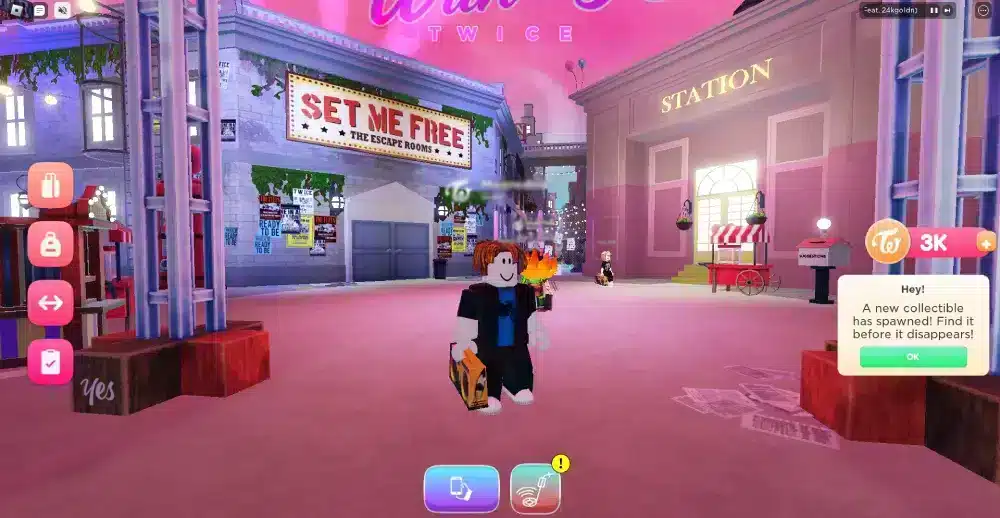
Pro Tips: Roblox Songs
- Check the audio length: Always test the track length before saving the code. This works because many public audio files are simply five-second sound effects rather than full, looped music tracks.
- Match the game vibe: Do not play heavy death metal in a relaxing pet adoption simulator. This works because playing appropriate music prevents other players from immediately muting your character in the settings menu.
- Use the preview feature: Always utilize the web browser to preview a track before entering it in-game. This works because you can adjust your system volume safely before blasting a potentially corrupted or extremely loud audio file.
- Watch out for copyright strikes: Never use boombox audio if you are actively streaming on Twitch or YouTube. This works because even licensed APM music can trigger automated copyright claims against your personal creator channel.
Common Mistakes Roblox Roblox Song Id Players Make
- Typing letters instead of numbers: Players often try to type the actual song title into the boombox interface. Fix: The boombox only accepts the specific numeric ID code; letters will immediately cause an error message.
- Buying a boombox for the wrong game: Players spend Robux on a catalog boombox, assuming it works globally on every single server. Fix: Always read the game description first, as many popular experiences actively disable global boombox gear to sell their own custom radio gamepasses.
- Pasting outdated wiki codes: Players copy codes from articles written in 2021 and wonder why they hear silence. Fix: The 2022 privacy update broke all old codes, so you must exclusively search for codes verified to work in the current year.
Optimize Your Music And Gameplay With ExitLag
Stop Dealing With Audio Stuttering
Even if you find the perfect roblox song, a bad internet connection will ruin the experience. When you suffer from high ping, your boombox audio will constantly stutter, buffer, or cut out entirely. This completely destroys the immersive atmosphere you are trying to create.
Furthermore, packet loss causes severe desync between your character and the music. If you are trying to coordinate a dance routine or host a virtual concert, network instability makes it impossible. You need your actions to register on the server instantaneously.

Stabilize Your Connection Fast
ExitLag is a professional game connection optimizer that actively analyzes multiple network paths in real time. It uses advanced Multipath Technology to route your game data through the fastest, most stable servers available. If your primary connection drops a packet, the secondary paths ensure your music keeps playing smoothly.
Unlike a standard VPN, ExitLag does not encrypt your traffic, ensuring your inputs suffer absolutely zero delay. It focuses entirely on prioritizing your gaming packets over background applications. Keep your virtual concerts running flawlessly without any frustrating interruptions.
Enhance your online gaming sessions today. Download the desktop client atExitLag Download for a seamless PC experience. If you prefer playing on the go, optimize your mobile network withExitLag for Android or secure your connection usingExitLag for iOS right now to unleash your id for songs roblox.
All game images used in this blog post belong to Roblox Corporation. They are used for informational and educational purposes only and do not imply endorsement or affiliation with the rights holders.
Got questions or want to connect with other players? Join the conversation at the ExitLag Forum!