Rocket League Tracker Network is a third-party statistics platform designed to help players understand their competitive progress beyond the rank badge shown in-game. It brings together ratings, playlist performance, leaderboards, match information, seasonal data, and other statistics that can make long-term improvement easier to measure.
Your rating is one of the first numbers worth understanding when using Rocket League Tracker Network. If you are unsure how Rocket League matchmaking ratings relate to divisions and competitive progress, our complete guide to Rocket League MMR and ranks explains the system in more detail. Combining that knowledge with a tracker gives you more context than simply watching your visible rank change after a session.
The main advantage of Rocket League Tracker Network is not that it tells you whether you played well from a single number. Instead, it gives you data that can reveal patterns across multiple matches, playlists, and seasons. When used correctly, those patterns can help you set realistic goals, identify inconsistent results, and better understand what is happening behind your competitive rank.
What is Rocket League Tracker Network?
Rocket League Tracker Network is the Rocket League section of Tracker Network, also known as Tracker.gg. The platform provides searchable player profiles, global and regional leaderboards, rating information, match history, performance statistics, and tools for following progression over time.
The wider Tracker Network ecosystem supports many competitive games. Players who have already used R6 Tracker, Valorant Tracker, or another game-specific tracker will recognize the same general idea: take available player data and organize it into profiles and dashboards that are easier to analyze.
However, features are not identical across every supported game. A feature available through Siege Tracker or a Val Tracker profile should not automatically be assumed to exist in Rocket League.
What stats can you see?
The current Rocket League tracker provides several types of information that are useful for competitive players.
Depending on the profile, platform, playlist, and data available, you can review areas such as:
- current skill rating;
- rank and division information;
- rating progression;
- recent match history;
- MMR gained or lost between tracked matches;
- lifetime statistics;
- seasonal statistics;
- playlist-specific performance;
- goals, saves, assists, and other recorded stats;
- global and regional leaderboards.
The value comes from combining metrics rather than obsessing over one number.
For example, falling MMR over five games may simply represent a short losing streak. Falling MMR across several sessions while another performance statistic also declines gives you more reason to investigate your play.
A tracker should therefore be treated as an analysis tool rather than a verdict on your skill.
Does Rocket League Tracker show your real MMR?
Tracker Network displays a numerical skill rating for Rocket League playlists, which gives players a clearer view of rating progression than relying only on the rank icon.
The relationship between MMR, ranks, divisions, and seasonal adjustments can change over time. Because of that, you should avoid treating an old chart of exact rank thresholds as permanently valid.
MMR also needs context. A rating in 1v1 should not be compared directly with your rating in 2v2 as if both represented exactly the same skill level. Each playlist has its own competitive environment.
This is one reason Rocket League Tracker Network is useful: it lets you separate playlist progression instead of reducing your entire Rocket League performance to one rank.
Cosmetics are also separate from competitive statistics. If you are checking your profile while deciding what to spend Credits on, our Rocket League Item Shop guide explains how the shop works. The Item Shop affects cosmetics, not your MMR or the competitive data displayed by a tracker.
How do you use Rocket League Tracker Network?
Using Rocket League Tracker Network starts with finding the correct player profile. You can then use that page to follow changes across sessions rather than checking individual statistics without context.
Players familiar with Valorant Tracker or R6 Tracker will notice a similar workflow: search for the account, open the profile, select the relevant mode or playlist, and compare the current data with previous results.
You do not need to turn every Rocket League session into a spreadsheet. A few useful metrics reviewed consistently are usually more actionable than dozens of numbers checked after every match.
Search for your Rocket League profile
The Rocket League Tracker website currently supports player searches and account identification through supported platforms such as Epic Games, Steam, and Xbox.
Make sure you are looking at the correct player before analyzing anything. Display names can be similar, and platform differences may affect how a profile is found.
Once you open the correct profile, establish a baseline.
Write down or mentally note:
- your current rank;
- current rating in your main playlist;
- your secondary playlist rating;
- recent rating trend;
- number of games in the sample you are reviewing.
Then play normally.
After several matches, return to the tracker and compare the session rather than reacting to every individual win or loss.
This creates a more useful question. Instead of asking, “Why did my MMR drop after that game?” you can ask, “What happened across my last ten competitive matches?”
Use the desktop overlay on Windows
Tracker Network also offers a Rocket League desktop app for Windows built on the Overwolf platform.
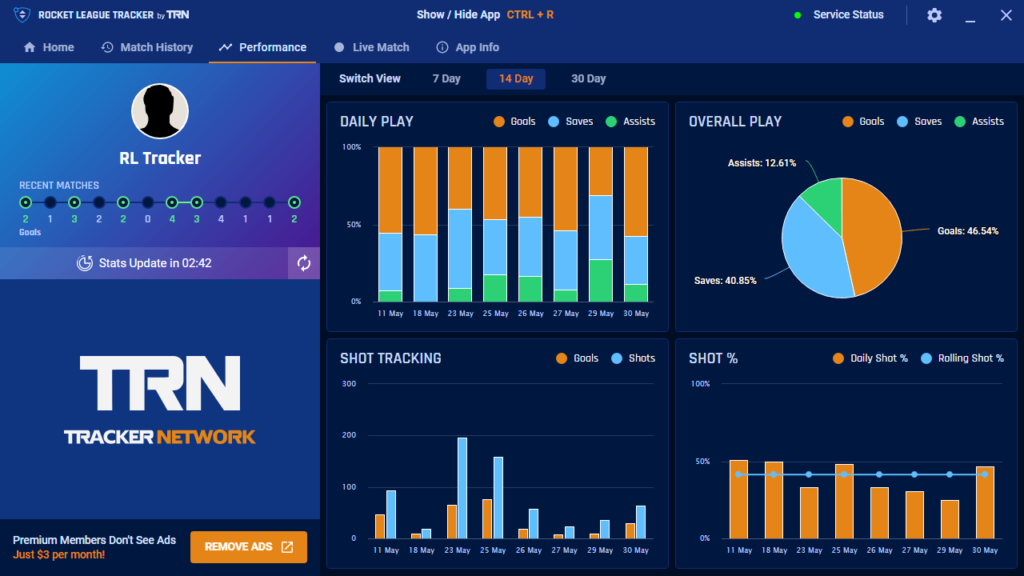
Its current features include live match scouting, recent match summaries, player profiles, rating progression, and performance information. The overlay can show information about teammates and opponents while you play.
The desktop overlay is not available for console play because it needs to run on the same supported PC system as the game.
That distinction is important. A website profile may still be useful when you play on another platform, but desktop overlay functionality is a separate feature.
Similar distinctions exist throughout Tracker Network. Someone coming from Siege Tracker or a Val Tracker tool may be familiar with in-game overlays, but implementation and supported features vary between games.
Which Rocket League stats actually help you improve?
Statistics are only useful when they lead to a meaningful adjustment.
A high number does not automatically mean you are doing something correctly, and a low number does not always expose a problem. Rocket League is highly contextual: positioning, boost management, rotations, challenges, spacing, and decision-making are difficult to summarize through simple totals.
That is why Rocket League Tracker Network works best alongside replay review and deliberate practice.
Track MMR trends instead of individual losses
MMR naturally moves up and down.
If you check your rating after every loss, it is easy to overreact to normal competitive variance. A better approach is to study trends across a larger sample.
Try grouping your analysis into sessions of around five to ten matches.
Ask:
- Did my rating trend upward or downward?
- Did I repeatedly lose after long sessions?
- Is one playlist consistently stronger?
- Am I struggling when playing at certain times?
- Does my performance decline when I queue while frustrated?
- Did a rank change happen because of one streak or a persistent trend?
A tracker can help make those patterns visible.
This is particularly useful when comparing your primary and secondary playlists. You might discover that your 2v2 rating improves steadily while your 1v1 results remain inconsistent.
That does not necessarily mean you are a “better” 2v2 player in every respect. The modes test different skills.
Combine statistics with mechanical analysis
Goals and saves are easy to count. Mechanics are harder.
A player may score fewer goals because they are playing the third position more often, creating pressure, controlling midfield, or enabling a teammate. Similarly, a high number of saves may indicate great defending, or it may indicate that your team is spending too much time under pressure.
The same caution applies to shooting percentages and possession statistics.
To understand the reason behind the numbers, review actual gameplay.
Car choice can also affect how mechanics feel even though hitboxes are standardized into defined categories. Our guide to Rocket League hitboxes and car types explains how different bodies relate to the game’s hitbox categories.
Combining replay review with Rocket League Tracker Network data gives you two perspectives:
- the tracker shows what changed;
- the replay can help explain why it changed.
That is much more useful than chasing one attractive statistic.
Is Rocket League Tracker Network accurate?
This is one of the most common questions around third-party stat tracking.
Tracker Network can provide useful rating and performance information, but it should not be treated as an official replacement for the systems operated by Psyonix and Epic Games. It is a third-party service that organizes available player information and provides additional analysis tools.
As with any tracker, data availability and update behavior may vary depending on the feature, profile, platform, or tracking method involved.
Why can tracker data sometimes look different?
Several situations can create confusion.
A profile may not have refreshed yet. A match might not appear exactly when you expect it. Some historical information can depend on what was previously recorded. Different third-party tools may also calculate or display derived metrics differently.
That means you should distinguish between:
- your official in-game competitive rank;
- numerical ratings displayed through tracking tools;
- statistics recorded by an overlay;
- derived performance metrics;
- leaderboard information.
A Valorant Tracker, R6 Tracker, and Rocket League tracker may all use the same Tracker Network branding while working with different games and different available datasets.
Therefore, seeing a particular feature in one product does not guarantee identical behavior elsewhere.
Is Tracker Network official?
No. Tracker Network is a third-party statistics platform rather than the official Rocket League website.
That does not make its statistics useless. It simply means players should understand which service they are using and where authoritative game information comes from.
For official news, patches, seasonal information, game modes, and announcements, use the official Rocket League website. Use the tracker for the player-statistics and analysis functions it provides.
This separation becomes especially important whenever a patch changes ranked systems, playlists, seasonal resets, or other competitive mechanics.
An old stat explanation can remain online long after the game itself changes.

What is the difference between Rocket League Tracker and other Tracker Network tools?
Tracker Network supports a wide range of competitive titles rather than focusing exclusively on Rocket League.
That broader ecosystem explains why searches for R6 Tracker, Siege Tracker, Valorant Tracker, and Val Tracker often lead players toward related Tracker Network products.
The branding is connected, but each game has its own statistics, available integrations, and useful metrics.
Rocket League Tracker vs R6 Tracker
Rainbow Six Siege and Rocket League are fundamentally different competitive games.
A R6 Tracker or Siege Tracker may emphasize information appropriate to a tactical shooter, while Rocket League is centered on playlists, ratings, goals, saves, assists, and vehicle-based match performance.
The broader principle is the same: organize competitive information so players can inspect trends.
The useful questions are different.
In Rocket League, you might ask whether your 2v2 rating has plateaued over several weeks. In Siege, completely different metrics may matter.
Copying analysis habits from one game without adapting them can produce misleading conclusions.
Rocket League Tracker vs Valorant Tracker
The same applies to Valorant Tracker, sometimes informally searched as Val Tracker.
Valorant has agents, weapons, maps, rounds, economy systems, and shooter-specific statistics. Rocket League does not.
Rocket League data should therefore be interpreted around its own mechanics.
Instead of asking which tool has more statistics, ask whether the available statistics answer your question.
If you want to measure competitive rating progression, Rocket League Tracker can be helpful. If you want to understand why you repeatedly concede goals during bad rotations, replay analysis may be more valuable.
A tracker is strongest when it supports analysis rather than replacing it.
How can you use Rocket League Tracker for competitive play?
Competitive Rocket League rewards consistency.
A player who produces one excellent session followed by three poor ones may struggle to climb even if their peak mechanics look impressive. Tracking performance over longer periods can show whether improvement is becoming repeatable.
Rocket League Tracker Network can therefore work well as part of a broader competitive routine.
Build a simple weekly review
You do not need a complicated analytics system.
Once per week, compare:
| Area | What to check |
| Main playlist | Rating change over the week |
| Secondary playlist | Whether progress differs |
| Match volume | How much you actually played |
| Losing streaks | When they happened |
| Winning streaks | Whether they were sustained |
| Session length | Whether longer sessions hurt results |
| Replays | Recurring positioning or decision errors |
Then choose one thing to work on.
For example, suppose your Rocket League Tracker Network profile shows that your rating repeatedly drops near the end of long sessions. Your training goal may not need to be “get better mechanically.” A more useful adjustment could be ending Ranked earlier when decision-making deteriorates.
Statistics become valuable when they change behavior.
Follow competitive Rocket League for context
Competitive players can also learn by watching high-level play, although professional statistics should not become unrealistic benchmarks for regular matchmaking.
The official Rocket League competitive schedule and events hub provides information about major esports events and RLCS competition.
Watch how high-level teams position themselves rather than focusing exclusively on highlight mechanics.
Pay attention to:
- spacing between teammates;
- when players challenge;
- when they retreat;
- boost pathing;
- possession decisions;
- defensive patience;
- recovery after a failed challenge.
Then review your own games with the same concepts in mind.
Your tracker data may show a losing trend, but the gameplay itself explains which decisions need adjustment.
How can ExitLag complement Rocket League Tracker Network?
ExitLag and Tracker Network solve different problems.
Rocket League Tracker Network measures and organizes performance information. ExitLag focuses on network routing for supported online games.
One cannot replace the other.
If your mechanics, rotations, or decision-making are causing losses, changing your network route will not fix those gameplay issues. Likewise, a statistical dashboard cannot repair an unstable internet route.
Separate connection problems from gameplay problems
This distinction is useful when analyzing a bad competitive session.
Imagine your rating falls during ten matches.
Your first reaction might be that you simply played poorly. However, if those matches also contained abnormal ping spikes, packet loss, or connection instability, networking may have influenced the experience.
On another day, your connection might be completely stable while your positioning repeatedly creates bad challenges. That is a gameplay problem.
Use Rocket League Tracker Network to observe performance trends and Rocket League’s network indicators to diagnose connectivity separately.
ExitLag can help optimize routes between your device and supported game infrastructure and may improve connection stability when the problem involves inefficient or unstable routing. Results depend on your ISP, region, destination, and current network conditions.
What ExitLag cannot change
ExitLag does not modify:
- your MMR;
- your visible rank;
- your Rocket League statistics;
- matchmaking rules;
- your teammates;
- your mechanics;
- your car hitbox;
- Item Shop content;
- RLCS results.
It also cannot resolve a global Rocket League outage or guarantee lower ping.
Its role is connection optimization.
If network routing is contributing to instability during competitive games, you can test ExitLag and compare your connection under the same general conditions. If the issue comes from mechanics, positioning, or decision-making, use training and replay analysis instead.
The strongest approach is diagnostic: understand what kind of problem you actually have before choosing a tool to address it.
FAQ about Rocket League Tracker Network
Rocket League statistics can become confusing because players often mix together MMR, visible ranks, match statistics, third-party profiles, and overlay data.
These common questions clarify what Rocket League Tracker Network is useful for and where its limitations begin.
Is Rocket League Tracker Network free?
Core Tracker Network features can be accessed for free, while Tracker Network also offers premium features and subscriptions.
The exact division between free and premium functionality can change, so check the platform itself before subscribing based on an older feature list.
Can you use Rocket League Tracker on console?
You can search and review supported player profile information through Tracker Network, but the Rocket League desktop overlay requires Windows PC and is not available for console play.
Do not confuse profile tracking with the in-game overlay. They are different features.
Can Rocket League Tracker show MMR?
Yes. Rating and MMR progression are among the central features of Rocket League Tracker.
You can use them to study movement across individual playlists and longer periods rather than relying only on the visible rank badge.
Does Rocket League Tracker update after every match?
Match and rating information can update as data becomes available, but you should not assume every feature is always instantaneous.
If a result does not appear immediately, wait for the profile to refresh before treating the missing information as an error.

Is Rocket League Tracker safe to use?
Tracker Network provides a web-based stats platform and an official Tracker.gg desktop application built on Overwolf.
As with any software, download applications only from the legitimate provider and review the permissions and system requirements before installing them.
Avoid unofficial programs that claim to modify MMR, manipulate ranks, or provide competitive advantages.
Can Rocket League Tracker make you rank up faster?
No tracking platform can make you rank up automatically.
A tracker can give you better information about your performance. Whether that information leads to improvement depends on how you use it.
Review trends, combine statistics with replays, choose specific training goals, and avoid changing your strategy based on a tiny sample of games.
Is Tracker Network only for Rocket League?
No. Tracker Network supports many titles, which is why terms such as R6 Tracker, Valorant Tracker, Siege Tracker, and Val Tracker are associated with the same broader ecosystem.
Each game’s service has its own available statistics and features.
What is the best way to use Rocket League Tracker Network?
Start with one or two questions instead of trying to analyze every available number.
Track your main playlist rating over several sessions, identify meaningful trends, and compare those trends with what you see in replay reviews. Then choose a specific area to improve.
If the data shows inconsistent results but your matches also suffer from ping spikes or route instability, test the network separately rather than assuming every loss reflects skill.
Used this way, Rocket League Tracker Network becomes a practical tool for understanding your competitive progress instead of simply another screen full of statistics. Pair the data with replay analysis, focused training, and, when network routing is part of the problem, test ExitLag to see whether route optimization can help provide a more stable connection. The goal is not to chase numbers after every match, but to use Rocket League Tracker Network to recognize patterns and make better decisions over time.
All game images used in this article belong to their respective owners. They are used for informational and educational purposes only and do not imply endorsement or affiliation with the rights holders.
Got questions or want to connect with other players? Join the conversation at the ExitLag Forum!