Rocket League MMR is the hidden or visible skill rating that decides your competitive rank, your matchmaking range, and how close you are to ranking up or dropping down. Whether you play Duel, Doubles, Standard, Hoops, Rumble, Dropshot, or Snow Day, this number is the foundation of ranked progression.
Understanding rank badges is easier when you also understand how each tier fits into the wider ladder, so it helps to compare this guide with a complete breakdown of Rocket League ranks and competitive progression. Once you connect visible rank, playlist performance, and Rocket League MMR, it becomes much easier to know whether you are improving or just bouncing between divisions.
Rocket League MMR matters because it turns every ranked match into measurable progress. You may see Gold, Platinum, Diamond, Champion, Grand Champion, or Supersonic Legend on screen, but behind those icons, Rocket League MMR is what keeps matches balanced and separates each playlist into its own competitive climb.
What is MMR in Rocket League?
MMR stands for Matchmaking Rating. In Rocket League, it works as a skill score that rises when you win and falls when you lose. The exact gain or loss depends on the match, your rating, your opponents, and how the system evaluates the expected result.
In older versions of Rocket League, players usually needed third-party tools to see exact MMR. Since the Season 22 update, players have had the option to display MMR in Competitive Playlists, making ranked progress easier to understand without relying only on division arrows.
That change made MMR Rocket League searches even more useful, because players can now compare what they see in-game with external trackers, rank distribution pages, and replay analysis tools.
How MMR connects to your visible rank
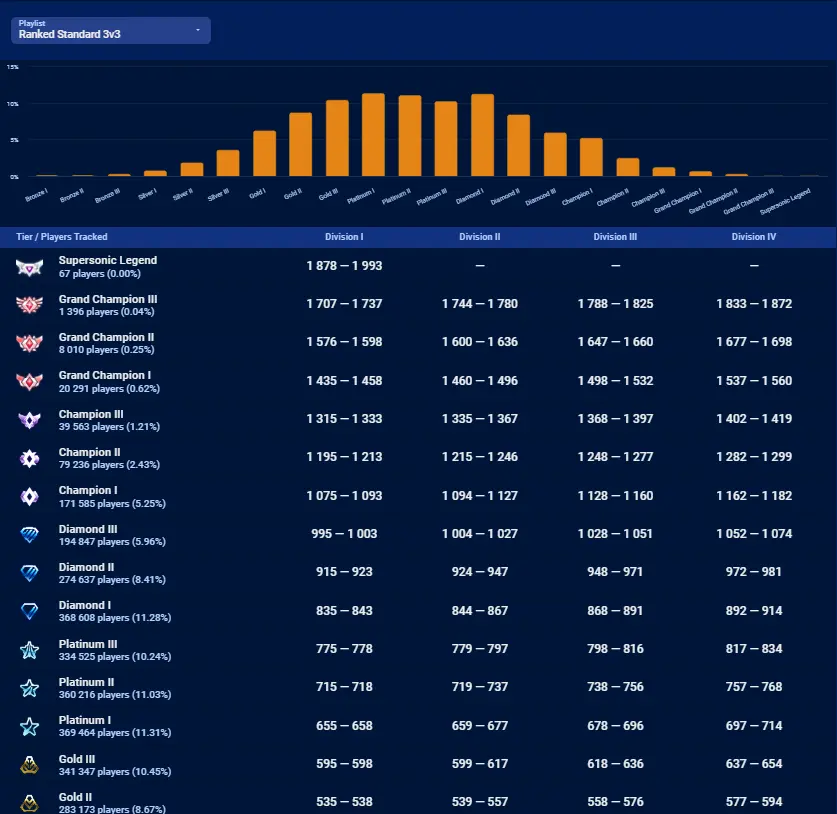
Your visible rank is the public version of your MMR range. For example, a player in Diamond II has an MMR value that fits within the Diamond II bracket for that playlist.
However, Rocket League does not use one universal rank for every mode. Your Duel rating can be much lower than your Doubles rating. Your Hoops rating can be completely different from your Standard rating. That is why Rocket League MMR ranks should always be read by playlist.
A player might be:
- Champion I in 2v2 Doubles;
- Diamond I in 3v3 Standard;
- Platinum III in 1v1 Duel;
- Gold III in Hoops;
- Unranked in Snow Day.
This does not mean the system is broken. It means each mode has its own competitive history.
Why each playlist has its own MMR
Rocket League modes reward different skills. Duel punishes every mistake because there is no teammate behind you. Doubles rewards fast recovery, passing, and controlled challenges. Standard needs rotation discipline, boost management, and team spacing.
Extra modes add even more variation. Hoops has a different arena shape, vertical scoring angle, kickoff rhythm, and backboard behavior. Because of that, searches such as RL rank distribution hoops MMR Rocket League are common among players who feel that their Hoops rank does not match their 2v2 or 3v3 rank.
Each playlist has separate MMR because each playlist asks different questions:
- Can you defend alone?
- Can you rotate with one teammate?
- Can you manage three-player spacing?
- Can you read rebounds in Hoops?
- Can you adapt to Rumble power-ups?
- Can you stay calm during Dropshot pressure?
The same player can answer those questions very differently depending on the mode.
How do you see your MMR in Rocket League?
Rocket League now includes optional MMR visibility for Competitive Playlists. When enabled, it can show your MMR on Competitive Playlist tiles and on the post-match scoreboard after ranked matches.
This is useful because it removes some of the guesswork from rank progression. Instead of wondering whether you are one game or five games away from ranking up, you can track your actual rating more clearly.
In-game MMR visibility
To use the built-in feature, go into Rocket League settings and look for the option related to displaying MMR in Competitive Playlists. The exact menu wording can change, but the feature is designed to make ranked progress more transparent.
Once enabled, you can use your MMR to understand:
- how much rating you gained after a win;
- how much rating you lost after a defeat;
- whether you are close to promotion;
- whether you are close to deranking;
- how different playlists compare.
This does not replace skill improvement, but it helps you measure progress more accurately. For many players, seeing Rocket League MMR tracker data and in-game MMR side by side makes ranked sessions less confusing.
Why your MMR can move differently between matches
Most players expect every win to give the same amount of MMR and every loss to remove the same amount. That is not always how ranked systems work.
Your MMR changes can vary based on factors such as:
| Situation | Possible MMR effect |
| Winning against stronger opponents | You may gain slightly more |
| Losing against weaker opponents | You may lose slightly more |
| Placement matches | Rating movement can be more volatile |
| Early season matches | Ranks may feel less stable |
| Party matchmaking | Team averages can affect match balance |
| Long win or loss streaks | Changes may feel more noticeable |
Because of this, MMR Rocket League progress is best judged over many matches, not one game. A single bad loss is frustrating, but a 30-game trend tells you far more.
What MMR is each Rocket League rank?
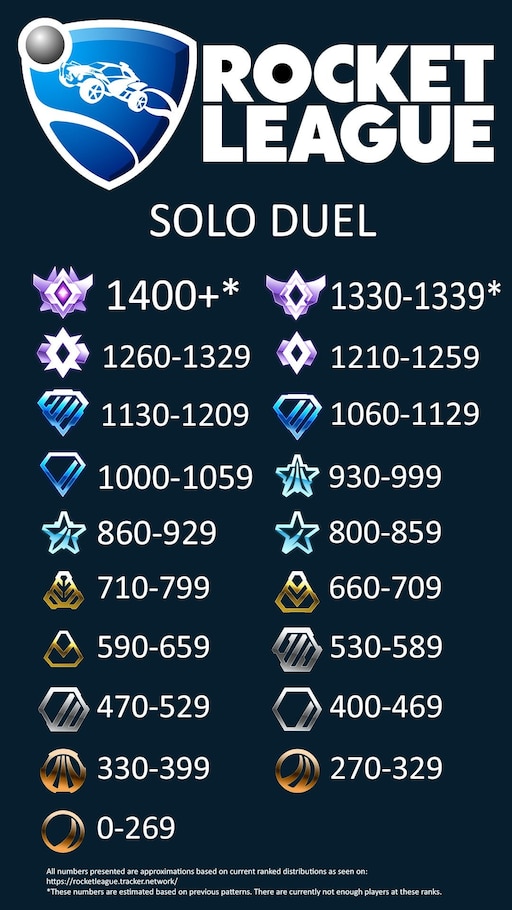
Rocket League MMR ranks are usually discussed as ranges, but exact thresholds can shift by season, playlist, and competitive population. Community trackers often estimate or display rank ranges based on tracked data, while the game itself applies its internal matchmaking logic.
For publication, it is safer to treat MMR values as approximate unless they come directly from the current in-game display or a live tracker. The most important lesson is not memorizing one exact number. It is understanding how each rank tier reflects your consistency.
General rank structure
Rocket League’s competitive ladder follows this broad order:
| Rank tier | General meaning |
| Bronze | New or very early competitive skill level |
| Silver | Basic control and simple positioning |
| Gold | Growing consistency and basic rotations |
| Platinum | Better reads, faster recoveries, more team play |
| Diamond | Stronger mechanics and smarter pressure |
| Champion | Advanced speed, discipline, and awareness |
| Grand Champion | High-level execution and consistency |
| Supersonic Legend | Elite top-end competitive play |
When people search for Rocket League MMR ranks, they are usually trying to answer one of three questions: how close they are to ranking up, why a teammate has a different rank, or why one playlist feels harder than another.
The answer often comes down to playlist-specific rating. A Diamond player in Doubles is not automatically Diamond in Duel or Hoops.
Why rank thresholds are not always fixed
MMR thresholds are not always a perfect universal chart. They can vary across playlists and seasons, and external tools may display data differently depending on what they track.
For that reason, avoid treating old screenshots or outdated charts as final proof. Instead, use this practical approach:
- Check your current MMR in-game.
- Compare it with a live tracker.
- Look at your recent win/loss trend.
- Review which playlist you are measuring.
- Track progress over several sessions.
This matters even more for RL rank distribution hoops MMR Rocket League research, because Extra Modes often have smaller populations and different rank curves than standard competitive playlists.
How does Hoops MMR compare to ranked 2v2 and 3v3?
Hoops MMR can feel strange if you mostly play standard modes. The arena is smaller, the goals are elevated, and many normal ground-based habits do not translate cleanly.
That is why a player who feels comfortable in Diamond 2v2 might struggle in Platinum Hoops, while another player with strong aerial reads might climb Hoops faster than expected.
Why Hoops has a different skill curve
Hoops rewards fast aerial recovery, backboard reads, controlled touches, and vertical awareness. It also punishes weak clears because the ball can drop into scoring position quickly.
Compared with Standard or Doubles, Hoops often demands:
- quicker aerial decisions;
- better wall reads;
- stronger backboard defense;
- more controlled soft touches;
- faster kickoff recovery;
- awareness of awkward rebounds.
This explains why RL rank distribution hoops MMR Rocket League searches are so common. Players are not just curious about numbers. They are trying to understand why the mode feels different.
How to climb in Hoops without overthinking MMR
The best way to improve Hoops MMR is to stop treating it like normal 2v2. You need to train the specific situations the mode creates.
Focus on:
- backboard clears;
- ceiling reads;
- low boost defense;
- soft touches near the rim;
- recovery after aerial misses;
- kickoff follow-ups;
- positioning below the ball instead of chasing every wall bounce.
If you queue with random teammates, Hoops can feel inconsistent. A good partner helps a lot because the mode is built around quick trust and fast second touches.
For players who want better teammates instead of relying entirely on solo queue, learning how to use Rocket League LFG tools to find players can make ranked sessions more predictable. That is especially helpful when you are trying to protect Rocket League MMR instead of gambling it with mismatched playstyles.
What is the best Rocket League MMR tracker?
A Rocket League MMR tracker helps you monitor rating, ranks, match history, and playlist progress outside the normal match screen. Even with in-game MMR visibility, trackers remain useful because they organize data over time.
The best tracker depends on what you want. Some players only want rank and rating. Others want leaderboards, distribution data, replay review, or long-term performance history.
What a tracker should show
A useful tracker should make ranked improvement easier to understand. Look for features such as:
- current MMR by playlist;
- rank and division;
- recent match history;
- win/loss trends;
- peak rating;
- session changes;
- playlist comparison;
- leaderboards or rank distribution.
A good Rocket League MMR tracker helps you answer practical questions. Are you improving in 2v2 but stagnating in 3v3? Are you losing more in late-night sessions? Are you close enough to promotion to keep queueing, or should you stop before tilt starts?
The goal is not to obsess over every point. The goal is to use data to make better decisions.
Tracker limits and common mistakes
Trackers are powerful, but they are not magic. They may depend on public profiles, platform data, API access, refresh timing, or tracked-player samples. Some distribution pages estimate population data rather than showing every Rocket League player in real time.
That means tracker data should guide your decisions, not replace your own review.
Avoid these mistakes:
- checking MMR after every single goal;
- assuming one loss means you are declining;
- comparing your Hoops rating directly to 2v2;
- trusting outdated rank charts;
- ignoring replay mistakes because the tracker says you gained MMR.
For squad-based modes, a tracker works even better when paired with stable teammates. Guides on building Rocket League teams for ranked play can help you reduce the chaos that often comes with solo queue and inconsistent rotations.
How do you use Rocket League Tracker Network?
Tracker Network is one of the most popular tools for checking Rocket League stats, ranks, and leaderboards. It can show profile data, playlist ranks, historical movement, and distribution-style insights depending on what is available for the player and platform.
Because Rocket League now has in-game MMR visibility, Tracker Network is best used as a broader progress dashboard rather than the only way to see your rating.
When Tracker Network is useful
Use Rocket League Tracker Network when you want to compare playlists, monitor rank trends, check leaderboards, or understand where your current rank sits in relation to other tracked players.
It is especially useful for:
- checking multiple playlists quickly;
- reviewing your peak rank;
- comparing current and previous sessions;
- checking friends or teammates;
- seeing leaderboard placement;
- estimating rank distribution.
Searches for Rocket League MMR tracker often lead players there because it gives a fast overview of competitive status without needing to open every playlist in-game.
How to read tracker data correctly
Tracker data is most useful when you read it as a trend. A single match can be noisy. A full week of matches is much more meaningful.
For example:
| Tracker pattern | What it may suggest |
| Slowly rising MMR | Your consistency is improving |
| Big drops after long sessions | Tilt or fatigue may be hurting you |
| Strong 2v2 but weak 3v3 | Rotation spacing may need work |
| Strong Hoops but weak Duel | Aerial reads may be better than ground control |
| High win rate with one teammate | Team synergy is helping your climb |
This is where MMR Rocket League analysis becomes useful. You are not just asking, “What is my number?” You are asking, “What is my number telling me?”
How can Ballchasing improve your MMR climb?
Ballchasing is different from a simple MMR tracker. Instead of focusing only on rank and rating, it helps players analyze Rocket League replays, stats, and match details.
That makes it especially valuable when you want to understand why your MMR is moving, not just how much it moved.
What replay analysis can reveal
A tracker can tell you that you lost MMR. A replay can show you why.
With Ballchasing replay analysis and Rocket League statistics, players can review uploaded replays, check match details, compare performance, and look at patterns that are easy to miss during live play.
Replay review can help you spot:
- double commits;
- bad boost routes;
- weak recoveries;
- poor first touches;
- overcommits as last man;
- slow rotations;
- missed passing options;
- defensive panic touches.
For Rocket League MMR ranks, this matters because ranking up is rarely about one flashy mechanic. Most climbs come from removing repeated mistakes.
What to look for in your own replays
When reviewing a replay, do not watch only your goals. Watch the possessions that happened before goals were conceded.
Ask yourself:
- Did I rotate behind my teammate?
- Did I challenge too early?
- Did I waste boost on a bad recovery?
- Did I leave the net open?
- Did I pass when I should have cleared?
- Did I boom the ball away with no follow-up?
- Did I panic because of pressure?
This is the kind of review that turns Rocket League MMR tracker information into real improvement. The tracker shows the result. The replay shows the reason.
How to increase Rocket League MMR consistently
To increase Rocket League MMR, you need consistent wins over time. That sounds obvious, but many players lose MMR because they chase rank emotionally instead of building repeatable habits.
A good climb is not only mechanical. It is also mental, strategic, and practical.
Build a simple ranked routine
Before you queue, warm up. Do not jump directly into ranked after opening the game.
A solid routine can be simple:
- 5 minutes of Free Play;
- 5 minutes of shooting practice;
- 5 minutes of aerial or recovery training;
- 2 casual games if you feel cold;
- ranked only when your inputs feel clean.
Then, set a stop rule. For example, stop ranked after three straight losses or after you feel yourself blaming teammates more than reviewing decisions.
This protects your Rocket League MMR because it keeps you from turning one bad match into a full losing streak.
Focus on decisions, not only mechanics
Mechanics help, but decision-making wins ranked games.
To climb, focus on:
- challenging only when you have backup;
- rotating far post;
- keeping enough boost for recovery;
- avoiding risky solo plays as last man;
- taking controlled touches instead of panic clears;
- matching teammate speed;
- leaving the ball when your teammate has a better angle.
This applies to MMR Rocket League growth in every playlist. Better decisions reduce free goals. Fewer free goals mean more close wins. More close wins mean more stable MMR gains.
How ExitLag can help Rocket League players
ExitLag can help Rocket League players by optimizing connection routes between your device and game servers. It does not guarantee a specific rank, ping, or win rate, but it may improve connection stability when routing issues, packet loss, or ping spikes are affecting your matches.
This matters because Rocket League is extremely timing-based. A delayed dodge, late aerial, or unstable touch can turn a clean save into a missed ball.
Connection stability and competitive consistency
Rocket League MMR is based on winning and losing, but your ability to win depends partly on how consistent the game feels. If your ping spikes at kickoff, if your car rubber-bands during saves, or if touches feel delayed, your ranked performance can suffer.
ExitLag can help with:
- route optimization;
- connection stability;
- reduced packet loss in supported cases;
- more consistent routing to game servers;
- smoother sessions when your default route is unstable.
Again, this does not replace mechanics, positioning, or teamwork. It supports the technical side of competitive play so your inputs feel more reliable.
When ExitLag is worth testing
ExitLag is worth testing if you notice patterns like:
- sudden ping spikes;
- packet loss warnings;
- rubber-banding;
- delayed touches;
- inconsistent server feel;
- worse connection during peak hours;
- better performance in some regions than others.
If your issue is low FPS, outdated drivers, or bad local Wi-Fi, solve those too. But when the problem is route stability, ExitLag can be part of a smarter ranked setup.
For players serious about Rocket League MMR, that can make a difference in consistency. You still need to earn every win, but a more stable connection helps you play closer to your real level.
FAQ
Below are common questions players ask when learning how Rocket League MMR works. Use these answers as a practical guide, but always confirm live rank, playlist, and tracker data because competitive systems can change between seasons.
Rocket League MMR is Matchmaking Rating, the score used to place players into fair competitive matches. It rises when you win and falls when you lose.
Yes. Rocket League added an optional setting that lets players display MMR in Competitive Playlists, including playlist tiles and post-match scoreboards.
Rocket League Tracker Network is one of the most popular options for checking ranks, MMR, leaderboards, and playlist progress. Ballchasing is better for replay analysis.
Hoops has its own playlist rating and rewards different skills, especially aerial reads, backboard defense, and vertical control. Your standard mode rank does not automatically transfer.
Rank thresholds and player distribution can shift between seasons. Placement matches and soft resets can also affect where you start in each playlist.
Casual has its own matchmaking logic, but competitive ranks and visible ranked progress are tied to Competitive Playlists. Do not compare Casual rating directly with ranked progress.
This can happen when the system expects you to win, when opponents are rated lower, or during volatile periods such as placements. Look at trends instead of one match.
ExitLag does not directly increase MMR. It can help optimize routes and may improve connection stability, which can support better performance if network issues are hurting your matches.
Yes, in many cases. If you are tilted, tired, or making repeated mistakes, stopping early can protect your Rocket League MMR better than forcing more games.
They work best together. MMR shows your result, while replay review shows the mistakes, habits, and decisions that caused that result.
Final thoughts
Rocket League MMR is more than a number. It is the system behind your rank, your matchmaking, your playlist identity, and your long-term competitive progress.
The best way to climb is to combine several tools. Use in-game MMR visibility to understand immediate changes. Use a tracker to follow long-term trends. Use replay analysis to find mistakes. Queue with better teammates when possible. Improve your connection if lag or packet loss keeps disrupting matches.
Most importantly, judge progress over time. One bad session does not define your rank. One promotion does not mean the climb is finished. Consistency is what moves players from Gold to Platinum, Platinum to Diamond, Diamond to Champion, and beyond.
Start tracking smarter, review your replays, stabilize your setup, and test ExitLag if connection issues are affecting ranked play. With better data, better habits, and better match stability, Rocket League MMR becomes easier to understand, easier to protect, and easier to climb.
All game images used in this article belong to their respective owners. They are used for informational and educational purposes only and do not imply endorsement or affiliation with the rights holders.
Got questions or want to connect with other players? Join the conversation at the ExitLag Forum!