

Every Throne and Liberty Global player knows how frustrating Throne and Liberty Global Lag can be when it disrupts gameplay. You are exploring the world, completing quests, or battling other players, and suddenly your character freezes, skills do not register, or the game becomes unresponsive. Lag in Throne and Liberty Global can ruin even the most strategic plans.
Throne and Liberty Global Lag affects players worldwide, even those with high-speed internet. Therefore, understanding why lag occurs and how to fix it is essential for a smooth gaming experience. This guide will explore the causes of lag, explain how to troubleshoot it, and provide actionable solutions to enhance your performance.
Even minor delays can make a huge difference in intense battles or timed quests. Players often lose progress or miss critical actions, making lag one of the most common frustrations in Throne and Liberty Global.
What is lag in Throne and Liberty Global?
Before diving into solutions, it is important to understand what lag means in the context of Throne and Liberty Global. Lag refers to the delay between your input and the game’s response.
- Character movements that are delayed
- Skills and abilities that fail to activate on time
- Stuttering or freezing during exploration or battles
- Delays in chat or interface response
Like this, players experience delayed actions and slower reactions even with good internet. Lag in Throne and Liberty Global is often caused by network instability, inefficient server routing, or hardware limitations. By understanding these causes, players can identify whether the problem is network-related or device-related.
Main causes of Throne and Liberty Global Lag
There are several factors that contribute to lag in Throne and Liberty Global. Understanding these causes is the first step to resolving performance issues.
Network Instability
Unstable internet connections are a major contributor to Throne and Liberty Global Lag. High latency, packet loss, and inconsistent speed can result in delays and unresponsive gameplay.
Distance from Servers
The physical distance between the player and the game servers can impact latency. Connecting to distant servers increases the time it takes for data to travel back and forth, resulting in noticeable lag.
Server Overload
High player activity on servers can cause congestion, leading to delayed responses and stuttering. This is especially common during peak hours or special in-game events.
Hardware and Software Limitations
Older PCs or devices with limited processing power or RAM may struggle to run the game smoothly. Similarly, outdated graphics drivers or conflicting background applications can exacerbate lag.
Understanding lag, ping, and FPS in Throne and Liberty Global
It is essential to distinguish between lag, ping, and FPS to troubleshoot effectively.
| Term | Meaning | Main Cause | Impact on Gameplay |
| Lag | Delay between player input and game response | Network instability | Delayed actions, unresponsive skills |
| Ping | Time in milliseconds for data to travel to the server and back | Distance to server or routing | High ping causes delayed responses |
| FPS | Frames per second | Hardware limitations | Choppy visuals, poor gameplay smoothness |
Therefore, not all lag issues are related to your internet connection. Understanding the difference helps players focus on the real problem and apply the correct solution.
Why Throne and Liberty Global Lag happens even with good internet
Even players with fast and stable internet connections can experience Throne and Liberty Global. However, the problem often lies in the route data takes to reach the game servers. Internet providers may use inefficient paths, causing longer travel times and increased latency.
Additionally, server congestion, packet loss, and hardware limitations can further affect game responsiveness. Like this, understanding the combination of factors causing lag is key to implementing effective fixes.
Solutions to fix Throne and Liberty Global Lag
There are multiple practical solutions to improve performance and reduce lag. Combining network optimization, software adjustments, and hardware improvements ensures the best results.
1. Optimize Your Internet Connection
- Use a wired Ethernet connection rather than Wi-Fi for more stability.
- Close background applications consuming bandwidth.
- Select servers closest to your location whenever possible.
2. Update Game and Drivers
- Keep Throne and Liberty Global updated to the latest version.
- Update graphics card drivers and network adapters for optimal performance.
3. Adjust Game Settings
- Reduce graphics settings if hardware is limited.
- Turn off background applications that interfere with game performance.
- Clear the game cache to remove corrupted temporary files.
4. Check Hardware Requirements
- Ensure your device meets the recommended specifications.
- Upgrade RAM or CPU if necessary.
- Restart your device before intensive gaming sessions.
Finally, combining these steps provides a noticeable reduction in Throne and Liberty Global and improves gameplay smoothness significantly.
Advanced optimization tips
For competitive or high-level players, additional steps can further enhance performance.
Use Connection Optimization Tools
Routing software can select the fastest path to game servers, reducing packet loss and latency. This ensures smoother performance even during peak hours.
Monitor Network Performance
Network monitoring tools can identify bottlenecks in your internet or system resources, allowing targeted improvements.
Consider Cloud Gaming Options
Cloud gaming can reduce hardware dependency and improve performance if your local device struggles with high-end graphics or processing requirements.
Summary table of solutions
| Issue | Solution | Benefit |
| Network instability | Wired connection, close apps | Lower latency, smoother gameplay |
| High ping | Use nearby servers, routing software | Faster responses, fewer delays |
| Hardware limitations | Upgrade RAM/CPU | Smooth visuals and gameplay |
| Software conflicts | Update game, clear cache | Fewer freezes, improved stability |
Like this, you can quickly identify the source of Throne and Liberty Global and apply the appropriate solution for optimal performance.

Improve your gameplay now
Do not let lag ruin your experience in Throne and Liberty Global. By following the steps outlined above and optimizing your network and hardware, you can enjoy smooth, responsive gameplay.
Try optimizing your connection and updating your system today to eliminate lag and enhance your performance. Take action now to achieve the best Throne and Liberty Global experience possible.
Play without lag
In conclusion, Throne and Liberty Global affects many players even with high-speed internet connections. However, understanding the causes, optimizing your network, updating software, and upgrading hardware can significantly reduce delays, packet loss, and stuttering.
Finally, taking the right steps ensures smooth and enjoyable gameplay. Do not let Throne and Liberty Global Lag hold back your progress. Optimize your connection today and experience zero lag gameplay.
How to use ExitLag in Throne and Liberty Global
The process is extremely simple:
Step 1 – Access the official ExitLag website and download the application. There’s a free trial period for new users.
Step 2 – Install and open the program. Log in with your account.
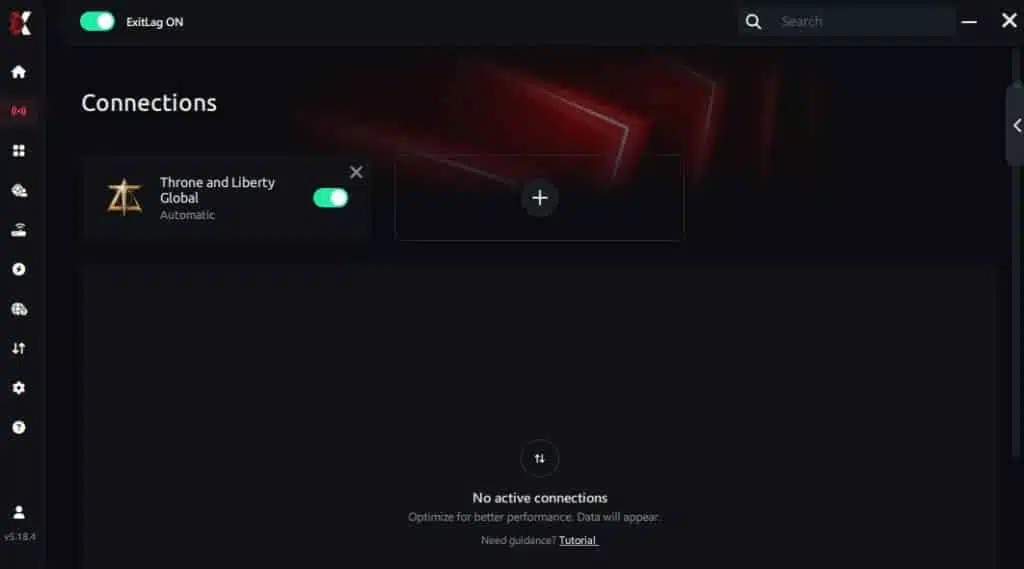
Step 3 – In the search bar, type “Throne and Liberty Global” and select the game from the list.
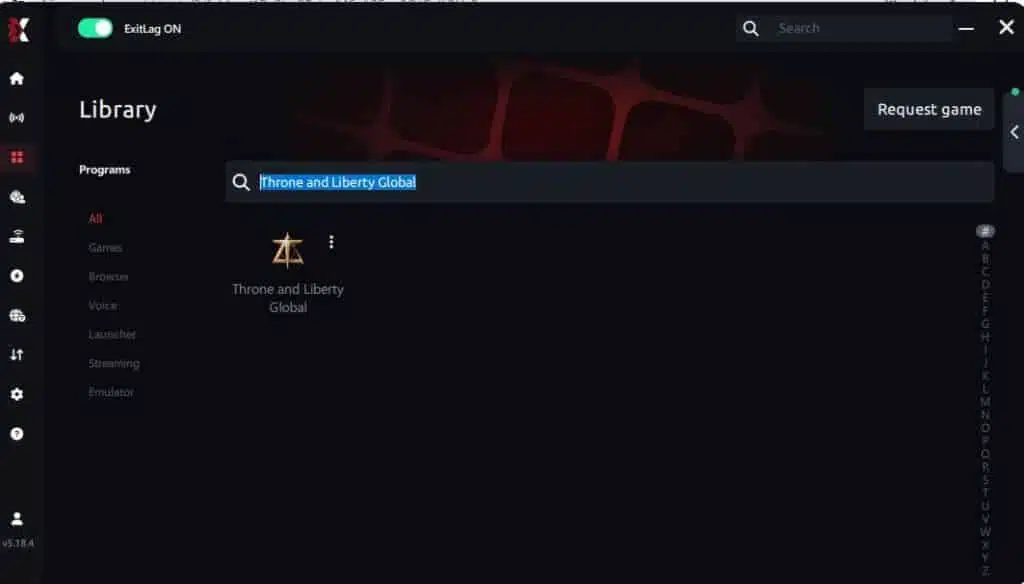
Step 4 – Choose between automated or manual route
Based on the results, you can let ExitLag automatically select the best route or manually choose the server that showed the lowest latency for your connection.
AI-optimized automated route
Based on the results, you can let ExitLag automatically select the best route through AI optimization. The system analyzes multiple connection paths in real time and automatically identifies the most efficient route for your connection, ensuring the lowest possible latency without requiring manual choices.
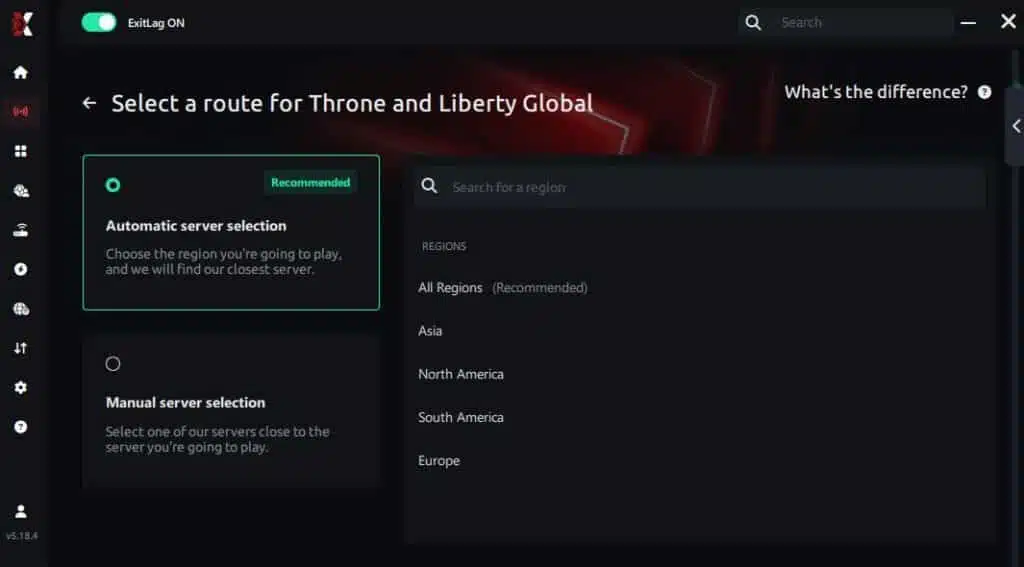
Manual route
If you prefer to have full control over your connection, you can manually choose the server based on the ping test results. Simply select the server that showed the lowest latency or the one that best meets your specific gaming needs, allowing complete customization of your experience.
Step 5 – Click “Throne and Liberty Global” or the play button. ExitLag will begin optimizing your connection automatically.
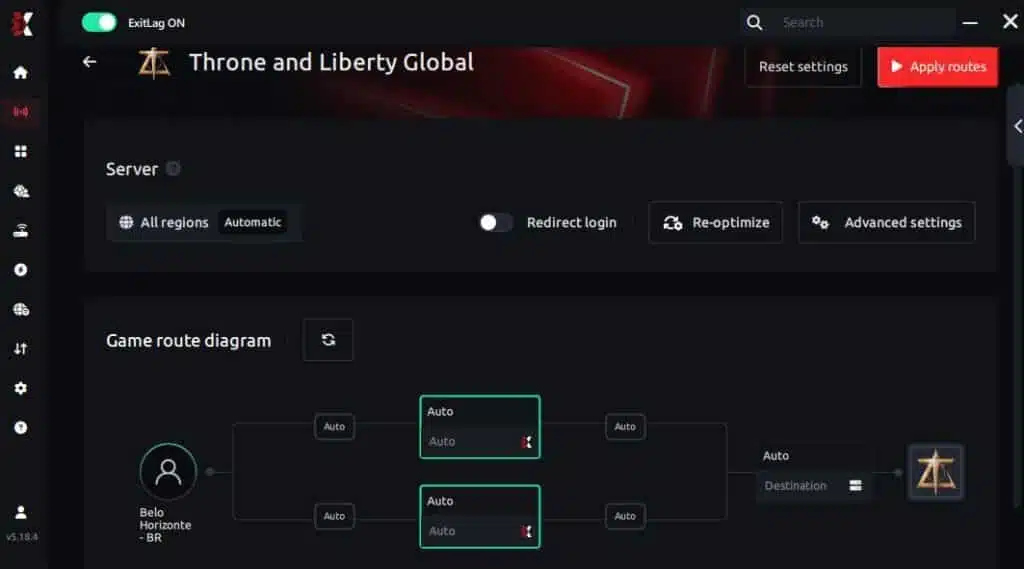
Step 6 – Wait a few seconds until optimization is complete. You’ll see ping indicators in the interface.
Step 7 – Launch Throne and Liberty Global normally. The optimization will already be active.
ExitLag runs in the background while you play, constantly adjusting routes to maintain the best possible performance.
Got questions or want to connect with other players? Join the conversation at the ExitLag Forum!




