

CSGO float is the permanent numerical value that helps determine how worn a weapon skin appears in Counter-Strike 2. It influences the item’s wear category, visible scratches, color coverage, collector appeal, and sometimes its market price.
Because Valve continues to adjust Counter-Strike 2, inventory systems, finishes, stickers, and trading rules can change over time. Following the latest CS2 updates and patch changes can help collectors understand whether an update has affected the appearance, inspection process, or market interest surrounding a CSGO float item.
A CSGO float does not measure weapon performance, accuracy, damage, or competitive effectiveness. It applies only to the cosmetic condition of eligible skins, and the number remains attached to the item throughout its lifetime.
What Is CSGO Float and How Does It Work?
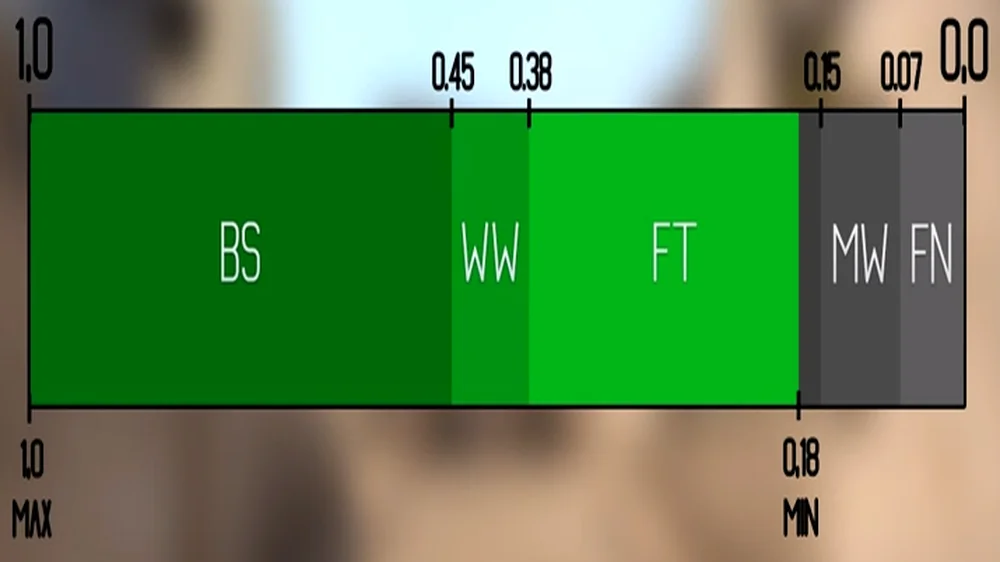
A CSGO float is commonly called a wear rating. It is represented by a decimal value that usually falls somewhere between 0 and 1, although an individual finish may support only part of that full range.
Lower numbers generally represent less visible wear. Higher numbers generally represent more scratches, fading, discoloration, or missing paint. However, the exact result depends on how the artist created the finish and how Counter-Strike applies wear to that texture.
For example, a float of 0.03 is lower than 0.25. The first item will normally belong to a cleaner wear category. That does not guarantee that it will look better to every buyer or that it will always be more expensive.
A collector checking CS float should therefore evaluate both the numerical rating and the actual in-game appearance.
Is Float Generated When a Skin Is Created?
The float is assigned when the item is generated. That can happen when a skin is obtained through a case, trade-up contract, weekly drop, souvenir package, or another supported item-generation system.
Once assigned, the value does not become worse through gameplay. Using a skin in thousands of matches will not increase its float.
This means:
- A Factory New skin does not gradually become Minimal Wear.
- A Battle-Scarred skin cannot be repaired through gameplay.
- Trading the item does not change its float.
- Adding or removing stickers does not change the float.
- Renaming the weapon does not affect wear.
- A StatTrak counter does not alter the condition.
A checker such as CSFloat can retrieve the wear rating from the item’s inspect data. Older players may still call the service CSGOFloat, but the current branding reflects Counter-Strike 2 rather than only CS:GO.
Float is usually shown with several decimal places. Those additional digits matter most to collectors looking for extremely low, high, or specifically ranked items.
Float vs. Wear, Paint Seed, and Finish
Several related terms are often mixed together.
| Property | What it represents | Can it change? |
| Float value | The numerical wear rating | No |
| Wear category | Factory New, Minimal Wear, Field-Tested, Well-Worn, or Battle-Scarred | No |
| Paint seed | The placement or variation of a pattern | No |
| Finish catalog | The type of weapon finish | No |
| Stickers | Applied cosmetic items | Yes, depending on current game features |
| Name tag | Custom weapon name | Yes |
| StatTrak count | Recorded kills for supported items | Yes |
The float helps determine the wear category, but it is not the same as the paint seed.
The seed can change where colors, shapes, gradients, or texture details appear. This distinction is especially important for Case Hardened, Fade-style finishes, Marble Fade variants, and other pattern-sensitive skins.
Therefore, two items may have nearly identical CS float values but look significantly different because their seeds are different. Conversely, two items with the same seed can show different levels of wear because their floats are not the same.
What Are the CSGO Float Wear Ranges?
The standard CSGO float categories provide a general framework for describing skin condition. They are useful when browsing inventories and marketplace listings, but they do not mean every skin is available in all five categories.
The commonly used boundaries are:
| Wear category | General float range |
| Factory New | 0.00 to below 0.07 |
| Minimal Wear | 0.07 to below 0.15 |
| Field-Tested | 0.15 to below 0.38 |
| Well-Worn | 0.38 to below 0.45 |
| Battle-Scarred | 0.45 to 1.00 |
At a boundary, the higher category begins at the listed value. A float of exactly 0.07 is normally Minimal Wear rather than Factory New.
These broad ranges are one reason players search for CSFloat, CSGOFloat, or another inspection tool. The Steam inventory category alone does not show where an item sits inside its tier.
Why Are Some Wear Categories Unavailable?
Each finish can have its own minimum and maximum wear values.
For instance, a skin may support only floats between 0.00 and 0.08. That item could appear in Factory New or Minimal Wear, but it could never be Field-Tested, Well-Worn, or Battle-Scarred.
Another finish may begin at 0.10. In that case, a Factory New version cannot exist even though Factory New is one of the five general categories.
This corrects a frequent misconception in older guides. A buyer should never assume that every skin has:
- A Factory New version.
- A Battle-Scarred version.
- Access to the full 0-to-1 range.
- The same visual response to wear.
- The same price behavior at category boundaries.
The AK-47 Redline is a familiar example. Its available range begins above the normal Factory New cutoff, so a legitimate Factory New Redline does not exist.
Likewise, many premium finishes have restricted upper ranges and cannot appear in heavily worn categories.
Understanding these limits is part of the broader history of Counter-Strike as an esports phenomenon. The skin economy grew alongside the competitive game, creating a collector culture in which technical details such as float ranges, patterns, stickers, and item provenance became increasingly important.
Does Lower Float Always Mean a Cleaner Skin?
Usually, but not always in the way buyers expect.
A lower CSGO float generally reduces the amount of wear applied to a finish. However, the location and visibility of wear depend on the weapon model and the finish itself.
Possible outcomes include:
- Scratches appearing mostly on edges.
- Paint disappearing from a large central area.
- Color becoming darker rather than scratched.
- Wear having little visual impact.
- High float producing an intentional aesthetic.
- Two close floats looking almost identical.
- A slightly higher float looking cleaner because of texture placement.
Certain Battle-Scarred skins are desirable precisely because high wear creates a distinct appearance. Some collectors also pursue the highest recorded floats rather than the lowest.
Therefore, “lower is better” is a useful beginner rule, not a universal pricing law.
Inspect the exact item before buying. A marketplace screenshot, wear label, or rounded float may hide details that are obvious in the game.
How Do You Check the Float of a CS2 Skin?
The most reliable way to check CSGO float is to use the item’s inspect information. An inspect link identifies the specific item and allows compatible services to retrieve details such as its precise float, paint seed, finish, and stickers.
The Steam inventory normally displays the wear category, such as Minimal Wear or Field-Tested. It does not always present the full decimal prominently enough for detailed comparisons.
That is why collectors use services such as CSFloat, marketplace inspection features, and trusted inventory tools.
How to Inspect a Skin Step by Step
For an item in your Steam inventory:
- Open Steam.
- Go to your inventory.
- Select Counter-Strike 2.
- Choose the skin.
- Select the option to inspect it in-game when available.
- Review the weapon under different lighting and angles.
- Use a trusted float checker for the exact numerical value.
- Compare the number with the skin’s supported range.
- Record the paint seed if pattern placement matters.
- Confirm stickers, charms, and other applied items separately.
For a marketplace listing, use the listing’s inspect button when one is provided. Confirm that the inspected item is the exact item being sold rather than a generic preview.
A float checker should reveal information such as:
- Exact float value.
- Paint seed or pattern index.
- Finish catalog.
- Sticker placement and wear.
- Item identifiers.
- Supported wear range.
- Database ranking when available.
The same inspection process is valuable for sticker-focused weapons. This guide to CS2 red stickers and inventory styling explains how sticker color, placement, finish, and the underlying weapon can combine visually. A strong craft may affect buyer interest independently of CS float.
What Are CSFloat, Skinport, and CS.MONEY?
These names describe different third-party services in the Counter-Strike skin ecosystem.
CSFloat combines skin inspection and database functionality with a marketplace. Its checker can display detailed item information from a valid inspect link. Many long-time traders still search for CSGOFloat or csgofloat, referring to the earlier name and domain history.
Skinport is a third-party marketplace where users can browse listed Counter-Strike items and, in supported regions, buy or sell through the platform’s current system. Listings commonly include wear and item details, but availability, payment methods, fees, and withdrawal rules can vary.
CS.MONEY operates skin-related marketplace and trading features. Its exact modes, prices, fees, delivery systems, and regional options should be reviewed directly before any transaction.
These services are not operated by Valve. Their presence in the community does not make every similarly named website legitimate.
Before using Skinport, CS.MONEY, CSFloat, or another service:
- Type or bookmark the correct domain.
- Verify the Steam sign-in page.
- Read current fees and terms.
- Confirm supported countries.
- Check whether identity verification is required.
- Review delivery and trade-protection rules.
- Never provide Steam Guard codes to another person.
- Inspect the exact item before confirming.
- Verify the trade partner and item contents inside Steam.
No third-party checker can change a CSGO float. These services retrieve and display the item’s existing data.
How Does CSGO Float Affect Skin Prices?
CSGO float can influence price, but it is only one part of valuation. The weapon, finish, rarity, collection, StatTrak status, souvenir status, pattern, stickers, market demand, and current listing supply can all matter.
Two skins with the same name and wear category may have different prices because one sits near the cleaner edge of its range.
For example, both of these hypothetical items could be Field-Tested:
- Skin A: 0.151 float.
- Skin B: 0.369 float.
Skin A is extremely close to Minimal Wear. If the finish becomes visibly cleaner at lower floats, buyers may pay more for it even though both items have the same Field-Tested label.
This is often called an overpay: a premium above the ordinary market value for a desirable characteristic.
When Does a Low Float Add Value?
A low CS float is more likely to command a premium when:
- The item is among the lowest known for that finish.
- The skin shows substantial wear differences.
- The value is close to a cleaner category.
- The finish is expensive or highly collected.
- The item pairs with a desirable paint seed.
- The market has few comparable listings.
- Buyers actively collect float-ranked items.
However, a seller should not assume every extra zero creates a large premium.
A float of 0.041 may not be meaningfully more valuable than 0.045 when both look the same and neither has collector ranking. The market determines whether buyers care.
Ultra-low numbers can become collectible because of database rank. A #1, #2, or top-10 float may attract specialized buyers even when the visual difference is almost invisible.
The same can happen at the opposite extreme. A very high CSGO float may be valuable to collectors seeking the most worn examples.
Why Pattern and Stickers Can Matter More Than Float
Certain finishes derive much of their value from paint seed.
Examples include skins where the seed changes:
- The amount and location of blue.
- Fade percentage or color distribution.
- Web placement.
- Gem-like color patterns.
- Central artwork positioning.
- Dominant colors on a knife blade.
- Specific rare visual formations.
In such cases, a rarer pattern can be worth far more than a lower float.
Stickers can also change valuation. Important factors include:
- Sticker rarity.
- Tournament and year.
- Holo, foil, gold, or paper type.
- Placement on the weapon.
- Craft symmetry.
- Sticker wear.
- Whether the combination has collector history.
- The cost of recreating the craft.
A valuable sticker applied to a common skin does not automatically add its full unused-market price to the weapon. Applied stickers cannot normally be separated and resold as unused stickers.
Therefore, a proper appraisal should examine:
- Weapon and finish.
- Wear category.
- Exact float.
- Paint seed.
- StatTrak or souvenir status.
- Stickers and placement.
- Comparable recent listings.
- Real completed sales where available.
- Liquidity and buyer demand.
Do not rely on one CS.MONEY, Skinport, or CSFloat listing as proof of market value. A seller can list an item at any unrealistic price. Completed transactions and several comparable items provide better context.
How Do You Buy or Sell Float Skins Safely?
Buying or selling a CSGO float item can involve meaningful financial value. Treat every transaction as a security-sensitive action.
The official Steam Community Market provides an integrated environment, but wallet funds generally remain within Steam. Third-party marketplaces may offer other payment or withdrawal options, subject to their terms, fees, regions, and verification requirements.
Valve’s official Counter-Strike website and news hub is the appropriate source for game announcements and major updates. Marketplace services, browser extensions, databases, and social media accounts should not be mistaken for official Valve channels.
How to Compare Marketplace Listings
When comparing CSFloat, Skinport, CS.MONEY, Steam, or another marketplace, do not compare only the headline price.
Review:
| Factor | Why it matters |
| Exact float | Two items in the same wear tier may differ |
| Paint seed | Pattern rarity can dominate valuation |
| Sticker craft | Placement and rarity affect demand |
| Seller fee | Changes the seller’s net return |
| Buyer fee | Changes the final purchase cost |
| Currency conversion | Can add hidden expense |
| Withdrawal options | May vary by country |
| Delivery method | Bot and peer-to-peer systems differ |
| Trade restrictions | Items may be temporarily unavailable |
| Identity verification | May be required for certain actions |
| Support process | Important if a transaction fails |
| Liquidity | Rare items may take longer to sell |
Prices move over time. A guide should not promise that one marketplace is always cheapest or pays the most.
Before selling, compare what you receive after fees rather than the listed price alone. Before buying, compare the final total and inspect the item.
How to Avoid Steam and Skin Trading Scams
Common scams include:
- Fake Steam login pages.
- Sponsored search results using copied branding.
- Impersonated marketplace bots.
- API-key manipulation.
- Fake middlemen.
- Counterfeit price-check websites.
- QR-code login traps.
- “Verification” trades.
- Accidental-item claims.
- Tournament voting links.
- Fake team invitations.
- Browser extensions that replace trade details.
- Screenshares designed to capture backup codes.
- Buyers sending a different item than discussed.
Use these safeguards:
- Enable Steam Guard Mobile Authenticator.
- Protect the email connected to Steam.
- Use a unique password.
- Review authorized devices and sessions.
- Confirm every trade inside the official Steam interface.
- Check the recipient’s account carefully.
- Verify every item after the trade offer loads.
- Cancel when the offer changes unexpectedly.
- Never send an item merely to “verify” it.
- Do not trust screenshots as proof of payment.
- Avoid rushed deals and artificial deadlines.
- Bookmark genuine marketplace domains.
A legitimate csgofloat lookup does not require giving another person control of your account. A legitimate buyer does not need your password, Steam Guard code, email code, session cookie, or recovery information.
Is CSGO Float Still Relevant in Counter-Strike 2?
Yes. Although the primary game is now Counter-Strike 2, the skin inventory and wear system evolved from CS:GO. As a result, searches such as CSGO float, CSGOFloat, and cs float remain common.
The terminology survives because millions of items originated during the CS:GO era, and the community built its databases, tools, marketplaces, and vocabulary around that name.
The rendering engine changed with Counter-Strike 2, so certain finishes can look different under the new lighting and material systems. However, the item’s assigned float remains a core part of its identity.
Why Do Players Still Say CSGOFloat?
Players continue using CSGOFloat because:
- It was the established term for years.
- Existing skin databases used CS:GO branding.
- Search habits change slowly.
- Many inventories contain legacy items.
- Buyers recognize the phrase immediately.
- The float mechanic remains relevant in CS2.
The modern service name CSFloat is shorter and reflects the broader Counter-Strike skin market. Both terms may point users toward the same concept, but traders should still verify the exact domain before signing in.
The supplied separate Counter-Strike: Global Offensive Steam listing also reflects the continuing historical interest in the previous version. Availability, online features, community servers, and support can differ from Counter-Strike 2, so players should read the current Steam page rather than assume it functions as a full replacement for CS2.
Does Float Change How a Weapon Performs?
No.
Float does not officially change:
- Damage.
- Recoil.
- Accuracy.
- Movement speed.
- Reload speed.
- Magazine capacity.
- Hit registration.
- Matchmaking rank.
- Server performance.
- Competitive advantage.
A worn skin and a pristine skin on the same weapon perform identically.
Some players may feel more confident with a favorite skin, but that is subjective. Paying more for a lower CSGO float buys a cosmetic or collectible characteristic, not a stronger weapon.
How Can ExitLag Help Counter-Strike 2 Players?
ExitLag cannot change CSGO float, improve a skin’s wear category, find a rare pattern, modify market prices, or protect a poorly reviewed trade. Float and inventory data are controlled by Counter-Strike and Steam systems.
ExitLag focuses on network-route optimization. It may help when a player experiences unstable routing, packet loss, latency variation, or connection interruptions during supported online gameplay.
When ExitLag May Be Relevant
ExitLag may be useful when you notice:
- High or inconsistent ping.
- Packet loss during matches.
- Route congestion.
- Frequent connection drops.
- Poor routing to a selected game server.
- Performance that changes by time of day.
A more stable route may improve the gameplay experience while using a valuable inventory. However, it does not alter the inventory itself.
ExitLag also cannot guarantee lower ping in every situation. Results depend on the internet provider, region, destination, local network, and actual cause of the problem.
What ExitLag Cannot Fix
ExitLag will not fix:
- An incorrect CS float reading.
- A missing Steam item.
- A delayed trade restriction.
- A marketplace dispute.
- A phishing attack.
- A fake CS.MONEY website.
- An unavailable Skinport withdrawal method.
- A removed listing.
- A wrong paint seed.
- An overpriced item.
- A compromised Steam account.
- A platform-wide Steam outage.
Use inventory and marketplace support for transaction problems. Use Steam security tools for compromised accounts. Test ExitLag when the remaining issue is network stability during Counter-Strike 2 matches.
Frequently Asked Questions About CSGO Float
CSGO float is simple at its core, but pricing becomes more complicated when wear restrictions, patterns, stickers, rankings, and marketplaces are considered. The answers below address the most common questions from players and collectors.
A good float depends on the skin and your objective.
For a clean play skin, choose a value that looks good at a reasonable price. For a collection, extremely low, high, or ranked floats may be more desirable. For pattern-based skins, paint seed may matter more.
A float at the 0.07 boundary is normally Minimal Wear. Factory New covers values below 0.07, subject to the skin’s supported range.
No. Playing, trading, inspecting, or applying stickers does not change CSGO float.
A displayed value can be extremely close to zero, but collectors normally compare the full recorded decimal rather than assuming that a rounded display of 0.00 represents an exact mathematical zero.
No. Each finish can have a restricted minimum and maximum. Some begin above the Factory New range.
No. Some finishes have maximum floats below the Battle-Scarred threshold.
CSFloat is the current branding associated with the checker, database, and marketplace ecosystem. CSGOFloat is the older name still used in searches and community conversations.
Skinport listings can include item wear and inspection details. Always inspect the exact item and review the marketplace’s current interface, terms, and availability.
CS.MONEY provides item and marketplace information that may include float-related details. Confirm the exact item, current pricing, and applicable fees before trading.
No. A lower number may add value, but pattern, stickers, rarity, demand, appearance, and supply can matter more.
“Black float” is an informal collector term often used for extremely high-float skins whose heavy wear creates a dark or distinctive appearance. It is not an official wear category.
Yes, when a valid inspect link is available. Marketplace listings and inventories may provide an inspection option that a trusted checker can read.
Weapon float does not determine sticker wear. Stickers have separate properties and can be evaluated independently.
No. Inspect the item, compare similar listings, check pattern and stickers, review recent market activity, and decide whether the visual difference justifies the price.
A careful collector checks the exact item rather than relying on the wear label alone. Inspect the float, verify the paint seed, compare realistic listings, and protect every Steam transaction. Then test ExitLag when route instability affects your matches—not your inventory—and make more informed decisions around every CSGO float skin you buy, sell, or use.
All game images used in this article belong to their respective owners. They are used for informational and educational purposes only and do not imply endorsement or affiliation with the rights holders.
Got questions or want to connect with other players? Join the conversation at the ExitLag Forum!

