Creating immersive metaverse games usually requires sitting in front of a multi-monitor desktop battle station. However, millions of aspiring creators frequently wonder if they can develop experiences on smartphones and tablets using Roblox Studio Mobile. Therefore, understanding how mobile game creation operates helps you design projects without being chained to a desk.
Aspiring developers want the flexibility to tweak scripts, test obstacle courses, and organize models while traveling or relaxing on the couch. Indeed, exploring Roblox Studio Mobile workflows reveals exciting alternatives, including remote desktop streaming and official integrated mobile creation tools. Because unauthorized third-party download portals prey on mobile users, discovering legitimate development paths safeguards your personal account data.
Officially, a native standalone app called Roblox Studio Mobile does not exist for Android or iOS devices. Full desktop software requires Windows or macOS operating systems to execute complex physics simulations, high-end rendering, and Luau script debugging. Nevertheless, creators successfully build on mobile devices by utilizing remote desktop mirroring, cloud workstations, and the official mobile-first creation features inside the primary app.
Is Roblox Studio For Mobile Real Or A Myth?
The dream of downloading a native builder app straight from mobile app stores remains incredibly strong among young creators. You can easily find thousands of community tutorials discussing ways to build mobile games on handheld devices.
Furthermore, analyzing developer architecture clarifies why mobile devices present unique engineering challenges for the full engine.
- The desktop creation suite demands significant processing power to render heavy 3D geometry and terrain voxel grids.
- Professional game scripting relies heavily on keyboard shortcuts, multiple dockable windows, and precise mouse placement.
- Mobile operating systems strictly manage background processes, which can terminate complex game compilation tasks unexpectedly.
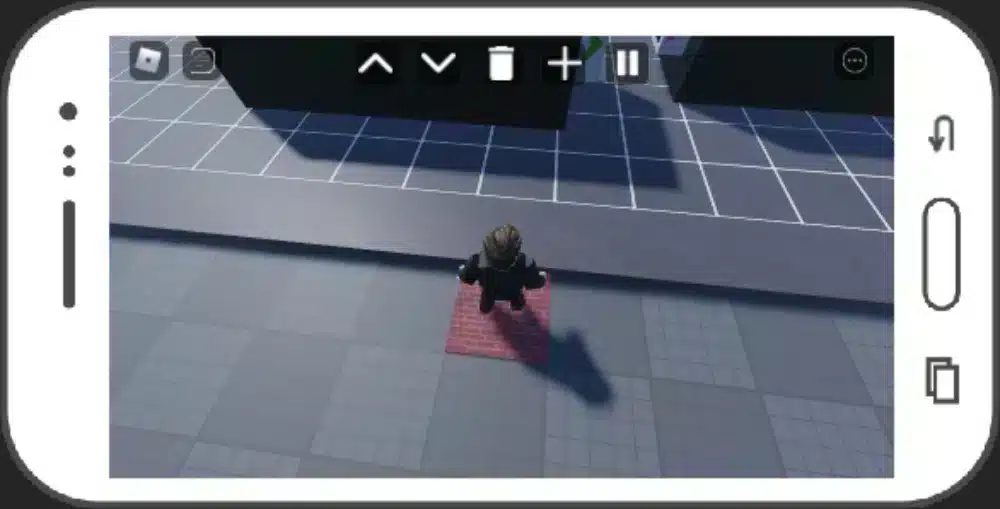
- Developers have introduced mobile-first creation tools like the Build mode inside the main mobile application.
Consequently, while a standalone portable studio app is not in app stores, mobile creation continues to expand rapidly.
How To Get Roblox Studio On Mobile Using Remote Desktop
Connecting a smartphone or tablet to your primary desktop computer provides an authentic way to use full desktop tools on mobile. By utilizing secure remote desktop applications, your home computer handles the computing workloads while streaming visual displays to your phone screen.
Moreover, pairing a portable Bluetooth keyboard and wireless mouse makes this remote setup function just like a compact laptop.
- Install a dependable remote desktop client such as Chrome Remote Desktop, Moonlight, or Parsec on your primary desktop.
- Download the companion streaming client application onto your iOS or Android mobile device.
- Link both devices securely under the same network account credentials and configure custom streaming bitrates.
- Launch your desktop builder remotely, using touch gestures or paired peripherals to edit projects on the go.
Thus, streaming your desktop session lets you make rapid adjustments to your projects without needing native mobile application installations.
Can You Get Roblox Studio On Mobile Through Cloud Services?
Creators who do not own high-powered desktop rigs often turn to virtual cloud computing platforms to access full creation suites. Cloud gaming machines provide high-performance virtual operating systems accessible from any standard mobile web browser.
In addition, cloud virtual desktops remove local hardware bottlenecks, enabling older tablets to run heavy development workloads smoothly.
- Cloud computing platforms grant temporary access to full Windows environments through mobile interfaces.
- Users can download, install, and execute the official desktop creation software directly within the virtual desktop.
- High-speed home internet connections ensure low-latency video streaming between cloud servers and mobile screens.
- Cloud sessions automatically sync project save files directly to official cloud servers for instant multi-platform access.
Therefore, remote cloud workstations offer a viable path for dedicated creators wanting to learn Roblox Studio For Mobile environments.
The Truth Behind Roblox Studio Mobile Download And APK Files
Searching mobile app stores for mobile creation tools frequently redirects unsuspecting players toward suspicious third-party websites. Unofficial sites aggressively advertise files labeled as a Roblox Studio Mobile Download to capture search traffic from eager young developers.
Furthermore, downloading unverified executable files onto your personal mobile smartphone introduces severe operating system security vulnerabilities.
- Official developers do not publish standalone installer files for Android or Apple mobile ecosystems.
- Websites promising cracked mobile studio applications generally distribute adware, trojans, or credential-stealing spyware.
- Unofficial files often prompt users to complete deceptive survey questionnaires that harvest private personal data.
- Attempting to run unverified files on mobile devices can compromise your primary accounts and linked payment methods.
Consequently, avoiding third-party APK packages remains the only way to protect your account inventory and personal device integrity.
The Hidden Dangers Of Any Roblox Studio Mobile APK
Sideloading unverified application packages onto mobile devices bypasses standard operating system security protections established by official app marketplaces. Sideloaded software labeled as a Roblox Studio Mobile APK often conceals malicious payloads that run silent background scripts.
Moreover, these deceptive packages rarely contain any actual functional game engine software at all.
- Inspect web domains carefully and avoid downloading package installers from unverified third-party software hubs.
- Recognize that genuine development tools are hosted exclusively on official developer creator subdomains.
- Understand that APK files claiming to emulate PC creation engines usually display looping fake loading screens.
- Enable built-in mobile security scanning to intercept and delete suspicious package files before installation occurs.
Taking a cautious approach to third-party file downloads prevents malicious actors from compromising your personal smartphone.
Can You Download Roblox Studio On Mobile Through Web Browsers?
Many players attempt to access the official Creator Hub using mobile web browsers to trigger manual software downloads. When clicking the primary download prompt on mobile, the web platform automatically evaluates your client operating system.
In addition, browser detection algorithms immediately recognize that handheld devices lack the necessary software architecture.
- The official web portal serves Windows executable files or Apple disk images exclusively.
- Mobile web browsers cannot execute desktop installer files designed for standard PC processors.
- Clicking desktop download links on mobile simply triggers informational prompts redirecting users to supported platforms.
- Creators can still access the Creator Hub web dashboard to review analytics, manage payouts, and update game passes.
Thus, understanding browser limitations saves valuable time when managing development assets from your smartphone.
How To Use Roblox Studio On Mobile With Workarounds
Learning How To Use Roblox Studio On Mobile effectively requires optimizing your mobile interface to manage touch-based controls. Standard desktop interfaces feature tiny menu dropdowns, complex property panels, and microscopic script text lines that frustrate standard touch navigation.
Consequently, setting up custom on-screen touch configurations transforms frustrating mobile sessions into productive development sprints.
- Pair an external Bluetooth mouse to achieve single-pixel selection accuracy across tiny workspace parts.
- Connect a physical keyboard or tablet case to execute essential camera pan commands and hotkeys.
- Configure custom on-screen gesture shortcuts within remote desktop client settings to emulate right-click rotations.
- Increase application scaling percentages inside your desktop display options to make mobile toolbar buttons larger.
Selecting the right peripheral accessories bridges the physical gap between compact touch screens and desktop software.
Mastering Touch Navigation And Precision Zooming
Navigating three-dimensional workspace environments on mobile screens demands delicate finger coordination and deliberate camera management. Without a physical scroll wheel, zooming into tiny parts or aligning wall corners can feel challenging.
Furthermore, mastering built-in remote software gestures keeps your camera steady during delicate scene adjustments.
- Use two-finger pinch motions within remote streaming apps to control smooth camera zoom depths.
- Double-tap and hold on-screen surfaces to emulate right-click drag actions for orbital camera rotations.
- Assign physical device volume buttons to trigger common actions like duplicate or delete.
- Utilize on-screen precision magnifying overlays provided by remote desktop tools to click tiny toolbar icons.
Practicing these touch combinations allows you to adjust scene lighting, move decorative props, and test layouts smoothly.
Scripting On Handheld Devices: Virtual Keyboards Vs Physical Peripherals
Writing complex Luau code on a standard mobile virtual keyboard presents significant speed and formatting obstacles. Virtual touch keyboards consume over half of the available mobile screen real estate, hiding essential context lines.
Moreover, missing physical modifier keys like Control, Shift, and Alt slows down everyday code editing workflows.
- Physical folding Bluetooth keyboards provide tactile key switches and restore full unhindered screen visibility.
- Virtual mobile keyboards frequently trigger aggressive autocorrect routines that corrupt specialized coding syntax.
- Dedicated external keyboards grant instant access to curly brackets, quotation marks, and indentation hotkeys.
- Tablet split-screen views allow you to display coding reference documentation alongside active remote sessions.
Therefore, packing a compact physical keyboard turns any standard mobile tablet into a functional programming workstation.
| Creation Method | Platform Requirement | Setup Complexity | Best Target Use Case |
| Remote Desktop Streaming | PC Host + Mobile Device | Medium (Requires Host PC) | Full Studio Access On The Go |
| Cloud Desktop Workstation | High-Speed Web Connection | Medium (Subscription Based) | PC Creation Without Owning A PC |
| In-App Mobile Build Mode | Official Mobile App | Low (Instant In-App Alpha) | Rapid Prototyping & Scene Design |
| Web Creator Hub Portal | Any Mobile Web Browser | Low (Zero Setup Needed) | Analytics & Asset Monetization |
Can You Use Roblox Studio On Mobile For Playtesting?
Testing how experiences perform on mobile hardware represents a critical step for every serious indie developer. Fortunately, testing mobile mechanics does not require running complex editing software directly on the phone itself.
Furthermore, creators can deploy seamless multi-device testing directly from their primary desktop development workstations.
- The desktop software includes comprehensive mobile device emulation profiles covering dozens of smartphone screens.
- Developers can simulate touch controls, on-screen thumbsticks, and varying aspect ratios directly inside the desktop client.
- Publishing active projects to private testing places allows developers to join sessions directly on actual mobile devices.
- Real-time mobile playtesting highlights performance bottlenecks, frame rate dips, and UI scaling errors immediately.
Consequently, separating development on PC from real-world testing on mobile ensures your published games run flawlessly.
Utilizing Team Create For Live Mobile Collaboration
The built-in Team Create framework revolutionizes collaborative development by allowing multiple users to build concurrently. While primary scene building happens on desktop machines, mobile accounts can join live sessions to inspect builds in real time.
In addition, live multi-user collaboration lets developers walk through active environments while teammates modify layouts.
- Enable the Team Create feature inside the desktop software collaboration settings tab.
- Grant editing permissions to your secondary mobile testing account through the permissions manager.
- Launch the project on your primary computer to begin active environment and asset editing.
- Log into the test world simultaneously using your mobile device to walk through changes in real time.
Taking advantage of live multi-device sessions accelerates quality assurance testing and level design feedback loops.
Diagnosing Mobile User Interface Scaling Issues
Mobile players interact with virtual worlds using on-screen thumbsticks and floating interaction buttons. If developers build interfaces strictly on large desktop monitors, interactive buttons often appear microscopic or overlap mobile controls.
Moreover, utilizing responsive interface tools prevents critical gameplay buttons from drifting off-screen on smartphones.
- Utilize scale sizing constraints rather than offset pixel values to ensure UI elements scale across all devices.
- Add aspect ratio constraint objects to prevent square inventory icons from stretching on ultra-wide screens.
- Test interface layouts across multiple emulated screen resolutions within the desktop view options.
- Ensure primary interaction buttons remain positioned safely away from native mobile home navigation bars.
Thus, designing with mobile interface constraints in mind ensures your creation appeals to millions of smartphone gamers.
Pro Tips: Roblox Studio Mobile
- Use cloud asset management: Save custom models and scripts directly to your account inventory so you can organize assets via mobile web browsers.
- Configure remote desktop custom resolutions: Set your host PC desktop resolution to match your tablet aspect ratio to eliminate black side bars during remote sessions.
- Leverage AI scene generation: Utilize built-in generative creation tools to draft complex background terrain quickly without placing thousands of parts manually.
- Test with touch emulation enabled: Keep touch screen device emulation active on your desktop workstation to catch button overlapping errors before publishing updates.
Common Mistakes Roblox Studio Mobile Users Make
- Downloading unverified third-party APKs: Many aspiring creators download suspicious application packages from unvetted blogs, infecting their phones with invasive adware. Fix: never download unofficial installer files, and rely strictly on remote desktop connections or official mobile creation features.
- Designing interfaces with pixel offset values: Novice builders design user interfaces using static pixel dimensions, causing menus to vanish or overlap thumbsticks on mobile screens. Fix: build all graphical interfaces using proportional scale properties and UI constraints to ensure dynamic sizing across every screen.
- Attempting heavy scripting without physical keyboards: Users frequently try to type lengthy Luau code using standard virtual mobile touchscreens, introducing syntax errors via autocorrect. Fix: connect a compact wireless Bluetooth keyboard to your mobile device to write clean, accurately indented code.
What Are The Official Mobile-First Creation Features?
Developers recognize that a massive portion of the global player community accesses virtual worlds exclusively on handheld devices. In response, modern platform development focuses heavily on introducing accessible, AI-powered creation tools directly into mobile applications.
Furthermore, emerging mobile creation features empower anyone to generate playable environments using simple text commands.
- The Build mode allows creators to generate, iterate, and share interactive scenes directly within the mobile application.
- AI-driven prompt systems generate complex 3D models, functional terrain, and basic interactive mechanics automatically.
- Shared backend architecture ensures that creations started on mobile transfer into desktop software for advanced scripting.
- Agentic playtesting systems automatically inspect mobile creations to identify pathfinding errors before public release.
Consequently, the boundary between handheld gaming and game development continues to blur with each modern update.
How Will Cloud Gaming Shape The Future Of Mobile Creation?
Browser-based cloud rendering represents the logical evolution of modern game development pipelines worldwide. As web streaming performance improves, running complete creative suites inside standard web browsers becomes increasingly viable.
Moreover, eliminating physical hardware requirements democratizes game development for aspiring creators across the globe.
- Modern web browsers support advanced graphical standards that handle complex 3D engine rendering effortlessly.
- Cloud infrastructure handles demanding physics simulations on remote enterprise servers rather than local mobile chips.
- Creators can collaborate inside unified virtual workspaces without downloading massive multi-gigabyte asset caches.
- Instant cross-platform synchronization ensures that edits made on a phone reflect immediately on consoles and desktops.
Thus, the ongoing expansion of cloud computing points toward a future where full game development happens anywhere.

Eliminate Network Lag In Mobile Lobbies With ExitLag
Whether you are remotely streaming Roblox Studio Mobile workflows from your desktop or playtesting your new multiplayer map, connection stability is everything. Sudden packet loss, routing congestion, and erratic ping spikes introduce frustrating input delays, disrupt remote streaming sessions, and ruin multiplayer playtests. Standard mobile wireless connections frequently suffer from interference, packet drops, and inefficient internet routing across crowded neighborhood lines.
ExitLag delivers the definitive network optimization solution designed specifically for creators and competitive mobile gamers demanding total connection stability. Operating as an intelligent connection optimizer rather than a basic proxy, it maps hundreds of global server routes in real time to locate the fastest, most reliable path available. Through proprietary Multipath Technology, your connection transmits critical game packets across multiple optimized routes simultaneously. Consequently, if your wireless connection encounters sudden packet loss or line jitter, secondary pathways maintain your session instantly, preventing disconnects and input desync.
Furthermore, ExitLag supports over 4,000 titles across an expansive global network of more than 1,500 dedicated servers worldwide. Its intelligent Traffic Shaper prioritizes active game packets ahead of background mobile downloads, while advanced routing algorithms keep ping flat during demanding multiplayer sessions. Enhance your mobile gaming and testing responsiveness today by picking up ExitLag for Android on the Google Play Store or downloading ExitLag for iOS from the App Store. For developers managing full desktop game creation rigs at home, optimize your entire battlestation with the ExitLag Download for PC.
Indeed, having a rock-solid, optimized connection gives you the freedom to test creations, manage projects, and conquer lobbies without worrying about Roblox Studio Mobile connectivity issues.
All game images used in this blog post belong to Roblox Corporation. They are used for informational and educational purposes only and do not imply endorsement or affiliation with the rights holders.
Got questions or want to connect with other players? Join the conversation at the ExitLag Forum!