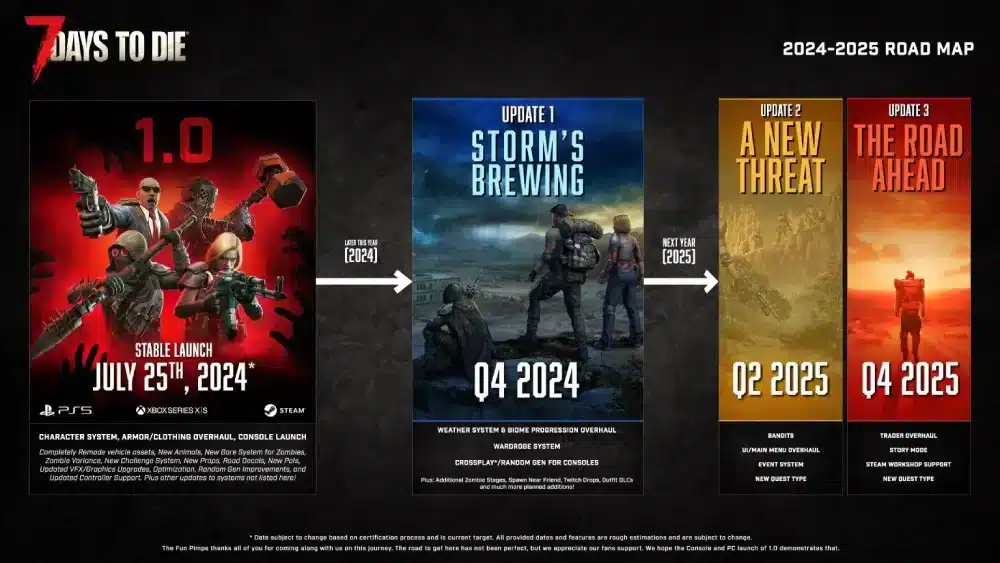
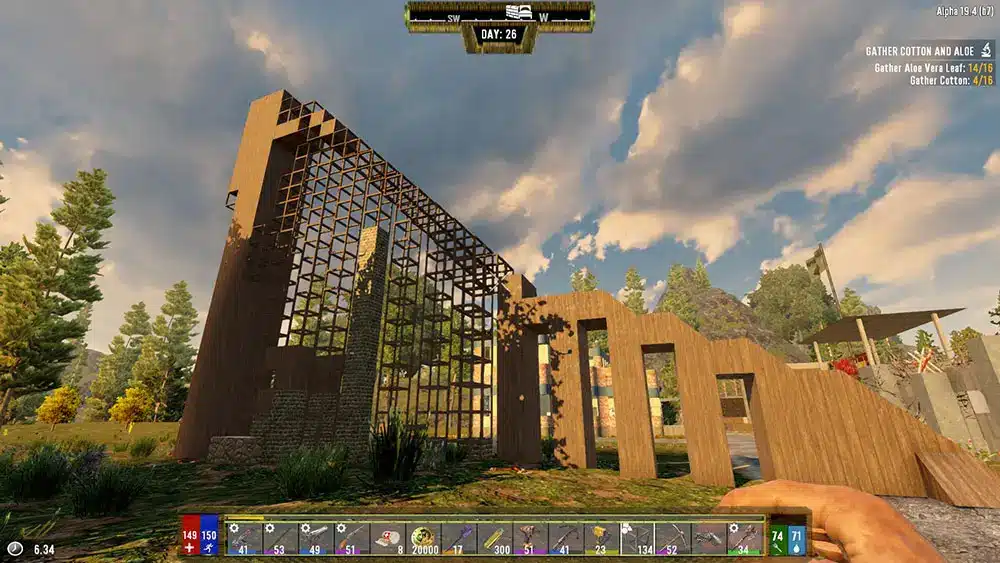
The 7 Days to Die map determines far more than where towns, traders, and roads appear. World type affects travel time, biome progression, available Points of Interest, resource access, base placement, performance, and how quickly survivors can prepare for Blood Moon hordes.
Players who want to expand or replace the standard 7 Days to Die map should first understand how custom content interacts with the current game version. Our complete guide to installing and using 7 Days to Die mods explains the difference between lightweight additions, overhaul packages, and custom worlds, as well as why compatibility must be checked after major updates.
Choosing the correct 7 Days to Die map is especially important in Version 3.0, also called Dead Hot Summer. Navezgane offers a handcrafted and predictable environment, pre-generated worlds provide ready-made alternatives, and Random World Generation creates a new layout from a seed and selected settings.
Older guides can be misleading because they mix information from Alpha 20, the discontinued PlayStation 4 edition, Version 1.0, and the current console release. This guide separates those versions and explains which map information remains useful in 2026.
What maps are available in 7 Days to Die?
The game offers three broad world categories: Navezgane, pre-generated worlds, and randomly generated worlds. Custom maps can also be installed on compatible PC versions, but they are not part of the standard selection.
Each category supports a different type of playthrough. Navezgane is designed manually, pregens are generated in advance and included with the game, while Random World Generation creates a world according to a seed and configuration choices.
Navezgane
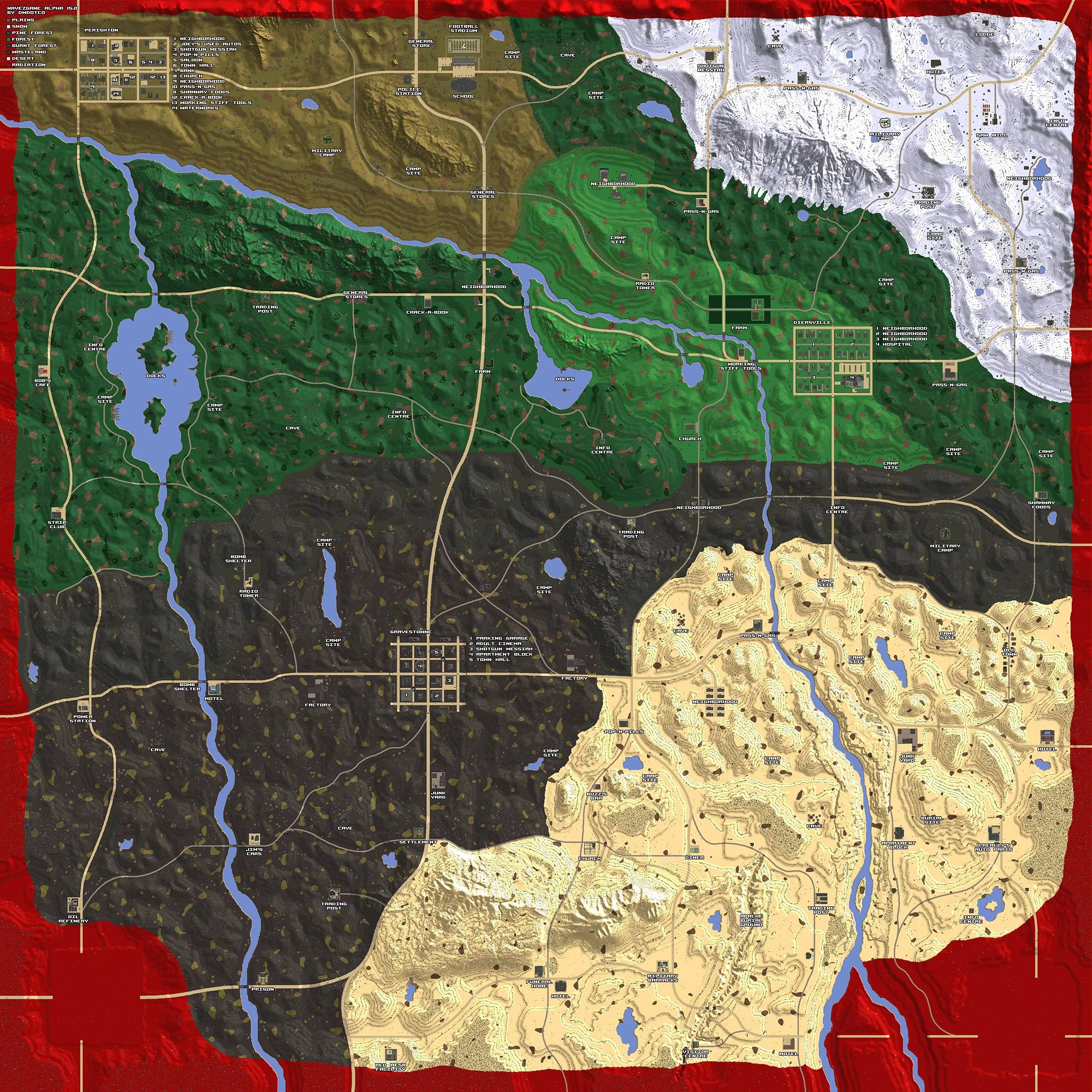
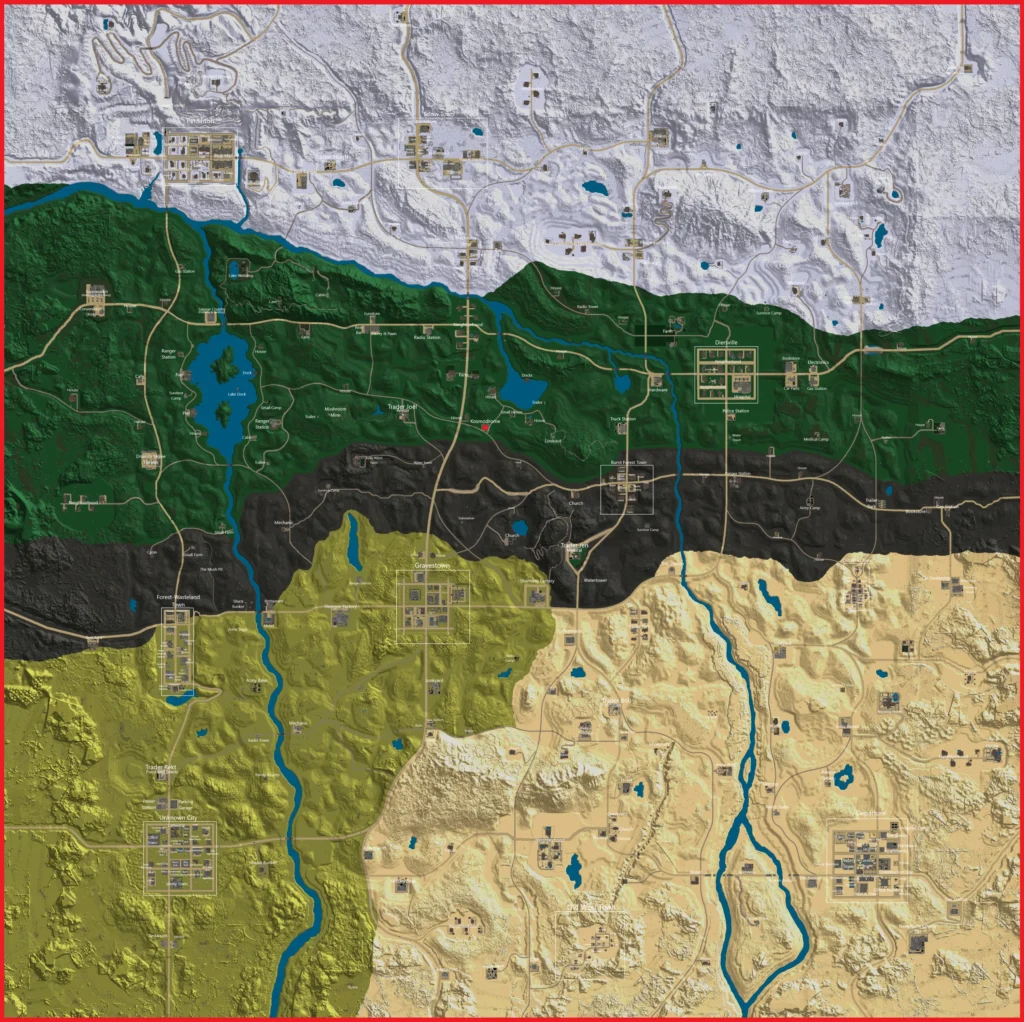
The 7 Days to Die Navezgane map is the game’s handcrafted setting. Its cities, roads, traders, landmarks, biome boundaries, and major Points of Interest are placed intentionally rather than generated when a new save begins.
Navezgane is set in a fictional Arizona county after a catastrophic outbreak. The environment includes forests, deserts, snow-covered areas, burnt territory, and the hazardous wasteland.
Its predictable structure makes it suitable for:
- Learning the game without an unknown layout.
- Following location-specific guides.
- Planning fixed trader routes.
- Revisiting familiar towns after an update.
- Playing with friends who want identical landmarks.
- Building long-term bases around known resources.
- Exploring locations designed specifically for the handcrafted world.
The Navezgane map has changed repeatedly throughout development. A map image created for Alpha 15, Alpha 20, Version 1.0, or Version 2.0 may not accurately represent the current layout.
Version 2.0 revised biome boundaries, trader positions, and several areas to support the newer biome-progression system. Therefore, always check the version attached to an image before using it as a navigation reference.
Pre-generated maps
Pregens are Random World Generation layouts that have already been created and packaged with the game. Players can start immediately without waiting for their computer or server to generate a new world.
These 7 Days to Die maps preserve the replayability of an unfamiliar layout while avoiding the processing time required by RWG. Everyone selecting the same pregen and version receives the same world.
Pregen selections can include different sizes and layouts. Their exact names and availability may change between releases, so old references to PREGEN6K, PREGEN8K, or PREGEN10K should always be connected to a specific build.
Pregens are useful when:
- The computer struggles to generate a large world.
- A server owner wants a ready-made map.
- Friends need an identical world without exchanging files.
- Players want more POI variety than Navezgane.
- A group wants to use existing community maps and coordinates.
- Generation time would delay a multiplayer launch.
Unlike Navezgane, pregens are not individually handcrafted from beginning to end. They were created through the generation system and then distributed as fixed layouts.
Random World Generation
Random World Generation, commonly shortened to RWG, creates terrain, settlements, roads, traders, biomes, wilderness locations, and POIs according to a seed and selected generation options.
The same seed must be combined with the same game version and compatible settings to reproduce the same 7 Days to Die map. A seed used in Alpha 20 will not necessarily create an identical world in Version 3.0 because the generation rules, POI library, terrain systems, and biome options have changed.
RWG provides the greatest replay value. Players cannot rely on memorized routes and must discover towns, traders, and important buildings during the playthrough.
However, larger generated worlds require more storage, memory, generation time, and travel. A world that looks impressive in the preview may be inconvenient for a solo survivor who spends most of the game around one town.
Platform support, map generation, crossplay, and version availability can differ between devices. Our current 7 Days to Die platform guide explains which editions are active and why the old console release should not be treated as the same product as the modern version.
Where are the main locations on the Navezgane map?
The 7 Days to Die Navezgane map contains established towns, roads, bridges, traders, wilderness sites, caves, industrial zones, military locations, farms, and unique structures.
Instead of placing every high-value building in one central city, the handcrafted world encourages travel between regions. Vehicles become increasingly important as players begin accepting distant trader quests or searching for biome-specific resources.
Major settlements and regions
Diersville is one of the most recognizable settlements on the Navezgane map. Its residential buildings and medical facilities can support early and intermediate looting, although urban streets can become dangerous when several buildings activate at once.
Perishton contains commercial and industrial structures. Its road access can make it useful as a staging area, but survivors should inspect nearby terrain before committing to a permanent base.
Departure is a larger urban area with dense blocks and several substantial POIs. Entering an unfamiliar high-tier building without ammunition, healing supplies, and an escape route can create a difficult fight.
Gravestown is associated with the damaged and dangerous parts of the county. It should not be treated as an ideal beginner destination simply because older guides describe its loot as valuable.
The modern 7 Days to Die Navezgane map also distributes traders across biome progression. A trader can become the center of an efficient route, but protected trader property cannot serve as a normal player base.
Roads are important because they connect settlements and reduce fuel consumption compared with difficult off-road terrain. Nevertheless, following a road without checking the map can lead to a dangerous biome or a distant dead end.
Biomes and progression
Biomes affect environmental hazards, enemies, resources, loot stages, visibility, and travel conditions. The current game encourages survivors to prepare before moving permanently into more dangerous regions.
The forest is generally the most manageable starting environment. It offers wood, wildlife, water-related resources, moderate visibility, and comparatively forgiving conditions.
The burnt biome introduces harsher surroundings and reduced visibility. The desert creates heat-related concerns and provides access to resources associated with dry terrain.
The snow biome introduces cold conditions and dangerous wildlife. The wasteland represents the highest-risk region, with stronger threats, difficult terrain, and potentially valuable POIs.
A sensible route through the Navezgane map should consider more than distance. Before entering another biome, prepare appropriate clothing or equipment, food, water, medical items, ammunition, repair materials, and a vehicle with enough fuel for the return trip.
Biome danger can also affect loot progression. Moving into a difficult region too early may increase the potential reward, but an unprepared character can lose more resources than the expedition provides.
Traders, POIs, and base locations
Traders provide quests, inventory, rewards, and progression routes. Locating one early helps establish a repeatable cycle between a settlement, a temporary shelter, and nearby quest buildings.
A good base location on the 7 Days to Die Navezgane map should balance several needs:
- Reasonable distance from a trader.
- Access to a town or group of POIs.
- Flat terrain for construction.
- Nearby water and basic resources.
- Roads suitable for vehicles.
- Enough separation from constantly activated buildings.
- Space for a dedicated Blood Moon structure.
- More than one escape route.
Building directly inside a large POI can save time initially, but the structure may contain hidden sleepers, weak supports, difficult repair areas, or quest-reset risks.
A separate crafting base and horde base often provide more control. The crafting location can prioritize storage and production, while the Blood Moon structure is designed around enemy pathing, repairs, traps, and escape options.
Players using an old Seven Days to Die PS4 map should not compare its coordinates directly with the current world. Our guide to the original and current console editions explains why the 2016 PS4 release stopped receiving the modern PC content and why PS5 uses a separate version.
How does Random World Generation work?
RWG uses a seed and generation rules to construct a complete world. Terrain, towns, biome distribution, roads, traders, wilderness POIs, and natural features are assembled before the save begins.
Version 3.0 expanded sandbox control, but gameplay settings should not be confused with every aspect of map generation. Some options determine survival rules, while world-generation settings affect the physical environment.
Seeds and reproducible worlds
A seed is a text or numerical value used during generation. The seed helps determine how the world is constructed.
Using the same seed does not guarantee an identical 7 Days to Die map under every circumstance. Reproduction also depends on:
- The game version.
- World size.
- Biome layout settings.
- Town and wilderness options.
- Installed mods.
- Custom prefabs.
- Generation files.
- Platform limitations.
- Changes introduced by patches.
A seed shared during Alpha 20 may produce a different result or may not be supported correctly in Version 3.0.
Server owners should record the seed, generated-world name, game version, size, mods, and relevant settings. This information is valuable when migrating a server or recreating a test environment.
Changing a seed after a world already exists does not transform the existing terrain safely. New generation settings normally require a new world and save.
Towns, roads, and Points of Interest
RWG does not place every building independently. Towns are assembled from road systems, tiles, districts, lots, and prefabricated structures.
A city may contain residential, commercial, industrial, rural, downtown, or old-west sections. The combination varies according to generation rules and available space.
Larger worlds generally create room for more settlements and POIs, but size does not guarantee that every specific building will appear. Random selection can omit a desired factory, bookstore, military site, or skyscraper.
Before committing to a long server season, administrators may preview the generated world and confirm that it contains a useful distribution of towns and biomes.
A perfect preview can reduce discovery, so groups should agree on how much information will be shared. Some players enjoy knowing trader positions immediately, while others prefer the uncertainty of exploring the 7 Days to Die maps naturally.
Road quality also matters. A town surrounded by mountains or distant from major connections may be frustrating even when it contains excellent POIs.
Choosing an appropriate size
Supported vanilla world sizes commonly range from approximately 4K to 10K, depending on the current interface, platform, and server configuration. Standard PC configurations have historically emphasized 6K, 8K, and 10K options.
A smaller map is often better for solo play. Towns, traders, and biomes remain close enough to reach without spending most of the day driving.
An 8K world provides more exploration and is a practical choice for many cooperative groups. It can support several bases and settlements without becoming excessively difficult to traverse.
A 10K world provides more room for a populated server, separate player groups, distant bases, and long-term exploration. It also increases travel, storage use, generation time, and the area that must be searched for a particular POI.
The official 7 Days to Die game website provides the supported game versions and release information. Confirm the current build before downloading a seed, custom world, or map image created for an older release.
What is the 7 Days to Die A20 Pregen 10K map?
The 7 Days to Die A20 Pregen 10K map refers to a large pre-generated world distributed during the Alpha 20 period. It was created with the world-generation systems and POI collection available at that time.
It is not the same as a current V3.0 random world merely because both may use a size close to 10K. Generation systems change substantially between major releases.
Why players still search for the Alpha 20 map
Alpha 20 introduced a major RWG overhaul and a large collection of POIs. Many community guides, annotated images, server discussions, and base-location recommendations were created around its pregens.
Players may search for the 7 Days to Die A20 Pregen 10K map because they:
- Returned to an old save.
- Are running an older modpack.
- Want a complete image of the world.
- Need coordinates for a specific POI.
- Remember a former server location.
- Are comparing Alpha 20 with newer versions.
- Downloaded a guide without noticing its date.
An Alpha 20 image can still be useful for an Alpha 20 installation. It should not be used as a location guide for Version 3.0.
Even similarly named pregens may be replaced or regenerated between releases. Coordinates, traders, roads, biome boundaries, and building placement can all change.
Can an A20 world be used in the current version?
Loading a very old world in a much newer game version is not recommended unless the player has confirmed an official migration path and created backups.
Major changes to blocks, POIs, terrain, quests, progression, and world generation can create missing content, visual seams, broken buildings, or save instability.
The safest approach is to preserve the old installation and save separately if the goal is historical access. For normal current play, generate or select a world built for the installed version.
Mods make compatibility more complicated. An overhaul designed for Alpha 20 may depend on old items, POIs, progression systems, or configuration files.
Do not update a long-running server immediately before confirming whether its map and mod collection support the new build.
How to identify an outdated map image
Check the title, filename, upload date, map label, and visible landmarks. Terms such as A20, A21, 1.0, 2.0, 2.5, or 3.0 indicate the intended version.
An image of the 7 Days to Die A20 Pregen 10K map should not be relabeled as a general current map. Doing so can send players toward coordinates that now contain different terrain or no usable destination.
Look for these signs:
- An old Alpha number in the filename.
- Trader positions that do not match the current game.
- Missing newer POIs.
- Different biome boundaries.
- Old road layouts.
- Towns that no longer exist.
- Coordinates outside the expected world.
- Comments reporting version incompatibility.
The official 7 Days to Die news and update page is the appropriate place to verify major world-generation changes. When a release adds POIs or modifies RWG, a newly generated world is usually the safest way to access that content correctly.
How is the Seven Days to Die PS4 map different?
The Seven Days to Die PS4 map belongs to the discontinued console edition released in 2016. That version was published under the former Telltale arrangement and stopped receiving major updates after 2017.
The modern console edition released for PlayStation 5 and Xbox Series X|S in 2024 is a separate product based on the current game. Guides should not refer to both as one continuous console build.
Navezgane on the original PS4 edition
The old PS4 release contains an earlier form of Navezgane based on much older PC development. Its cities, systems, enemies, crafting, graphics, and Points of Interest do not match Version 3.0.
A Seven Days to Die PS4 map image may show locations that were moved, rebuilt, removed, or surrounded by different biomes in the modern game.
The legacy edition also offered its own form of randomly generated play. However, its generation system was much older and should not be compared directly with modern RWG.
This corrects a common misconception that PS4 players could only use Navezgane. Random generation existed in the old console release, but it used the technology and content available to that legacy build.
Players remaining on PS4 should search specifically for:
- PS4 Patch 13 maps.
- Console version 1.18 information.
- Legacy Navezgane coordinates.
- PS4 random-gen seeds.
- Alpha 15-era console mechanics.
A PC, PS5, or Xbox Series guide may contain items, buildings, vehicles, skills, or map settings that do not exist on PS4.
The current PS5 and Xbox Series editions
The modern console release follows the active game and receives current updates. It supports the newer Navezgane, packaged worlds, and modern world-generation features according to the current platform build.
Crossplay and dedicated-server support have also expanded since Version 1.0. Players should still verify the current server and platform requirements before organizing a mixed group.
The modern edition does not convert the old Seven Days to Die PS4 map into the current one. A survivor beginning on PS5 starts within the current game environment rather than continuing the technical foundation of the 2016 release.
Old PS4 saves cannot be assumed to transfer into the modern product. The versions differ too substantially in world data, items, systems, and platform architecture.
Which console map should you choose?
Choose Navezgane when the group wants a predictable handcrafted environment. It works well for new players and for anyone following a version-correct location guide.
Choose a pregen when the group wants an unfamiliar world without waiting for generation. A pregen also makes it easier to share coordinates because everyone using that world has the same layout.
Choose RWG when discovery and configuration matter most. Adjust the world to fit the number of players and the desired travel distance.
For most small groups, a moderate size is more practical than the largest available option. A huge 7 Days to Die map can become repetitive when every trader quest requires a long drive.
How big is the current 7 Days to Die map?
Map size depends on the selected world. Navezgane, pregens, and RWG do not share one universal measurement.
Navezgane is commonly represented as a world near 6144 by 6144 blocks. Its usable area is affected by the irradiated boundary around the edge.
Comparing common world sizes
The table below shows how common size categories affect play:
| World type | Approximate size | Best suited for |
| Navezgane | Near 6K | New players, guided exploration, curated survival |
| Small RWG or pregen | Around 4K–6K | Solo play and short cooperative saves |
| Medium RWG or pregen | Around 8K | Established groups and varied exploration |
| Large RWG or pregen | Around 10K | Larger servers and long-term campaigns |
| Custom modded world | Varies | Experienced PC players and specialized servers |
A 10K world contains substantially more total area than a 6K world. The increase applies to both dimensions, so the total travel space grows faster than the number alone may suggest.
The largest map is not automatically the best. Greater distance can reduce the value of traders, shared bases, and cooperative exploration.
Performance and storage considerations
World size affects more than travel. Larger maps can increase:
- Initial generation time.
- World-file size.
- Server backup duration.
- Memory requirements during generation.
- The number of regions modified over time.
- Save-transfer time.
- Administrative workload.
- Vehicle dependence.
Moment-to-moment performance is also influenced by POI complexity, active enemies, player-built structures, view distance, mods, and server hardware.
A smaller world with a heavily modified city can perform worse than a larger world with players spread across simpler areas.
Map generation may appear frozen while the game processes terrain and settlements. Avoid closing the application immediately unless it has clearly failed or produced an error.
How can you navigate 7 Days to Die maps efficiently?
Efficient navigation begins with the in-game map, compass, roads, waypoints, quest markers, and recognizable terrain. External images can help, but relying on them constantly can remove the discovery that makes RWG valuable.
A survivor should build a personal network of marked resources, safe shelters, traders, and dangerous locations.
Use waypoints with a consistent system
Create distinct markers for different purposes. A simple naming convention makes the map easier to scan after dozens of discoveries.
Useful waypoint categories include:
- Main crafting base.
- Blood Moon base.
- Temporary shelter.
- Trader.
- Water source.
- Mine.
- Unlooted town.
- High-tier POI.
- Working vending machine.
- Vehicle location.
- Dangerous area.
- Shared team objective.
Remove obsolete markers. A map covered with abandoned bicycles, completed quests, and empty buildings becomes difficult to use.
In multiplayer, agree on marker names and colors when possible. “Trader 1,” “North mine,” or “Horde base” communicates more than a personal symbol without context.
Follow roads and establish outposts
Roads usually connect settlements and important regions. They are safer for vehicles than steep slopes, forests, rubble, or rivers.
Before making a long trip across a 7 Days to Die map, carry:
- Fuel.
- Repair kits.
- Food and water.
- Medical supplies.
- Ammunition.
- Building blocks.
- A bedroll.
- Lockpicks or breaching tools.
- Storage space.
- Clothing suited to the destination.
Small outposts reduce the risk of losing an entire expedition. A secure room with storage, a bedroll, and basic supplies can support several days of looting.
Do not leave every important item in a vehicle. Server instability, destruction, or an inaccessible location can separate the player from the inventory.
Plan around Blood Moon timing
Long-distance exploration becomes dangerous when the Blood Moon approaches. Returning across a large world can take longer than expected because of damaged roads, biome hazards, enemies, or low fuel.
Before leaving, compare the current day and time with the configured Blood Moon schedule. Version 3.0 allows extensive sandbox customization, so the familiar seven-day assumption may not apply to every server.
A prepared route should include enough time to:
- Return to the horde base.
- Repair damaged structures.
- Craft ammunition.
- Restock food and medicine.
- Organize weapons.
- Place traps or electricity.
- Move important equipment away from the fighting area.
Navigation is part of defense. A powerful base has little value when the survivor is stranded on the opposite side of the Navezgane map when the horde begins.
How can ExitLag support multiplayer map exploration?
ExitLag does not generate worlds, reveal the map, load POIs faster, increase FPS, change loot, or prevent zombies from spawning. Its role is limited to network-route optimization for supported online connections.
This distinction matters because map-related performance problems are not always caused by the internet.
Network problems ExitLag may help reduce
While playing on a remote server, players continually exchange information about movement, enemies, vehicles, inventories, structures, and world changes.
An unstable route may contribute to:
- High or fluctuating ping.
- Packet loss.
- Rubber-banding.
- Delayed container interactions.
- Vehicle position corrections.
- Disconnections during exploration.
- Slow responses from a remote server.
- Difficulty staying connected during hordes.
ExitLag analyzes available network paths and may direct supported traffic through a more stable route. Results depend on the internet provider, server location, region, congestion, and available paths.
It cannot guarantee lower ping or eliminate every disconnection. Players should compare several sessions under similar conditions.
Problems ExitLag cannot solve
ExitLag cannot correct:
- Low FPS caused by hardware.
- Slow world generation.
- Missing POIs.
- An outdated 7 Days to Die map.
- Corrupted saves.
- Incompatible mods.
- Server CPU overload.
- Excessive zombie counts.
- Complex player-built structures.
- A global service outage.
- Legacy PS4 limitations.
- Incorrect world settings.
If the game stutters in single-player, the network route is unlikely to be the primary cause. Review graphics settings, memory use, storage performance, mods, and the complexity of the nearby environment.
When a multiplayer character repeatedly teleports while packet loss or unstable ping appears, testing ExitLag may help identify whether another route provides a more consistent connection.
Frequently asked questions
The following answers summarize the main differences between Navezgane, pregens, RWG, current consoles, and legacy map information.
Is the 7 Days to Die map randomly generated?
It can be. Navezgane is handcrafted, while pregens are fixed worlds originally created through generation. Selecting RWG creates a new world from a seed and configuration settings.
How large is the Navezgane map?
The current 7 Days to Die Navezgane map is approximately a 6K world, commonly represented near 6144 by 6144 blocks. The irradiated boundary reduces the practical playable area. It should not be described as a 16K world or assumed to match an old Alpha map.
Is Navezgane the same on every version?
No. The Navezgane map has changed throughout development. Coordinates from Alpha 15, Alpha 20, Version 1.0, Version 2.0, and Version 3.0 may not match. Always confirm the version attached to an external map.
Are all 7 Days to Die maps infinite?
No. Navezgane, pregens, and RWG worlds have boundaries. Approaching or crossing the irradiated edge is dangerous. Random generation provides many possible layouts, but each generated world is finite.
What is a pregen map?
A pregen is a world generated in advance and included with the game. It loads without requiring the player’s device to build a new map. Pregens are fixed, so coordinates can be shared with other players using the same version and world.
Is the 7 Days to Die A20 Pregen 10K map still current?
No. The 7 Days to Die A20 Pregen 10K map belongs to the Alpha 20 period. It remains useful for an Alpha 20 installation or historical save, but its coordinates and POIs should not be applied to Version 3.0.
Can PS4 players use random maps?
The legacy PS4 edition includes its own older random-generation system. Therefore, it is incorrect to say that the old console could only use Navezgane. However, the Seven Days to Die PS4 map and generation systems are based on the discontinued 2017-era build and do not match the current PS5, Xbox Series, or PC versions.
Is the PS5 map the same as the PS4 map?
No. PS5 runs the modern console edition based on the active version of the game. The PS4 release is a separate legacy product with older terrain, POIs, progression, and features.
Which map size is best for solo play?
A world around 4K to 6K is usually practical for solo play. It reduces travel while still providing towns, traders, biomes, and exploration. Navezgane is also a good solo choice when the player prefers a curated layout.
Which size is best for multiplayer?
An 8K world is a balanced choice for many groups. A 10K world may suit larger communities or servers where teams want substantial separation. Consider server resources, player count, travel preferences, and campaign duration before selecting the largest size.
Can a seed recreate the same map?
Usually, but the same game version, size, settings, generation files, and compatible mods must also be used. A seed alone cannot recreate an Alpha 20 world accurately in Version 3.0.
Should I start a new world after a major update?
A new world is often recommended when an update changes RWG, biome layouts, traders, or the POI library. Existing terrain normally does not rebuild itself to include every new feature. Back up the server before updating or starting a replacement world.
Do treasure maps reveal the entire world?
No. Treasure maps are inventory items that mark a limited search area containing buried loot. They do not reveal towns, traders, roads, or the complete 7 Days to Die map. Bring digging tools, protection, food, and enough inventory space before traveling to the marked area.
Can ExitLag reveal map locations?
No. ExitLag does not reveal POIs, traders, treasure, enemies, or unexplored terrain. It may help optimize the network route when connection instability affects a multiplayer server.
The 7 Days to Die map you choose shapes the entire survival campaign. Use Navezgane for a curated journey, select a pregen for immediate variety, or generate an RWG world when discovery and customization matter most. Verify every external map against the installed version, choose a size that fits the number of survivors, and test ExitLag only when genuine network instability is affecting multiplayer exploration.
All game images used in this article belong to their respective owners. They are used for informational and educational purposes only and do not imply endorsement or affiliation with the rights holders.