If you play Destiny 2 and have heard of the D2 Raid Report, you probably know that this tool is one of the most trusted ways for the community to track raid performance. The D2 Raid Report allows players to see detailed statistics from their raids, including completed activities, fastest clear times, and other essential metrics that help improve gameplay.
But how exactly does the D2 Raid Report work, and why has it become a go-to resource for so many Guardians? Beyond simply displaying numbers, the tool gives you insight into your performance and helps you compare your stats with other players.
In this guide, we’ll explore how to use it effectively and highlight other tools you can use to track your Destiny 2 adventures.
What is Destiny 2 Raid Report?
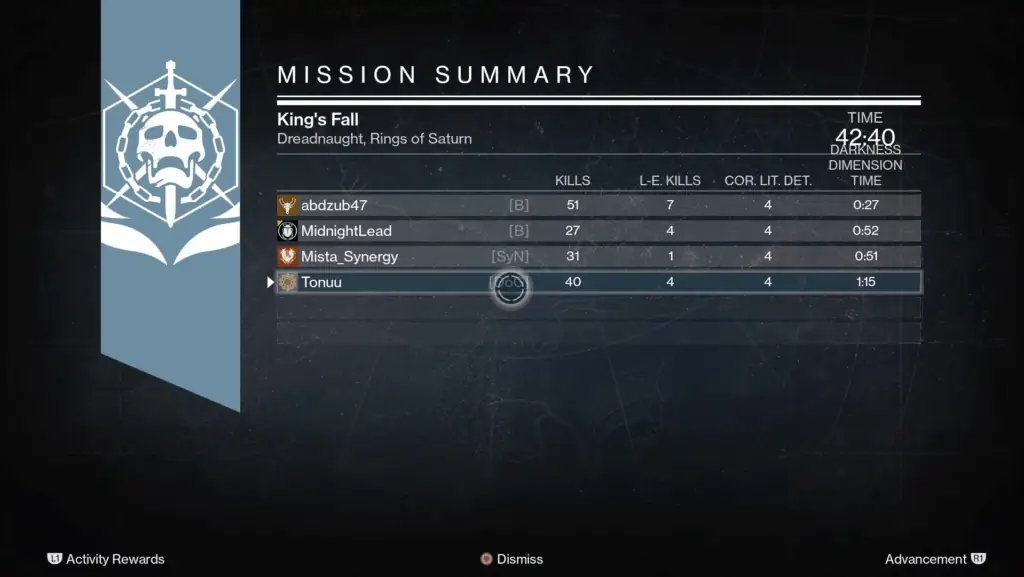
The D2 Raid Report is an unofficial tool that connects directly with Bungie's API to provide players with detailed raid statistics. While not an official Bungie product, it has become a reference point for Guardians who want to track their performance, analyze clears, and compare results with other players in the community.
Key Features of Raid Report D2
Using Raid Report Destiny 2, players can quickly access a range of statistics, such as:
- Total raids completed;
- Clears per difficulty (Normal, Heroic, Master);
- Fastest completion times;
- Number of deaths and revives during encounters;
- Raid participation trends over time.
These insights make the tool highly valuable for both casual and hardcore players who want to measure their progress and optimize their strategies.
Why the Community Uses Raid Report
The Raid Report D2 is widely respected in the Destiny 2 community for several reasons:
- It allows players to showcase their raid experience to clans or teams before joining high-level activities;
- It provides comparative data that helps players understand how they perform relative to others;
- It complements other tracking tools like Dungeon Report, Trials Report, and Crucible Report, giving a more complete overview of a Guardian’s PvE and PvP stats.
By combining detailed metrics and community validation, the D2 Raid Report remains the go-to solution for Guardians seeking reliable raid performance insights.
How to Use Raid Report (Step by Step)
Using D2 Raid Report is straightforward and allows Guardians to track their progress in Destiny 2 raids in detail. Here’s a simple step-by-step guide to get started:
Step 1: Access the Site
First, open your browser and go to Raid.Report. This is the main platform where all your Raid Report D2 data will be displayed.
Step 2: Enter Your Bungie ID or Gamertag
Once on the site, input your Bungie ID or Gamertag. This links your profile to the D2 Raid Report system, enabling it to pull stats directly from Bungie’s API.
Step 3: Explore Your Raid Stats
After entering your information, you can view detailed raid statistics, including:
- Total raids completed;
- Clears per mode (Normal, Heroic, Master);
- Average completion time;
- Deaths, revives, and other performance metrics.
Here’s an example table illustrating how stats might appear on Raid Report D2:
| Raid Name | Normal Clears | Heroic Clears | Master Clears | Fastest Time | Deaths | Revives |
| Garden of Salvation | 15 | 7 | 3 | 32m 15s | 12 | 5 |
| Deep Stone Crypt | 20 | 10 | 5 | 28m 40s | 18 | 6 |
| Vault of Glass | 12 | 8 | 2 | 35m 10s | 14 | 4 |
Step 4: Compare and Analyze
Beyond viewing your individual stats, D2 Raid Report allows comparisons with other Guardians or teams. This can help you:
- Identify strengths and weaknesses in your raid performance;
- Prepare for more challenging encounters;
- Evaluate your experience against broader community trends using tools like Dungeon Report, Trials Report, and Crucible Report.
With this step-by-step approach, players can maximize the insights from raid report destiny 2 and make informed decisions to improve their raid experience.
Other Destiny 2 Reports You Should Know

While the D2 Raid Report is essential for tracking raids, there are other tools that Guardians use to monitor different aspects of Destiny 2 gameplay. Understanding these alternatives can help you get a more complete view of your performance.
Dungeon Report: Tracking PvE Challenges
Dungeon Report focuses on Destiny 2 dungeons, providing detailed stats similar to raid tracking. Players can see:
- Completed dungeon activities;
- Clears per difficulty;
- Completion times;
- Deaths and revives.
This tool is perfect for Guardians who enjoy PvE content outside of raids and want insights similar to those offered by Raid Report D2.
Trials Report: Performance in PvP
For those who enjoy competitive PvP, the Trials Report tracks performance in Trials of Osiris. Using Destiny Trials Report, players can check:
- Match outcomes;
- K/D ratios;
- Weapon usage;
- Win streaks.
It’s a valuable tool to measure your Trials performance and compare it with other Guardians in the community.
Crucible Report: General PvP Stats
The Crucible Report gives a broader view of PvP activity in Destiny 2. It tracks metrics like:
- Win/loss ratios;
- Kill/death statistics;
- Most-used weapons;
- Map performance.
For PvP-focused players, combining Crucible Report with Trials Report provides a complete overview of competitive stats.
Warmind.io: A Complete Dashboard
Finally, Warmind.io offers a comprehensive dashboard covering both PvE and PvP. It aggregates data from raids, dungeons, Trials of Osiris, and Crucible, allowing players to see their performance across all game modes in one place.
Why D2 Raid Report Matters

Raids are the pinnacle of Destiny 2’s endgame content, and understanding your performance is essential for any serious Guardian. The D2 Raid Report is widely used to track stats, measure progress, and ensure players are ready for high-level encounters.
Measuring Individual Progress
Using Raid Report D2, players can clearly see how they are improving over time. Key benefits include:
- Tracking total raids completed;
- Comparing clears across different difficulties;
- Monitoring fastest completion times;
- Reviewing deaths and revives to identify areas for improvement.
This makes it easier for Guardians to set personal goals and focus on areas that need improvement.
Validating Experience for Teams and Clans
The D2 Raid Report is also crucial for community and clan activities. Before recruiting members for raids, teams often check raid stats to ensure experience levels. This can include:
- Evaluating raid participation history;
- Confirming proficiency in different raid encounters;
- Comparing stats with other tools like Dungeon Report, Trials Report, and Crucible Report.
By using raid report destiny 2, clans and communities can maintain high standards for their members while also fostering a competitive and collaborative environment.
Enhancing Team Strategies
Beyond individual tracking, the D2 Raid Report helps teams plan strategies by analyzing metrics such as:
- Average completion time per encounter;
- Player performance trends;
- Coordination needs for complex mechanics.
These insights help optimize raid runs and ensure Guardians are prepared for the most challenging encounters.
Improve Your Raid Experience (with ExitLag)

Raids in Destiny 2 are long, challenging, and require full focus. Unfortunately, issues like lag, disconnections, and unstable connections can ruin even the best-planned runs. Using D2 Raid Report helps you track your progress, but nothing replaces a stable connection for real-time performance. That’s where ExitLag comes in.
How ExitLag Enhances Your Gameplay
ExitLag is a route optimization software for online games that reduces lag, high ping, and packet loss. It works by sending your data through multiple routes and automatically selecting the fastest and most stable path to the game server. This ensures:
- Lower latency for faster reactions;
- Stable connections during long raid encounters;
- Reduced chances of disconnections during critical moments.
By combining tools like Raid Report D2, Dungeon Report, and Trials Report, with ExitLag, players can focus on strategy instead of connection issues.
Benefits for Destiny 2 Raids
Using ExitLag while tracking stats on raid report destiny 2 can make a noticeable difference in your raid experience:
- Smoother gameplay in endgame content;
- Reliable performance during long encounters and boss fights;
- Optimized routes that help minimize lag spikes, even in peak hours;
- Multi-route technology ensuring the fastest path to Destiny 2 servers.
With ExitLag, Guardians can spend less time worrying about technical issues and more time completing raids efficiently.
Experience ExitLag to secure victory against Destiny 2’s most challenging raid bosses and enjoy a more stable, responsive connection throughout your runs.
FAQ
D2 Raid Report is an unofficial tool that connects to Bungie's API to track detailed Destiny 2 raid stats, including clears, fastest times, deaths, and revives.
Visit Raid.Report, enter your Bungie ID or Gamertag, and view detailed statistics for each raid you’ve completed.
Yes, Raid Report D2 is safe to use. It only reads data from Bungie’s API and does not require sensitive information beyond your public profile.
Alternatives include Dungeon Report for dungeon stats, Trials Report for PvP performance, Crucible Report for general PvP stats, and Warmind.io for a full dashboard of PvE and PvP metrics.
Use Trials Report or Destiny Trials Report to enter your Bungie ID and track your Trials of Osiris performance, including win/loss ratios, K/D, and weapon usage.
Level Up Your Raid Experience with ExitLag
Tracking your progress with D2 Raid Report is crucial, but stable connections are essential for success in Destiny 2 raids. Don’t let lag ruin your runs, use ExitLag to play Destiny 2 with maximum stability and enjoy smoother, more reliable raids.
Don’t let lag ruin your raid runs, use ExitLag to play Destiny 2 with maximum stability.