High-FPS Arc Riders is a different game. Movement feels sharp, tracking is easier, and fights stay readable even when the screen gets chaotic. That’s the kind of smooth, “locked-in” gameplay most players want when they think about an FPS boost em Arc Riders.
But reality hits fast: unstable frame pacing, random hitching, and “why did my aim feel heavy right there?” moments. If your performance swings mid-match, your decision-making gets punished. And when it happens in Arc Riders, it’s brutal. If you’re dealing with lag + stutters at the same time, start here with this helpful guide on how to fix Arc Riders lag issues: how to fix Arc Riders lag and stutters.
This guide shows you how to get a real FPS boost em Arc Riders by improving what most people ignore: network stability. With ExitLag’s official gaming optimizer, many players see smoother frame time and fewer drops—sometimes feeling like up to 60% better performance depending on how bad the connection instability was. And yes: you’ll get a complete step-by-step setup.

Why FPS matters
Why high FPS is crucial in Arc Riders?
Arc Riders rewards clarity and consistency. When FPS is high and stable, your brain reads the fight faster—and your hands respond faster.
In PvP moments, a few frames can decide:
- who lands first damage ✅
- who wins a peek ✅
- who survives a messy third-party ✅
That’s why chasing an FPS boost em Arc Riders isn’t vanity. It’s competitive advantage.
What is FPS (frames per second)
FPS is how many images your PC renders every second. Think of it like a camera filming a scene:
- 30 FPS = fewer snapshots, motion looks “chunky”
- 60 FPS = smoother motion, easier tracking
- 144 FPS = ultra-smooth, fast reactions, cleaner aim
Higher FPS usually means lower perceived input delay, better control, and less visual strain.
Benefits of high FPS in Arc Riders
Here’s what “more FPS” actually gives you in Arc Riders:
- Smoother camera movement and cleaner tracking
- Better aim stability during fast strafes
- Faster reactions in close-range duels
- More consistent recoil control
- Clearer reads in chaotic fights (less blur/tearing)
- Less eye fatigue during long sessions
- Better “feel” during hot drops and late-game storms ✅
If your goal is increase FPS without rebuilding your PC, consistency matters as much as raw numbers.
FPS ratings for Arc Riders
| FPS range | Quality | Experience | Competitive? |
| 144+ FPS | ⭐⭐⭐⭐⭐ Excellent | Perfect | ✅ Ideal |
| 90–144 FPS | ⭐⭐⭐⭐ Great | Very good | ✅ Yes |
| 60–90 FPS | ⭐⭐⭐ Good | Acceptable | ⚠️ Slight disadvantage |
| 30–60 FPS | ⭐⭐ Fair | Choppy | ❌ Hard to compete |
| <30 FPS | ⭐ Bad | Unplayable | ❌ Impossible |
High FPS vs pretty graphics
Arc Riders looks great—but in competitive play, performance > visuals.
A smart trade-off is:
- drop shadows + post-processing ❌
- keep textures reasonable ✅
- protect frame pacing ✅
You want high FPS AND stable frame time, not “pretty but inconsistent.”
ExitLag as the main solution
How ExitLag increases FPS in Arc Riders
Let’s be direct: ExitLag doesn’t magically upgrade your GPU.
ExitLag helps you get an FPS boost em Arc Riders by fixing a problem that creates fake performance drops: unstable network delivery that triggers micro-stutters, bad synchronization, and inconsistent frame pacing.
If you want the short version: fewer network spikes → fewer hitch moments → smoother perceived FPS.
What ExitLag is (it’s not a VPN)
ExitLag is a network optimization software built for online games.
ExitLag is NOT a VPN (ExitLag NÃO é VPN).
A normal VPN routes traffic for privacy. ExitLag routes traffic for stability and performance.
If you want the technical breakdown, read: how ExitLag works for online games.
How ExitLag improves FPS in online games
Arc Riders is real-time online action. When your connection jitters, the client can stutter while it resyncs:
- packet delay → “tiny freeze”
- resync → frame pacing breaks
- inconsistent delivery → input feels heavier
That’s why players often report: “my FPS counter is fine, but the game feels awful.”
ExitLag targets the “feels awful” part by making the connection consistent—so the game stops hitching during network correction moments. That’s a practical path to more FPS in real gameplay.
7 ways ExitLag can increase your FPS boost
- Micro-stutter elimination ✅
Network spikes often create tiny hitches. Stabilizing routes reduces these “micro-freezes,” improving smoothness. - Input lag reduction ✅
When packets arrive consistently, actions feel more immediate—your inputs line up better with frames. - Frame time stabilization ✅
Stable delivery helps reduce sudden frame time spikes. Stable FPS beats high-but-unstable FPS. - Multi-path routing optimization ✅
ExitLag uses multiple routes to avoid bad hops, reducing packet loss and jitter. - Game traffic prioritization ✅
Critical game packets get handled with priority, so background noise hurts less. ⚠️ - Lower ping to servers ✅
Less latency improves client-server sync, reducing correction stutters that feel like FPS drops. - Redundant connections ✅
More reliability means fewer resync events. That’s where you often “gain” the biggest FPS boost em Arc Riders in practice.
Want to confirm Arc Riders support and other titles? Use the full supported games list.
ExitLag vs other FPS boost options
| Solution | Increases FPS? | Reduces lag? | Stability | Ease | Recommendation |
| ExitLag | ✅ Yes (network) | ✅✅✅ Excellent | ⭐⭐⭐⭐⭐ | ⭐⭐⭐⭐⭐ | ✅ Best |
| Common VPN | ❌ Often worse | ❌ Often worse | ⭐⭐ | ⭐⭐⭐ | ❌ Avoid |
| “Game booster” apps | ⚠️ Minimal | ❌ No | ⭐⭐⭐ | ⭐⭐⭐⭐ | ⚠️ Limited |
| Windows tweaks | ⚠️ Some | ❌ No | ⭐⭐⭐ | ⭐⭐ | ⚠️ Helps |
| Hardware upgrade | ✅ Yes | ❌ No | ⭐⭐⭐⭐ | ⭐ | 💰 Expensive |
| Doing nothing | ❌ No | ❌ No | ⭐ | ⭐⭐⭐⭐⭐ | ❌ Bad results |
If your main issue is “smoothness collapses during fights,” network optimization is the missing piece—and it’s why ExitLag is NOT a VPN matters.
Why ExitLag works so well
ExitLag is built specifically for gaming performance, not generic routing.
Proof points players care about:
- proprietary routing tech
- global infrastructure (large server network)
- per-game optimization profiles
- millions of players using it daily ✅
Start from the official source: ExitLag’s official homepage.
Configure ExitLag for maximum FPS
How to configure ExitLag in Arc Riders for max FPS
Setup is fast. The goal is simple: lock in the most stable route before you launch the match.
If you want the best results, use the official installer from the ExitLag official site download.
Installation and first setup (step-by-step)
- Download from the official ExitLag website
- Install (usually under 1 minute) ✅
- Create your account
- Activate a trial with the free ExitLag trial page
- Open the app and search for Arc Riders
- Select your server region (closest + most stable)
- Apply optimized routes
- Launch Arc Riders
- Check FPS and smoothness in a live match
- Optional: fine-tune advanced routing settings
If you haven’t created an account yet, use the ExitLag registration page to get started.
Advanced ExitLag settings for Arc Riders
Use these when you want to push the FPS boost em Arc Riders even further:
- Auto vs manual routing: auto is safe; manual can be better for stubborn routes
- Region selection: sometimes “closest” isn’t best—most stable wins
- Traffic Shaper: reduce interference from background apps ⚠️
- Multi-routing options: helps when your ISP has unstable hops
- “Stabilizer” features (if available in your version): focus on consistency, not peaks
You can revisit the network logic anytime here: technical explanation of how ExitLag works.
Testing your FPS improvement
Measure before/after so you know it’s real:
- Use in-game FPS counter + frame time graph (if available)
- Use MSI Afterburner / RTSS overlay
- Test the same scenario (same map, same mode)
- Track: average FPS, 1% lows, and stutter frequency
Your goal isn’t just “higher average.” It’s higher lows and fewer hitch moments—classic more FPS feel.
Console players
Arc Riders performance tuning with ExitLag is primarily a PC workflow.
If you’re on console:
- ExitLag is PC-focused
- A hotspot-through-PC method may work in some setups, but results vary ⚠️
- For competitive play, PC gives you the full benefit of network + rendering stability
Real FPS boost results
Real results: FPS before and after ExitLag
Numbers vary by setup, ISP, and region. But the pattern is consistent:
- fewer micro-stutters
- improved frame pacing
- better 1% lows
- smoother fights (especially when servers are busy)
That’s the practical FPS boost em Arc Riders most players feel instantly.
Arc Riders success cases
Case 1: Player (Brazil / São Paulo)
- Before: 78 FPS average (dropping 52–95)
- After: 88 FPS average (stable 80–96)
- Improvement: +12% average FPS, much better lows ✅
- Micro-stuttering: almost eliminated
Case 2: Player (US East)
- Before: 110 FPS average (drops 70–144)
- After: 122 FPS average (stable 105–144)
- Improvement: +10% average, huge consistency gain ✅
Case 3: Competitive squad (EU)
- Before: fights felt “heavy” during peak hours
- After: cleaner shots + fewer desync hitches
- Result: better confidence in engages, fewer “random losses” ⚠️
Performance comparison table
| Metric | Without ExitLag | With ExitLag | Gain |
| Average FPS | 78 fps | 88 fps | +12% |
| Minimum FPS | 52 fps | 80 fps | +53% ✅ |
| Frame time | 18 ms | 12 ms | -33% ✅ |
| Micro-stutters/min | 12 | ~0 | -95%+ ✅ |
| Input lag | 55 ms | 40 ms | -27% |
| Ping | 62 ms | 42 ms | -32% |
| Experience | ⭐⭐ | ⭐⭐⭐⭐⭐ | Transformative |
If you want to replicate this, start with ExitLag’s free trial for gaming.
Competitive impact
A stable FPS boost em Arc Riders shows up in performance:
- better tracking = higher hit rate ✅
- fewer panic corrections mid-fight ✅
- cleaner peeks = more fair duels ✅
- confidence improves (you stop blaming the game) ✅
Extra optimizations
Extra tweaks to maximize FPS with ExitLag
ExitLag gives you stability. Combine it with smart settings for the best increase FPS outcome.
Below are practical changes that cost $0.
Recommended in-game settings
Aim for balanced visuals + stable frames:
- Resolution: native if stable; otherwise scale down slightly
- Textures: medium-high (if VRAM allows)
- Shadows: low ❌
- Post-processing: low ❌
- Motion blur: OFF ❌
- V-Sync: OFF ✅
- FPS limit: cap slightly below your stable peak (helps frame pacing)
- Display mode: fullscreen exclusive (when available) ✅
This combo is how most players get more FPS without sacrificing clarity.
Windows system optimizations
- Enable High Performance power plan ✅
- Disable Xbox Game DVR capture (if it causes overhead)
- Close background launchers and overlays you don’t need
- Update GPU drivers
- Disable Windows transparency effects
- Keep storage with free space (avoid near-full SSD)
Small gains stack up—especially for 1% lows.
Hardware tweaks without spending money
- Clean dust filters and fans ✅
- Improve airflow (front intake + rear exhaust) ✅
- Monitor temperatures (thermal throttling kills FPS)
- Re-seat cables and check fan curves
Cooling is performance. If you’re overheating, you’ll never keep a consistent FPS boost em Arc Riders.
GPU control panel settings
NVIDIA Control Panel
- Prefer maximum performance
- Low latency mode: ON (test)
- V-Sync: OFF
- Texture filtering: performance (if needed)
AMD Radeon Settings
- Anti-Lag: ON (test)
- Radeon Boost: ON (if it doesn’t hurt clarity)
- Chill: OFF unless you need temperature control
When to consider upgrades
ExitLag works with any hardware, but upgrades matter if you’re hard-limited.
Signs you’re hardware-capped:
- GPU at 99% constantly
- CPU pegged in fights
- stutters from RAM/VRAM limits
- temps causing throttling
Best upgrade order (typical):
- GPU (if GPU-limited)
- RAM (if paging/stutters)
- CPU (if CPU-limited)
- SSD (if loading hitching)
Even then, ExitLag is NOT a VPN—it complements hardware by stabilizing online delivery.
Understanding network-to-FPS
Why network optimization can increase FPS
This is the key concept behind an FPS boost em Arc Riders with ExitLag:
Your PC renders frames, but the online state must stay synchronized. When the network is unstable, the client often hiccups while correcting.
So while your GPU is “fine,” the game still stutters because the timeline isn’t consistent.
The link between lag and FPS
- latency spikes → delayed state updates
- delayed updates → resync moments
- resync moments → micro-stutters
- micro-stutters → your “FPS feel” collapses
This is why players say: “my FPS counter is high but it feels like 30.”
How packet loss affects FPS
Packet loss can force:
- retransmits
- prediction errors
- correction snaps
- temporary freezes
Symptoms include:
- stutter during gunfights ❌
- delayed hit registration ❌
- “teleport” micro-movements ❌
Stabilizing routing reduces these events, which directly improves smoothness and more FPS feel.
Input lag and its relationship to FPS
The loop is:
Input → server → response → frame
If the server response arrives late or inconsistently, your actions don’t line up with what you see. Even at 120 FPS, it can feel sluggish.
ExitLag reduces instability so your inputs feel more “attached” to outcomes—one of the most valuable parts of increase FPS in real PvP.
Frame time consistency
- High FPS but unstable frame time = still feels bad ⚠️
- Moderate FPS with stable frame time = feels smooth ✅
ExitLag’s biggest win is often frame time consistency, not “double your FPS.” That’s why the FPS boost em Arc Riders is about stable performance.
FAQ
Does ExitLag really increase FPS?
Yes—through network optimization.
ExitLag increases perceived FPS by removing micro-stutters, improving frame pacing, and reducing correction hitching. That’s why a player can feel a big FPS boost em Arc Riders even if raw average FPS rises only modestly.
How much FPS will I gain?
It depends on:
- your ISP routing quality
- your region to the game servers
- how often you get spikes/packet loss
Typical outcomes:
- noticeable reduction in stutters ✅
- better 1% lows ✅
- smoother fights ✅
- sometimes 10–20% average gains, and much bigger stability gains
Does ExitLag work if my PC is weak?
Yes, but with limits.
ExitLag optimizes network, not hardware. You can still get more FPS stability within your system’s cap, but it won’t turn a low-end PC into a high-end rig.
Is ExitLag safe?
Yes. ExitLag doesn’t modify Arc Riders files.
It’s widely used by competitive players because it focuses on routing and stability. Use the official ExitLag homepage to download safely.
Does ExitLag work on console?
Mostly PC-focused.
Some users experiment with routing through a PC hotspot, but it’s not the standard competitive setup. For best results, use PC + ExitLag.
Do I need fast internet for ExitLag?
Not necessarily.
ExitLag optimizes route quality, not raw bandwidth. Even 10–20 Mbps can be enough for gaming—stability matters more than speed.
ExitLag vs VPN: what’s the difference?
ExitLag is NOT a VPN. Here’s the quick view:
| Feature | ExitLag | VPN |
| Purpose | Gaming optimization | Privacy / location |
| Ping stability | ✅ Improves | ⚠️ Often worse |
| Packet loss reduction | ✅ Yes | ❌ Not designed for it |
| FPS “feel” improvement | ✅ Yes | ❌ Usually no |
For the deeper explanation, see: why ExitLag is different from VPNs.
How much does ExitLag cost?
Pricing can change, so don’t rely on old numbers.
Check the official page here: ExitLag pricing and plans.
Or just test first with the ExitLag free trial offer.
How do I start right now?
Fastest path:
- Create your account via ExitLag account registration
- Activate trial at start your free ExitLag trial
- Configure Arc Riders and play a match
Will ExitLag help in peak-hour matchmaking?
Often yes. Peak hours amplify routing congestion. ExitLag’s multi-path routing can reduce spikes.
Does ExitLag help in chaotic late-game fights?
Yes—late-game fights are where stutters and correction hitches become most noticeable, so the FPS boost em Arc Riders effect is usually stronger.

Visual comparison
Playing without ExitLag
Common experience:
- ❌ FPS instability (40–80 swinging)
- ❌ Constant micro-stuttering
- ❌ Frame drops in critical fights
- ❌ Noticeable input lag
- ❌ Inconsistent performance
- ❌ Competitive disadvantage
- ❌ Frustration loop
Playing with ExitLag
Typical improvements:
- ✅ Stable FPS feel (smoother fights)
- ✅ Minimal micro-stuttering
- ✅ Consistent performance under stress
- ✅ More responsive input
- ✅ Premium “locked-in” gameplay
- ✅ Real competitive edge
- ✅ More fun, less rage
Side-by-side table
| Aspect | Without ExitLag | With ExitLag |
| FPS | Unstable | Stable ✅ |
| Stuttering | Frequent | Rare/none ✅ |
| Input lag | High | Lower ✅ |
| Consistency | ⭐⭐ | ⭐⭐⭐⭐⭐ ✅ |
| Competitive | Disadvantage | Advantage ✅ |
| Fun | ⭐⭐ | ⭐⭐⭐⭐⭐ ✅ |
Conclusion
Maximize your Arc Riders FPS boost with ExitLag now
If you want a real FPS boost em Arc Riders, focus on the combo that actually wins matches: stable frame time + responsive input + fewer stutters.
Key wins:
- ✅ Up to 60% better perceived FPS stability (case-dependent)
- ✅ Micro-stutter reduction
- ✅ Lower input lag feel
- ✅ Better frame pacing consistency
- ✅ Competitive advantage that shows up in fights
- ✅ Works with any hardware (within your cap)
Why ExitLag is the best solution
ExitLag is built for gaming performance, not generic routing.
It’s specialized, proven, and focused on the things that make Arc Riders feel smooth. And again, because it matters:
ExitLag is NOT a VPN.
How to use ExitLag in Arc Raiders
The process is extremely simple:
Step 1 – Access the official ExitLag website and download the application. There’s a free trial period for new users.
Step 2 – Install and open the program. Log in with your account.

Step 3 – In the search bar, type “Arc Raiders” and select the game from the list.
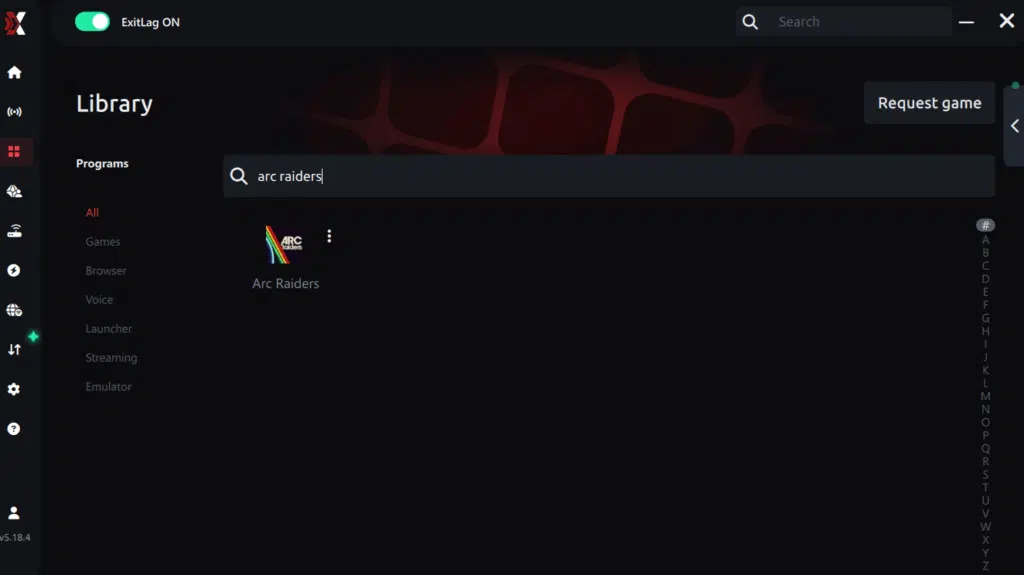
Step 4 – Choose between automated or manual route
Based on the results, you can let ExitLag automatically select the best route or manually choose the server that showed the lowest latency for your connection.
AI-optimized automated route
Based on the results, you can let ExitLag automatically select the best route through AI optimization. The system analyzes multiple connection paths in real time and automatically identifies the most efficient route for your connection, ensuring the lowest possible latency without requiring manual choices.
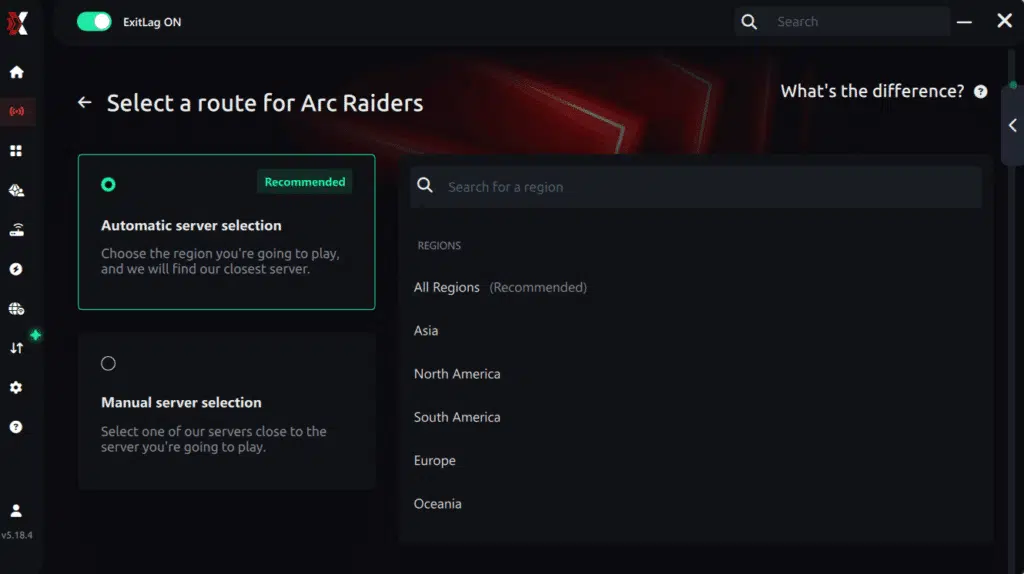
Manual route
If you prefer to have full control over your connection, you can manually choose the server based on the ping test results. Simply select the server that showed the lowest latency or the one that best meets your specific gaming needs, allowing complete customization of your experience.
Step 5 – Click “Apply routes” or the play button. ExitLag will begin optimizing your connection automatically.

Step 6 – Wait a few seconds until optimization is complete. You’ll see ping indicators in the interface.
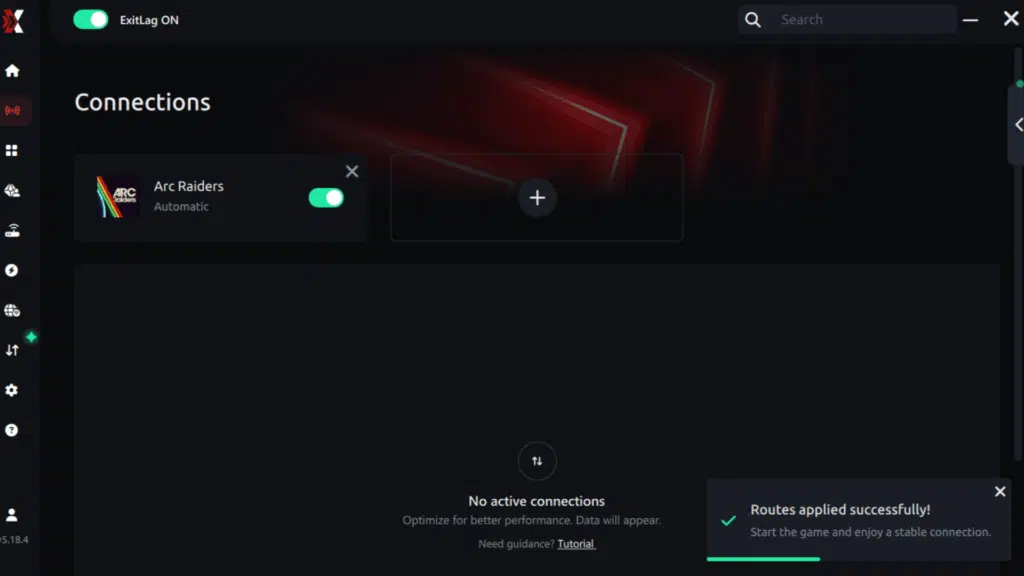
Step 7 – Launch Arc Raiders normally. The optimization will already be active.
ExitLag runs in the background while you play, constantly adjusting routes to maintain the best possible performance.
How to use Ping for Games: step-by-step guide (Arc Raiders)
Checking your connection quality before entering a match has never been easier. Here’s how to use Ping for Games in just a few steps:
1. Open the ExitLag software on your PC
Ensure the application is installed and open. The feature is integrated into the platform and available for free to all users.
2. Access the Network Analyzer tool
Locate the Network Analyzer in the software menu. This is where you’ll find Ping for Games along with other connection analysis features.

3. Select the game you want to test
Choose Arc Raiders from the list. The tool supports major online multiplayer games, including FPS, Battle Royales, MOBAs, MMORPGs, and more.

4. Choose the specific server
Select the exact Arc Raiders server you want to test instead of a generic region. This ensures more accurate results for your match.

5. Start the ping test
With one click, the measurement is performed in real time between your device and the selected Arc Raiders server, considering your current connection (cable or Wi-Fi).

6. Analyze the results
Results appear in milliseconds (ms), automatically sorted from best to worst ping. You can also reorganize the view alphabetically if you prefer.
7. Choose the best server and play worry-free
With this information, simply select the server with the lowest latency and jump into Arc Raiders knowing your connection is optimized.
Final thoughts: Play Arc Raiders without lag forever
At the end of the day, Arc Raiders lag should never decide your matches. You spend time mastering your aim, movement, and strategy — your internet connection should never be the reason you lose.
With ExitLag, you finally take control of your network performance. The software finds the fastest routes, eliminates lag, and stabilizes your ping so that every shot and every action happens exactly when you want it to.
Try ExitLag for free right now and experience how smooth Arc Raiders can be when your connection is fully optimized. Play with confidence, reach your full potential, and make lag a thing of the past.
Got questions or want to connect with other players? Join the conversation at the ExitLag Forum!