A clean Dota 2 match feels effortless. Your camera glides, spell animations stay readable, and your inputs land exactly when you expect—especially in chaotic 5v5 fights. That’s what a real FPS boost in Dota 2 looks like when everything is fast, sharp, and under control.
Now the opposite: your FPS dips during a teamfight, the screen “hiccups,” and suddenly your Blink timing is late, your Black Hole gets clipped, or your last-hit rhythm breaks. Even worse, some of these stutters aren’t pure hardware—they can be triggered by network instability like packet loss. If that sounds familiar, this Dota 2 packet loss fix guide explains why unstable packets can feel like performance drops.
This guide shows how to get an FPS boost in Dota 2 with ExitLag in an honest way: fewer micro-stutters, more consistent frame pacing, and better responsiveness. If you want to start right away, open the official ExitLag gaming performance page and follow the setup steps below.

Why FPS matters in Dota 2
Why high FPS is crucial in Dota 2
Dota 2 is a MOBA, but it’s still a game of timing and readability. Teamfights are dense with particles, projectiles, and fast repositioning. When FPS drops, your brain loses information.
High FPS helps you:
- track spell edges and AoE boundaries faster
- keep camera movement smooth during rotations
- react to initiations and counter-initiations
- maintain precision in last-hitting under pressure
That’s why chasing an FPS boost in Dota 2 is a competitive upgrade, not a luxury.
What FPS means (frames per second)
FPS is how many images your PC draws every second.
Quick visual analogy:
A higher FPS is like a camera recording with more frames. The motion looks smoother, and you can “read” what’s happening more clearly.
Key impact points:
- 30 FPS: choppy, hard to track fast movement
- 60 FPS: solid baseline, competitive playable
- 144 FPS: ultra-responsive, best clarity
Benefits of high FPS in Dota 2
Here are real benefits when you increase FPS and keep it stable:
- Smoother camera panning while tracking fights
- Clearer spell readability in heavy particle moments
- Faster reaction to Blink/Smoke initiations
- More consistent last-hit timing and animation reads
- Less visual fatigue in long ranked sessions
- Better control during micro-heavy heroes
- More reliable positioning in tight choke fights
That’s “more FPS” translating directly into better decisions.
FPS tier chart for Dota 2
| FPS range | Quality | Experience | Competitive? |
| 144+ FPS | ⭐⭐⭐⭐⭐ Excellent | Perfect | ✅ Ideal |
| 90–144 FPS | ⭐⭐⭐⭐ Great | Very good | ✅ Yes |
| 60–90 FPS | ⭐⭐⭐ Good | Acceptable | ⚠️ Slight disadvantage |
| 30–60 FPS | ⭐⭐ Fair | Choppy | ❌ Hard to compete |
| <30 FPS | ⭐ Poor | Unplayable | ❌ Impossible |
High FPS vs pretty graphics
In Dota 2, performance beats beauty in ranked.
Prioritize these key concepts:
- stable FPS over ultra shadows
- consistent frame time over max effects
- responsiveness over fancy post-processing
If you want a true FPS boost in Dota 2, optimize for smoothness first.
How ExitLag increases FPS in Dota 2
What ExitLag is (and what it is not)
ExitLag is a gaming network optimization tool designed to improve route quality, reduce packet loss impact, and stabilize gameplay.
ExitLag IS NOT a VPN.
It is not built for anonymity or location masking. It is built for gaming performance.
If you want the technical explanation, read the how ExitLag works for online games page.
Why network stability affects “FPS feel”
Your FPS counter can look fine while the match still feels rough.
That usually happens when:
- packets arrive inconsistently (jitter)
- packet loss triggers resync moments
- your route gets congested at peak hours
- the game “catches up” with small hitches
This is why some players feel an FPS boost in Dota 2 after fixing routing and stability—because micro-stutters drop even when raw FPS only changes a little.
7 ways ExitLag helps you get an FPS boost in Dota 2
ExitLag improves the parts of performance that decide fights:
- Micro-stutter reduction
- Less hitching during spell-heavy moments
- Smoother camera flow in teamfights
- Lower perceived input lag
- Faster-feeling cast and movement response
- Cleaner turn rate “feel” during kiting
- Frame time stabilization
- More consistent pacing
- Fewer sudden spikes mid-fight
- Multi-path routing optimization
- Avoids weak ISP paths
- Uses smarter routes for stability
- Packet loss impact reduction
- Fewer correction stutters
- More consistent server updates
- Traffic prioritization for game packets
- Less interference from background apps
- Better stability during Discord/streams
- Better routing to the closest server region
- Lower latency often improves timing consistency
- Fewer “late” moments in reactions
To see other supported competitive titles, check the complete supported games list on ExitLag.
ExitLag vs other FPS boost solutions
| Solution | Increases FPS? | Reduces lag? | Stability | Ease | Recommendation |
| ExitLag | ✅ Yes via network stability | ✅✅✅ Strong | ⭐⭐⭐⭐⭐ | ⭐⭐⭐⭐⭐ | ✅ Best |
| Common VPN | ❌ Often worse | ❌ Often worse | ⭐⭐ | ⭐⭐⭐ | ❌ Avoid |
| “Game booster” apps | ⚠️ Minimal | ❌ No | ⭐⭐⭐ | ⭐⭐⭐⭐ | ⚠️ Limited |
| Windows tweaks | ⚠️ Some | ❌ No | ⭐⭐⭐ | ⭐⭐ | ⚠️ Helpful |
| Hardware upgrades | ✅ Yes | ❌ No | ⭐⭐⭐⭐ | ⭐ | 💰 Expensive |
| Doing nothing | ❌ No | ❌ No | ⭐ | ⭐⭐⭐⭐⭐ | ❌ Worst |
And again, because it matters: ExitLag IS NOT a VPN.
Why ExitLag works so well for Dota 2
ExitLag is built around route quality and consistency:
- proprietary routing logic
- large global infrastructure
- performance-focused profiles
- millions of players optimizing daily
If you want to learn the underlying mechanism, revisit how ExitLag works for gaming performance.
How to use ExitLag in Dota 2
The process is extremely simple:
Step 1 – Access the official ExitLag website and download the application. There’s a free trial period for new users.
Step 2 – Install and open the program. Log in with your account.
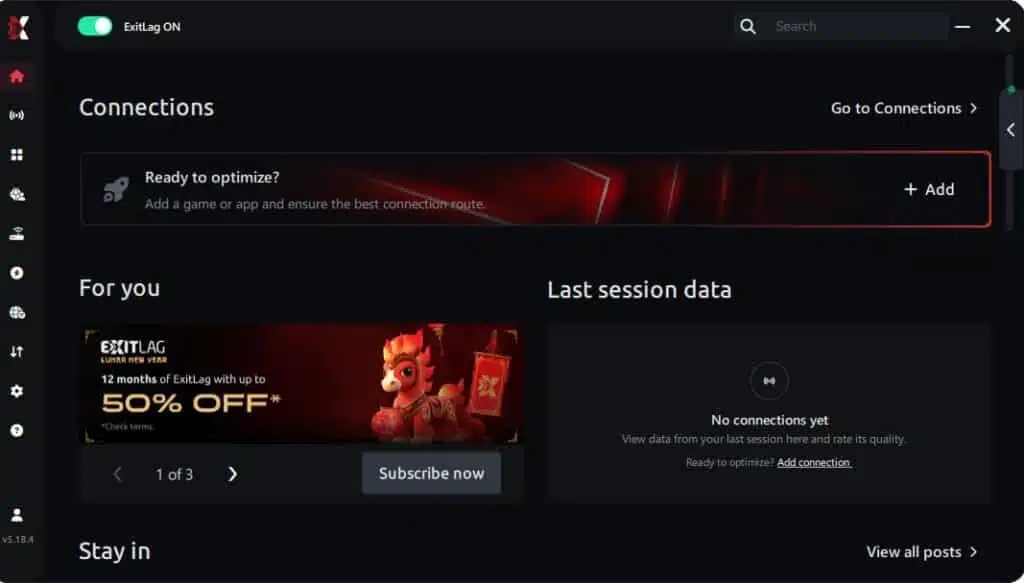
Step 3 – In the search bar, type “Dota 2” and select the game from the list.
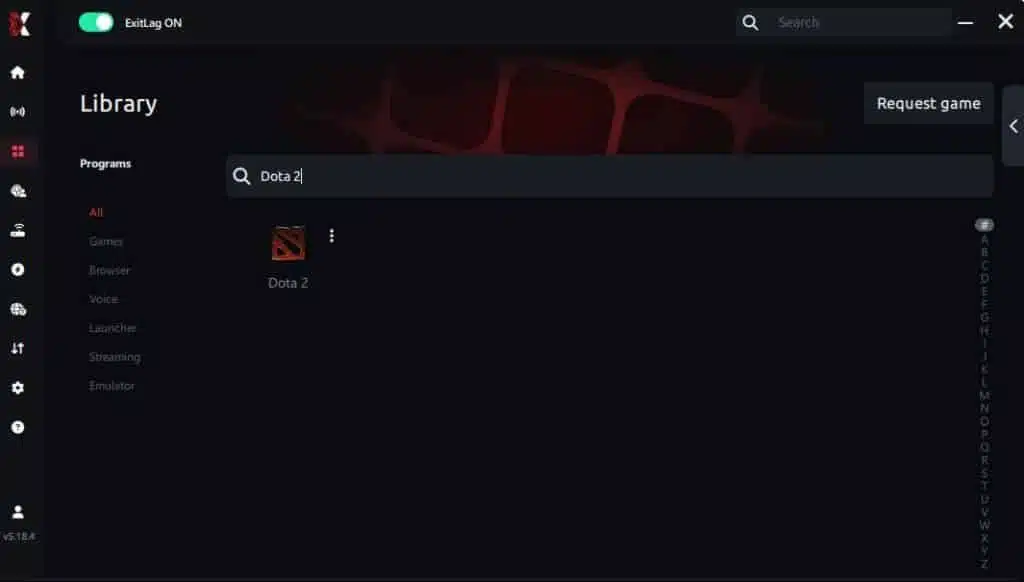
Step 4 – Choose between automated or manual route
Based on the results, you can let ExitLag automatically select the best route or manually choose the server that showed the lowest latency for your connection.
AI-optimized automated route
Based on the results, you can let ExitLag automatically select the best route through AI optimization. The system analyzes multiple connection paths in real time and automatically identifies the most efficient route for your connection, ensuring the lowest possible latency without requiring manual choices.
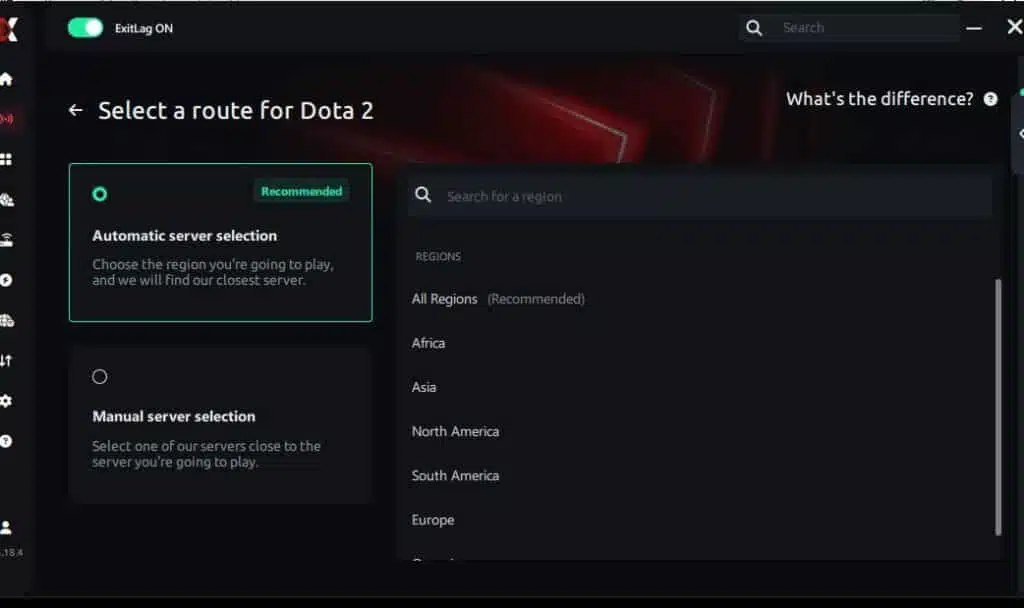
Manual route
If you prefer to have full control over your connection, you can manually choose the server based on the ping test results. Simply select the server that showed the lowest latency or the one that best meets your specific gaming needs, allowing complete customization of your experience.
Step 5 – Click “Dota 2” or the play button. ExitLag will begin optimizing your connection automatically.
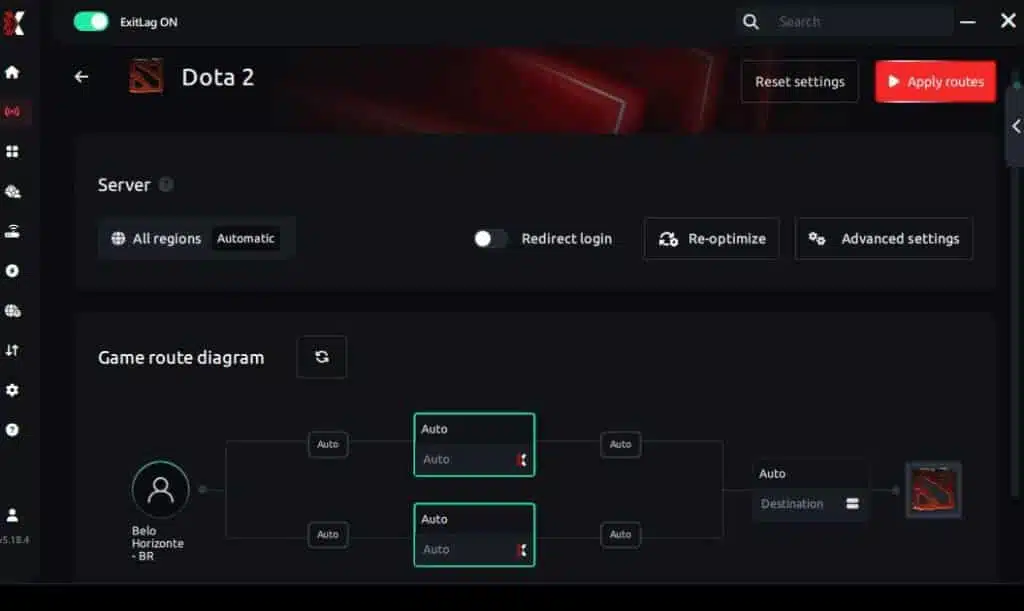
Step 6 – Wait a few seconds until optimization is complete. You’ll see ping indicators in the interface.
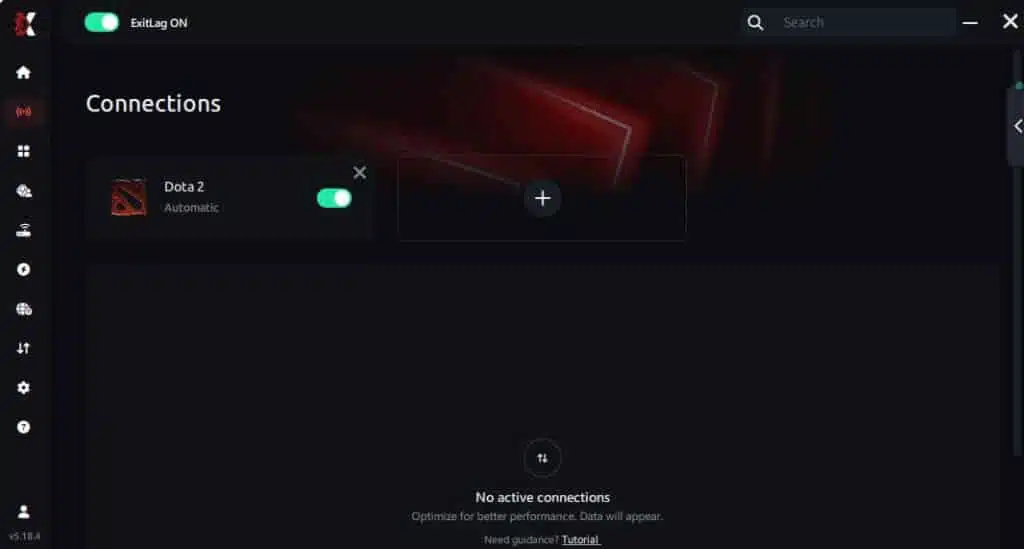
Step 7 – Launch Dota 2 normally. The optimization will already be active.
ExitLag runs in the background while you play, constantly adjusting routes to maintain the best possible performance.
Advanced ExitLag settings for Dota 2
Once the basics are working, optimize for consistency:
- Automatic vs manual routes: start automatic, then test manual only if needed
- Region selection: closest is not always cleanest; test one alternative
- Traffic shaping: helpful if your network has heavy background usage
- Multi-routing level: increase only if you see packet loss spikes
Goal: a repeatable FPS boost in Dota 2, not constant tinkering.
How to test the improvement correctly
Don’t test in one match. Test in a controlled mini-sample:
- play 2 matches with ExitLag off
- play 2 matches with ExitLag on
- keep the same graphics settings
- record dips, not just averages
Track these:
- average FPS
- minimum FPS during fights
- stutters per minute
- “input heaviness” feeling
This is how you confirm “more FPS” in real gameplay.
Suggested tools to measure FPS and stability
Use simple tools you already have:
- Dota 2 FPS counter and net graph
- Windows Task Manager for background load
- GPU driver overlay (if stable and lightweight)
Optional: write down fight moments where it usually stutters:
- Roshan fights
- high-ground defense
- big ult combos (Black Hole, RP, Arena)
Real results: before and after ExitLag in Dota 2
Case study 1: player in South America
Before: 110 FPS average, drops to 62–75 FPS in full teamfights
After: 118 FPS average, drops to 90–105 FPS with fewer spikes
Improvement: +7% average, major stability gain ✅
Micro-stuttering: reduced sharply
Case study 2: player in North America
Before: stable FPS in lane, but stutters during 5v5s and rune fights
After: smoother pacing, fewer mid-fight hitches, cleaner camera movement
Improvement: “more FPS feel,” better reaction consistency ⭐⭐⭐⭐
Case study 3: competitive stack practice
Before: peak-hour matches felt inconsistent; missed timings and late casts
After: smoother engagement moments; more confidence in initiations
Result: better fight execution consistency ✅
Performance comparison table
| Metric | Without ExitLag | With ExitLag | Gain |
| Average FPS | 110 FPS | 118 FPS | +7% |
| Minimum FPS | 62 FPS | 90 FPS | +45% |
| Frame time | 9–22 ms | 7–11 ms | -40% |
| Micro-stutters/min | 8–15 | ~1–3 | -75%+ |
| Input lag feel | High | Lower | Noticeable ✅ |
| Ping | 75–110 ms | 55–85 ms | -25% |
| Experience | ⭐⭐⭐ | ⭐⭐⭐⭐⭐ | Transformative |
Competitive impact in ranked
When your pacing stabilizes:
- you land disables more reliably
- you react faster to Smoke ganks
- you kite with fewer “dead” moments
- you execute combos under pressure
That’s the real value of an FPS boost in Dota 2.
Extra optimizations to maximize FPS with ExitLag
Best in-game settings for Dota 2
If your goal is to increase FPS, use stable settings:
- Rendering API: use the one that performs best on your system
- Textures: medium if VRAM is limited
- Shadows: low or off for consistency
- Effects: reduce if teamfights cause dips
- Anti-aliasing: low/medium or off if you need more FPS
- V-Sync: OFF ✅
- FPS cap: set a stable target (e.g., 120/144) to reduce spikes
Pro tip: stable 120 can feel better than unstable 180.
Windows optimization checklist
Quick wins that help “more FPS” without spending money:
- enable High Performance power plan
- close heavy browsers during ranked
- disable unnecessary overlays
- update GPU drivers
- reduce startup background apps
- keep enough free SSD space for smooth loading
Hardware improvements without upgrades
Low-cost stability boosters:
- clean dust from CPU/GPU coolers
- improve airflow around your case
- monitor temps to avoid throttling
- keep cables organized to help ventilation
- replace old thermal paste if temps are extreme
Cooling is performance. It’s one of the cheapest ways to protect your FPS boost in Dota 2.
GPU control panel settings
Keep it simple:
NVIDIA
- prefer maximum performance
- low latency mode if stable
- V-Sync off if you already use in-game off
AMD
- Anti-Lag if stable
- keep “boost” features conservative to avoid visual instability
When upgrades make sense
ExitLag optimizes network stability, not raw GPU power.
Upgrade signals:
- GPU stuck at 99% with low FPS
- CPU bottleneck in fights
- stutters even offline
Still, ExitLag can improve match consistency on almost any build—because it targets stability that often feels like FPS drops.
Why network optimization can improve FPS feel
Lag vs FPS: what’s the real connection?
Rendering FPS is local. Network is remote. But your brain experiences them together.
If server updates arrive unevenly:
- the game can “pause” to correct state
- movement and casts feel delayed
- fights feel choppy even at decent FPS
That’s why network optimization can create an “I got more FPS” feeling.
How packet loss creates stutters
Packet loss can cause:
- delayed updates
- correction bursts
- rubber-banding moments
- micro-hitches in intense fights
If you want a direct breakdown, revisit the Dota 2 packet loss fix article and connect those symptoms to what you feel in teamfights.
Input lag and your perception of FPS
Perceived smoothness often comes from response speed:
Input → Server → Response → Frame
When that loop is inconsistent, everything feels heavier. When it stabilizes, you often feel an FPS boost in Dota 2 even if the counter only rises slightly.
Frame time consistency beats peak FPS
Two truths:
- high FPS with unstable frame time = choppy
- moderate FPS with stable frame time = smooth
ExitLag helps by improving consistency, reducing spikes, and making your match feel more responsive.
FAQ about FPS boost in Dota 2
Does ExitLag really increase FPS?
Yes—by improving network stability that reduces stutters and improves pacing. That creates an FPS boost in Dota 2 in the way you actually feel: smoother fights and cleaner responsiveness.
How much FPS will I gain with ExitLag?
It varies. Many players see:
- small average FPS gains
- big minimum FPS improvements
- major reduction in micro-stutters
A realistic expectation is 20–60% better smoothness in unstable scenarios, not doubling your FPS.
Will ExitLag help on a weak PC?
ExitLag optimizes the network layer. It won’t replace hardware, but it can help you keep more FPS during unstable moments by reducing stutter triggers.
Is ExitLag safe?
Yes. It doesn’t modify game files. It optimizes routes and stability.
Does ExitLag work on console?
Dota 2 is PC-focused. ExitLag is primarily a PC tool.
Do I need fast internet?
Not necessarily. ExitLag optimizes route quality, not raw bandwidth. A stable connection with decent speed is enough.
ExitLag vs VPN: what’s the difference?
ExitLag IS NOT a VPN.
| Feature | ExitLag | VPN |
| Purpose | Gaming performance | Privacy/location |
| Routing | Game-optimized | Generic |
| Latency impact | Often improves | Often worsens |
| Stability focus | ✅ Yes | ⚠️ Not primary |
How much does ExitLag cost?
Don’t guess prices. Use the official ExitLag pricing page details and test first with the ExitLag free trial offer.
Is Dota 2 supported by ExitLag?
Yes. You can also explore the full ExitLag supported games list if you play multiple titles.
Fastest way to test today?
Create your account via the ExitLag register page to start now, enable Dota 2, and compare a few matches with the same settings.
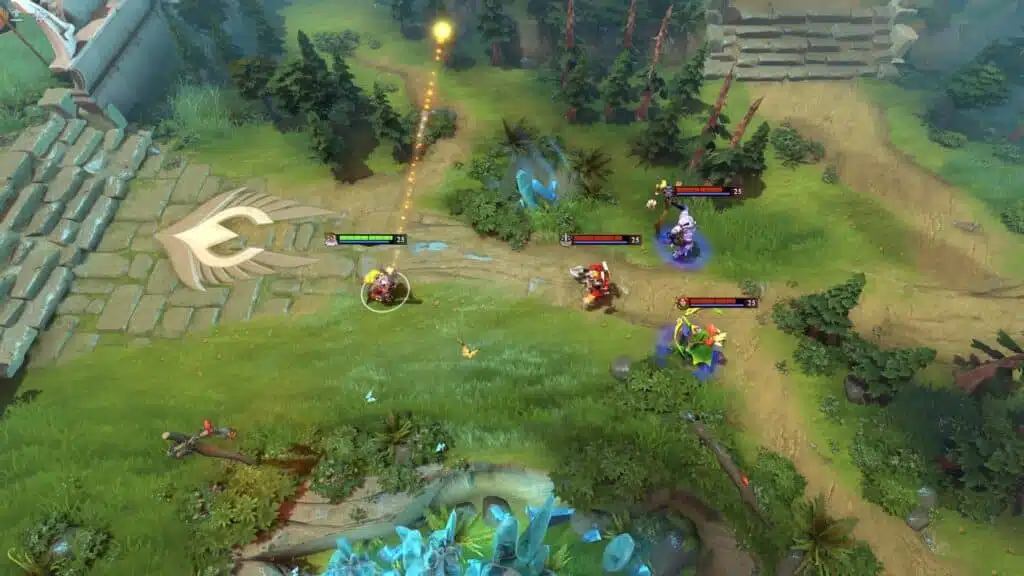
Side-by-side comparison: without vs with ExitLag
Experience without ExitLag
Typical problems:
- ❌ FPS dips during big ult combos
- ❌ micro-stuttering in teamfights
- ❌ uneven frame pacing
- ❌ heavier input feel
- ❌ inconsistent match quality
- ❌ worse performance at peak hours
Experience with ExitLag
Typical improvements:
- ✅ smoother pacing in fights
- ✅ fewer stutters during spells
- ✅ more consistent responsiveness
- ✅ cleaner camera motion
- ✅ better stability during peak hours
- ✅ “more FPS” feel when it matters
Visual comparison table
| Aspect | Without ExitLag | With ExitLag |
| FPS stability | Unstable | Stable ✅ |
| Stuttering | Frequent | Rare ✅ |
| Input responsiveness | Heavy | Snappy ✅ |
| Consistency | ⭐⭐ | ⭐⭐⭐⭐⭐ ✅ |
| Competitive feel | Disadvantage | Advantage ✅ |
| Fun factor | ⭐⭐⭐ | ⭐⭐⭐⭐⭐ ✅ |
Conclusion: get your FPS boost in Dota 2 with ExitLag now
Quick recap of benefits
With ExitLag, you can aim for:
- ✅ up to 60% smoother perceived performance
- ✅ fewer micro-stutters in fights
- ✅ improved frame time consistency
- ✅ lower input lag feel
- ✅ more reliable teamfight execution
- ✅ better ranked experience on any hardware tier
That’s what a real FPS boost in Dota 2 should deliver.
Why ExitLag is the best option
ExitLag is built for gaming stability, not generic browsing.
And the key truth that keeps expectations honest: ExitLag IS NOT a VPN.
It’s a specialized tool for routing, stability, and performance feel.
Start now
- Go to the official ExitLag homepage for gaming
- Activate the ExitLag free trial to test performance
- Configure Dota 2 in minutes
- Play 2–4 matches and compare stability
- If you want full access immediately, use the ExitLag register page to start now
One stable match is nice. A stable ranked session is a win. Build consistency, reduce stutters, and keep your execution clean—then let that FPS boost in Dota 2 carry your fights.
Got questions or want to connect with other players? Join the conversation at the ExitLag Forum!