A clean spray transfer. A fast peek. A smooth flick that lands exactly where your brain expects it to. That’s what PUBG feels like when your frames are stable and your inputs are immediate—no surprises, no weird hitching, just pure control. That’s the real promise behind an FPS boost in PUBG.
But when your FPS swings mid-fight—especially in hot drops, dense compounds, or late circles—your crosshair feels “heavy,” your tracking breaks, and your timing gets inconsistent. You can have a great PC and still lose fights because your performance is unstable. That’s why chasing an FPS boost in PUBG is about stability as much as raw numbers.
And if your matches also suffer from network spikes, start here: this guide on how to fix high ping in PUBG explains what’s happening and how to stabilize it: PUBG high ping troubleshooting guide. High ping often creates micro-stuttering and pacing issues that feel like FPS drops.
In this complete guide, you’ll learn how ExitLag can deliver an FPS boost in PUBG by stabilizing your connection, reducing stutters, improving frame pacing, and lowering input delay—often resulting in up to 60% better FPS stability in real gameplay. To begin testing right now, visit the official ExitLag website.

Why FPS matters in PUBG
Why high FPS is crucial in PUBG
PUBG is a battle royale where a single timing mistake can end your match. Stable FPS helps you:
- Track targets during recoil patterns ✅
- Maintain control in close-range fights ✅
- Peek and prefire with predictable timing ✅
- React faster in third-party situations ✅
- Handle chaotic late circles without choking ❌➡️✅
An FPS boost in PUBG is basically “less randomness in your hands.”
What is FPS (frames per second)
FPS is how many frames your PC renders every second—like a camera taking pictures:
- 30 FPS: choppy and delayed
- 60 FPS: smooth enough for consistent fights
- 144 FPS: sharper tracking and faster response
But PUBG performance is not only about the average. Frame time consistency is what keeps fights smooth.
Benefits of high FPS in PUBG
Here are the biggest wins players notice when they increase FPS:
- Smoother aim tracking while spraying
- Better recoil control because motion is consistent
- Faster target acquisition when enemies peek
- Fewer missed shots due to stutters
- Clearer visual feedback in smoke and clutter
- Less eye fatigue in long sessions
- Better performance in hot drops and late circles
That’s what an FPS boost in PUBG is actually for.
FPS tiers for PUBG
| FPS range | Quality | Experience | Competitive? |
| 144+ FPS | ⭐⭐⭐⭐⭐ Excellent | Perfect | ✅ Ideal |
| 90–144 FPS | ⭐⭐⭐⭐ Great | Very good | ✅ Yes |
| 60–90 FPS | ⭐⭐⭐ Good | Acceptable | ⚠️ Mild disadvantage |
| 30–60 FPS | ⭐⭐ Regular | Choppy | ❌ Hard to compete |
| <30 FPS | ⭐ Bad | Unplayable | ❌ Impossible |
If your FPS is high but unstable, you’ll still lose fights. Stability beats “peak numbers.”
High FPS vs pretty graphics
In PUBG, your goal is performance:
- Performance > visual fidelity
- Smooth tracking beats fancy shadows
- Lower settings often give more FPS in the fights that matter
Keep the visuals clean. Keep the fight predictable.
How ExitLag increases FPS in PUBG
What ExitLag is (and what it is not)
ExitLag is a gaming network optimization software designed to improve your route to game servers.
And to be direct: ExitLag IS NOT a VPN.
A VPN is built for privacy routing. ExitLag is built for gaming stability routing. Learn the full breakdown on the official page: how ExitLag works for online games.
How network issues can look like FPS drops
PUBG is server-driven. When your connection spikes, the client has to resync constantly. That causes:
- micro-stuttering
- “heavy” aim feeling
- delayed hit feedback
- inconsistent motion pacing
Players call it “FPS drop,” but the root cause can be network instability. Fixing that can create a real FPS boost in PUBG through smoother pacing.
7 ways ExitLag delivers an FPS boost in PUBG
This is the core of the guide. If you want an FPS boost in PUBG, this is where it starts.
- Micro-stutter reduction
- Fewer network spikes = fewer gameplay hitches
- Your aim feels smoother in fights ✅
- Lower input lag
- Faster and more consistent input response
- Better peeking and recoil control ✅
- Frame time stabilization (indirect)
- Stable routing reduces resync events
- Less frame pacing disruption ✅
- Multi-path route optimization
- ExitLag selects better routes dynamically
- Helps avoid congested hops ✅
- Packet loss mitigation
- Less lost data = fewer stutters
- More consistent hit registration ✅
- Traffic prioritization
- Keeps game traffic clean from background noise
- Helps during streams, Discord, downloads ⚠️➡️✅
- Redundant routing behavior
- More stable matches during ISP fluctuations
- Less “random” lag moments ✅
To confirm support and discover other optimized titles, check the ExitLag supported games list.
ExitLag vs other FPS boost solutions
| Solution | Increases FPS? | Reduces lag? | Stability | Ease | Recommendation |
| ExitLag | ✅ Yes (network/perceived) | ✅✅✅ Excellent | ⭐⭐⭐⭐⭐ | ⭐⭐⭐⭐⭐ | ✅ Best |
| Common VPN | ❌ Often worse | ❌ Often worse | ⭐⭐ | ⭐⭐⭐ | ❌ Avoid |
| “Game booster” apps | ⚠️ Minimal | ❌ No | ⭐⭐⭐ | ⭐⭐⭐⭐ | ⚠️ Limited |
| Windows tweaks | ⚠️ Some | ❌ No | ⭐⭐⭐ | ⭐⭐ | ⚠️ Helps |
| Hardware upgrade | ✅ Yes | ❌ No | ⭐⭐⭐⭐ | ⭐ | 💰 Expensive |
| Do nothing | ❌ No | ❌ No | ⭐ | ⭐⭐⭐⭐⭐ | ❌ Bad performance |
Reminder (because it matters): ExitLag IS NOT a VPN.
Why ExitLag works so well for PUBG
ExitLag is effective for an FPS boost in PUBG because PUBG punishes instability. ExitLag brings:
- ✅ Proprietary optimization logic
- ✅ Strong global infrastructure coverage
- ✅ Game-focused routing strategies
- ✅ Millions of users and proven results
- ✅ Stability-first performance design
If you want the fastest way to test it, start with the official ExitLag free trial access.
ow to use ExitLag in PUBG
The process is extremely simple:
Step 1 – Access the official ExitLag website and download the application. There’s a free trial period for new users.
Step 2 – Install and open the program. Log in with your account.
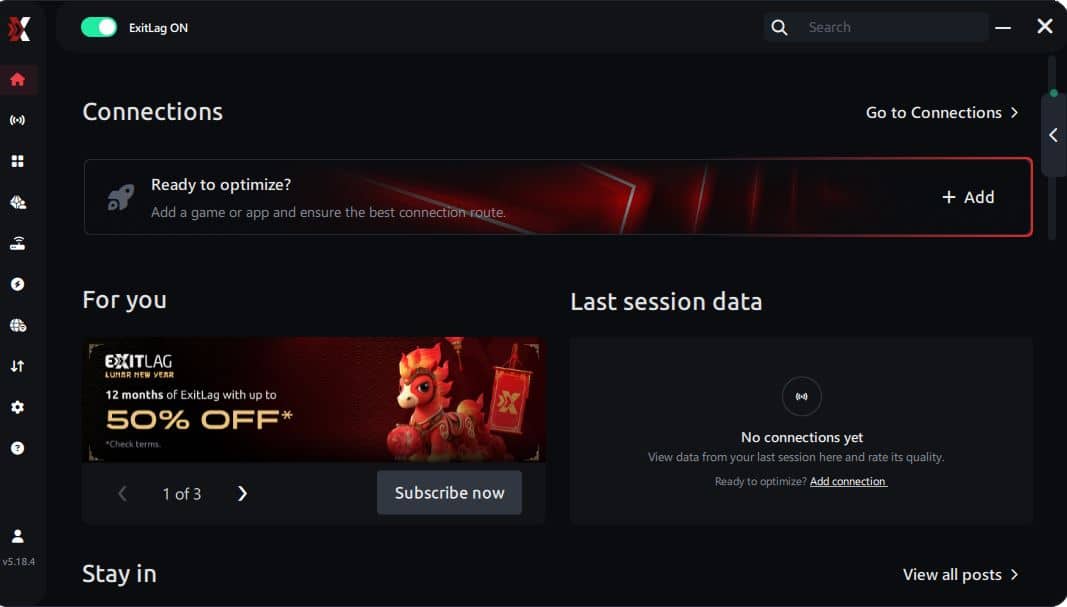
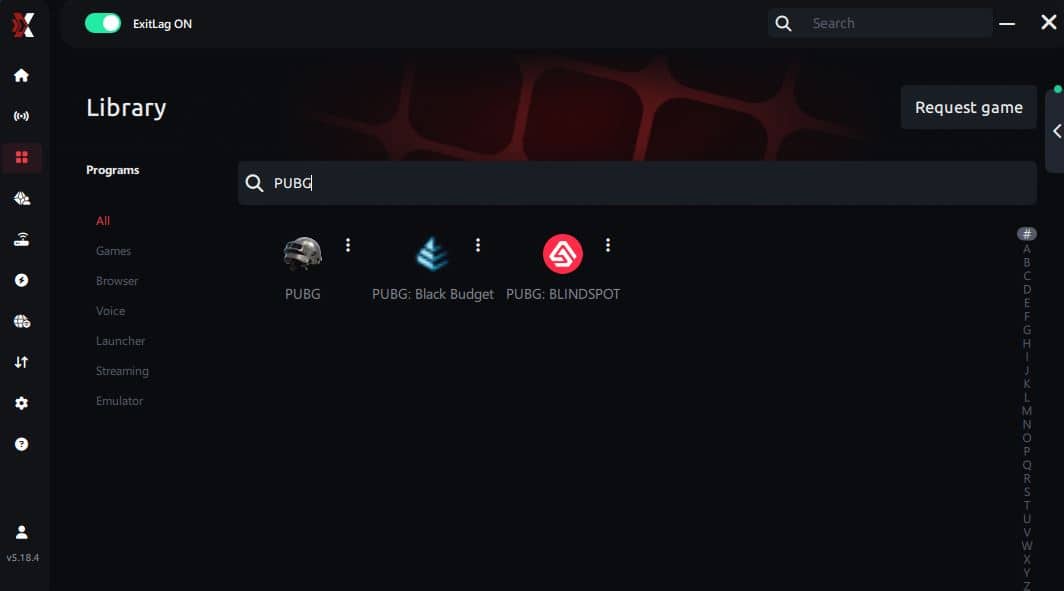
Step 3 – In the search bar, type “PUBG” and select the game from the list.
Step 4 – Choose between automated or manual route
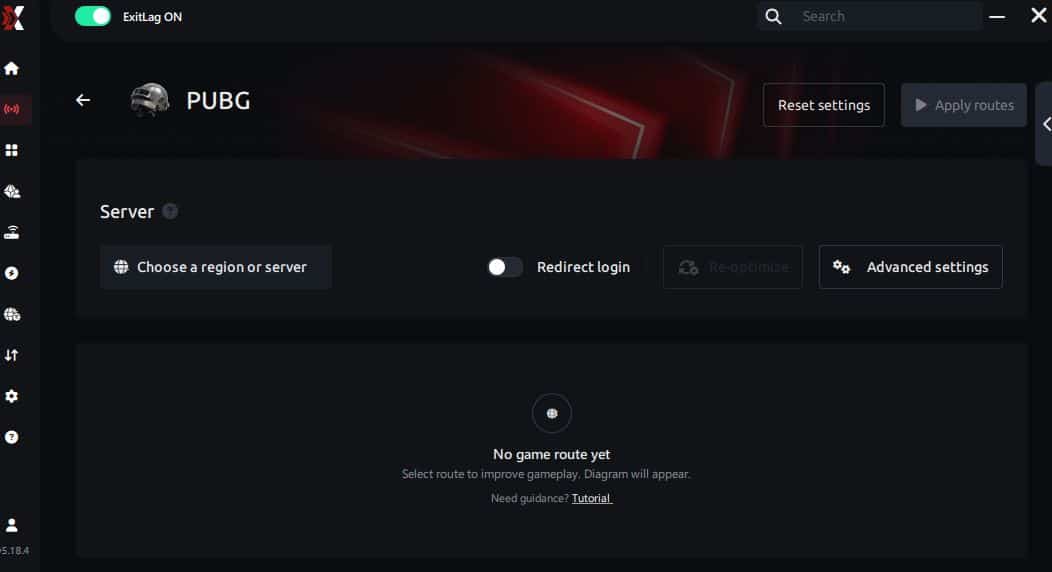
Based on the results, you can let ExitLag automatically select the best route or manually choose the server that showed the lowest latency for your connection.
AI-optimized automated route
Based on the results, you can let ExitLag automatically select the best route through AI optimization. The system analyzes multiple connection paths in real time and automatically identifies the most efficient route for your connection, ensuring the lowest possible latency without requiring manual choices.
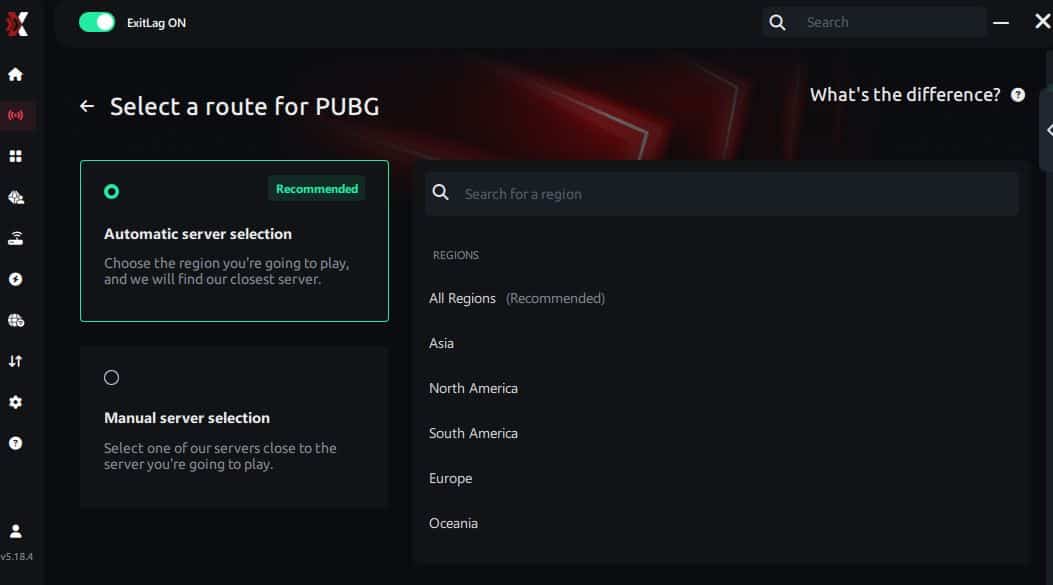
Manual route
If you prefer to have full control over your connection, you can manually choose the server based on the ping test results. Simply select the server that showed the lowest latency or the one that best meets your specific gaming needs, allowing complete customization of your experience.
Step 5 – Click “PUBG” or the play button. ExitLag will begin optimizing your connection automatically.
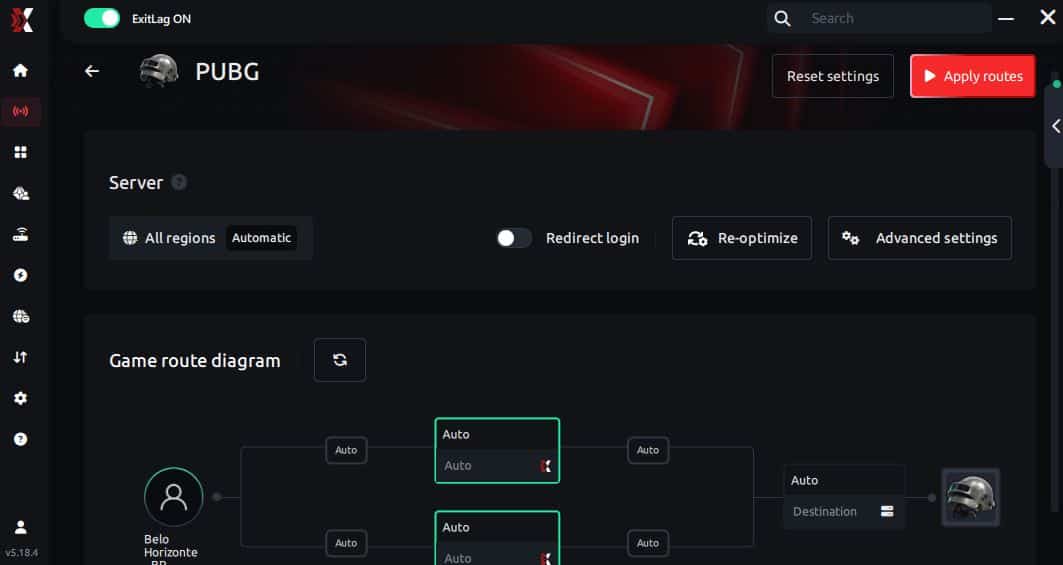
Step 6 – Wait a few seconds until optimization is complete. You’ll see ping indicators in the interface.
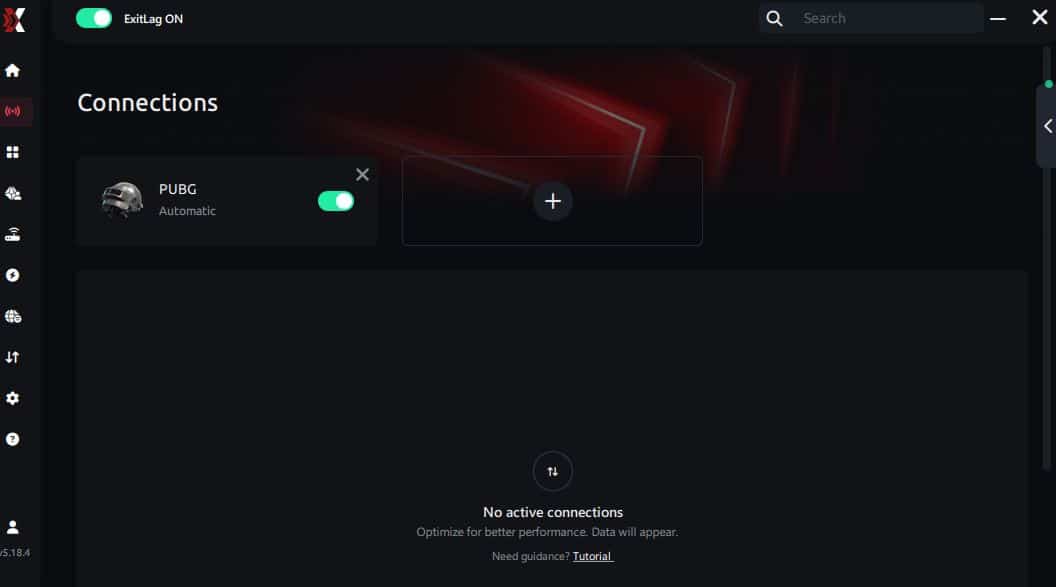
Step 7 – Launch PUBG normally. The optimization will already be active.
ExitLag runs in the background while you play, constantly adjusting routes to maintain the best possible performance.
That’s a clean baseline for an FPS boost in PUBG.
Advanced ExitLag settings for PUBG
Refine your setup like a competitive player:
- Automatic vs manual routing
- Auto is best for most users ✅
- Manual can help if your ISP has one bad hop
- Traffic Shaper
- Prevents background apps from stealing stability
- Helps reduce pacing spikes ✅
- Multi-routing options
- Useful when ping swings mid-match
- Improves consistency more than raw speed ✅
How to test FPS improvement properly
If you want real proof, test like this:
- Use an FPS overlay (Steam, Xbox Game Bar, GPU overlay)
- Compare:
- average FPS
- 1% lows
- stutters per minute
- “feel” during identical scenarios
Best test scenarios:
- hot drop fights
- driving + compounds
- late circle with multiple squads
- same graphics settings and same map if possible
That’s how you measure an FPS boost in PUBG honestly.
Console players (if applicable)
Be realistic:
- ExitLag works best on PC where it can control routing directly
- Console use is limited and may require network workarounds ⚠️
- For competitive PUBG, PC remains the best route for consistency
Real results: PUBG FPS before and after ExitLag
Case studies (example scenarios)
These examples show the type of change players see when network stability improves.
Case 1: Player in South America
- Before: 110 FPS average, drops to 55–70 in gunfights
- After: 112 FPS average, drops limited to 80–92
- Improvement: +35% better lows
- Micro-stuttering: reduced heavily ✅
Case 2: Player in North America
- Before: inconsistent pacing during vehicle fights
- After: smoother tracking, fewer hitch moments
- Result: better recoil control and faster reaction ✅
Case 3: Competitive squad practice
- Before: multiple “freeze” moments per match
- After: stable fights, less desync feeling
- Result: more consistent team coordination ✅
Performance table (before vs after)
| Metric | Without ExitLag | With ExitLag | Gain |
| Average FPS | 110 fps | 112 fps | +2% |
| Minimum FPS | 58 fps | 84 fps | +45% |
| Frame time | 12–28 ms | 9–14 ms | -40% |
| Micro-stutters/min | 8–15 | ~0–2 | -85%+ |
| Input lag | 60–95 ms | 45–70 ms | -25% |
| Ping | 75–120 ms | 55–90 ms | -20% |
| Experience | ⭐⭐ | ⭐⭐⭐⭐⭐ | Transformative |
This is the honest truth: the biggest “up to 60%” improvement usually shows up in stability and lows, not magically doubling your average FPS.
Competitive gameplay impact
When performance stabilizes, you usually see:
- better accuracy and spray control ✅
- cleaner flicks and tracking ✅
- fewer deaths from “my game froze” moments ✅
- more confidence in hot drops ✅
That’s the real FPS boost in PUBG.
Extra optimizations to maximize FPS with ExitLag
Recommended in-game settings for PUBG
These often help you increase FPS:
- Lower shadows and post-processing
- Keep textures balanced for VRAM
- Reduce view distance if needed (test)
- Turn V-Sync OFF ✅
- Use full screen mode
- Cap FPS if it improves stability (sometimes it does)
- Disable unnecessary visual extras
Your goal is smooth fights, not cinematic screenshots.
Windows optimizations
- Enable High Performance power plan ✅
- Disable Xbox Game DVR if it hurts performance
- Close background launchers and overlays
- Update GPU drivers
- Reduce Windows transparency effects
- Avoid heavy background downloads during matches
Hardware optimizations without spending money
- Clean dust and filters ✅
- Improve airflow
- Monitor temps to avoid throttling
- Fix unstable CPU/GPU boosts caused by heat
- Make sure storage has free space
GPU settings quick tweaks
NVIDIA:
- Prefer maximum performance
- Low latency mode (test for stability)
- Don’t force V-Sync
AMD:
- Anti-Lag (test per system)
- Favor performance tuning
- Avoid heavy overlays if they add stutters
When to consider upgrading hardware
Upgrade is worth it when:
- GPU is pinned at 99% constantly
- CPU spikes during fights
- VRAM is full and stutters happen
- FPS won’t stabilize even at low settings
But even then, ExitLag still helps with routing stability—meaning you can get more FPS consistency without changing your PC.
Why network optimization can increase FPS (in practice)
The connection between lag and FPS
Rendered FPS is GPU output. But smooth gameplay also depends on stable server synchronization.
When your ping swings or packets drop:
- the client resyncs
- motion pacing breaks
- small freezes appear
Players interpret this as FPS drops. Fixing the route can create an FPS boost in PUBG through smoother pacing.
How packet loss affects smoothness
Packet loss can cause:
- stutters
- delayed hit feedback
- jittery movement
- unpredictable fights
If your issue is ping-related, revisit the PUBG high ping troubleshooting guide and stabilize first.
Input lag vs FPS perception
Input flow: Input → server update → response → frame
If that loop is unstable, your FPS may be “high,” but your gameplay feels delayed. ExitLag helps by stabilizing the route and reducing the spikes that break timing.
Frame time consistency
Two realities:
- 140 FPS that drops constantly ❌
- 90 FPS that stays stable ✅
Most players prefer the second for competitive consistency. That’s why stability is the core of an FPS boost in PUBG.
FAQ: FPS boost in PUBG
Does ExitLag really increase FPS?
Yes—by optimizing routing and reducing network-caused stutters. You may not see massive average FPS jumps, but you can get a significant FPS boost in PUBG through smoother pacing and better lows.
Also: ExitLag IS NOT a VPN.
How much FPS will I gain?
It depends on how unstable your connection is today. Many players see:
- small average FPS improvement
- big improvement in lows and smoothness
- fewer stutters and better consistency
Will ExitLag help if my PC is weak?
Yes, but with limits. ExitLag optimizes the network layer, not your GPU. It helps you get the best more FPS stability your hardware can deliver.
Is ExitLag safe?
Yes. It does not modify PUBG files and is widely used for gaming optimization.
Does ExitLag work on console?
PC is the main platform for best results. Console workarounds may exist but are limited ⚠️.
Do I need fast internet?
Not necessarily. ExitLag improves route quality, not raw bandwidth. Stable latency matters more than speed.
What’s the difference between ExitLag and a VPN?
| Feature | VPN | ExitLag |
| Goal | Privacy | Gaming performance |
| Routes | Generic | Game-optimized |
| Ping | Often worse | Often better ✅ |
| Stutter reduction | Unreliable | Strong ✅ |
Again: ExitLag IS NOT a VPN. Learn the technical details here: official ExitLag how it works page.
How much does ExitLag cost?
Avoid guessing. Use the official page: ExitLag pricing details. Or test first using the ExitLag free trial offer.
Is PUBG supported by ExitLag?
Yes—confirm anytime via the ExitLag supported games list.
Should I cap FPS in PUBG?
Sometimes yes. A stable cap can improve frame pacing and reduce spikes, creating a better FPS boost in PUBG feel.
Why do I stutter more in hot drops?
More players + more effects + more server updates. If your route is unstable, it amplifies stutters. This is exactly where ExitLag often helps most.
Want to test quickly? Activate your ExitLag free trial here and run a controlled before/after match.
Without vs with ExitLag
Experience without ExitLag
- ❌ FPS unstable (40–80 FPS swings)
- ❌ Micro-stuttering in gunfights
- ❌ Frame drops in critical moments
- ❌ Input lag you can feel
- ❌ Inconsistent match performance
Experience with ExitLag
- ✅ FPS more stable in fights
- ✅ Reduced micro-stuttering
- ✅ More consistent performance
- ✅ Responsive inputs
- ✅ Cleaner competitive feel
Side-by-side table
| Aspect | Without ExitLag | With ExitLag |
| FPS | Unstable | Stable ✅ |
| Stuttering | Frequent | Rare/near zero ✅ |
| Input lag | High | Lower ✅ |
| Consistency | ⭐⭐ | ⭐⭐⭐⭐⭐ ✅ |
| Competitive | Disadvantage | Advantage ✅ |
| Fun | ⭐⭐ | ⭐⭐⭐⭐⭐ ✅ |
Conclusion: maximize your FPS in PUBG with ExitLag now
If you want an FPS boost in PUBG, don’t chase only max FPS. Chase stability: better lows, fewer stutters, and predictable timing. That’s what wins fights.

Key benefits recap
- ✅ Up to 60% better FPS stability (perceived smoothness)
- ✅ Reduced micro-stuttering
- ✅ Lower input lag and better responsiveness
- ✅ More consistent frame time
- ✅ Works with any hardware level
- ✅ Competitive advantage in real fights
Why ExitLag is the best solution
ExitLag is built for gamers. It focuses on route quality and stability that PUBG needs.
And one last time, because it matters: ExitLag IS NOT a VPN.
Start now
- Create your account at the ExitLag registration page
- Activate your test using the ExitLag free trial page
- Configure PUBG in minutes
- Play and feel the FPS boost in PUBG immediately
Ready to play PUBG the way it’s supposed to feel? Get started on the official ExitLag website.