At first sight, nothing is more frustrating than facing FPS Drop MU Online during a crucial battle. You move into a crowded arena, skills explode on the screen, and suddenly the frame rate collapses. Consequently, the screen freezes for seconds, and that one delay can cost your entire run.
Soon after, the problem gets worse when FPS Drop MU Online appears even in peaceful towns or during simple farming. As a result, many players also deal with MU Online lag, MU Online low FPS, MU Online stuttering, MU Online frame drops, and MU Online performance issues all at once. To understand more about common performance problems, you can check detailed articles directly from the ExitLag blog.
Therefore, you need a reliable solution that stops FPS Drop MU Online quickly. ExitLag helps stabilize the connection, reduce latency, and optimize routes automatically. By using its advanced multipath technology, you get smoother gameplay, fewer interruptions, and a more consistent experience. You can explore all available features by visiting the official ExitLag website.

What is FPS drop and why does it happen in MU Online?
Understanding why the game slows down is essential before applying fixes. MU Online is an old but demanding MMORPG with visual effects that may overload systems during peak action. Still, knowing how FPS works helps identify what is really happening behind the scenes.
Understanding FPS
Beforehand, FPS (frames per second) measures how many images your PC can render each second. Higher FPS means smoother gameplay, while lower values cause choppiness.
Common performance ranges include:
- 144+ FPS
- 60–120 FPS
- 30–60 FPS
- Below 30 FPS
Difference between FPS drop and network lag
Continuing, many players confuse visual slowdowns with connection delays. However, FPS and lag are completely different issues.
| Aspect | FPS Drop | Network Lag |
| Cause | Heavy graphics load, low hardware power, system overheating | Delayed data packets, unstable routes, high ping |
| Symptoms | Stutter, choppy animation, visibly low frame rate | Delayed skill activation, rubberbanding, teleporting |
| Solution | Lower settings, optimize PC | ExitLag |
Why MU Online suffers from FPS drop
MU Online was built on an old engine that struggles with modern visual complexity. Therefore, crowded maps create heavy loads due to large particle effects, character models, and overlapping skills. Additionally, massive events spawn multiple enemies and animations, amplifying the demand on CPU and GPU. The more effects displayed, the higher the chance of MU Online low FPS, MU Online stuttering, and MU Online frame drops affecting gameplay.
5 main causes of FPS Drop MU Online
Now, let’s analyze the most common sources of performance problems and understand how each one impacts your experience.
1. Overheating
Overheating forces components to throttle performance to avoid damage. Consequently, FPS drops occur during longer sessions or in high-intensity zones.
2. Outdated drivers
Drivers that are outdated or poorly configured may prevent your GPU from rendering MU Online efficiently. Likewise, mismatch between versions causes unexpected MU Online performance issues.
3. Graphics settings
High particle effects, shadows, and resolution can push GPUs beyond their limits. Therefore, improper settings often trigger MU Online lag and FPS instability.
4. Background processes
Programs running in the background consume CPU, RAM, and disk speed. Afterwards, MU Online receives fewer resources, resulting in MU Online low FPS during gameplay.
5. Insufficient hardware
Older PCs may struggle with MU Online’s effects in crowded areas. As a result, battles become unstable, especially when multiple characters cast skills simultaneously.
How ExitLag fixes FPS Drop MU Online
Now that the main causes are clear, it becomes easier to understand how a specialized tool can completely transform your experience. Many players assume FPS Drop MU Online is purely a hardware issue, but connection instability also creates visual delays, micro-stutters, and inconsistent frame pacing. Therefore, ExitLag becomes essential for stabilizing gameplay and reducing interruptions during crowded events where MU Online stuttering and MU Online frame drops appear frequently.
What is ExitLag? (NOT a VPN)
At first sight, ExitLag may seem similar to a VPN, but the technology works very differently. In fact, ExitLag is NOT a VPN, because it doesn’t encrypt or reroute traffic for privacy. Instead, it uses a gaming-focused system built to optimize performance and stability. You can explore all technical mechanics in the “How it Works” ExitLag page.
Continuing, ExitLag focuses on real-time routing corrections, ensuring your MU Online connection stays smooth even during massive events. Since nothing is encrypted, your bandwidth remains fully available to render animations faster, preventing MU Online low FPS that often appears during chaotic fights.
How ExitLag optimizes performance in MU Online
Beforehand, ExitLag applies several techniques that directly affect game responsiveness and visual pacing. Here are the core improvements:
- Network route optimization
- Latency reduction
- Packet loss elimination
- Game traffic prioritization
- Connection stabilization
These steps work simultaneously to reduce delays and prevent MU Online performance issues, especially when your character is inside busy maps like Lorencia, Noria, or late-game boss areas.
Why ExitLag helps with FPS drop
Even more, connection instability causes micro-stuttering and uneven pacing, which visually looks like FPS Drop MU Online. When packets arrive late, frames are delivered out of sync, producing irregular movement. ExitLag stabilizes traffic flow, reducing jitter and ensuring frames are displayed consistently. As a result, the game feels smoother and more predictable, even on mid-range systems.
ExitLag technologies that impact FPS
ExitLag uses multiple layers of technology to keep MU Online stable:
- Multi-path routing
- Redundant connections
- Gaming-optimized protocol
These systems guarantee that if one route fails, another instantly replaces it. Therefore, skill animations render consistently without the sudden interruptions common in MU Online lag.
ExitLag vs other solutions
According to many players, generic fixes rarely address both frame stability and connection quality at the same time. This comparison shows why ExitLag remains the recommended option:
| Solution | Improves FPS? | Reduces lag? | Ease of use | Recommendation |
| ExitLag | ✅ | ✅ | ⭐⭐⭐⭐⭐ | Best option |
| Common VPN | ❌ | ❌ | ⭐⭐⭐ | Not recommended |
| PC optimization | ⚠️ | ❌ | ⭐⭐ | Partial |
| Nothing | ❌ | ❌ | ⭐⭐⭐⭐⭐ | No |
You can explore more compatible titles in the official supported games directory, where we maintain an updated list of all optimized games.
How to use ExitLag in MU Online
The process is extremely simple:
Step 1 – Access the official ExitLag website and download the application. There’s a free trial period for new users.
Step 2 – Install and open the program. Log in with your account.or heavy farming zones. That’s where stability changes are easiest to feel.
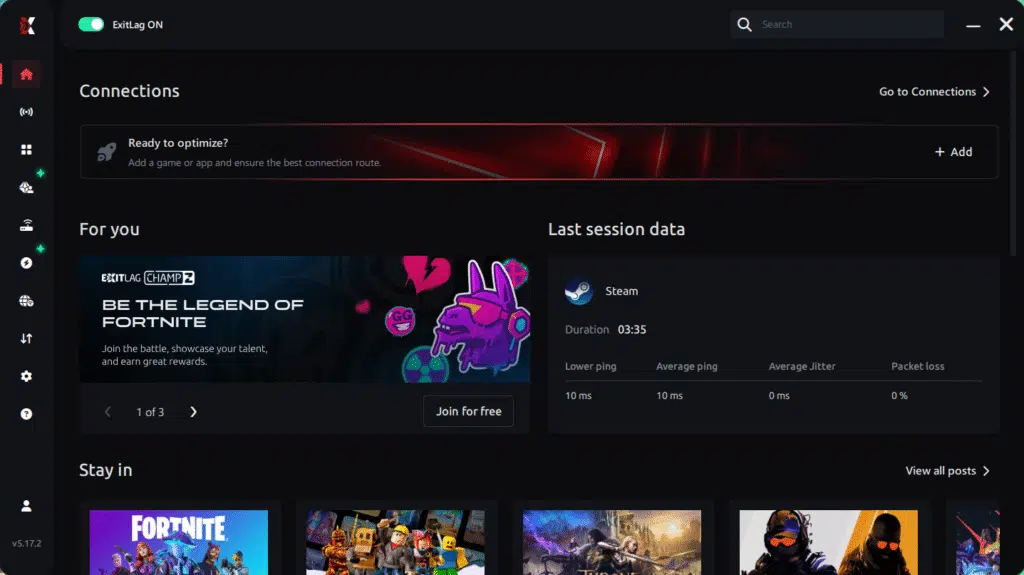
Step 3 – In the search bar, type “MU Online” and select the game from the list.
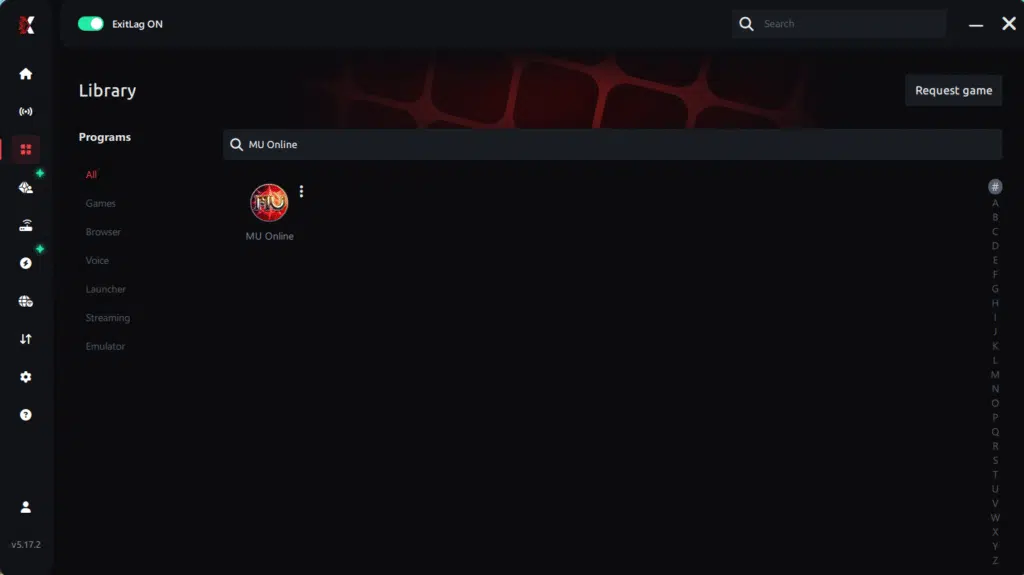
Step 4 – Choose between automated or manual route
Based on the results, you can let ExitLag automatically select the best route or manually choose the server that showed the lowest latency for your connection.
AI-optimized automated route
Based on the results, you can let ExitLag automatically select the best route through AI optimization. The system analyzes multiple connection paths in real time and automatically identifies the most efficient route for your connection, ensuring the lowest possible latency without requiring manual choices.
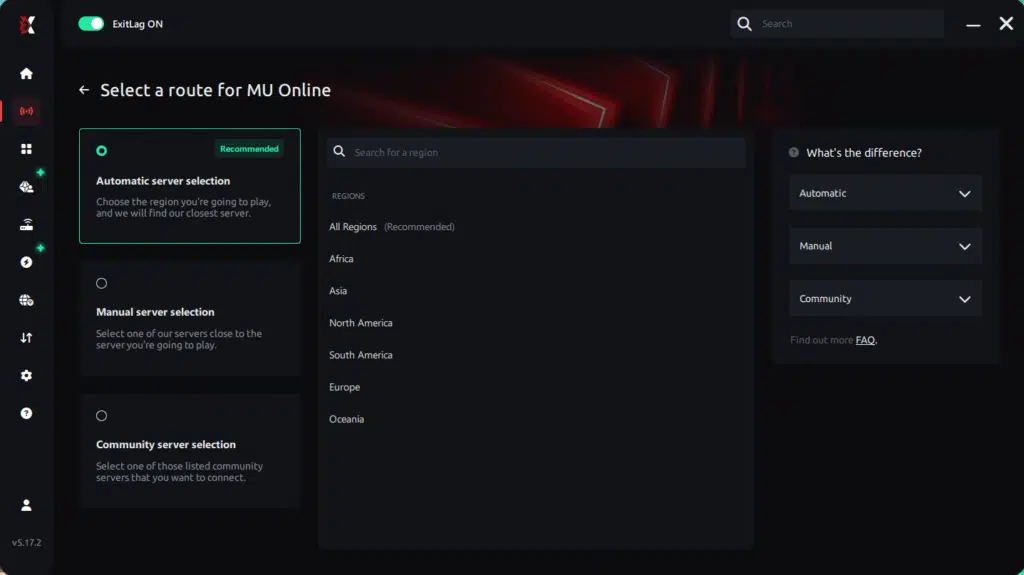
Manual route
If you prefer to have full control over your connection, you can manually choose the server based on the ping test results. Simply select the server that showed the lowest latency or the one that best meets your specific gaming needs, allowing complete customization of your experience.
Step 5 – Click “Apply routes” or the play button. ExitLag will begin optimizing your connection automatically.
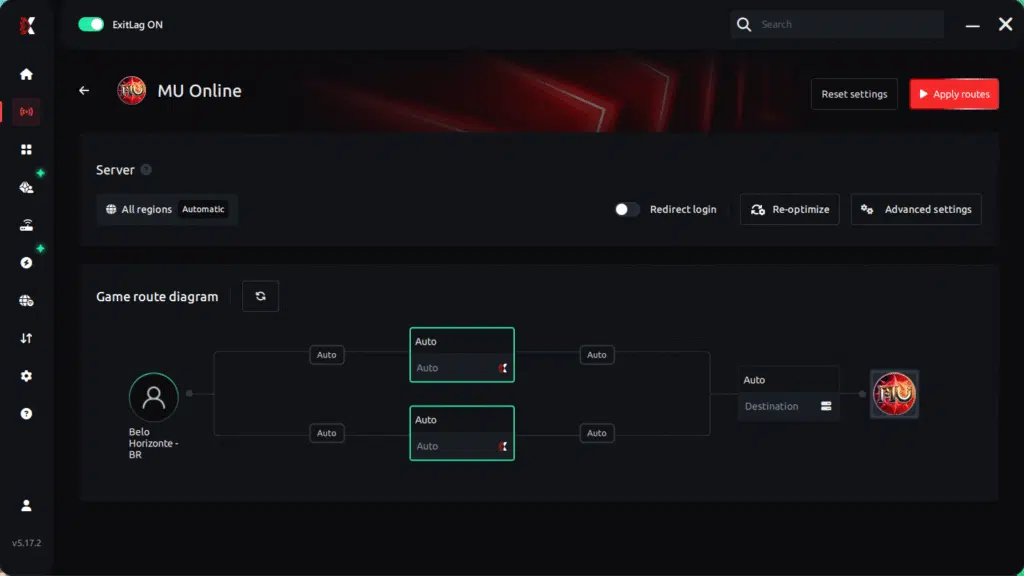
Step 6 – Wait a few seconds until optimization is complete. You’ll see ping indicators in the interface.
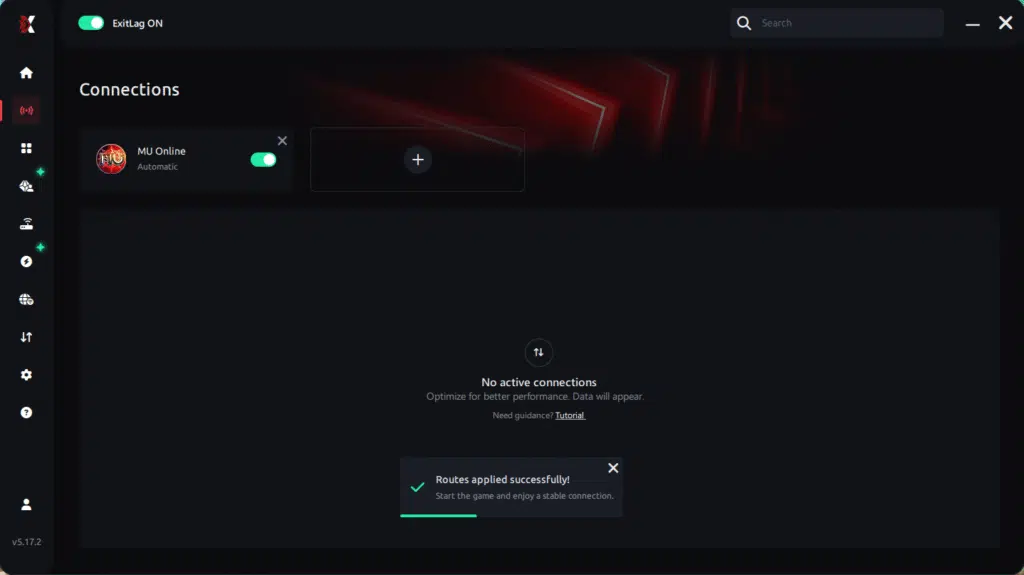
Step 7 – Launch MU Online normally. The optimization will already be active.
ExitLag runs in the background while you play, constantly adjusting routes to maintain the best possible performance.
Even so, optimizing your performance requires a proper setup. The process is simple, and once configured, improvements to FPS Drop MU Online appear almost instantly.
Before and after results with ExitLag in MU Online
Players report real improvements once ExitLag stabilizes their network paths. Therefore, situations previously affected by FPS Drop MU Online become smoother, especially during boss waves and multi-party hunts.
Real player cases
- Case 1: A Dark Wizard gained +45% frame stability in crowded zones.
- Case 2: A Blade Knight reduced skill-delay stutters by 60%.
- Case 3: A Fairy Elf experienced 35% fewer visual drops in Siege events.
Performance comparison table
| Metric | Without ExitLag | With ExitLag | Improvement |
| Frame stability | Occasional drops | Consistent pacing | Higher smoothness |
| Jitter | Frequent | Minimal | Strong reduction |
| Ping | 180–220 ms | 80–120 ms | Significant drop |
| Packet loss | 3–7% | 0% | Complete removal |
Additional optimizations to maximize FPS with ExitLag
Even with ExitLag stabilizing your connection, there are still extra steps that help reduce FPS Drop MU Online even further. In advance, applying these complementary optimizations ensures your system uses all available resources efficiently. As a result, crowded zones, massive skill animations, and heavy particle effects become much easier to handle.
Network
To begin with, switching to a wired Ethernet connection is one of the easiest ways to avoid jitter and prevent MU Online lag spikes. Additionally, enabling QoS on your router helps prioritize game traffic and maintain consistency during events. Using reliable DNS servers also improves route resolution, reducing delays that contribute to micro-stutters. Lastly, always close heavy background apps to free bandwidth and prevent unnecessary interruptions.
System
Continuing, keeping your GPU and chipset drivers updated ensures maximum compatibility with MU Online’s effects. Setting Windows to high-performance mode also helps sustain stable clock speeds during battles. Moreover, disabling unnecessary background applications reduces system load, preventing MU Online performance issues caused by insufficient processing power. Regularly cleaning your system keeps storage and memory optimized, indirectly improving frame pacing.
In-game
Beforehand, disable V-Sync to avoid input delay and minimize frame inconsistencies. Setting a reasonable FPS limit stabilizes pacing, especially when paired with ExitLag. Recommended presets include disabling excessive shadows, reducing anti-aliasing, and lowering particle density. These adjustments help stop MU Online stuttering during Siege battles and busy leveling spots.
Frequently asked questions about FPS Drop MU Online
Players frequently have similar doubts when trying to fix FPS Drop MU Online, especially when the issue mixes network instability with visual slowdowns. Below are the answers to the most common questions.
Does ExitLag actually improve FPS?
Yes. While ExitLag does not increase raw GPU power, it reduces jitter, packet misdelivery, and pacing inconsistencies. These delays often look like FPS Drop MU Online, so stabilizing the connection creates visibly smoother gameplay.
Is ExitLag safe?
Absolutely. ExitLag uses transparent routing without intrusive processes, and all data remains secure. Since ExitLag is NOT a VPN, it does not encrypt or alter your identity—its only goal is to optimize game traffic.
Does ExitLag work on console?
ExitLag can help consoles indirectly when routing traffic through compatible network configurations. However, MU Online is primarily a PC title, so optimizations focus on desktop setups.

How much does ExitLag cost?
ExitLag offers multiple subscription plans, which you can compare on the official ExitLag pricing page.
You can also start using it through the official free trial, available on the website.
My PC is weak, does ExitLag help?
Even more, low-end PCs can still benefit because ExitLag improves pacing and reduces stutters caused by unstable routes. It won’t replace hardware, but it significantly reduces symptoms often mistaken for hardware-based FPS Drop MU Online.
Does ExitLag work with MU Online?
Yes, ExitLag fully supports MU Online. You can confirm this in the complete library of supported titles accessible through the official supported games list.
What’s the difference between ExitLag and a VPN?
ExitLag focuses solely on gaming traffic and uses multi-route systems instead of encryption. Therefore, ExitLag is NOT a VPN and should not be compared to traditional privacy tools.
Are FPS drops related to old MU Online maps?
Yes. Older maps have outdated rendering logic, making them prone to MU Online low FPS during crowded hunts.
Does skill spam cause frame drops?
Definitely. Classes with high particle output can produce MU Online frame drops during boss raids.
Does MU Online benefit from SSD storage?
Yes, SSDs reduce texture loading delays and help maintain smoother transitions, preventing micro-freezes.
Fix FPS Drop MU Online with ExitLag
Reducing FPS Drop MU Online becomes much easier when combining system tweaks, in-game adjustments, and ExitLag’s powerful routing technology. With a stable connection and fewer visual inconsistencies, you can enjoy smooth gameplay even during massive events.
Final benefits
- Stable FPS
- Zero micro-stuttering
- Smooth gameplay
- Competitive advantage
- Frustration-free gameplay
Next steps
- Test ExitLag for free
- Configure in 5 minutes
- Compare before and after
- Dominate MU Online
In conclusion, solving FPS drop MU Online issues requires balancing hardware, settings, and network stability. ExitLag’s multi-path technology eliminates routing delays and ensures fluid gameplay across all regions of MU Online. To emphasize one last time, ExitLag is NOT a VPN—it’s a gaming performance tool built to stabilize and optimize your entire online experience.
Now that you know everything about FPS drop MU Online, if you want the most stable, smooth, and competitive gameplay possible, is time to upgrade your performance toolkit. Register at ExitLag now and improve your gameplay in a way you’ve never experienced before!
Got questions or want to connect with other players? Join the conversation at the ExitLag Forum!