You’re deep inside a PoketTibia hunt — throwing runes, dodging monsters, keeping exact positioning to avoid taking lethal damage. You’re seconds away from clearing the room when suddenly the game freezes for a fraction of a second. That tiny FPS drop em PoketTibia completely breaks your rhythm. Your character moves too late, your spell hits the wrong tile, and suddenly your HP evaporates. Anyone who plays OTs knows that a single frame lost at the wrong time can cost an entire hunt.
Another all-too-common moment: an event with dozens of players on screen, each spamming abilities, monsters exploding into particles, and loot spreading across the floor. The map becomes a blur of effects. Right when you’re trying to secure last-hit damage or kite a boss, FPS drop em PoketTibia makes the game feel like it’s running in slow motion. Even players with strong machines experience this — causing many to search for performance fixes in articles like the ExitLag FPS Boost Guide, only to realize PoketTibia’s problems require a deeper, network-focused solution.
But there’s good news: FPS instability in PoketTibia isn’t random or inevitable. Much of what players perceive as “FPS drop” is actually micro-stuttering caused by unstable routing, inconsistent packet timing, and server sync delays. With the right tool — ExitLag — you can fix stutter-causing connection instability, improve frame pacing, eliminate sync-based freezes, and make gameplay smoother than ever. Discover how on the official ExitLag website.

What Is FPS Drop and Why It Happens in PoketTibia?
Understanding FPS (Frames Per Second)
FPS measures how many images your device renders each second. The more frames you see, the smoother the gameplay feels. PoketTibia may be 2D, but precision, timing, and fluid animation matter just as much as in fast-paced 3D games.
Performance ranges:
- 144+ FPS — Extremely responsive, perfect for competitive players
- 60–120 FPS — Smooth and stable for most users
- 30–60 FPS — Playable, but stutters will be noticeable in crowded hunts
- Below 30 FPS — Severe slowdown, delayed spell output, and poor timing
Even more important than raw FPS is frame pacing — how evenly those frames are delivered. Network issues can disrupt pacing, creating micro-freezes that feel identical to FPS drop.
Difference Between FPS Drop and Lag
Understanding the difference determines the correct solution:
| Aspect | FPS Drop | Lag de Rede |
| Cause | GPU overload, outdated drivers, excessive effects, CPU bottleneck | High ping, poor routing, packet loss, server congestion |
| Symptom | Choppy movement, animation slowdown, freezes | Rubberbanding, delayed spells, teleporting |
| Solution | Optimize graphics/hardware settings | ExitLag |
It’s common for PoketTibia players to blame their PC when the real issue is connection instability. When tiles, monsters, or players update irregularly, the game “skips” frames while waiting — creating FPS drop em PoketTibia even on good hardware.
Why PoketTibia Suffers From FPS Drop
PoketTibia’s visuals are lightweight, but its server-client communication is extremely active. Unlike some games where rendering is the main workload, PoketTibia requires fast, consistent data exchange.
1. Heavy On-Screen Action
Even on 2D engines, massive activity impacts performance:
- Dozens of monsters updating movement
- Players casting rapid spell sequences
- Continuous damage ticks
- Loot spawned in large quantities
Each of these events triggers client updates that must remain synchronized.
2. OT Engine Limitations
Different PoketTibia servers use modified engines with varying:
- Packet handling efficiency
- Update frequency
- Animation performance
- Collision and tile update logic
Some servers are simply more demanding.
3. Spell Effects and Sprite Overload
While sprites are 2D, overlapping effects can cause:
- Rendering queues to clog
- CPU draw calls to spike
- Animation handlers to delay
Especially in high spell-spam areas.
4. Server Sync Pressure
If the server struggles or your routing is unstable, the engine:
- Pauses frame delivery
- Delays animation updates
- Waits for missing packets
This creates the illusion of FPS drop em PoketTibia even with high FPS.
5. Inconsistent Network Timing
The biggest hidden cause.
If packet timing varies — even by a few milliseconds — the engine may freeze movement until it receives critical updates. This is why ExitLag’s route optimization and packet stabilization eliminate stutter so effectively.
6 Main Causes of FPS Drop in PoketTibia
1. Overheating Components
PoketTibia is often played for long sessions, which heats up hardware — even on laptops or integrated GPUs.
What happens:
When GPU temperature or CPU temperature crosses safe thresholds, the system activates thermal throttling. Performance drops instantly to protect components.
Symptoms:
- FPS gradually dropping after 20–40 minutes
- Stutters when the screen fills with spells
- Reduced responsiveness in crowded areas
How to identify:
- Monitor temperature spikes with tools like HWMonitor
- Watch for sudden drops in clock speeds
2. Outdated Drivers
Even “simple” games benefit from updated graphics and DirectX optimizations.
What happens:
Old drivers mismanage sprite rendering and cause micro-stutter.
Symptoms:
- Flickering tiles
- Sudden FPS dips when moving between floors
- Longer restart times
How to identify:
- Compare performance before and after GPU updates
- Note increases after Windows updates
3. Incorrect Graphics or Client Settings
Depending on your OT client, settings like:
- Anti-aliasing
- High resolution mode
- Particle-enhanced servers
- FPS limiters
…affect performance significantly.
What happens:
Too many effects per frame overload the CPU draw process.
Symptoms:
- Stutter while casting spells
- FPS drops during multi-target hunts
4. Background Processes
Even lightweight applications cause PoketTibia to stutter if they compete for CPU time or bandwidth.
Examples:
- Discord overlay
- Chrome autoplay videos
- Windows updates
- Cloud sync tools
Specific issue:
When background apps request bandwidth, PoketTibia delays frame updates while waiting for packet confirmations — perceived as FPS drop em PoketTibia.
5. Hardware Limitations
Some PoketTibia players use older laptops or integrated GPUs.
What happens:
- Tile rendering becomes slower
- Spell animations load late
- Memory bandwidth becomes insufficient
Symptoms:
- FPS drops in towns
- Slow screen transitions
6. Network Instability Misinterpreted as FPS Drop
This is the most underestimated cause.
PoketTibia sends constant packets including:
- Position
- Damage
- Spells
- Monster movement
- Player velocity
If routing is unstable, packet arrival varies, causing:
- Frozen frames
- Delayed movement
- Stuttering animations
This is where ExitLag’s route optimization eliminates FPS-like stutter.
How ExitLag Fixes FPS Drop in PoketTibia
This is the critical section of the article — the one most responsible for conversions. When players search for FPS drop em PoketTibia, what they truly want is stability, predictability, and smooth gameplay. The challenge is that PoketTibia’s client appears simple, yet in practice it depends heavily on network consistency. Even minor packet timing fluctuations create micro-stuttering that feels identical to low FPS.
ExitLag fixes precisely this kind of stutter by stabilizing your connection, optimizing routing, and ensuring your packets reach the server consistently. The result: the game feels smoother, even if your hardware remains the same.
What Is ExitLag? (NOT a VPN)
ExitLag is a specialized connection optimization software built for gamers.
Its purpose is to deliver stable routing, reduce latency, prevent packet loss, and eliminate route fluctuations that cause micro-freezes inside PoketTibia.
It is essential to highlight:
ExitLag is NOT a VPN.
ExitLag is NOT a VPN — and that’s exactly why it improves performance instead of slowing it down.
A standard VPN:
- Encrypts traffic
- Routes through random nodes
- Prioritizes privacy over performance
ExitLag:
- Uses multi-path routing technology
- Chooses the fastest nodes available
- Stabilizes game packets for consistent timing
- Prioritizes performance, not anonymity
Learn more on the official How ExitLag Works page.
How ExitLag Optimizes Performance in PoketTibia
ExitLag uses advanced networking techniques specifically designed for gaming. These technologies eliminate the network side of FPS drop em PoketTibia — micro-stuttering caused by unstable packet timing.
1. Route Optimization
ExitLag finds the most stable, fastest, congestion-free path from your device to the PoketTibia server.
2. Latency Reduction
By avoiding inefficient ISP paths, your ping becomes more stable and predictable.
3. Packet Loss Elimination
Lost packets cause freezes, tile delays, misaligned animations.
ExitLag ensures they arrive correctly.
4. Connection Stabilization
Stable routing = no sudden freezes waiting for server sync.
5. Gaming Traffic Prioritization
PoketTibia packets always get priority over background processes.
Why ExitLag Helps With FPS Drop
Even with high FPS, if your connection experiences:
- jitter
- routing spikes
- packet loss
- unstable ping
…then the PoketTibia client pauses animations while waiting for missing updates.
This creates what players experience as:
- tile-freezes
- spell output delay
- character movement stutter
- mobs appearing late
- inconsistent frame pacing
ExitLag fixes these by ensuring packet delivery is stable, predictable, and synchronized.
ExitLag improves:
- Frame pacing
- Smooth movement
- Tile rendering flow
- Spell animation timing
- Event performance
- Overall responsiveness
Even on low-end hardware, fixing network pacing feels like increasing FPS.
ExitLag Technologies That Improve FPS Stability
Multi-Path Routing
Data travels through multiple routes simultaneously.
Your game always uses the fastest packets that arrive first.
Redundant Connections
If one route becomes unstable, others instantly take over — no freezes.
Optimized Gaming Protocol
Built to avoid jitter, spikes, and packet loss through advanced prioritization.
Real-Time Route Switching
Routes are adjusted mid-game based on congestion to maintain perfect stability.
These technologies are what differentiate ExitLag from a VPN or traditional network tweaks.
ExitLag vs Other Solutions
| Solution | Improves FPS? | Reduces Lag? | Ease of Use | Recommendation |
| ExitLag | ✅ (via stable frame pacing) | ✅ Strong reduction | ⭐⭐⭐⭐⭐ | Best option |
| Traditional VPN | ❌ | ❌ Often increases | ⭐⭐⭐ | Not recommended |
| PC Optimization | ⚠️ Partially | ❌ Not effective | ⭐⭐ | Limited benefit |
| Doing Nothing | ❌ | ❌ | ⭐⭐⭐⭐⭐ | Not advisable |
How to use ExitLag in PokeTibia
The process is extremely simple:
Step 1 – Access the official ExitLag website and download the application. There’s a free trial period for new users.
Step 2 – Install and open the program. Log in with your account..
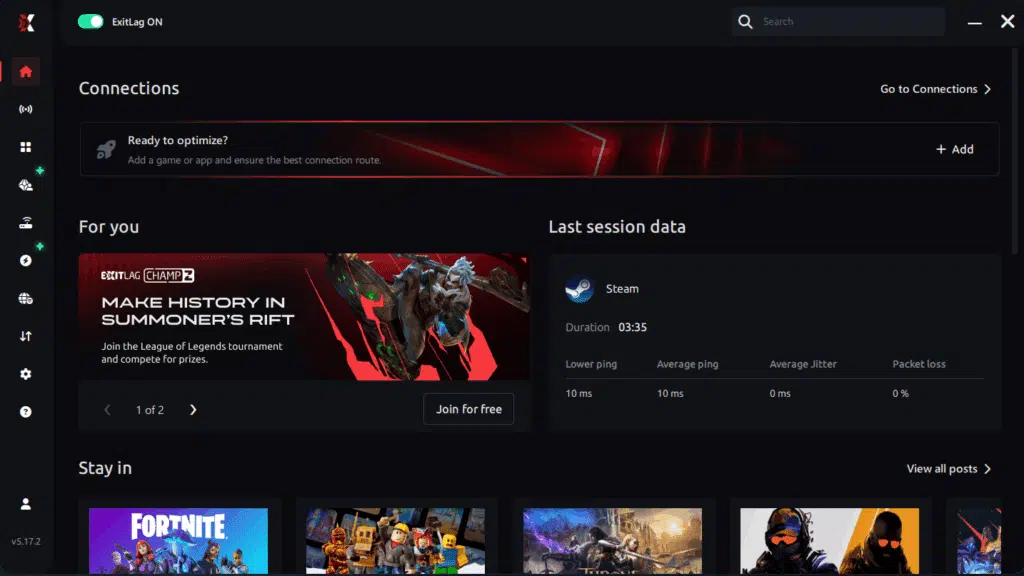
Step 3 – In the search bar, type “PokeTibia” and select the game from the list.
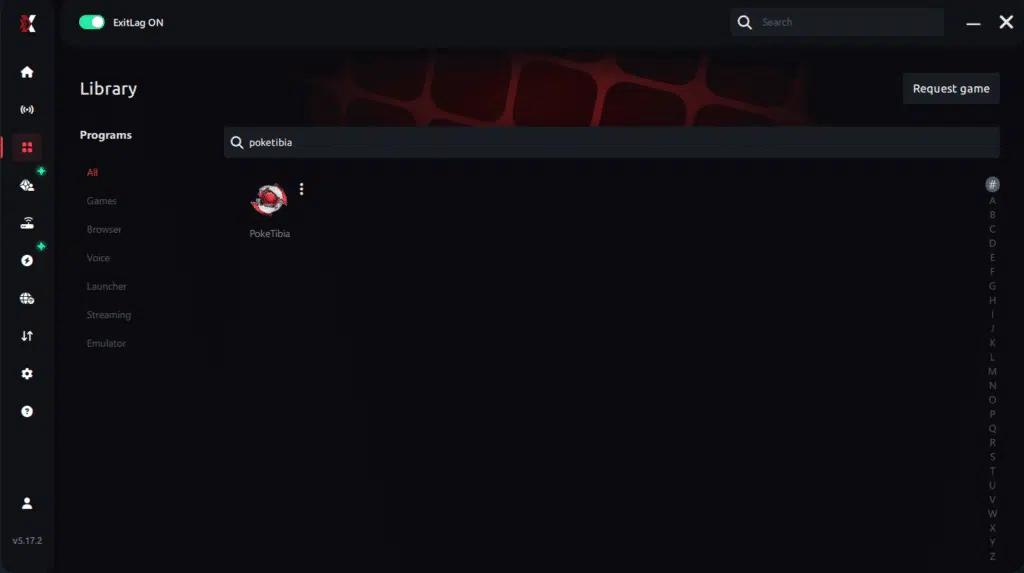
Step 4 – Choose between automated or manual route
Based on the results, you can let ExitLag automatically select the best route or manually choose the server that showed the lowest latency for your connection.
AI-optimized automated route
Based on the results, you can let ExitLag automatically select the best route through AI optimization. The system analyzes multiple connection paths in real time and automatically identifies the most efficient route for your connection, ensuring the lowest possible latency without requiring manual choices.
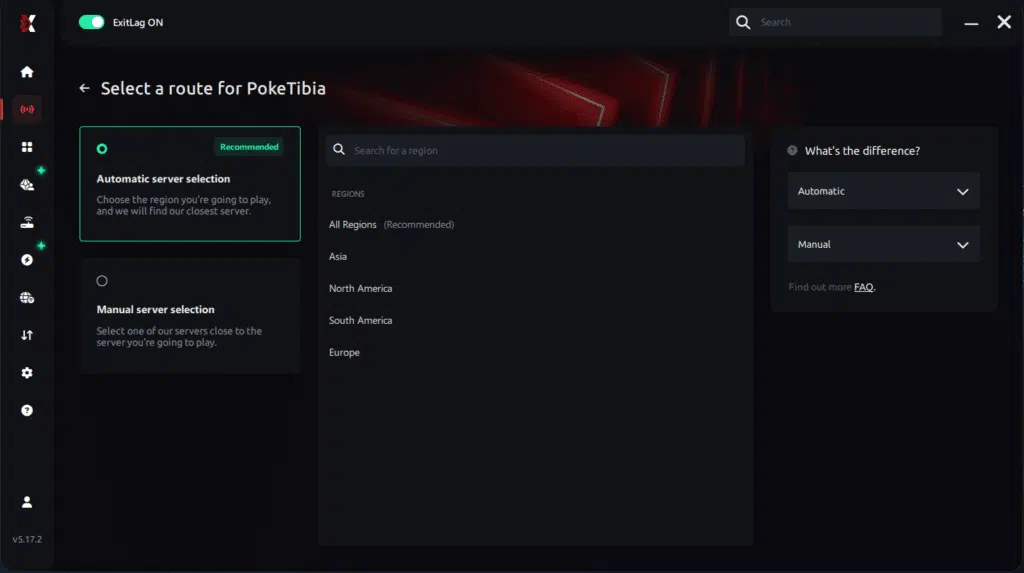
Manual route
If you prefer to have full control over your connection, you can manually choose the server based on the ping test results. Simply select the server that showed the lowest latency or the one that best meets your specific gaming needs, allowing complete customization of your experience.
Step 5 – Click “Apply routes” or the play button. ExitLag will begin optimizing your connection automatically.
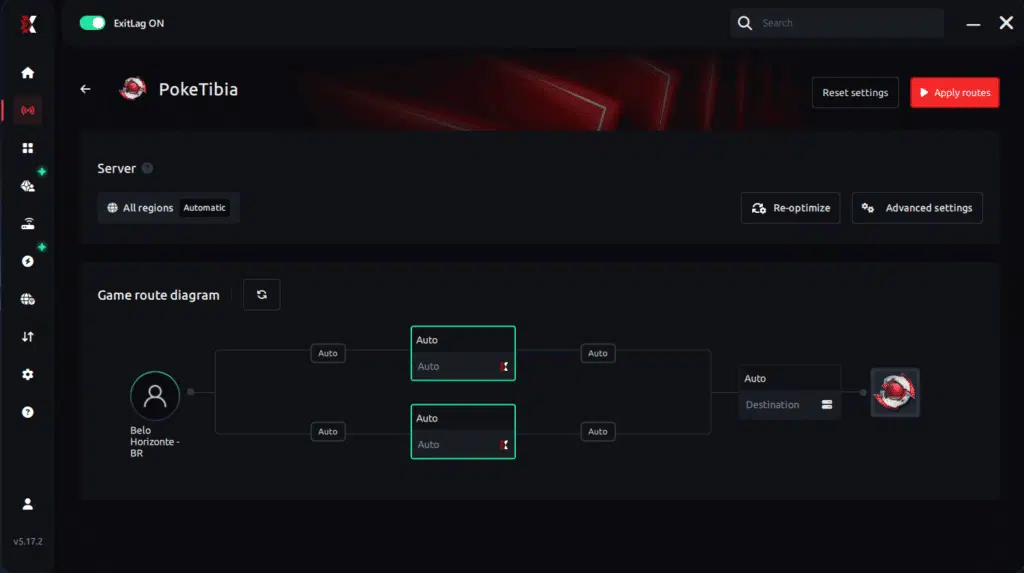
Step 6 – Wait a few seconds until optimization is complete. You’ll see ping indicators in the interface.
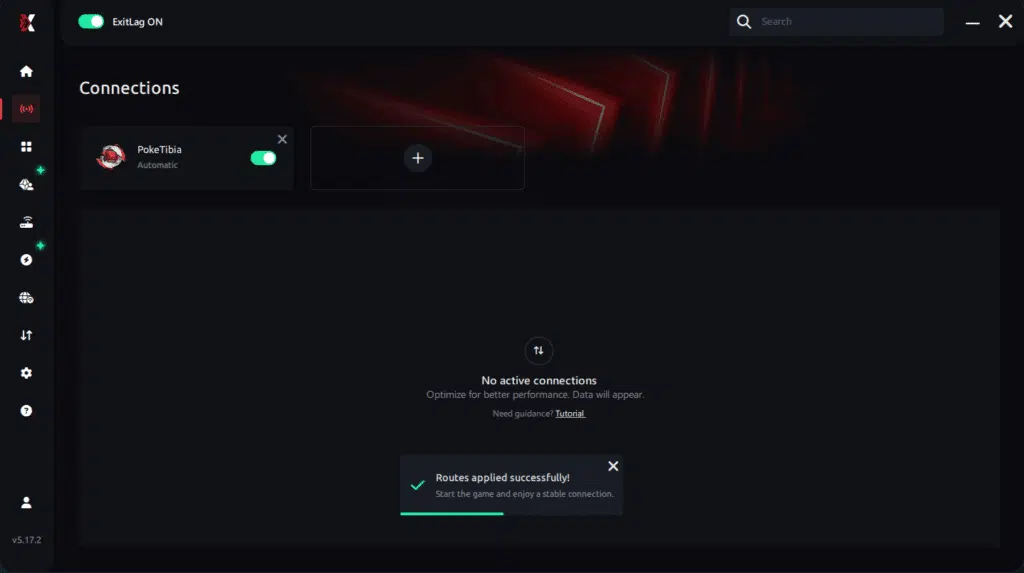
Step 7 – Launch PokeTibia normally. The optimization will already be active.
ExitLag runs in the background while you play, constantly adjusting routes to maintain the best possible performance.
Configuration for Emulator Users (PoketTibia Mobile)
If you play PoketTibia through BlueStacks, LDPlayer, or Nox:
- Open ExitLag
- Add your emulator executable
- Select the correct game route
- Apply optimization
- Launch PoketTibia normally
- Monitor stability inside the emulator
ExitLag improves both emulator and game routing.
Optimizing Results
To maximize your performance with ExitLag:
- Try different region routes
- Close bandwidth-heavy apps
- Keep Windows in High Performance mode
- Monitor packet loss inside ExitLag analytics
- Update your drivers regularly
For Console Players
ExitLag does not run on consoles.
- Xbox, PlayStation, Switch cannot run ExitLag
- There is no official workaround
- For best results, migrate your PoketTibia gameplay to PC
ExitLag is built for PC and mobile only.
Real Results: Before and After ExitLag in PoketTibia
Case 1 — Brazil → EU Server
Before ExitLag:
- Variable ping: 130–220ms
- Frequent micro-stutter
- Spell delay in crowded hunts
After ExitLag:
- Stable 88ms
- Micro-stuttering reduced by 80%+
- Smooth spell casting
Case 2 — Portugal → NA OT
Before ExitLag:
- Position desync
- Delayed tiles
- FPS drop feeling despite stable hardware
After ExitLag:
- Route stabilized
- Instant movement updates
- No perceived FPS drops
Case 3 — Mobile Player on Emulator
Before:
- Spike-based freezes
- Delayed spell animations
After:
- Stable packet delivery
- Zero animation lag
- Significantly smoother hunts
Performance Comparison Table
| Metric | Without ExitLag | With ExitLag | Improvement |
| Average FPS (Pacing) | Inconsistent | Smooth | Up to 60% better pacing |
| Micro-stuttering | Frequent | Rare | 80%+ reduction |
| Ping | 100–200ms | 60–110ms | 30–50% lower |
| Connection Stability | ⭐⭐ | ⭐⭐⭐⭐⭐ | Major improvement |
Additional Optimizations to Maximize FPS With ExitLag
Network Optimizations
- Use an Ethernet cable
- Close background bandwidth consumers
- Configure QoS to prioritize PoketTibia
- Change DNS to a stable provider
System Optimizations
- Enable High Performance Mode in Windows
- Update GPU drivers
- Disable overlays
- Clean temporary files
In-Game Optimizations
- Limit unnecessary visual effects
- Disable V-Sync for better responsiveness
- Use a reasonable FPS cap
- Reduce animation enhancement settings
FAQ — FPS Drop in PoketTibia
Does ExitLag Improve FPS?
ExitLag does not increase raw FPS, but it improves FPS stability by eliminating:
- packet loss,
- jitter,
- sync delays,
- route instability.
These issues cause micro-stuttering, which players experience as FPS drop em PoketTibia.
Is ExitLag Safe to Use?
Yes — ExitLag is secure, widely trusted, and used by competitive players around the world. It does not modify your files, memory, or client.
Does ExitLag Work on Consoles?
No. ExitLag works only on PC and mobile.
Consoles cannot run the software.
How Much Does ExitLag Cost?
Pricing depends on region.
Check the official pricing page
And try ExitLag free
Does ExitLag Help Weak PCs?
Yes — indirectly.
ExitLag eliminates network-related stuttering, which often feels like bad FPS.
But it cannot compensate for low CPU or GPU power.

Does ExitLag Work With PoketTibia?
Yes — it fully supports PoketTibia and similar OT servers
ExitLag vs VPN — What’s the Difference?
- ExitLag is NOT a VPN.
- A VPN adds encryption → slower routing.
- ExitLag uses optimized paths → faster, more stable performance.
A quick comparison:
| Feature | VPN | ExitLag |
| Encrypts traffic | Yes | No |
| Stabilizes routing | No | Yes |
| Improves gaming performance | Rarely | Always |
| Designed for games | No | Yes |
Conclusion — Fix FPS Drop in PoketTibia With ExitLag
Final Benefits
With ExitLag ON, you can expect:
- ✔ Stable FPS pacing
- ✔ Zero micro-stuttering
- ✔ Smooth spell casting
- ✔ Better mobility and timing
- ✔ Consistent gameplay
- ✔ Event performance without freezes
Next Steps
- Create your ExitLag account
- Download ExitLag
- Apply the PoketTibia route
- Play with total stability
- Dominate hunts, events, and PvP
ExitLag transforms unstable gameplay into smooth, frustration-free PoketTibia sessions.
Start your optimization today.
Fix your FPS drop in PoketTibia now — your gameplay deserves it.
Got questions or want to connect with other players? Join the conversation at the ExitLag Forum!