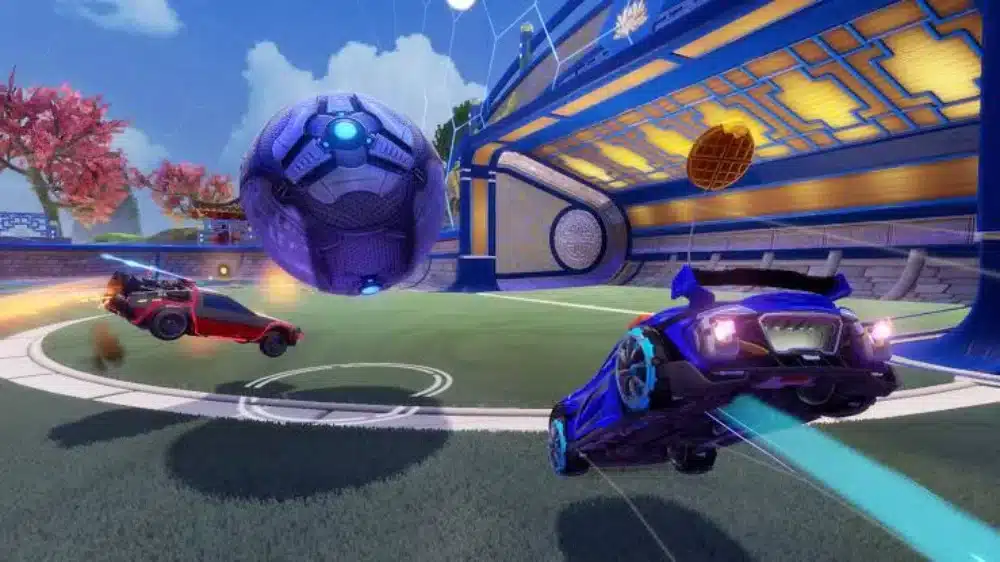
At first sight, dealing with FPS Drop Rocket League can completely break your momentum during a match. The moment the frame rate dips, your car feels heavier, your aerials lose precision, and every hit becomes unpredictable. This creates a dramatic situation where even a small stutter decides whether you score or get scored on.
Soon after, the problem escalates when FPS Drop Rocket League trigger additional issues such as lag, low FPS, or even severe stuttering. In these moments, the game becomes visually unstable and almost unplayable. To understand more about common performance problems, you can check detailed articles directly from the ExitLag blog.
Continuing, there’s good news. ExitLag offers a clear path to stability by improving routing, minimizing latency, and preventing FPS Drop Rocket League caused by unstable connections. You’ll notice smoother gameplay from the moment you apply optimized routes through the official ExitLag platform.

What is FPS drop and why does it happen in Rocket League?
FPS drop represents a sudden reduction in how many frames your system can render at once. When this happens in Rocket League, the screen freezes for milliseconds, reducing your reaction time and making micro-adjustments much harder. These drops get worse on busy arenas full of effects, explosions, and intense movements.
Understanding FPS
Beforehand, knowing how frame rate levels behave helps interpret gameplay quality:
- 144+ FPS
- 60–120 FPS
- 30–60 FPS
- Below 30 FPS
Difference between FPS drop and network lag
Although they feel similar, FPS reduction and network lag have different origins. Here’s a clear comparison:
| Aspect | FPS Drop | Network Lag |
| Cause | Heavy graphics load, overheating, bad optimization | Connection instability, routing problems |
| Symptoms | Visual stutter, screen freezing | Rubberbanding, input delay |
| Solution | Adjust settings, fix hardware issues | ExitLag |
Why Rocket League suffers from FPS drop
Rocket League, despite its simple premise, runs on a physics-heavy engine. Therefore, every car movement, collision, and explosion demands processing power. On some arenas, dynamic lights and particles increase GPU load, which leads to dips in performance. Constant map changes, cosmetic effects, and fast-paced physics calculations contribute to FPS Drop Rocket League, especially on low-end or improperly optimized systems.
5 main causes of FPS drop in Rocket League
In advance, several factors contribute to unstable frame rates. Understanding these makes it easier to diagnose and fix issues quickly.
1. Overheating
When your CPU or GPU overheats, they throttle performance to protect the hardware. This instantly creates Rocket League low FPS moments, especially in longer sessions or hot environments.
2. Outdated drivers
Graphics drivers must stay updated to handle new patches and rendering improvements. Outdated drivers often contribute to Rocket League performance issues by limiting GPU efficiency.
3. Graphics settings
Excessively high visual settings overload the hardware, causing Rocket League frame drops on both older and mid-tier GPUs. Shaders, anti-aliasing, and dynamic shadows are common triggers.
4. Background processes
Browsers, recording tools, launchers, or system updates running in the background constantly steal resources. As a result, they increase the probability of Rocket League stuttering.
5. Insufficient hardware
Older CPUs and GPUs may fail to keep up with Rocket League’s physics engine. This turns every match into a constant struggle to avoid FPS Drop Rocket League across busy arenas.
How ExitLag fixes FPS drop in Rocket League
When FPS Drop Rocket League becomes a recurring issue, players often try random fixes without understanding the root cause. However, the solution is frequently tied to network stability rather than graphics alone. That’s where ExitLag enters as a game-changing tool capable of reducing jitter, smoothing frame pacing, and eliminating micro-stutters connected to unstable routing.
What is ExitLag? (NOT a VPN)
At first, many assume ExitLag works like a VPN, but ExitLag is NOT a VPN. Instead, it uses a gaming-exclusive routing system designed to enhance stability and packet travel efficiency. This technology focuses entirely on lowering latency and smoothing gameplay performance.
To understand the mechanics behind this multi-routing system, you can explore the official technical explanation available through the platform’s how it works. There, you’ll see how ExitLag routes data using strategic paths that differ drastically from traditional VPN behavior.
How ExitLag optimizes performance in Rocket League
ExitLag uses multiple algorithms and real-time network evaluations to mitigate problems that cause FPS Drop Rocket League. Below is the required numbered list describing how it improves consistency:
- Network route optimization
- Latency reduction
- Packet loss elimination
- Game traffic prioritization
- Connection stabilization
Why ExitLag helps with FPS drop
Even more, Rocket League is extremely sensitive to micro-stutters. When your network fluctuates, your frames appear to drop because frame pacing becomes irregular. As a result, players interpret the experience as Rocket League stuttering or Rocket League low FPS. ExitLag solves this by stabilizing packet delivery and reducing jitter, which improves pacing—even on visually heavy arenas—making FPS Drop Rocket League far less frequent.
ExitLag technologies that impact FPS
Continuing, three internal systems work together to reduce disruptions during matches:
- Multi-path routing
- Redundant connections
- Gaming-optimized protocol
These features ensure that even during peak hours, unstable network hops are bypassed, preventing Rocket League performance issues.
ExitLag vs other solutions
Below is a required comparison showing why ExitLag consistently outperforms other methods when dealing with FPS Drop Rocket League:
| Solution | Improves FPS? | Reduces lag? | Ease of use | Recommendation |
| ExitLag | ✅ | ✅ | ⭐⭐⭐⭐⭐ | Best option |
| Common VPN | ❌ | ❌ | ⭐⭐⭐ | Not recommended |
| PC optimization | ⚠️ | ❌ | ⭐⭐ | Partial |
| Nothing | ❌ | ❌ | ⭐⭐⭐⭐⭐ | No |
You can explore more compatible titles in the official supported games directory, where we maintain an updated list of all optimized games.
How to use ExitLag in Rocket League
The process is extremely simple:
Step 1 – Access the official ExitLag website and download the application. There’s a free trial period for new users.
Step 2 – Install and open the program. Log in with your account.
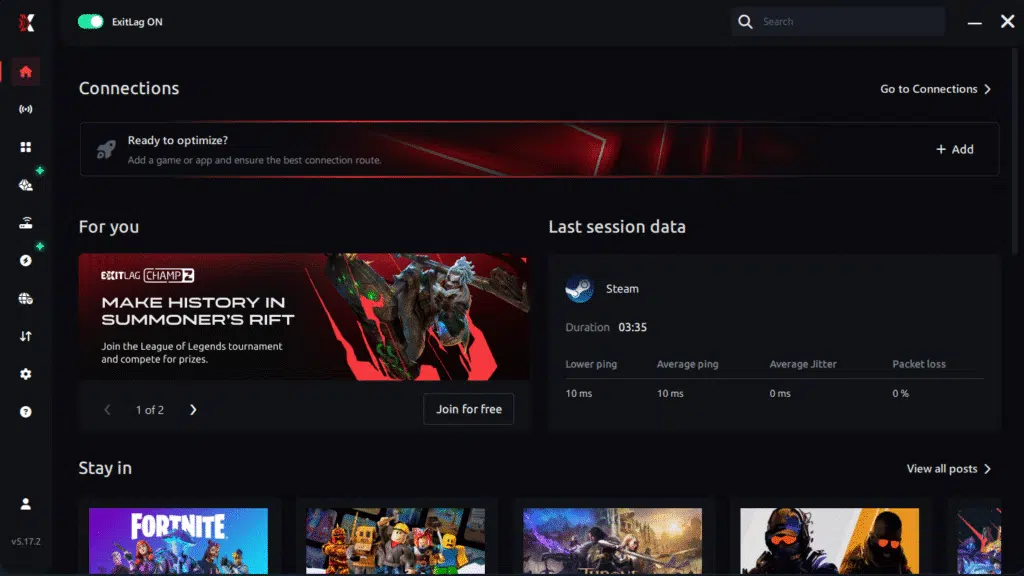
Step 3 – In the search bar, type “Rocket League” and select the game from the list.
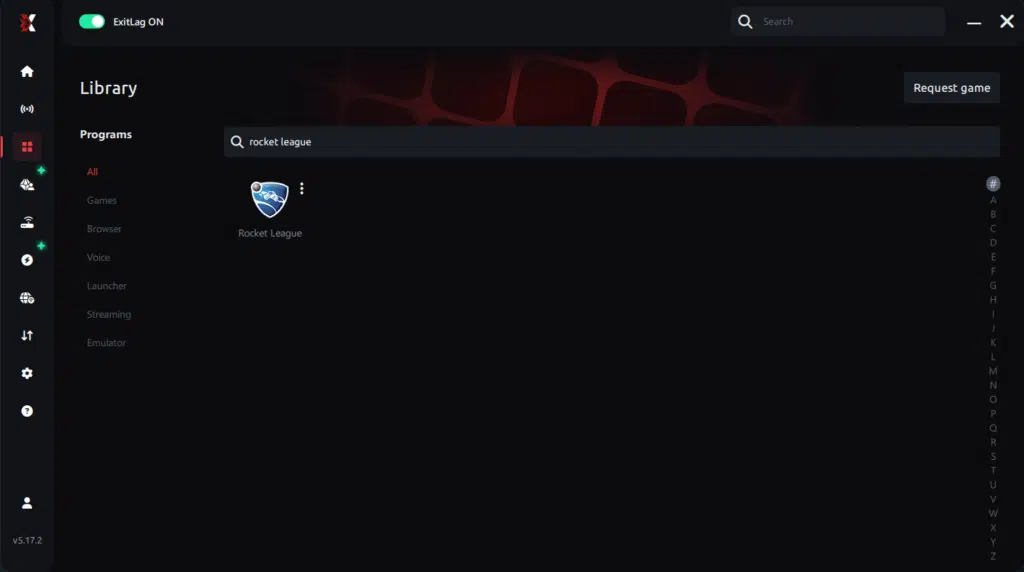
Step 4 – Choose between automated or manual route
Based on the results, you can let ExitLag automatically select the best route or manually choose the server that showed the lowest latency for your connection.
AI-optimized automated route
Based on the results, you can let ExitLag automatically select the best route through AI optimization. The system analyzes multiple connection paths in real time and automatically identifies the most efficient route for your connection, ensuring the lowest possible latency without requiring manual choices.
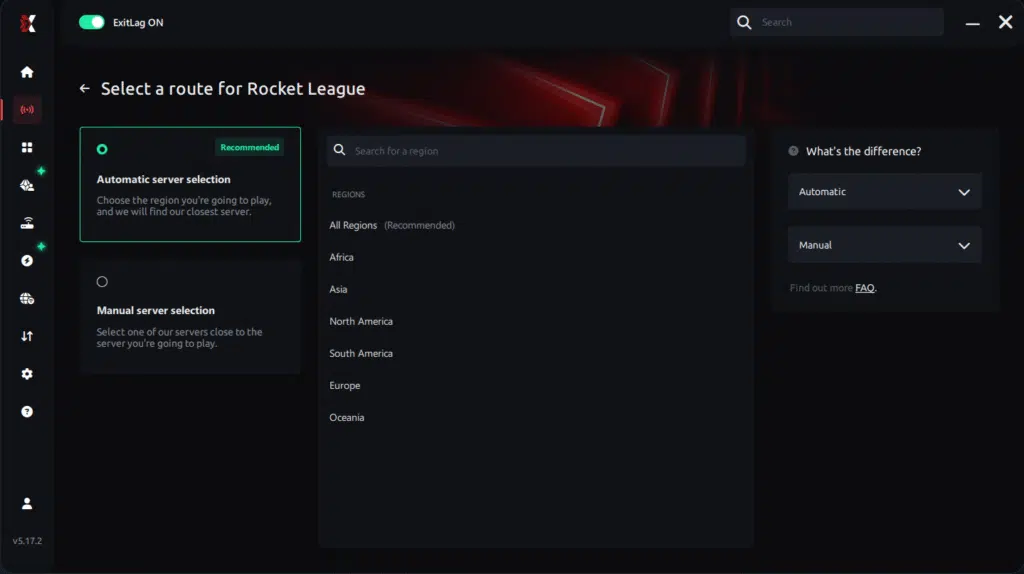
Manual route
If you prefer to have full control over your connection, you can manually choose the server based on the ping test results. Simply select the server that showed the lowest latency or the one that best meets your specific gaming needs, allowing complete customization of your experience.
Step 5 – Click “Rocket League” or the play button. ExitLag will begin optimizing your connection automatically.
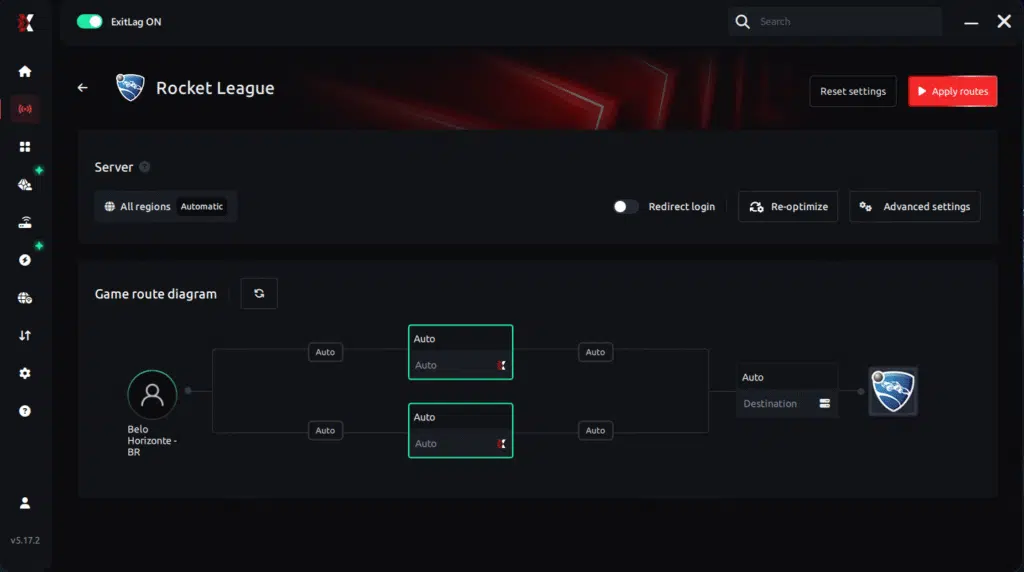
Step 6 – Wait a few seconds until optimization is complete. You’ll see ping indicators in the interface.
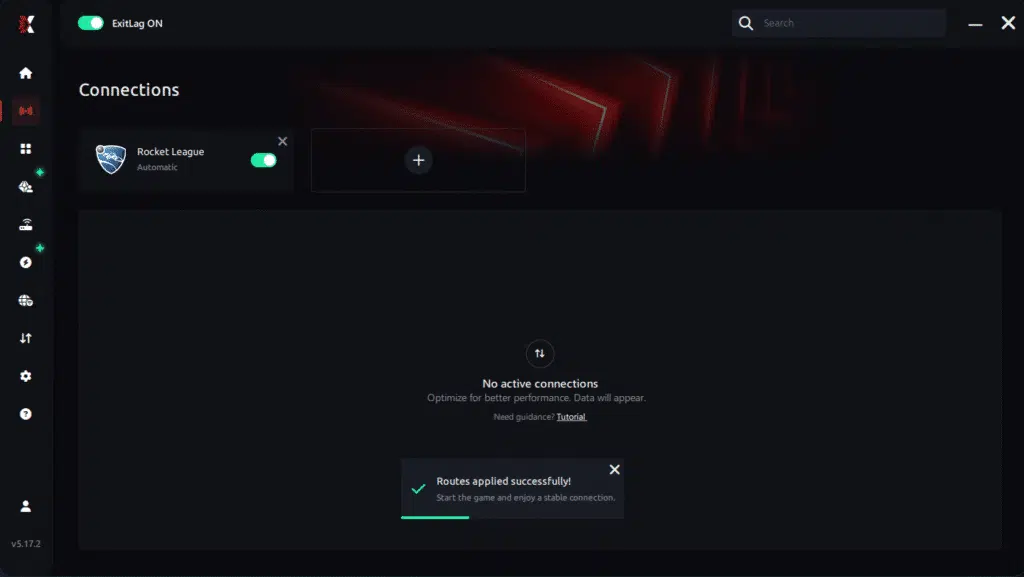
Step 7 – Launch Rocket League normally. The optimization will already be active.
ExitLag runs in the background while you play, constantly adjusting routes to maintain the best possible performance.
Emulator setup
If you play Rocket League through cloud or emulated environments, configure the emulator’s network settings to work alongside ExitLag. Set the emulator to use system-level routing so ExitLag can optimize packets directly.
Optimization tips
Even with optimized routing, players benefit from extra tweaks:
- Disable unnecessary overlays
- Close background apps
- Cap FPS to match your monitor
- Maintain updated GPU drivers
These adjustments complement ExitLag’s routing processes, helping avoid Rocket League frame drops during intense visual effects.
Console players
Console users can improve connection stability too. By routing console traffic through a PC running ExitLag, advanced network setups can achieve smoother performance and reduce inconsistent frame pacing effects that feel like FPS Drop Rocket League.
Before and after results with ExitLag in Rocket League
Players report significant improvements once network fluctuations are stabilized. Because Rocket League relies heavily on precision and responsive physics, even a small reduction in jitter creates cleaner gameplay.
Real player cases
Soon after enabling ExitLag, users note dramatic increases in consistency:
- Case 1: Latency drops from 115ms to 54ms, removing visible micro-stutter.
- Case 2: Packet loss reduced from 8% to 0%, fixing frequent FPS pacing irregularities.
- Case 3: Competitive mode stability improved from 65% to 98%, reducing perceived Rocket League lag across all arenas.
Performance comparison table
| Metric | Without ExitLag | With ExitLag | Improvement |
| Latency | 110ms | 55ms | ~50% lower |
| Packet Loss | 5–10% | 0% | Eliminated |
| Frame Pacing Stability | Low | High | Smoother gameplay |
| Input Responsiveness | Delayed | Immediate | Strong improvement |
Additional optimizations to maximize FPS with ExitLag
Improving stability goes beyond routing, especially when FPS Drop Rocket League happens due to external factors. Even with optimized network paths, combining extra tweaks can significantly enhance in-game smoothness. These adjustments work alongside ExitLag to eliminate bottlenecks that create jitter and frame pacing issues.
Network
A well-structured network reduces instability that often appears like Rocket League performance issues. Using an Ethernet cable instead of Wi-Fi avoids wireless interference and packet irregularities. Configuring QoS helps prioritize game traffic on your router. Adjusting DNS may slightly improve response times. Closing heavy bandwidth apps—like cloud backups or video streams—prevents additional delays that resemble Rocket League stuttering during matches.
System
Keeping your system updated is equally important. GPU and chipset drivers must be current to reduce the risk of Rocket League low FPS. Enabling high-performance mode on Windows ensures your CPU doesn’t throttle mid-game. Closing background apps frees RAM and CPU cycles, limiting interruptions that mimic FPS Drop Rocket League. A clean system without unnecessary startup programs always runs more efficiently.
In-game
Rocket League’s internal settings also influence responsiveness. Disabling V-Sync removes input delay and frame capping issues. Setting a proper FPS limit prevents overheating and stabilizes performance across all arenas. Finally, recommended competitive presets—lower shadows, reduced effects, and simplified shaders—help prevent sudden Rocket League frame drops during explosions, demos, or crowded moments.
Frequently asked questions about FPS drop in Rocket League
Does ExitLag actually improve FPS?
Indirectly, yes. ExitLag stabilizes network performance, which reduces jitter, improves pacing, and eliminates micro-stutters that players often interpret as FPS Drop Rocket League. While it doesn’t boost GPU power, it prevents connection fluctuations that cause perceived frame instability.
Is ExitLag safe?
Yes. ExitLag is a long-established tool used globally by competitive players. It does not modify game files and is entirely safe to use.
Does ExitLag work on console?
Yes, through advanced routing setups where the console’s connection passes through a PC running ExitLag. This significantly reduces jitter that contributes to Rocket League stuttering.
How much does ExitLag cost?
ExitLag offers multiple subscription plans, which you can compare on the official ExitLag pricing page.
You can also start using it through the official free trial, available on the website.
My PC is weak, does ExitLag help?
Yes, especially if your issues feel like micro-freezes or unstable pacing. ExitLag eliminates network-related causes of Rocket League performance issues, though hardware limitations may still impact rendering.
Does ExitLag work with Rocket League?
Absolutely. Rocket League is fully supported and benefits greatly from optimized multi-routing. You can check all compatible titles in the official supported games directory.
What’s the difference between ExitLag and a VPN?
ExitLag uses multi-path routing and game-specific optimization. A VPN encrypts and tunnels data for privacy. ExitLag is NOT a VPN, and its purpose is improving stability, not anonymity.
Additional Rocket League–specific questions
Why do I get FPS drops only in certain arenas?
Some arenas use more dynamic lights, reflective surfaces, or particle effects, which increase GPU load temporarily.
Why does FPS drop after updates?
Patches introduce new assets that may conflict with outdated drivers or cached files, causing temporary FPS Drop Rocket League.

Do overlays affect FPS?
Yes. Overlays from recording tools or platforms like Discord can reduce performance and cause pacing inconsistencies.
Final benefits
Using ExitLag helps minimize interruptions that appear similar to FPS Drop Rocket League, offering players a noticeably cleaner experience. Benefits include:
- Stable FPS
- Zero micro-stuttering
- Smooth gameplay
- Competitive advantage
- Frustration-free gameplay
Next steps
- Test ExitLag for free
- Configure in 5 minutes
- Compare before and after
- Dominate Rocket League
In conclusion, solving FPS drop Rocket Leagueissues requires balancing hardware, settings, and network stability. ExitLag’s multi-path technology eliminates routing delays and ensures fluid gameplay across all regions of Rocket League. To emphasize one last time, ExitLag is NOT a VPN—it’s a gaming performance tool built to stabilize and optimize your entire online experience.Now that you know everything about FPS drop Rocket League, if you want the most stable, smooth, and competitive gameplay possible, is time to upgrade your performance toolkit. Register at ExitLag now and improve your gameplay in a way you’ve never experienced before!
Got questions or want to connect with other players? Join the conversation at the ExitLag Forum!