The mobile battle royale scene moves fast, and small advantages stack up quickly. Free Fire MAX exists for players who want the classic Garena formula, but with a more premium look and feel—sharper textures, richer lighting, and smoother transitions that make every drop feel more “console-like” without losing the snappy pacing people love.
Want the premium look without the match-to-match instability? Start by fixing the connection side first—read how to fix Free Fire lag with ExitLag and handle the usual culprits (routing spikes, jitter, packet loss). Once the connection stops swinging, it’s much easier to judge whether switching to MAX is actually worth it.
If you’ve been debating whether it’s worth switching (or reinstalling), this guide breaks down what actually changes, how Free Fire MAX compares to standard Free Fire, and what to do if your matches still feel unstable. You’ll also learn how to approach Free Fire MAX download safely, how to treat Free Fire Max codes without risking your account, and how to tune your settings for consistent FPS.
Free Fire MAX can look incredible—until lag, packet loss, or routing issues turn a clean 1v1 into a delayed mess. That’s why connection optimization matters as much as graphics settings in competitive play. In the middle of ranked chaos, even a tiny delay can change your outcome in Free Fire Max gameplay.
Your goal is simple: smooth visuals, stable frames, and a connection that doesn’t betray you.
Before you tweak settings or reinstall, get a clean baseline of the ecosystem. This Free Fire overview of core mechanics clarifies what MAX changes versus what stays the same. With that context, you’ll stop chasing placebo settings.
What is Free Fire MAX, and what makes it different?
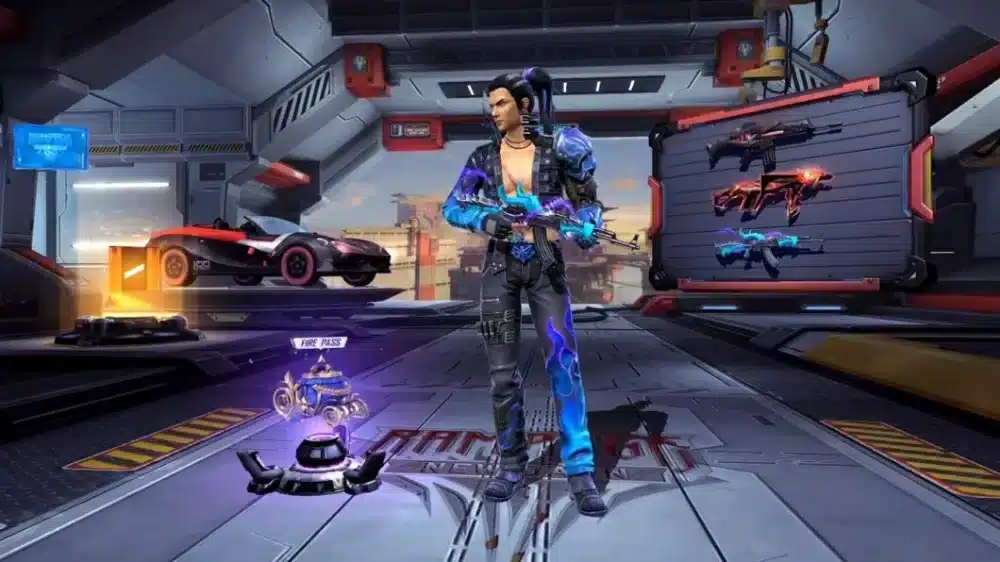
Free Fire MAX is the enhanced edition of Garena Free Fire built for players who want improved visuals and a more immersive presentation. It keeps the same core battle royale loop—drop in, loot fast, fight smart—but upgrades the experience with HD assets, refined animations, and expanded customization.
The key point is this: Free Fire MAX isn’t a different “game ecosystem.” With Firelink, it stays compatible with the original version, meaning you can play with friends across versions and keep your progress synced. That’s a major reason many players treat it as a visual upgrade rather than a separate title.
Before you change anything, it helps to know which upgrades impact your experience (graphics and UI flexibility) and which ones don’t (core balance and matchmaking rules).
Graphics, audio, and UI upgrades you actually notice
Once you load in, the most obvious improvements are lighting, texture detail, and smoother transitions. The interface and lobby presentation also feel more “premium,” especially on newer devices.
Here’s what most players notice first:
- Cleaner textures and sharper edges on weapons, outfits, and environment assets
- More dramatic lighting and shadowing (depending on your settings)
- Smoother lobby and menu animations
- More immersive audio layering in fights (device-dependent)
This is also where customization becomes a competitive factor. A better HUD layout and clearer visual clarity can make tracking targets easier—especially during fast peeks and close-range sprays in Free Fire Max gameplay.
Firelink crossplay and shared progress (what stays the same)
Garena’s Firelink system is what keeps the ecosystem unified:
- Same account and inventory
- Same friends list and squads
- Same matchmaking pool (with crossplay enabled)
So if your priority is staying synced with friends, switching to Free Fire MAX won’t isolate you. You’re mostly choosing a different presentation layer, plus deeper HUD customization—without losing progress.
Is Free Fire MAX better than Free Fire?
This is one of the most common real-player questions because “better” depends on your device, your priorities, and your tolerance for heat/battery drain. Free Fire MAX can feel dramatically better on a mid-to-high-end phone, while it may feel unstable on older devices unless you tune settings carefully.
The short truth: if your phone can handle it, the upgrade is worth it for clarity and smoothness. If your phone struggles, you may need balanced settings (or stick to standard Free Fire).
Performance and device compatibility (what to expect)
Free Fire MAX asks more from your phone—GPU, RAM, and storage—because HD assets are heavier. However, it’s still designed to run across a wide device range with performance settings.
Typical outcomes:
- Mid/high-end devices: more stable FPS and cleaner visuals
- Low-end devices: better visuals but higher chance of heat throttling or stutters
- Storage impact: larger install size and more frequent asset downloads
If you’re focused on stability, your best move is to install cleanly, then configure for consistent frames instead of chasing max visuals. A steady 45–60 FPS often wins more fights than prettier shadows.
If the install is clean but fights still feel delayed, don’t blame graphics first—measure the connection. This how to fix high ping in Free Fire breakdown helps you spot ping variance and route issues that show up in ranked. Fix the spikes, then fine-tune visuals.
Visual upgrades vs. gameplay balance (what DOESN’T change)
A common myth is that Free Fire MAX gives unfair gameplay advantages. In reality:
- Damage balance, weapons, and mechanics remain aligned with Free Fire
- Most “advantages” are clarity-based (visibility and UI) rather than hard stats
- Crossplay means Garena must keep the competitive field consistent
So yes, Free Fire MAX can feel “better,” but not because it changes core balance—because it can make information easier to read and your controls easier to tailor.
How do you download Free Fire MAX safely?
This question shows up constantly in search because players want the best version while avoiding fake installers, shady APK sites, and account risk. The safest approach is always official distribution.
If you’re looking for Free Fire MAX download, prioritize the Google Play Store or Apple App Store. Anything else should be treated as a last resort—and even then, you need to be extremely careful.
Official Android and iOS install steps
For most players, the process is straightforward:
Android (Google Play):
- Open Google Play Store
- Search “Free Fire MAX”
- Install and launch
- Sign in and link using Firelink
iOS (App Store):
- Open App Store
- Search “Free Fire MAX”
- Download and launch
- Log in and confirm account sync
Practical tips before installing:
- Keep at least 2–3 GB free storage to avoid corrupted downloads
- Update your OS first (older OS versions can cause crashes)
- Use a stable Wi-Fi network for first-time asset downloads
This approach covers most regions and dramatically reduces risk compared to random third-party sources claiming “fast Free Fire MAX download.”
APK installs and emulators (risks, benefits, and safe habits)
Sometimes players look for APK installs due to store restrictions or device compatibility. Here’s the reality:
- APK files can be repackaged with malware
- Fake versions often steal logins or inject mods
- Using unauthorized installers can violate Garena’s policies
If you must use a non-store source, treat it like a security problem:
- Avoid “modded” builds entirely
- Never grant suspicious permissions
- Don’t log into your main account on an untrusted install
- Prefer official sources whenever possible
For emulators (BlueStacks, LDPlayer, etc.), the experience can be smooth on PC, but keep it clean:
- Use official emulator websites
- Avoid macros/scripts that could flag your account
- Don’t mix emulator play with sketchy “Free Fire Max codes generator” sites
What are the best Free Fire MAX settings for smoother gameplay?
Even with perfect installation, your experience depends heavily on settings. The goal is consistency: stable FPS, minimal frame drops during fights, and readable visuals during chaotic pushes.
This matters because Free Fire MAX can look great but still stutter if your phone overheats or background apps eat RAM. Settings are your first defense.
Recommended graphics settings by device tier
Use this quick table as a starting point (then adjust based on your stability):
| Device Tier | Graphics | FPS | Shadows | High-Res Textures | Recommended Goal |
| Low-end (2–3 GB RAM) | Smooth/Low | 30 | Off | Off | Stability first |
| Mid-range (4–6 GB RAM) | Balanced/Medium | 45–60 | Low/Off | Medium | Consistent fights |
| High-end (8 GB+ RAM) | High/Ultra | 60 | On | On | Max clarity + smoothness |
If you’re chasing better Free Fire Max gameplay, prioritize FPS over shadows. Shadows look cool, but they often cost the most performance.
Quick “stability-first” checklist:
- Set graphics to Balanced/Medium
- Turn off heavy effects (dense vegetation, ultra shadows)
- Keep FPS at the highest stable level
- Disable background recording tools when playing ranked
How to reduce lag, stutters, and overheating
Lag isn’t always “internet lag.” Sometimes it’s device performance. To reduce stutters:
- Close background apps before launching the game
- Restart your phone before ranked sessions
- Avoid charging while playing (heat spikes cause throttling)
- Keep brightness reasonable (some devices heat faster at max brightness)
- Disable battery saver modes that throttle performance
Also, keep your game updated. Updates often include performance fixes and asset optimizations that improve Free Fire MAX stability.
Are Free Fire Max codes safe, and how should you use them?
Players search for Free Fire Max codes every day because free rewards are tempting. The risk is that scam sites target exactly that behavior—promising “unlimited diamonds” or “instant skins,” then stealing accounts.
The safe rule is simple: use official redemption channels only.
Free Fire Max codes are typically time-limited and region-limited. If a site claims:
- “codes generator”
- “diamond hack”
- “instant premium rewards”
…it’s almost always a trap.
Where to redeem codes without risking your account
Safe habits:
- Redeem through Garena’s official redemption portal (not random “mirror” sites)
- Verify you’re signed in with the correct platform (Google, Facebook, Apple, etc.)
- Screenshot successful redemption confirmation
- Log out after redeeming if you used a shared device
If a code fails, don’t spam retries across multiple sites. That behavior can trigger security checks.
Common code scams to avoid (and why they work)
Scam patterns are consistent:
- Fake login pages that mimic Garena
- “Human verification” loops that collect data and never deliver rewards
- APK “reward apps” that install malware
If you care about your inventory and rank, treat Free Fire Max codes like you treat passwords: official sources only, minimal exposure, no shortcuts.
Minimum and recommended requirements for Free Fire MAX
Specs aren’t just about “can it open?” They’re about “can it stay stable in ranked fights?” Free Fire MAX can run on lower specs, but it shines when your device has enough RAM and a decent chipset.
Here’s a practical baseline:
| Requirement Type | Minimum | Recommended |
| OS | Android 4.4 / iOS 11 | Android 8.0+ / iOS 12+ |
| RAM | 2 GB | 4 GB+ |
| Storage | ~1.5 GB (varies) | 2.5 GB+ |
| CPU | Dual-core 1.2 GHz | Octa-core 2.0 GHz+ |
If you meet the recommended specs, Free Fire MAX is much more likely to deliver smooth Free Fire Max gameplay without aggressive stutters.
How ExitLag improves your Free Fire MAX connection
This section is only about ExitLag—because for competitive shooters, connection quality is not optional. Even if your graphics are perfect, routing issues can cause delayed hit registration, rubber-banding, or inconsistent response during peak hours.
Free Fire MAX is fast. That means routing instability is punished immediately.
ExitLag works by optimizing the network route between you and the game server, aiming to reduce ping spikes and minimize packet loss. In practice, that can translate into:
- More consistent responsiveness in fights
- Fewer sudden “delay moments” during rushes
- Smoother server connections when your ISP route is unstable
Why routing and packet loss matter more than “raw speed”
A common misconception is that higher Mbps equals better gaming. In reality, competitive stability depends more on:
- Packet delivery consistency
- Route quality to the server
- Jitter (ping variance), not just average ping
So even with “fast internet,” you can still experience unstable matches if your route is inefficient.
ExitLag targets exactly that: it tries to create a cleaner path to the server so your inputs and server updates stay consistent in Free Fire MAX.
How to set up ExitLag for Free Fire MAX (quick steps)
A practical setup flow usually looks like this:
- Install ExitLag on your PC (or follow ExitLag-supported methods for your setup)
- Select your game/profile and choose the best server region
- Enable route optimization features
- Test a few matches during peak hours to compare stability
- Keep your settings consistent and only tweak one variable at a time
If your main issue is unstable ranked performance, ExitLag can be the difference between “random delay deaths” and consistent engagement timing—especially when you’re pushing hard in Free Fire Max gameplay.
Free Fire MAX Advance Server: what it is and how to join

The Advance Server exists for players who want early access to upcoming content—new characters, weapons, balance changes, and experimental features. It’s also a structured way for Garena to gather bug reports before rolling updates globally.
However, access is limited and not always open. Availability depends on region and testing cycles.
For dates, windows, and official testing updates, skip reposts and go straight to the source. The official Free Fire news and announcements page is where Garena posts what’s actually live. If it’s not there, treat it as unconfirmed.
What you can do in the Advance Server
The Advance Server typically includes:
- Test builds of upcoming content
- Bug reporting tools
- Occasional reward systems for valid bug discoveries
It’s not meant for “main account progress.” It’s for testing—and progress usually doesn’t carry over to live servers.
How to register without getting scammed
Treat Advance Server access like Free Fire MAX download: official sources only.
- Register through Garena’s official pages
- Avoid “guaranteed access” websites
- Never pay anyone for an invite
- Don’t install mystery APKs from Telegram/Discord sellers
If it isn’t official, it’s not worth your account.
FAQ: Free Fire MAX questions players actually ask
Free Fire MAX has a lot of recurring questions—especially around storage, syncing, and whether it’s “safe” to switch. Here are the most common answers, in a quick and practical format.
When you need official videos, event updates, and feature previews, use the verified channel instead of clip accounts. The official Free Fire YouTube channel is the fastest way to confirm what’s real before you change anything. It also helps you avoid fake “code” content designed to farm logins.
Storage, syncing, and switching versions
Yes. Because of HD textures and enhanced assets, expect a larger install and more downloaded resources over time.
No. Firelink sync keeps your inventory and progression connected across versions.
If you have 4 GB RAM (or more) and a reasonably modern chipset, yes—especially if you configure balanced settings for stable FPS.
Codes, safety, and account security
Yes—when you use Free Fire Max codes through official redemption channels. Avoid generators, unofficial reward apps, and fake login pages.
They can, and they also put your device at risk. If you care about your account, stick to official app stores for Free Fire MAX download.
Does ExitLag get you banned?
ExitLag is designed to optimize routing (connection stability), not modify game files. Still, always follow the game’s rules and avoid anything that touches client modifications or cheats.
If you want the premium look and consistent competitive performance, the smartest combo is stable settings + clean installs + reliable routing. Free Fire MAX can feel incredible when your frames are steady and your connection doesn’t spike mid-fight—and that’s exactly where ExitLag can help.
Ready to stop losing fights to lag? Try ExitLag and optimize your route for Free Fire MAX—so your aim, not your ping, decides the outcome.
Got questions or want to connect with other players? Join the conversation at the ExitLag Forum!