Learning how to make clothes on Roblox is one of the best ways to personalize your avatar, express your creativity, and even start earning Robux through original designs. Whether you're interested in creating simple T-shirts or detailed classic shirts and pants, Roblox provides tools that make the process accessible to beginners and experienced creators alike.
How to make clothes on Roblox has become a popular topic because avatar customization plays a huge role in the platform's community. How to make clothes on Roblox involves using templates, image-editing software, and Roblox's official creation tools to design wearable items that can be uploaded, shared, or sold through the Marketplace, depending on your account permissions.
What is how to make clothes on Roblox? It refers to the process of designing and uploading clothing items for Roblox avatars. This includes creating classic T-shirts, Shirts, and Pants by using the official Roblox create platform, following Roblox's image specifications, and publishing your creations according to the platform's guidelines.
In this guide, you'll learn the differences between clothing types, how to use templates correctly, the tools you'll need, common beginner mistakes, and helpful tips for creating professional-looking Roblox clothing.
How to Make Clothes on Roblox: Understanding the Different Clothing Types
Before opening an image editor, it's important to understand that Roblox offers different categories of avatar clothing.
Each clothing type serves a different purpose and uses different creation methods.
Classic Clothing
Classic clothing includes the original wearable items available on Roblox.
These are:
- Roblox t shirt;
- Shirts;
- Pants.
Although they may look similar inside the game, each one is created differently.
For example, a T-shirt simply places an image on the front of an avatar's torso, while Shirts and Pants wrap around multiple parts of the character model.
Layered Clothing
Roblox has also introduced Layered Clothing, which behaves differently from classic clothing.
Layered Clothing:
- Adapts to different avatar body types;
- Uses advanced 3D assets;
- Requires different creation workflows;
- Is intended for more experienced creators.
For beginners learning how to make clothes on Roblox, Classic Clothing is the best place to start.
Tools You Need Before Creating Clothes
Fortunately, you don't need expensive software to begin designing Roblox clothing. Many creators start with free tools before moving to professional applications.
Image Editing Software
Any editor capable of working with PNG files can be used.
Popular options include:
- Paint.NET;
- GIMP;
- Photoshop;
- Photopea;
- Krita.
Each program allows you to edit templates while preserving image transparency.
Roblox Create
The official Roblox create platform is where creators upload and manage their clothing.
Using Roblox Create, you can:
- Upload clothing assets;
- Manage creations;
- Publish items;
- Configure Marketplace listings;
- Track your creator projects.
Using official Roblox tools ensures your clothing follows the platform's publishing process.
Roblox Shirt Template Explained
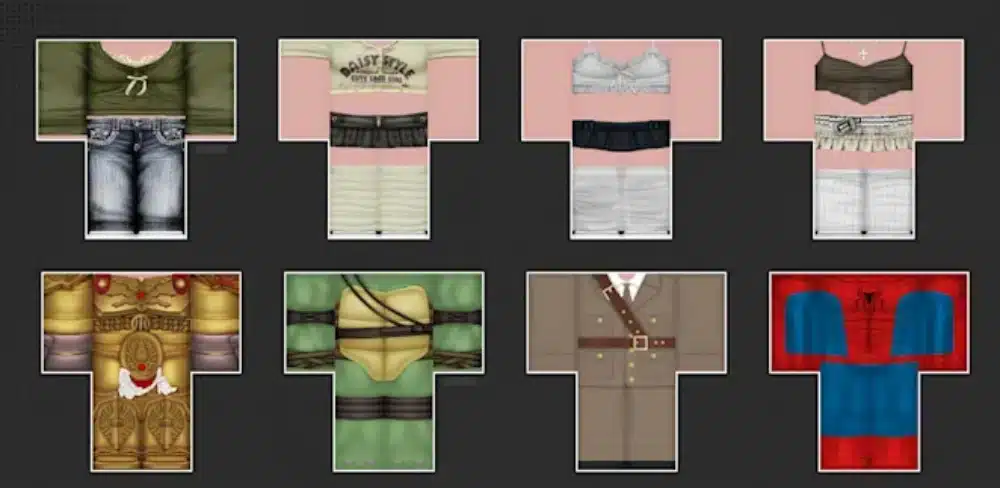
One of the most important resources for beginners is the Roblox shirt template.
Instead of drawing directly onto a character, creators edit a flat template that wraps around the avatar's body.
What Is the Roblox Shirt Template?
The Roblox shirt template is a PNG image divided into sections representing different body parts.
These sections include:
- Front torso;
- Back torso;
- Sleeves;
- Arms;
- Upper legs;
- Lower legs.
Understanding how each section connects is essential for creating seamless designs.
Why Templates Matter
Without the proper template, clothing won't align correctly on the avatar.
Using the correct shirt template in Roblox helps you:
- Position artwork accurately;
- Avoid texture stretching;
- Create symmetrical designs;
- Reduce editing errors;
- Produce professional-looking results.
Spending time learning the template layout makes future projects much easier.
Step-by-Step Guide to Creating Roblox Clothes
Once you understand the template, you're ready to begin designing. Following a structured workflow helps prevent common mistakes.
Step 1: Download the Template
First, obtain the official Roblox shirt template from Roblox's creator resources.
Always use current templates rather than outdated community versions.
Step 2: Design Your Clothing
Open the template inside your preferred image editor.
Keep these design tips in mind:
- Use high-resolution graphics;
- Maintain clean edges;
- Match colors carefully;
- Check alignment frequently;
- Save your work often.
Small adjustments can significantly improve the final appearance.
Step 3: Export as PNG
Roblox requires transparent PNG files.
Before exporting:
- Remove unnecessary background layers;
- Preserve transparency;
- Double-check image dimensions;
- Review all visible seams;
- Save the final PNG.
Following these steps reduces upload issues later.
Types of Clothes You Can Create
Roblox offers several clothing categories for creators.
Understanding the differences helps you choose the right project.
| Clothing Type | Difficulty | Template Required | Best For |
| Roblox t shirt | Easy | No body template | Beginners |
| Shirt | Medium | Yes | Detailed clothing |
| Pants | Medium | Yes | Complete outfits |
| Layered Clothing | Advanced | 3D workflow | Experienced creators |
For most beginners learning how to make clothes on Roblox, starting with T-shirts provides an excellent introduction before moving to Shirts and Pants.
Designing Better Roblox Clothing
Creating technically correct clothing is only the first step. The best creators also focus on visual quality.
Keep Your Designs Simple
Many beginners try to include too many details.
Instead, focus on:
- Clean color palettes;
- Consistent lighting;
- Balanced proportions;
- Readable designs;
- High contrast where appropriate.
Simple clothing often looks better than overly complex designs.
Test Before Publishing
Before uploading your final design, inspect every section carefully.
Check for:
- Misaligned sleeves;
- Cropped graphics;
- Visible seams;
- Blurry textures;
- Color inconsistencies.
Testing your work saves time and improves overall quality.
Common Mistakes When Learning How to Make Clothes on Roblox
Every creator makes mistakes while learning how to make clothes on Roblox. Fortunately, most of them are easy to avoid once you understand how Roblox clothing templates work.
Taking a little extra time to review your designs before uploading them can save hours of troubleshooting later.
Using the Wrong Template
One of the most frequent mistakes is downloading an outdated or incorrect shirt template in Roblox.
Always make sure you:
- Use the latest official template;
- Keep the original image dimensions;
- Avoid stretching the template;
- Preserve transparent areas;
- Export the final file as a PNG.
Following these recommendations helps your clothing display correctly on avatars.
Ignoring Avatar Proportions
Another common issue is forgetting that a flat image wraps around a three-dimensional character.
To improve your designs:
- Align graphics across connected sections;
- Keep sleeves symmetrical;
- Test colors under different lighting;
- Avoid placing important details across seams;
- Preview the clothing before publishing.
Small adjustments often make a significant difference in the final result.
Can You Earn Robux by Creating Clothes?
Many creators begin learning how to make clothes on Roblox simply for fun. However, designing original clothing can also become part of a successful creator journey.
Selling clothing requires following Roblox's current Marketplace rules and eligibility requirements.
Publishing Your Designs
Once your clothing is complete, you can upload it through Roblox create.
Before publishing, remember to:
- Review your artwork carefully;
- Follow Roblox Community Standards;
- Use original designs;
- Add clear item names;
- Write accurate descriptions.
High-quality listings are more likely to attract attention from other players.
Tips for Building a Clothing Catalog
Growing your collection takes consistency rather than creating a single successful item.
Many experienced creators recommend:
- Publishing regularly;
- Following seasonal trends;
- Creating matching outfit collections;
- Listening to community feedback;
- Improving your designs over time.
Building a recognizable style can help your creations stand out among thousands of Marketplace items.
Best Practices for Designing Roblox Clothing
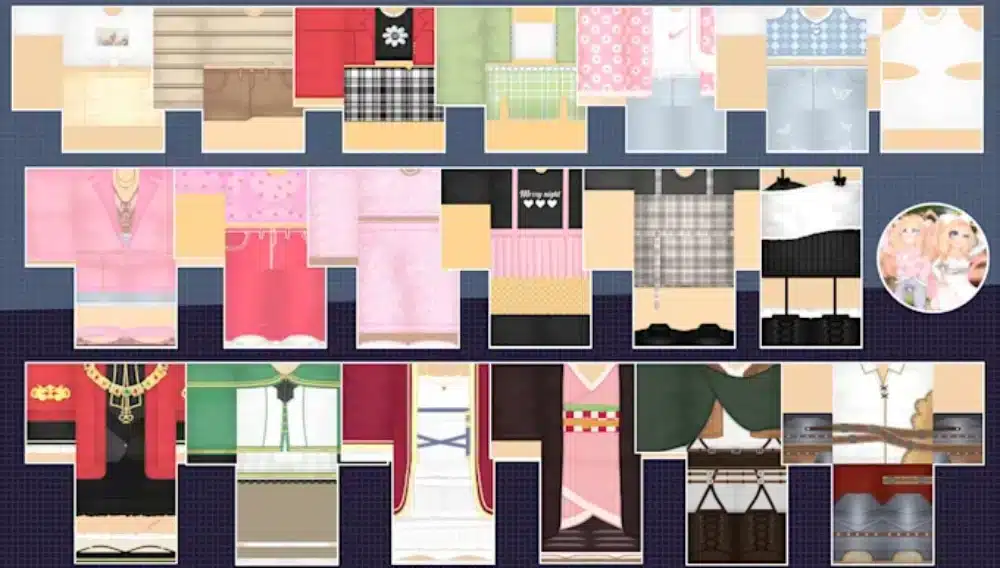
Creating attractive clothing isn't just about artistic ability. Good organization and attention to detail also contribute to better results.
Focus on Originality
Original designs help your clothing stand out while respecting Roblox's policies.
Try to:
- Create unique color combinations;
- Develop your own themes;
- Avoid copying existing clothing;
- Experiment with different styles;
- Build a recognizable brand.
Originality makes your work more memorable and supports a healthier creator community.
Learn from the Community
The Roblox creator community regularly shares tutorials, feedback, and design inspiration.
Helpful resources include:
- Roblox Creator Hub;
- Official Roblox documentation;
- Creator forums;
- Community Discord servers;
- Educational videos from experienced creators.
Learning from others can significantly improve your skills over time.
Why a Stable Connection Helps Roblox Creators
Whether you're uploading clothing, managing your projects, or testing new avatar designs, a stable internet connection helps make the creative process smoother.
Connection issues may cause:
- Slow uploads;
- Delayed asset synchronization;
- Login interruptions;
- Longer loading times;
- Difficulty accessing creator tools.
Although creativity is the most important ingredient, a reliable connection supports a more efficient workflow.
ExitLag helps optimize the route between your PC and supported game servers and online services by using intelligent multi-path routing technology.
Rather than functioning as a VPN, ExitLag focuses on improving connection stability, helping reduce lag, high ping, and packet loss whenever possible during supported online experiences.
FAQ
Do I need Roblox Premium to create clothes?
You can design clothing without Roblox Premium. However, depending on Roblox's current policies, certain publishing or selling features may require additional eligibility or account requirements. Always check the latest information through the official Roblox Creator Hub.
What's the difference between a Roblox T-shirt and a Shirt?
A Roblox t shirt places a single image on the front of an avatar's torso, making it ideal for beginners. Shirts, on the other hand, wrap around multiple body parts using a full Roblox shirt template, allowing for much more detailed designs.
Where can I get the Roblox shirt template?
The safest option is downloading the official Roblox shirt template from Roblox's Creator Hub. Using official resources helps ensure compatibility with the latest avatar specifications.
Can I sell the clothes I create?
Yes, provided your account meets Roblox's current creator and Marketplace requirements. Clothing must also follow Roblox's Community Standards and intellectual property policies.
Does ExitLag improve Roblox performance?
Yes. ExitLag can help optimize your connection route on supported platforms by reducing network instability, high ping, and packet loss. It is not a VPN and does not change your IP address or account location.
Create Better Roblox Clothes with Confidence and ExitLag
Learning how to make clothes on Roblox is an excellent way to express your creativity while becoming part of one of the world's largest creator communities. By understanding how Roblox create, the Roblox shirt template, and other clothing tools work together, you can design unique outfits that showcase your personal style and continue improving with every new project.
Whether your goal is creating custom outfits for your own avatar or building a Marketplace catalog, success comes from practicing consistently, following Roblox's official guidelines, and refining your designs over time. Even simple t shirts on Roblox can become the starting point for more advanced creations as your skills grow.
As you create, upload, and test your designs, maintaining a stable connection helps make the process smoother and more reliable.
Ready for a more stable online experience while creating and playing? Download ExitLag today and optimize your connection for Roblox and hundreds of other supported online games.