Marvel Rivals 2103 error usually appears when players are trying to queue, join matchmaking, or reconnect during periods of instability. In many cases, it is linked to the “operation frequency too high” message, which suggests that the game is receiving too many repeated requests or that the servers are struggling to process matchmaking normally.
Error 2103 is only one of several problems that can interrupt login, matchmaking, or normal gameplay. This Marvel Rivals connection troubleshooting guide covers broader symptoms and additional checks for players who are unsure which part of their setup is failing.
The Marvel Rivals 2103 error can be frustrating because it does not always mean something is wrong with your PC, console, router, or account. Sometimes, the safest fix is simply to stop pressing the queue button repeatedly, wait a few minutes, restart the game, and check whether other players are reporting the same issue.
Marvel Rivals 2103 error also gets confused with other connection problems, including error code 10 Marvel Rivals, Marvel Rivals error code 10, Marvel Rivals error code 211, and Marvel Rivals error code 4. These codes may look similar, but they can happen in different moments, such as login, launch, matchmaking, or platform authentication.
This guide explains what the error means, what you should try first, which fixes are safe, when the problem is probably server-side, and how ExitLag can help optimize your route without promising a guaranteed fix.
What Is Marvel Rivals 2103 Error?
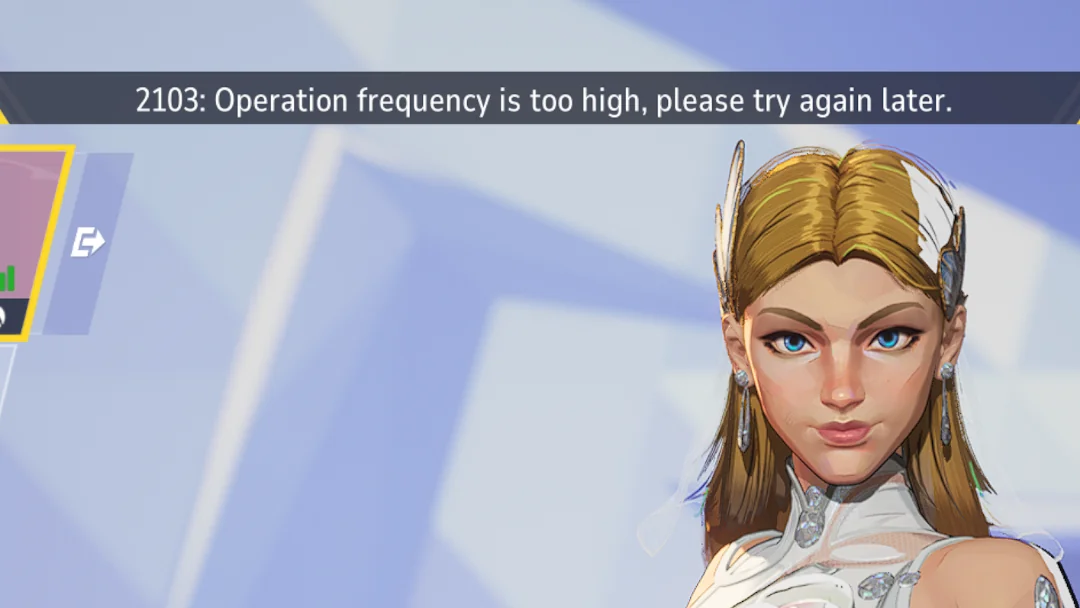
Marvel Rivals 2103 error is commonly associated with matchmaking frequency, queue overload, or temporary server instability. The message often appears when the game believes too many operations are being requested in a short amount of time.
In practice, that can happen when you click matchmaking several times, cancel and restart queue attempts too quickly, switch modes repeatedly, or try to reconnect while the servers are already delayed. However, it can also appear even when you did nothing wrong.
This is why players often describe the issue as a server-side problem. The game may be online, but matchmaking can still be unstable. Therefore, the first step is not to panic or reinstall the game immediately.
Why does the 2103 message appear?
The 2103 message appears when the game cannot complete an operation normally. In most player reports, that operation is matchmaking. Instead of placing you into a match, the system blocks or delays the request.
Possible causes include:
- Too many queue attempts in a short time;
- Matchmaking server overload;
- Temporary regional instability;
- Packet loss or inconsistent routing;
- Launcher or client desync;
- Server maintenance or hidden backend issues.
This is also why the Marvel Rivals 2103 error can disappear without you changing anything. If the server side normalizes, the code may stop appearing.
Is Marvel Rivals 2103 error a ban?
No, Marvel Rivals 2103 error should not be treated as a ban by default. It is usually discussed as a matchmaking or operation-frequency issue, not as an account punishment.
A ban or account restriction usually comes with a clearer message, account notice, or enforcement-related warning. Error 2103 is more commonly tied to failed queue operations.
Still, avoid spamming queue requests. If the message says operation frequency is too high, repeated clicking can make the cooldown feel worse. Instead, wait, restart, and check server status before trying again.
How Do You Fix Marvel Rivals 2103 Error?
To fix Marvel Rivals 2103 error, start with simple steps before trying advanced network changes. In many cases, the issue is temporary, so aggressive troubleshooting can waste time or create new problems.
The best approach is to move in order: check servers, stop queue spam, restart the game, restart the launcher, test your connection, and only then move to DNS, firewall, or file verification steps.
Step 1: Stop queue spam and wait
If you see the 2103 message, do not keep pressing the matchmaking button. Wait at least one or two minutes before trying again.
Use this quick reset:
- Cancel the queue if possible.
- Wait 60 to 120 seconds.
- Do not switch modes repeatedly.
- Try matchmaking once.
- If it fails again, restart the game.
This matters because the Marvel Rivals 2103 error is connected to operation frequency. Repeated queue attempts may look like excessive requests, especially when servers are already slow.
Step 2: Restart Marvel Rivals and the launcher
If waiting does not help, fully close Marvel Rivals and restart your launcher.
On PC, do this:
- Exit Marvel Rivals.
- Close Steam or Epic Games Launcher.
- Open Task Manager.
- End remaining Marvel Rivals, Steam, or Epic background tasks.
- Reopen the launcher.
- Start the game again.
This can refresh authentication, matchmaking connection, and launcher communication. It is also useful when Marvel Rivals error code 211 appears on launch or login, especially for Steam users.
How Do You Know If Marvel Rivals Servers Are Down?
You can suspect a server-side issue when many players report the same error at the same time. If social media, Discord, Reddit, or community forums are full of queue complaints, the problem is probably not only your connection.
This matters because local fixes cannot repair a server outage. If the problem is on the backend, the best action is to wait and avoid changing too many settings at once.
Signs the issue is server-side
The problem may be server-side if:
- Friends in different regions are getting the same error;
- Queue times freeze or never complete;
- You see 2103 after every matchmaking attempt;
- Restarting the game does not help;
- Other online games work normally;
- Social channels show many similar reports.
In that situation, do not reinstall the game first. Reinstalling should be one of the last options, not the first.
Signs the issue is local
The issue may be local if only you are affected, your internet is unstable, or other online games also have problems.
Check these signs:
| Symptom | Possible cause |
| High ping in several games | ISP or routing issue |
| Random disconnects | Wi-Fi instability or packet loss |
| Game fails after update | Corrupted files or outdated client |
| Login fails only on one launcher | Launcher authentication issue |
| Firewall warning appears | Security software blocking access |
If your issue looks local, continue with the steps below.
Technical instability should be separated from normal differences in hero performance and match outcomes. Once the servers and your connection are working correctly, reviewing current Marvel Rivals win rates can provide better context for whether repeated losses are linked to balance, team composition, or individual decisions.
How to Fix Error Code 10 Marvel Rivals on PC
Error code 10 Marvel Rivals is usually treated as a connection or login-related problem. It may appear when the game cannot connect correctly to the servers, when authentication fails, or when the local network is unstable.
Players searching for error code 10 Marvel Rivals PC usually want a practical fix, but there is no single guaranteed solution. The right step depends on whether the cause is the server, your launcher, your local network, or your game files.
Check updates and verify game files
First, make sure your game is fully updated. A version mismatch after a patch can cause connection or login errors.
On Steam:
- Open Steam.
- Go to Library.
- Right-click Marvel Rivals.
- Select Properties.
- Go to Installed Files.
- Click Verify integrity of game files.
On Epic Games Launcher:
- Open your Library.
- Find Marvel Rivals.
- Click the three dots.
- Select Manage.
- Choose Verify.
This can help with Marvel Rivals error code 10 when the issue is caused by missing, outdated, or corrupted files.
Restart your router and switch to Ethernet
If the files are fine, check your connection. Restart your router by unplugging it for about 30 seconds, then reconnecting it.
For a more stable test:
- Use Ethernet instead of Wi-Fi;
- Pause downloads and cloud syncing;
- Close streaming apps;
- Restart your PC;
- Test another online game;
- Run a speed and packet loss test.
If error code 10 Marvel Rivals disappears on Ethernet, your Wi-Fi signal, router distance, or local interference may be part of the issue.
How to Fix Marvel Rivals Error Code 211
Marvel Rivals error code 211 is often reported during launch or login, especially by PC players. It may be related to launcher communication, Steam authentication, firewall permissions, or a temporary client issue.
Because the exact cause can vary, treat Marvel Rivals error code 211 as a launcher and connection troubleshooting case rather than a single known bug with one universal fix.
Restart Steam or Epic completely
Do not just close the window. Fully close the launcher and make sure it is not still running in the background.
On Windows:
- Press Ctrl + Shift + Esc.
- Open Task Manager.
- End Steam, Epic Games Launcher, and Marvel Rivals tasks.
- Restart the launcher as normal.
- Launch Marvel Rivals again.
This can refresh login state and platform communication. It is a simple fix, but it is often worth trying before changing network settings.
Allow Marvel Rivals through the firewall
If restarting does not help, check Windows Firewall.
Use this process:
- Search for Windows Defender Firewall.
- Select Allow an app through firewall.
- Look for Marvel Rivals.
- Look for Steam or Epic Games Launcher.
- Allow both Private and Public networks if needed.
- Save changes and restart the game.
Do not leave your firewall disabled permanently. If temporarily disabling security software helps, turn it back on and create proper exceptions instead.
How to Fix Marvel Rivals Error Code 4
Marvel Rivals error code 4 is usually discussed as a network-related issue, especially on PlayStation consoles. However, similar connection logic can apply across platforms.
If you are seeing Marvel Rivals error code 4, start with basic connection checks before assuming your account, console, or installation is broken.
Console network checks
On PlayStation or Xbox, try:
- Restarting the console;
- Restarting the router;
- Testing internet connection in system settings;
- Switching from Wi-Fi to Ethernet;
- Checking NAT type;
- Updating the game;
- Updating system software.
If the error appears during a known outage, wait before reinstalling. Console reinstallations can take time and may not help if matchmaking or login servers are unstable.
PC network checks
On PC, use the same general connection steps used for Marvel Rivals error code 10 and error code 10 Marvel Rivals PC.
Try this order:
- Restart the game.
- Restart the launcher.
- Verify files.
- Restart the router.
- Use Ethernet.
- Allow the game through firewall.
- Flush DNS.
- Test again.
This step-by-step order keeps troubleshooting clean. If you change everything at once, you may not know what actually fixed the issue.
After connection and launcher problems are resolved, players can focus on improving their impact within a match. This guide to Marvel Rivals DPS heroes explains how damage-focused characters differ and what to consider when choosing one for the team.
Advanced Fixes for Marvel Rivals Connection Errors

If basic fixes do not work, you can try advanced network resets. These are most useful when you have repeated login, queue, or server connection errors across multiple sessions.
Use these carefully. If you are not comfortable changing network settings, keep the steps simple or ask someone with technical experience to help.
Flush DNS on Windows
DNS cache issues can sometimes interfere with how your PC reaches online services.
To flush DNS:
- Open Command Prompt as administrator.
- Type ipconfig /flushdns.
- Press Enter.
- Restart your PC.
- Launch the game again.
You can also renew your IP with:
ipconfig /release
Then:
ipconfig /renew
These commands can help refresh network configuration, but they do not guarantee a fix for server-side problems like a widespread Marvel Rivals 2103 error event.
Reset network settings carefully
Windows also allows a full network reset. This should be used only after simpler steps fail.
Before doing it, remember:
- Saved Wi-Fi networks may be removed;
- VPN adapters may need setup again;
- Custom DNS settings may reset;
- You may need to restart your PC.
If you use a VPN, proxy, or custom DNS, disable them temporarily for testing. Some routing tools can help connection stability, but unstable or unsupported VPN paths can also make login and matchmaking worse.
How Can ExitLag Help With Marvel Rivals 2103 Error?
ExitLag can help Marvel Rivals players by optimizing the route between their device and game servers. It does not guarantee that the Marvel Rivals 2103 error will disappear, especially if the problem is server-side. However, it may help when the issue is related to unstable routing, packet loss, latency spikes, or inefficient ISP paths.
This is important because online shooters depend on consistent connection quality. Even when your internet speed looks fine, the route your traffic takes to the server can still be unstable.
What ExitLag can help optimize
ExitLag may help with:
- Route optimization;
- Connection stability;
- Ping consistency;
- Packet loss reduction in some cases;
- Better routing during peak hours;
- More stable paths when ISP routing is inefficient.
For example, if you often see error code 10 Marvel Rivals, Marvel Rivals error code 10, or queue instability only at certain hours, testing a different optimized route may help identify whether routing is part of the problem.
What ExitLag cannot guarantee
ExitLag cannot fix every Marvel Rivals problem. It cannot repair server outages, bypass maintenance, remove account restrictions, or force matchmaking servers to accept requests during backend instability.
Use ExitLag as a connection optimization tool, not as a magic repair button.
Some errors or unusual behaviors may be corrected through game updates rather than local network changes. The official Marvel Rivals March 2025 patch notes show how updates can address hero interactions, input problems, and issues that appear under unstable network conditions.
A safe expectation is:
| Problem type | Can ExitLag help? |
| ISP routing instability | It may help |
| Packet loss on your route | It may help |
| Server outage | No guaranteed fix |
| Game files corrupted | Verify files instead |
| Firewall blocking the game | Fix firewall rules |
| Queue server overloaded | Wait for stability |
This keeps the promise realistic and useful.
How to Prevent Marvel Rivals 2103 Error in Future Sessions
You cannot prevent every Marvel Rivals 2103 error, especially if the cause is server-side. However, you can reduce local issues that make matchmaking, login, and connection errors more likely.
The goal is to keep your game updated, your connection stable, and your queue behavior clean.
Best habits before playing
Before starting a long session:
- Update Marvel Rivals;
- Restart the launcher after big patches;
- Use Ethernet if possible;
- Close heavy downloads;
- Avoid streaming while playing;
- Keep Windows and GPU drivers updated;
- Check server reports before ranked sessions.
These habits also help with Marvel Rivals error code 4, Marvel Rivals error code 211, and error code 10 Marvel Rivals PC, because many codes are connected to login, platform, or network stability.
Best habits during matchmaking
During matchmaking:
- Press queue once.
- Wait for the game to respond.
- Do not spam cancel and requeue.
- Avoid switching modes repeatedly.
- If the queue freezes, wait briefly.
- Restart the game if the error repeats.
This is especially important for the Marvel Rivals 2103 error, because operation frequency issues can become worse when players repeatedly send new matchmaking requests.
Maintenance notices, new patches, and known service problems may explain an error before any advanced troubleshooting is necessary. Check the official Marvel Rivals news page for current announcements whenever several players begin reporting the same queue or login issue.
FAQ
Marvel Rivals errors can be confusing because different codes may appear for similar connection problems. These answers summarize the safest way to understand and troubleshoot the most common issues.
Marvel Rivals 2103 error usually means the game could not process an operation normally, often because of matchmaking frequency, queue overload, server instability, or repeated requests.
Not always. It can happen because of server-side issues. However, repeated queue clicks, unstable routing, packet loss, or launcher problems may also contribute.
Start by checking server status, restarting the game, updating the client, verifying files, restarting your router, switching to Ethernet, and allowing the game through your firewall.
Marvel Rivals error code 10 is commonly treated as a connection or login error. It may involve server instability, outdated files, ISP issues, firewall blocks, or launcher communication problems.
Restart Steam or Epic completely, end launcher tasks in Task Manager, relaunch the game, verify files, and check firewall permissions for both Marvel Rivals and your launcher.
Marvel Rivals error code 4 is usually linked to network connection issues, often reported by console players. Restart your console, test your network, update the game, and check server status.
ExitLag can help optimize routing and may improve connection stability, but it cannot guarantee a fix for server outages, maintenance, account issues, or backend matchmaking problems.
Final Thoughts
Marvel Rivals 2103 error is annoying, but it is usually not a reason to panic. In many cases, it is connected to matchmaking frequency, server instability, or temporary connection problems. The best first response is to stop queue spam, wait briefly, restart the game, and check whether other players are affected.
If the problem continues, move through the troubleshooting steps in order. Check updates, verify files, restart your launcher, test Ethernet, review firewall permissions, and flush DNS only after simpler fixes fail.
What to remember before changing settings
Do not reinstall the game as your first reaction. Do not disable your firewall permanently. Do not assume every code has the same cause. Marvel Rivals 2103 error, Marvel Rivals error code 10, Marvel Rivals error code 211, and Marvel Rivals error code 4 can overlap, but they are not always the same problem.
Try ExitLag before your next Marvel Rivals session
If your connection feels unstable, download ExitLag and test whether optimized routing can help improve stability in Marvel Rivals. It may help reduce routing issues, smooth out latency spikes, and improve connection consistency while you queue, play ranked, and troubleshoot the Marvel Rivals 2103 error. All game images used in this article belong to their respective owners. They are used for informational and educational purposes only and do not imply endorsement or affiliation with the rights holders.
Got questions or want to connect with other players? Join the conversation at the ExitLag Forum!