A Marvel Rivals crosshair is one of the most important visual settings you can adjust if you want better aim, cleaner tracking, and more consistent performance. In a fast team-based shooter, your reticle helps you understand where your shots, projectiles, and abilities are going before the fight even begins.
Visual clarity also depends on how smoothly the game is running while you aim. If your reticle feels harder to track during fights, checking common causes of FPS drop in Marvel Rivals can help you separate crosshair issues from performance problems.
The right Marvel Rivals crosshair can make targets easier to read, especially during chaotic battles with bright effects, movement skills, shields, and vertical combat. A Marvel Rivals crosshair should not block your screen or disappear into the map. It should help you stay focused on your target while keeping enough visibility to react fast.
In this guide, you will learn how to choose the best crosshair Marvel Rivals players can use for different heroes, how to adjust Marvel Rivals crosshair settings, how to import Marvel Rivals crosshair codes, and which Marvel Rivals crosshair color works best across maps. You will also see how Marvel Rivals aim settings and ExitLag can improve your overall gameplay stability. PC players can import reticle codes directly, while console players usually need to recreate those settings manually.
What is the best crosshair in Marvel Rivals?
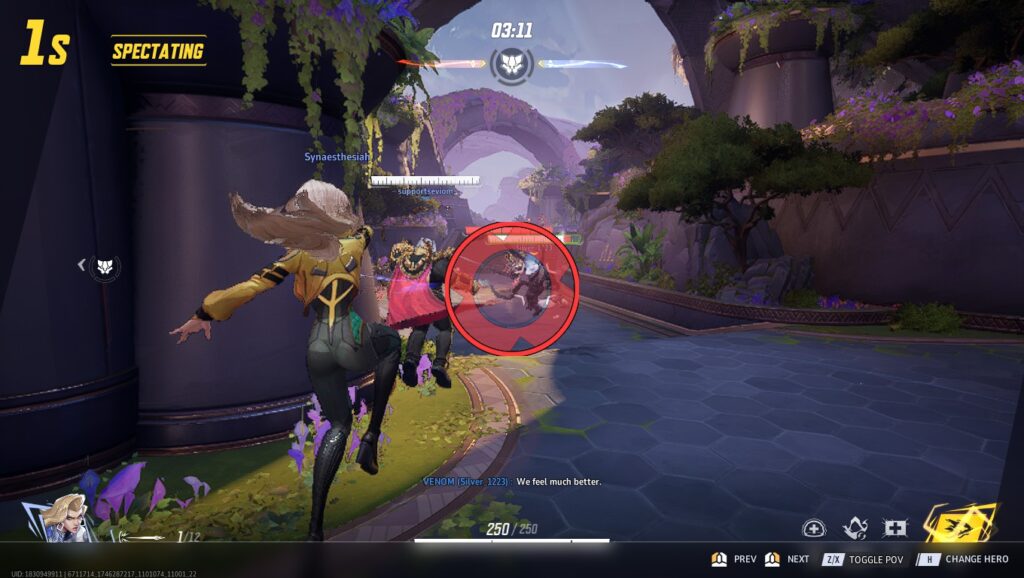
The best crosshair Marvel Rivals players can use depends on the hero, role, and attack style. There is no single perfect reticle for every character. Some heroes need pinpoint accuracy. Others benefit from a wider circle, a dynamic reticle, or a hybrid setup.
For example, precision heroes often work better with a dot or tight crosshair. Melee and close-range heroes usually benefit from a larger circle that helps track movement. Hybrid heroes can use a medium cross or circle-cross combination for balanced visibility. Several current guides recommend different crosshair styles based on hero type rather than one universal preset.
Hero kits also shape what kind of reticle feels natural in real matches. The official Marvel Rivals heroes page is useful for comparing character roles, attack styles, and abilities before deciding whether a dot, cross, or circle makes more sense.
Best crosshair for precision heroes
Precision heroes need a clean reticle. If you play characters that rely on direct shots, headshots, or accurate projectile timing, use a small dot or tight cross.
Best options:
- Small dot
- Tight crosshair
- Thin cross with small center gap
- High-opacity reticle
- Minimal outline
This setup works well because it keeps the center of your screen clean. It also reduces visual noise when tracking targets at mid or long range.
Recommended Marvel Rivals crosshair color options:
- Cyan
- Neon green
- Bright red
- Magenta
Best crosshair for close-range heroes
Close-range heroes need target awareness more than pixel-perfect precision. A larger circle or dynamic reticle can help you keep track of nearby enemies while moving quickly.
Best options:
- Circle reticle
- Circle plus cross
- Larger center gap
- Medium thickness
- Bright color with outline
This is useful for melee, shotgun-style, or high-mobility heroes. The reticle gives you a wider visual reference without forcing you to focus on a tiny point.
How to change crosshair in Marvel Rivals?
If you are searching for how to change crosshair Marvel Rivals, the process is simple. The exact menu wording can vary by platform and update, but the general path is through Settings, then Keyboard or Controller, then the HUD or Combat section. Guides consistently point players to the HUD reticle area to customize or import crosshairs.
Changing your Marvel Rivals crosshair settings is worth doing early. Even small adjustments can improve visibility, reduce distraction, and make aim training more consistent.
Step-by-step crosshair change
Use this path:
- Open Settings.
- Go to Keyboard or Controller.
- Find the Combat or HUD section.
- Look for Reticle or Reticle Save.
- Choose your reticle type.
- Adjust size, opacity, width, color, and outline.
- Save the setup.
- Test it in Practice Mode.
After that, play a few matches before changing again. Do not adjust every round. Your aim needs time to adapt.
Settings you should adjust first
Focus on these Marvel Rivals crosshair settings first:
| Setting | What it changes | Best beginner choice |
| Type | Shape of the reticle | Dot or cross |
| Color | Visibility on maps | Cyan or green |
| Width | Line thickness | Thin to medium |
| Opacity | Reticle strength | High |
| Center gap | Space in the middle | Small |
| Outline | Contrast boost | On or medium |
For most players, a simple crosshair is better than a stylish one. The goal is clarity, not decoration.
Marvel Rivals crosshair codes: how do they work?
Marvel Rivals crosshair codes let players import ready-made reticle setups without manually changing every slider. This is useful if you want to test community presets, streamer settings, or hero-specific layouts quickly.
On PC, players can paste an import string into the reticle import area. Console players may need to copy the same design manually because import code support is generally described as a PC-focused feature in current guides.
How to import Marvel Rivals crosshair codes
To import Marvel Rivals crosshair codes:
- Copy the full reticle code.
- Open Settings.
- Go to Keyboard or Controller.
- Enter the Combat / HUD section.
- Find Reticle Save.
- Click Import Save or the import icon.
- Paste the code.
- Confirm and save.
- Test the reticle before ranked matches.
Some guides also note that players can apply different crosshairs to specific heroes, which is useful because Marvel Rivals has very different character kits.
Popular Marvel Rivals crosshair code types
Instead of treating codes as magic, think of them as shortcuts. The real value is the reticle style.
| Crosshair style | Best for | Why it works |
| Tight crosshair | Precision heroes | Clean center focus |
| Dot sight | Long-range aim | Minimal screen obstruction |
| Melee circle | Close-range heroes | Better movement tracking |
| Small cross | Flexible picks | Good for hero swapping |
| Circle + cross | Hybrid kits | Precision and awareness |
A strong Marvel Rivals crosshair should match your hero first and your personal taste second.
Best Marvel Rivals crosshair settings by hero type
Different heroes need different reticles. This is why copying one “pro crosshair” without context can hurt your aim. A great reticle for a sniper-style hero may feel terrible on a melee brawler.
Good Marvel Rivals aim settings should support the way each hero deals damage. Hitscan, projectile, melee, aerial, and support characters all demand different levels of precision and awareness.
Recommended settings by role
| Hero type | Recommended reticle | Suggested color | Main benefit |
| Precision DPS | Dot or tight cross | Cyan, red | Better headshot focus |
| Projectile DPS | Small cross | Green, cyan | Easier lead tracking |
| Melee heroes | Circle | Yellow, magenta | Better close-range awareness |
| Supports | Thin cross | Pink, cyan | Clean ally and enemy tracking |
| Hybrid heroes | Circle + cross | Green, white | Balanced visibility |
For the best crosshair Marvel Rivals experience, keep a few presets instead of forcing one layout on every character.
Static vs dynamic crosshair
Static crosshairs do not move or expand much. Dynamic crosshairs can react to firing, movement, or weapon behavior, depending on the game settings and hero.
Static reticles are better if you want:
- Consistency
- Less distraction
- Better muscle memory
- Cleaner long-range aim
Dynamic reticles are better if you want:
- More feedback
- Spread awareness
- Close-range tracking help
- A more responsive visual feel
For ranked play, many players prefer static reticles because they are easier to read under pressure.
Best Marvel Rivals crosshair color
Choosing the right Marvel Rivals crosshair color is just as important as choosing the shape. A good color must stay visible across bright effects, dark areas, shields, ability particles, and map backgrounds.
Current crosshair guides often recommend high-contrast options such as light blue, green, cyan, or other bright tones because they stand out better during fights.
Best colors to use
Good color choices include:
- Cyan
- Neon green
- Bright yellow
- Magenta
- Pink
- Red, if it does not blend with enemy effects
Avoid colors that disappear into the environment. Dark blue, gray, black, and low-opacity white can become hard to see during chaotic fights.
How to test crosshair color
Test your color in:
- Practice range
- Bright maps
- Dark areas
- Team fights
- Ultimate-heavy moments
- Long-range angles
A color that looks good in the menu may fail during real matches. Always test it in actual gameplay.
Official updates can also affect how certain heroes, maps, and combat situations feel over time. The main Marvel Rivals website is the safest place to confirm current game information before treating one crosshair setup as permanent.
Marvel Rivals aim settings that support your crosshair
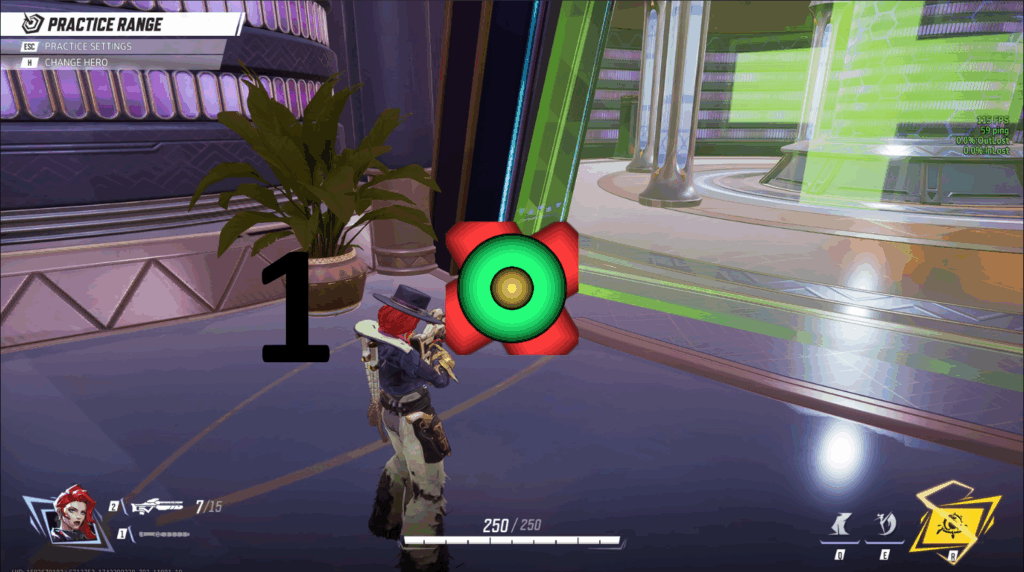
Your crosshair helps your vision, but your Marvel Rivals aim settings control how your input feels. If your sensitivity is too high, even the best reticle will feel unstable. If it is too low, you may struggle to track fast heroes.
The goal is not to copy someone else perfectly. The goal is to build settings that let your hand, eyes, and reticle work together.
Basic aim settings tips
Use these principles:
- Lower sensitivity for precision heroes
- Slightly higher sensitivity for melee and mobility heroes
- Keep settings consistent while practicing
- Avoid changing sensitivity every match
- Test in Practice Mode before ranked
A good Marvel Rivals crosshair should make your aim easier to read. It should not compensate for unstable sensitivity.
Crosshair and aim training routine
Try this quick routine:
- Pick one hero.
- Choose one reticle.
- Track moving bots for 5 minutes.
- Practice flicks for 5 minutes.
- Play one unranked match.
- Adjust only one setting at a time.
This helps you understand whether the issue is your reticle, your sensitivity, or your tracking habits.
Why ExitLag improves Marvel Rivals performance
Even the best Marvel Rivals crosshair cannot fix lag, packet loss, or unstable routing. If your connection delays your inputs, your reticle may look correct while your shots feel inconsistent. That creates frustration because it feels like your aim is wrong when the real issue is network stability.
ExitLag helps optimize your connection route, reduce instability, and improve responsiveness during online matches. For a fast shooter like Marvel Rivals, that can make aiming, tracking, and reacting feel much smoother.
Why connection stability affects aim
Connection problems can cause:
- Delayed shots
- Rubberbanding
- Hit registration frustration
- Ping spikes during fights
- Inconsistent movement feedback
That matters because your Marvel Rivals crosshair settings only help if the game responds cleanly when you aim and shoot.
When to use ExitLag
ExitLag is especially useful if you:
- Play ranked matches
- Have unstable Wi-Fi
- Connect to distant servers
- Notice ping spikes
- Experience packet loss
- Play during peak internet hours
A strong crosshair improves visual precision. ExitLag helps your connection support that precision.
Network issues can make even a well-designed reticle feel unreliable because your aim may look right while the match responds late. If that happens often, reviewing how to fix Marvel Rivals high ping can help you understand whether connection instability is affecting your shots.
FAQ
The best crosshair Marvel Rivals players can use depends on the hero. Precision heroes usually work best with a dot or tight crosshair, while close-range heroes often benefit from a circle.
To learn how to change crosshair Marvel Rivals, open Settings, go to Keyboard or Controller, find the HUD or Combat section, and adjust the reticle options. You can also import codes on PC.
Marvel Rivals crosshair codes are import strings that let players copy reticle presets quickly. They are useful for testing community or hero-specific setups.
The best Marvel Rivals crosshair color is usually a high-contrast option like cyan, neon green, yellow, pink, or magenta.
Use a dot for precision heroes and long-range shots. Use a crosshair or circle if you need better tracking, wider awareness, or more comfort during chaotic fights.
Current guides generally describe code importing as a PC feature, while console players may need to recreate settings manually.
Technical problems can also interrupt testing before you even get enough matches to judge a reticle properly. When loading issues appear, a guide for Marvel Rivals stuck at 99 can help players troubleshoot access problems before returning to aim settings and crosshair adjustments.
Do Marvel Rivals aim settings matter more than crosshair?
Both matter. Marvel Rivals aim settings control how your input feels, while your crosshair controls visual clarity. The best setup combines both.
A better Marvel Rivals crosshair gives you cleaner aim, stronger visibility, and more confidence in every fight. Marvel Rivals crosshair customization is not only about style. It affects how you track enemies, read movement, and stay focused during chaotic team fights. Test different Marvel Rivals crosshair settings, try useful Marvel Rivals crosshair codes, choose a clear Marvel Rivals crosshair color, and refine your Marvel Rivals aim settings around your favorite heroes. Then, use ExitLag to reduce connection instability and make every shot feel more consistent. Try ExitLag today and play Marvel Rivals with smoother, more reliable performance.
Got questions or want to connect with other players? Join the conversation at the ExitLag Forum!