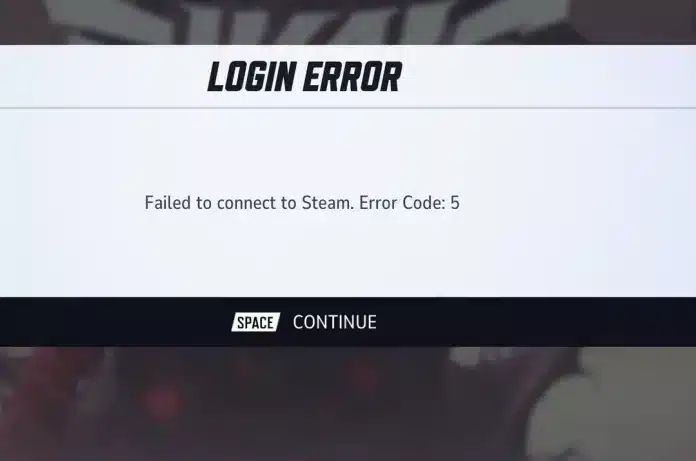
Encountering Marvel Rivals error code 5 can be frustrating, especially when you're ready to jump into a match with your favorite heroes. This connection-related error usually prevents players from accessing the game's online services, interrupting matchmaking or login attempts before gameplay even begins.
Like many online multiplayer titles, Marvel Rivals error code 5 usually appears when the game cannot maintain stable communication between your device and its servers. Network interruptions, server maintenance, corrupted files, or local configuration issues can all contribute to the problem, making it important to identify the root cause before attempting a fix.
This guide explains what Marvel Rivals error code 5 means, explores the most common causes, provides step-by-step troubleshooting solutions, and compares it with other frequent errors like Marvel Rivals error code 10 and Marvel Rivals error code 211.
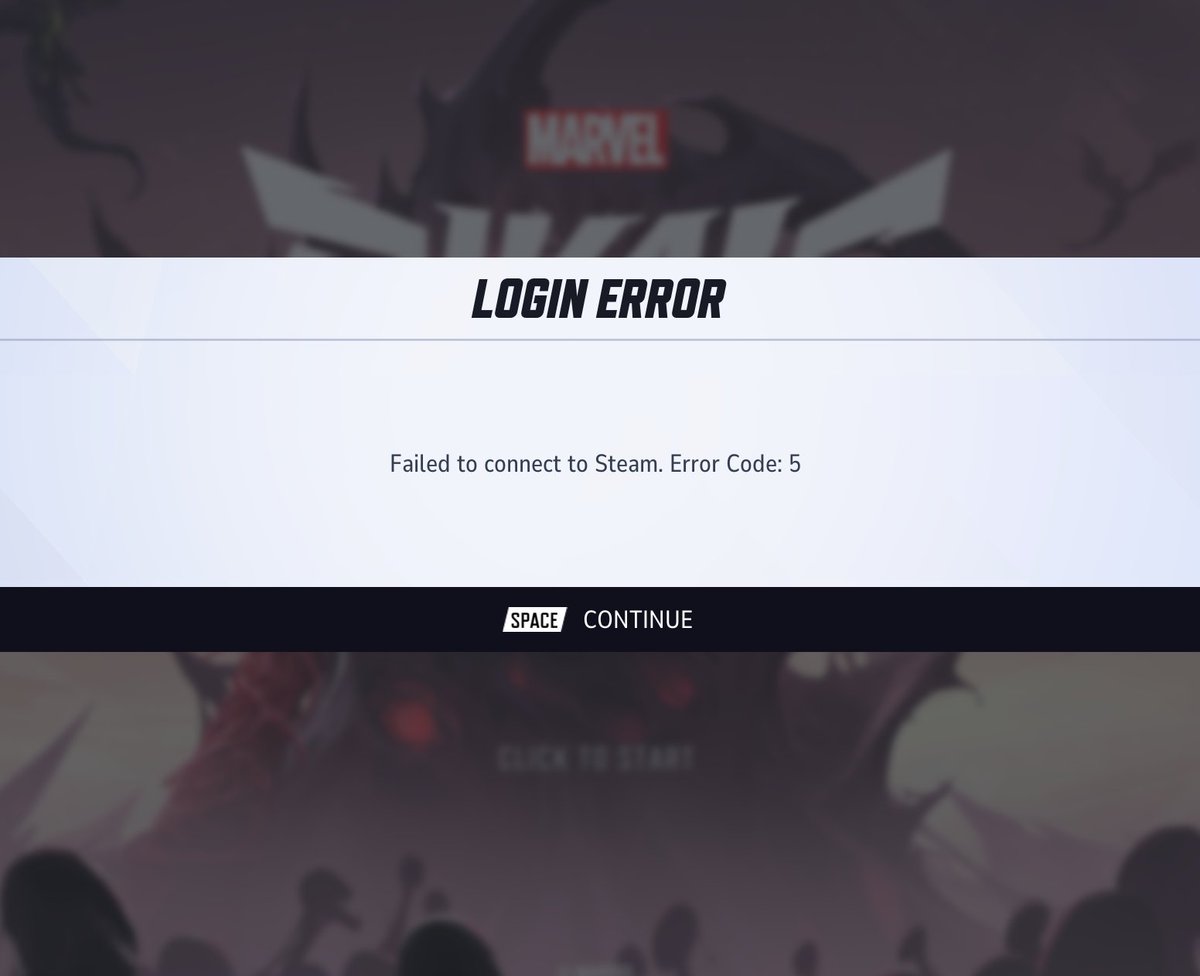
What Is Marvel Rivals Error Code 5?
Marvel Rivals error code 5 is generally associated with connection or authentication problems that prevent the game client from successfully communicating with Marvel Rivals' online services.
Although the exact trigger may vary depending on the player's platform or network conditions, the error typically appears during login, server authentication, or matchmaking initialization. In many cases, the issue is temporary and can be resolved without reinstalling the game.
Unlike gameplay bugs or crashes, this error usually occurs before entering a match, indicating that the game cannot complete its connection to the required online infrastructure.
Common Symptoms
Players experiencing this issue often notice:
- Login failures;
- Matchmaking interruptions;
- Server connection errors;
- Authentication timeouts;
- Unexpected return to the main menu;
- Error messages during startup.
Recognizing these symptoms can help narrow down the appropriate solution more quickly.
What Causes Error Code 5?
There isn't a single cause behind Marvel Rivals error code 5. Instead, several factors may prevent the game from establishing a stable connection with its servers.
Sometimes the issue originates from server-side maintenance, while in other cases it results from local network problems, corrupted game files, outdated software, or security applications blocking network communication.
Understanding the possible causes allows players to avoid unnecessary troubleshooting steps and focus on the most likely solution.
Most Common Causes
The error is frequently linked to:
- Temporary server outages;
- Internet connection instability;
- High packet loss;
- Firewall restrictions;
- Antivirus interference;
- Corrupted game files;
- Outdated game versions;
- Platform service interruptions.
Many of these issues can be resolved in just a few minutes.
Check Marvel Rivals Server Status First
Before changing any system settings, verify whether the problem is affecting all players.
Online games regularly undergo maintenance, receive emergency hotfixes, or experience temporary server overload during major updates. If the servers are unavailable, local troubleshooting won't resolve the problem.
Checking official communication channels can save significant time and prevent unnecessary configuration changes.
Where to Look
Useful sources include:
- Official Marvel Rivals social media accounts;
- Community announcements;
- Steam news updates;
- Platform status pages;
- Official Discord server.
If widespread server issues are reported, the best solution is simply waiting until services are restored.
Restart Your Network Equipment
A surprisingly effective solution involves restarting your networking hardware.
Routers and modems occasionally accumulate temporary routing errors, stale sessions, or DNS problems that interfere with online games.
Performing a complete power cycle refreshes these connections and often resolves intermittent communication issues.
To maximize effectiveness:
- Turn off your PC or console;
- Power off your modem and router;
- Wait about 60 seconds;
- Turn the modem back on first;
- Wait for the internet connection to stabilize;
- Restart the router;
- Launch Marvel Rivals again.
This simple process solves many connection-related problems without additional troubleshooting.
Verify Game Files
Corrupted or incomplete game files can also trigger Marvel Rivals error code 5, particularly after interrupted downloads or updates.
Fortunately, platforms like Steam include built-in verification tools that compare installed files with the latest official versions and automatically replace damaged files.
Running a file verification is often much faster than performing a complete reinstallation.
Benefits of File Verification
The process can repair:
- Missing files;
- Damaged assets;
- Incomplete updates;
- Installation inconsistencies;
- Corrupted configuration files.
It's one of the safest troubleshooting steps because it doesn't affect your game progress.
Review Firewall and Antivirus Settings
Security software sometimes mistakes online games for suspicious network activity, blocking outgoing or incoming connections required for authentication.
If Marvel Rivals cannot communicate properly with its servers, Marvel Rivals error code 5 may appear even when your internet connection is functioning normally.
Instead of disabling your antivirus entirely, consider creating an exception for the game's executable and launcher. Allowing Marvel Rivals through Windows Firewall can also resolve connection problems while maintaining overall system security.
Check for Pending Updates
Keeping both the game and your operating system updated is essential for maintaining compatibility with online services.
Developers frequently release patches that address connection issues, authentication bugs, and server communication improvements. Running an outdated version may prevent successful login until the latest update is installed.
Always verify that:
- Marvel Rivals is fully updated;
- Steam or your launcher is current;
- Windows has the latest networking updates;
- Network drivers are up to date.
Installing pending updates is a quick step that can eliminate several potential causes of connectivity errors.
Understanding Other Marvel Rivals Error Codes
Although Marvel Rivals error code 5 is one of the more common connection-related issues, players may also encounter other error messages that stem from different underlying causes.
Knowing how these errors differ can make troubleshooting much more efficient and help you avoid applying fixes that aren't relevant to your situation.
| Error Code | Typical Cause | First Recommended Action |
| Error Code 5 | Connection or authentication issue | Check servers and internet connection |
| Error Code 10 Marvel Rivals | Login or network communication issue | Restart network and verify updates |
| Marvel Rivals Error Code 211 | Server communication or account authentication issue | Verify server status and account connectivity |
Understanding these distinctions helps you identify the most appropriate troubleshooting path before making deeper system changes.
Advanced Troubleshooting for Marvel Rivals Error Code 5
If the basic solutions haven't resolved Marvel Rivals error code 5, it's time to investigate more advanced causes.
While these issues are less common, they can prevent the game from maintaining a stable connection even when your internet appears to be working normally.
Many players discover that the problem lies outside the game itself. Local network settings, DNS configuration, VPN software, or background applications can all interfere with communication between the game client and Marvel Rivals' servers.
Change Your DNS Server
Your Internet Service Provider's default DNS servers aren't always the fastest or most reliable. Slow DNS resolution may contribute to authentication or connection issues during login.
Popular public DNS providers include:
- Google Public DNS;
- Cloudflare DNS;
- Quad9.
After changing your DNS settings, restart your computer and router before launching the game again.
Disable VPNs and Proxy Services
VPNs can sometimes improve routing, but they may also introduce additional latency or conflict with regional server authentication.
If you're using:
- A VPN;
- A proxy server;
- Network filtering software;
- Privacy-focused routing tools.
temporarily disable them and test whether Marvel Rivals error code 5 disappears.
If the issue is resolved, the VPN configuration may be interfering with the game's connection process.
Close Background Applications
Applications running in the background can unexpectedly consume bandwidth or interfere with online games.
Before launching Marvel Rivals, consider closing programs such as:
- Torrent clients;
- Bandwidth-intensive cloud backup software;
- Streaming applications;
- Network monitoring tools;
- Large download managers.
Reducing unnecessary network traffic may improve connection stability during login and matchmaking.
How Error Code 5 Compares to Other Marvel Rivals Errors
Many players search for multiple error codes at the same time because their symptoms appear similar. However, understanding the differences helps you choose the correct troubleshooting method.
Error Code 10 Marvel Rivals
Both error code 10 Marvel Rivals and Marvel Rivals error code 5 generally involve connection or authentication problems.
However, Error Code 10 is more commonly associated with failures during login or communication with account services. In many cases, restarting the launcher, checking for updates, or verifying your internet connection resolves the issue.
If the problem affects many players simultaneously, server maintenance is often the underlying cause.
Marvel Rivals Error Code 211
Marvel Rivals error code 211 typically indicates that communication with the game's online infrastructure has failed.
Possible causes include:
- Temporary server outages;
- Authentication failures;
- Platform service interruptions;
- Regional connectivity problems.
Like Error Code 5, checking official server announcements should be one of your first troubleshooting steps.
Best Practices to Prevent Future Connection Errors
Although no online game is completely immune to server issues, adopting a few preventive habits can significantly reduce the likelihood of encountering connection-related problems.
Maintaining a stable network environment is especially important for competitive multiplayer games where reliable communication with game servers directly affects the overall experience.
Follow These Recommendations
- Keep Marvel Rivals updated;
- Update Windows and network drivers regularly;
- Restart your router periodically;
- Use a wired Ethernet connection whenever possible;
- Avoid downloading large files while gaming;
- Add Marvel Rivals to your firewall exceptions;
- Monitor official maintenance announcements before troubleshooting.
These simple practices can prevent many common connectivity issues before they occur.
Why Network Routing Can Affect Online Games
Even if your internet speed is excellent, the path your connection takes to reach the game server isn't always optimal.
Internet traffic passes through multiple intermediary networks before reaching its destination. Congested routes, unstable peering points, or inefficient routing decisions can increase latency, packet loss, and connection instability, all of which may contribute to login failures or interrupted online sessions.
This is why two players with similar internet speeds can experience very different connection quality.
For supported games and services, ExitLag uses intelligent multi-path routing technology to optimize network routes and improve connection stability, helping reduce the impact of inefficient internet routing.
FAQ
What does Marvel Rivals error code 5 mean?
Marvel Rivals error code 5 generally indicates that the game cannot establish or maintain a proper connection with its online services. This may result from server issues, local network problems, or authentication failures.
Is Marvel Rivals error code 5 caused by server maintenance?
Sometimes. During scheduled maintenance or unexpected outages, players may encounter this error until the game's servers return to normal operation.
What's the difference between Marvel Rivals error code 5 and error code 10?
While both are commonly related to connectivity, Marvel Rivals error code 10 is typically associated with login or account communication issues, whereas Error Code 5 more broadly involves server connectivity and authentication.
How is Marvel Rivals error code 211 different?
Marvel Rivals error code 211 is generally linked to failures in server communication or account authentication. Although similar symptoms may occur, the underlying cause can differ depending on the platform and current server status.
Should I reinstall Marvel Rivals to fix error code 5?
Usually not. It's best to check server status, restart your network equipment, verify game files, and review firewall settings before considering a full reinstallation.
Solve Marvel Rivals Error Code 5 and Get Back Into the Game
Marvel Rivals error code 5 is usually a temporary connectivity issue that can be resolved by checking server availability, verifying game files, reviewing your network configuration, and ensuring your system is fully updated.
Understanding how it differs from Marvel Rivals error code 10 and Marvel Rivals error code 211 also makes troubleshooting faster and more effective.
Download ExitLag to enjoy a more stable connection and smoother online matches in Marvel Rivals!