Minecraft commands can completely change how you play. They let you move faster, build smarter, control the world, and automate tasks that would normally take a long time by hand. Whether you want quick travel, cleaner survival management, or advanced map creation, commands give you direct control over the game.
Teleporting is one of the first command tricks most players learn because it saves time immediately and makes large worlds much easier to manage. If you want a more focused breakdown of that feature alone, this Minecraft teleport command guide is a practical companion for coordinates, player targeting, and fast movement setups.
Minecraft commands are useful for beginners, creative builders, server admins, and redstone lovers alike. Once you understand the basics, it becomes much easier to teleport, change time, summon mobs, protect items, and automate events. That is why so many players search for how to use commands in Minecraft as soon as they want more freedom inside their worlds.
Minecraft commands also matter because they save time. Instead of doing everything manually, you can use short text inputs to transform your world in seconds. From simple weather control to advanced automation, Minecraft commands open the door to precision, speed, and creativity that normal gameplay cannot always match.
What are Minecraft commands?
Minecraft commands are text-based instructions entered in the chat box or through special blocks. They let you change game rules, move players, spawn items, control mobs, and reshape the environment. In short, they act like built-in admin tools.
These tools are powerful because they work across many areas of the game. You can use them for survival convenience, creative building, adventure maps, testing, multiplayer moderation, or full automation systems.
Common uses include:
- Teleporting instantly
- Switching game modes
- Changing time and weather
- Giving yourself items
- Summoning mobs
- Filling areas with blocks
- Copying structures
- Protecting inventory on death
Commands also become especially useful once exploration turns dangerous and you need more control over where you go and how you recover. That is part of why eerie survival scenarios and underground threats remain such a big part of the game’s appeal, as shown in this Cave Dweller Minecraft guide, which highlights how fast a situation can escalate without good positioning or escape options.
For many players, commands are the fastest way to remove repetitive work and focus on the fun parts of Minecraft.
How do commands work in Minecraft?
Commands only work when cheats are enabled. In single-player, you can enable cheats when creating a world or by opening the world to LAN and turning cheats on temporarily. On servers, players usually need operator permissions.
Every command starts with a slash:
/time set day
/weather clear
/gamemode creative
Once entered correctly, the effect happens instantly. That simplicity is part of what makes commands so useful.
Are Java and Bedrock commands the same?
Many core commands are similar, but there are differences in syntax, selectors, and advanced data handling. Java usually supports more complex technical setups, while Bedrock often keeps some commands simpler.
However, the basics remain familiar in both versions:
- /tp for teleporting
- /give for items
- /summon for spawning entities
- /gamerule for changing world rules
If you switch between editions, always check command syntax before building bigger systems.
How do you use commands in Minecraft?
Before learning advanced tricks, you need to know where commands go and how to activate them. This is the foundation for everything else. Players searching how to use commands in Minecraft usually need just a few key steps before everything clicks.
First, enable cheats. Then open chat, type a command with /, and press Enter. That is the core process. After that, the learning curve becomes much easier.
How to enable cheats step by step
Use this quick setup:
- Create or open a world
- Turn Allow Cheats on
- Open the chat box
- Type your command starting with /
- Press Enter
Examples:
/gamemode creative
/time set day
/weather clear
If you are playing on a server, you may need admin permissions or operator access first.
Where should you type the commands?
Most commands are entered directly into chat. On Java Edition, you usually press T or /. On Bedrock, the chat button opens the same function.
If you run into problems while enabling cheats, opening chat, or getting commands to behave the way you expect, it helps to check the official support material first. The official Minecraft Help Center is the best place to review platform-specific guidance and troubleshooting before assuming a command is broken.
Later, you can move from chat-based control to automation with Minecraft command block setups. That is where the game becomes even more flexible.
What is the teleport command in Minecraft?
Teleporting is one of the most useful command features in the entire game. It saves time, helps with multiplayer coordination, and makes creative or administrative work much easier. That is why players constantly search Minecraft command for teleport, Minecraft teleport command, and teleport command Minecraft.
Teleport commands are simple, but they become even more powerful when you learn different target formats.
Basic teleport command examples
The most common format is:
/tp @p 100 64 200
This teleports the nearest player to coordinates X 100, Y 64, Z 200.
Other useful variations:
/tp Steve Alex
/tp @a 0 80 0
/tp @p ~ ~10 ~
What these do:
- Teleport one player to another player
- Teleport all players to a fixed location
- Teleport yourself 10 blocks upward
These examples cover the most common use cases for Minecraft command for teleport in everyday play.
When should you use teleport commands?
Teleporting is especially helpful for:
- Fast travel in survival worlds
- Returning to your base
- Coordinating multiplayer groups
- Testing custom maps
- Escaping dangerous areas
- Moving players during events
If you build large worlds, the Minecraft teleport command quickly becomes one of the most important tools you use.
What are the 20 best Minecraft commands to know?
Once you know the basics, the next step is learning the commands that offer the most value in real gameplay. The list below covers movement, building, inventory management, survival control, and automation.
These are the most practical Minecraft commands for everyday use.
| Command | Function | Example |
| /tp | Teleports players | /tp @p 100 64 200 |
| /give | Gives items | /give @p diamond_sword |
| /gamemode | Changes game mode | /gamemode creative |
| /weather | Changes weather | /weather clear |
| /time set | Sets time of day | /time set day |
| /summon | Spawns entities | /summon zombie |
| /kill | Eliminates players or mobs | /kill @e[type=zombie] |
| /effect | Applies potion effects | /effect give @p speed 30 2 |
| /setblock | Places one block | /setblock ~ ~1 ~ stone |
| /fill | Fills an area with blocks | /fill ~1 ~1 ~1 ~10 ~10 ~10 stone |
| /clone | Copies a structure | /clone 0 64 0 10 70 10 20 64 20 |
| /gamerule | Changes global settings | /gamerule keepInventory true |
| /xp | Adds experience | /xp add @p 500 points |
| /title | Shows screen text | /title @a title {“text”:”Welcome!”} |
| /difficulty | Changes difficulty | /difficulty hard |
| /spawnpoint | Sets spawn point | /spawnpoint @p 100 65 100 |
| /clear | Removes items | /clear @p |
| /say | Broadcasts a message | /say Welcome to the server! |
| /locate | Finds structures | /locate village |
| /give @p command_block | Gives a command block | /give @p command_block |
This list alone can transform the way you play. It covers almost every major convenience feature most players want.
Best commands for survival and convenience
If you want fast improvements with minimal learning, start with these:
- /tp
- /gamerule keepInventory true
- /spawnpoint
- /weather clear
- /time set day
These make survival less frustrating and much more efficient. They are especially useful for testing builds, recovering after death, and managing long sessions.
Best commands for creative building
Builders benefit most from:
- /fill
- /setblock
- /clone
- /gamemode creative
- /tp
These allow fast shaping, copying, and movement across large builds. Players looking for Minecraft commands for blocks often start here because these commands remove hours of manual work.
How do you get a command block in Minecraft?
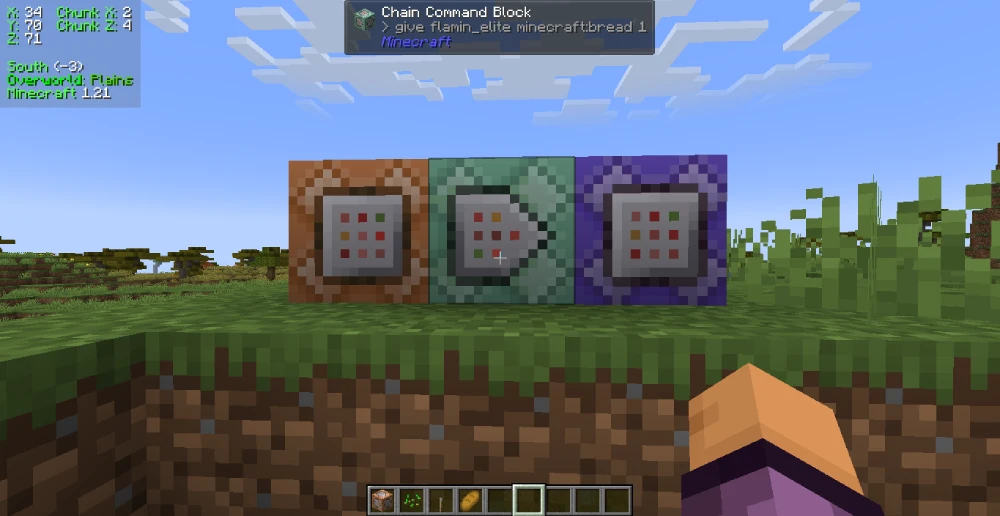
A command block is one of the most powerful automation tools in the game. It can run commands automatically when powered by redstone, allowing you to create systems, traps, map events, teleports, messages, and much more.
That is why so many players search how to get command block in Minecraft, how do you get a command block in Minecraft, and how to make a command block in Minecraft.
The truth is simple: you do not craft a command block in normal gameplay. You spawn it with a command.
Command block command and setup
Use this command:
/give @p command_block
That instantly places a command block in your inventory if cheats are enabled. This is the fastest answer to both how to get command block in Minecraft and how do you get a command block in Minecraft.
Once placed, right-click it and enter the command you want. Then power it with redstone.
You can use command blocks for:
- Auto-teleport systems
- Welcome messages
- Mob spawning events
- Adventure map triggers
- Puzzle mechanics
- Minigames
For many builders, learning Minecraft command block systems is the point where Minecraft starts to feel like game design.
Can you make a command block in survival?
No standard crafting recipe exists. That means how to make a command block in Minecraft is usually answered with a clarification: you create access to it through commands, not crafting.
That is also why some players specifically search command block Minecraft PC. On PC, especially Java Edition, command blocks are widely used in custom maps and technical builds. Bedrock players can use them too, but advanced setups may behave differently depending on version.
Which Minecraft commands help with inventory and death?
Inventory management is one of the most common reasons players start using commands. Losing all your gear after death can be frustrating, especially in long survival worlds. Fortunately, commands can solve that quickly.
That is why phrases like Minecraft command inventory keep and Minecraft command save inventory are so popular.
How to keep your inventory after death
Use this gamerule:
/gamerule keepInventory true
This makes you keep your items after dying. It is the direct solution behind most searches for Minecraft command inventory keep.
This command is ideal for:
- Casual survival worlds
- Adventure maps
- Co-op play
- Building-focused sessions
- Practice runs
It removes a lot of punishment and keeps the game moving.
Is there a save inventory command?
Most players searching Minecraft command save inventory are really looking for the keepInventory gamerule. There is no single universal command literally called “save inventory,” but this gamerule solves the same problem in most situations.
You can also combine it with other helpful survival commands:
/spawnpoint @p 100 65 100
/gamerule keepInventory true
/time set day
/weather clear
Together, these create a much smoother survival experience.
What are the best Minecraft commands for blocks and building?
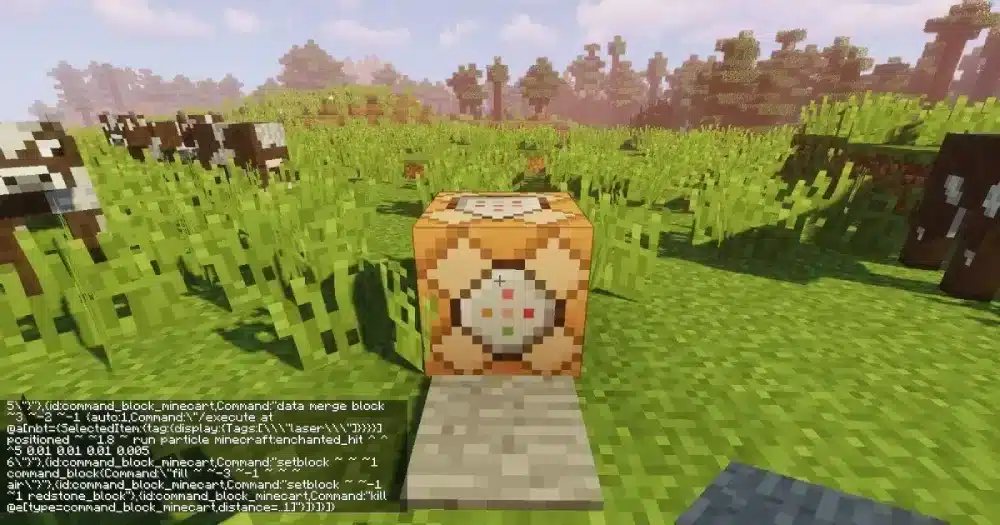
Building commands are some of the most powerful tools in the game because they let you scale up projects dramatically. If you are making cities, arenas, test zones, or giant structures, manual placement is simply too slow for many tasks.
That is where Minecraft commands for blocks become essential.
Best block placement commands
The two most important block commands are:
/setblock ~ ~1 ~ stone
/fill ~1 ~1 ~1 ~10 ~10 ~10 stone
/setblock places one block at a precise coordinate.
/fill places many blocks across a defined area.
These are ideal for:
- Walls
- Floors
- Platforms
- Templates
- Testing build palettes
For bigger construction work, /fill quickly becomes one of the most useful Minecraft commands in the game.
How does clone help builders?
The /clone command copies one structure and pastes it elsewhere:
/clone 0 64 0 10 70 10 20 64 20
This is useful for repeating:
- Houses
- Towers
- Gates
- Puzzle rooms
- Arena sections
When used well, clone saves huge amounts of time. It is one of the best tools for map makers and anyone building at scale.
Why should you use command blocks in custom maps?
Regular chat commands are powerful, but command blocks take that power and automate it. Instead of typing the same action again and again, you can make the world respond automatically to redstone, triggers, or timers.
This is why Minecraft command block systems are so central to advanced builds and adventure maps.
Command blocks are ideal for:
- Story maps
- Timed events
- Teleport pads
- Boss encounters
- Puzzle logic
- Server lobbies
You can chain them together to create complex systems that would be impossible with manual input alone.
What can a command block automate?
A command block can automate things like:
- Teleporting players into arenas
- Spawning mobs at intervals
- Starting weather effects
- Showing title messages
- Opening progression gates
- Running repeatable world logic
This makes command block Minecraft PC setups especially popular among players who want to create polished custom experiences.
How do redstone and command blocks work together?
Redstone acts like a trigger or power source. Once the block receives power, it runs the stored command.
You can use:
- Buttons
- Pressure plates
- Repeaters
- Redstone clocks
- Observers
This lets you build systems that feel alive. For creators, command blocks are where Minecraft starts blending building with programming.
Why does ExitLag matter for Minecraft online play?
Commands improve control inside the game, but connection quality still matters, especially on multiplayer servers. Teleporting, building at scale, and using automation all feel better when your inputs are stable and responsive.
That is even more noticeable when you are playing older modes, simpler maps, or nostalgia-heavy sessions where smooth input and stable movement still shape the experience. This Classic Minecraft nostalgia guide is a useful reminder that even the game’s simplest forms feel better when the session itself stays responsive.
That is where ExitLag becomes relevant. It helps optimize your route to game servers, which can reduce lag spikes, instability, and stuttering during online sessions.
In practical terms, that matters when you are:
- Playing on busy multiplayer servers
- Using fast movement and teleports
- Managing PvP or minigames
- Running large custom maps
- Building with lots of server-side interactions
How can ExitLag improve your Minecraft experience?
Even simple actions feel worse with unstable latency. Delayed movement, block lag, and desynced interactions can interrupt the flow of the game.
ExitLag can help by improving:
- Connection stability
- Server response consistency
- Online movement smoothness
- Reliability during crowded sessions
That means your building, teleporting, and command-based systems feel more consistent during online play.
Who benefits most from ExitLag?
ExitLag is especially useful for:
- Multiplayer-focused players
- Server admins
- PvP players
- Players on distant servers
- Map creators testing online systems
If you rely on timing, movement, or server responsiveness, a stronger connection makes a real difference.
FAQ
The best starter commands are /tp, /gamemode, /give, /time set day, and /weather clear. They are easy to learn and immediately useful.
Use this command with cheats enabled:
/give @p command_block
That is the direct answer to how to get command block in Minecraft.
The most common version is:
/tp @p 100 64 200
This is the standard Minecraft teleport command used to move a player to coordinates.
Yes. Use:
/gamerule keepInventory true
This is the main solution behind searches for Minecraft command inventory keep and Minecraft command save inventory.
The most useful block-related commands are /setblock, /fill, and /clone. They help builders place, copy, and reshape structures much faster.
No, but command block Minecraft PC searches are common because PC players, especially on Java Edition, use command blocks heavily in custom maps and technical creations.
Final thoughts on Minecraft commands
Learning Minecraft commands gives you far more control over the game. You can teleport in seconds, protect your inventory, automate systems, manage multiplayer sessions, and build much faster than normal. From basic survival convenience to full command block logic, the possibilities grow quickly once you understand the essentials.
The smartest approach is to start small. Learn teleporting, inventory protection, and a few building commands first. Then move into command blocks and automation when you feel comfortable. Over time, Minecraft commands stop feeling like cheats and start feeling like creative tools.
That shift is part of what makes Minecraft so durable as a sandbox, whether you are building simple survival conveniences or designing full custom systems. The official Minecraft website is still the clearest place to explore the broader game, its editions, and the creative flexibility that makes command-based play so rewarding.
If you also play online and want smoother server performance while building, teleporting, or running advanced systems, ExitLag is worth testing. Use ExitLag to improve connection stability and make your Minecraft commands experience feel even cleaner, faster, and more reliable.
Got questions or want to connect with other players? Join the conversation at the ExitLag Forum!