The Spirit Box Phasmophobia tool is one of the most iconic and misunderstood pieces of equipment in the game. For both new investigators and experienced ghost hunters, mastering the Spirit Box is essential for consistent evidence collection and accurate ghost identification.
In Phasmophobia, gathering evidence quickly and safely can mean the difference between a clean contract and a chaotic hunt. The Spirit Box Phasmophobia mechanic adds tension because it requires direct communication with the ghost, often placing players in dangerous situations.
So, what exactly is the Spirit Box, who should use it, and when does it actually work? In Phasmophobia, the Spirit Box allows players to communicate with certain ghost types using voice recognition, usually when the lights are off and the player is in the ghost room.
Spirit Box Phasmophobia: How This Evidence Tool Works
Understanding how the Spirit Box Phasmophobia system functions is the first step to using it effectively. Unlike passive tools, the Spirit Box relies on real-time voice input and strict environmental conditions.
What Is the Spirit Box in Phasmophobia
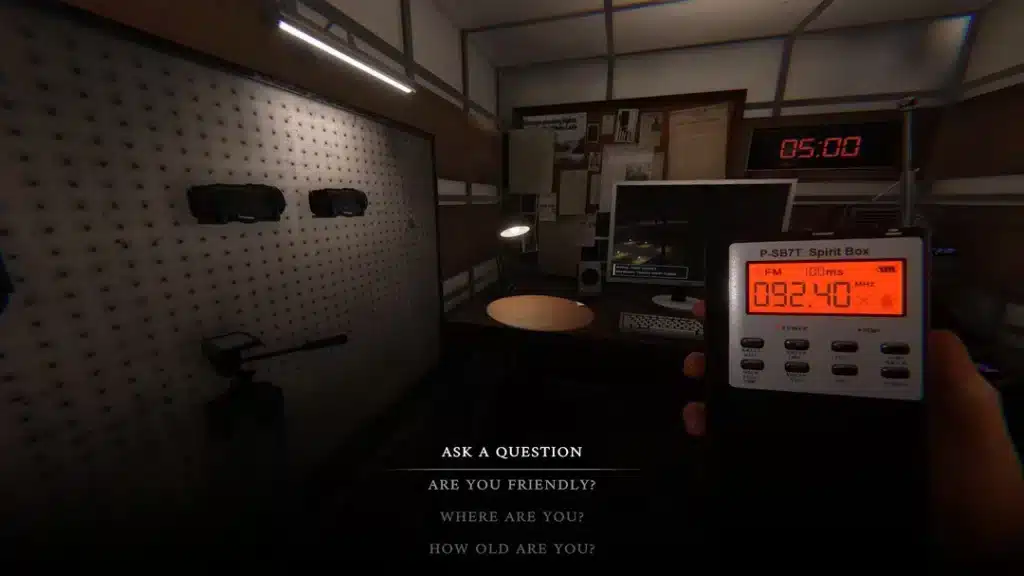
The Spirit Box is an electronic device designed to scan radio frequencies, allowing ghosts to respond through distorted voices or direct text feedback. When active, it cycles through channels and listens for valid questions spoken by players.
If the ghost type supports Spirit Box evidence, it may respond with phrases such as:
- “Behind you”
- “Away”
- “Close”
- “Adult”
- “Old”
A response confirms Spirit Box evidence instantly, making it one of the fastest ways to narrow down ghost types.
Which Ghosts Respond to the Spirit Box
Not all ghosts respond to Spirit Box communication. Only specific ghost types will answer, and even then, only under the right conditions.
Ghosts that can respond to the Spirit Box include:
- Spirit
- Wraith
- Poltergeist
- Jinn
- Mare
- Demon
- Yokai
- Onryo
If the ghost does not have Spirit Box as one of its evidences, it will never respond, no matter how many questions you ask.
How to Use Spirit Box Phasmophobia Correctly
Learning how to use Spirit Box Phasmophobia tools properly prevents wasted time and unnecessary hunts. Many failed attempts happen because players overlook simple setup rules.
Spirit Box Setup Requirements
Before asking any questions, make sure all requirements are met:
- Turn off the lights in the room
- Stay inside the ghost room
- Hold the Spirit Box in your hand
- Ask clear, recognized questions
Some ghosts respond only when players are alone, while others answer even with teammates nearby. Checking the whiteboard for “alone” requirements is critical.
Common Mistakes That Prevent Spirit Box Responses
Even experienced players make mistakes that block Spirit Box evidence:
- Asking questions with lights on
- Standing outside the ghost room
- Talking during hunts
- Using unsupported phrases
Background noise, open microphones, or unstable connections can also interfere with voice recognition, especially in multiplayer sessions.
Best Locations to Use the Spirit Box
Positioning matters when using the Spirit Box. Using it in the wrong room or during the wrong phase of the investigation dramatically lowers success rates.
Ghost Room Identification Tips
Before pulling out the Spirit Box, confirm the ghost room using:
- Temperature drops
- Freezing breath
- EMF Level 2–5 activity
Once confirmed, stay inside the room and ask questions slowly and clearly.
Small Maps vs Large Maps Strategy
On small maps, Spirit Box usage is straightforward due to limited room sizes. On large maps, such as high schools or prisons, narrowing down the ghost’s exact location is essential before attempting communication.
Splitting roles helps:
- One player confirms the room
- One player handles Spirit Box
- Others monitor sanity and activity
Why Connection Stability Matters When Using the Spirit Box
Because the Spirit Box relies on real-time voice recognition, unstable connections can cause delayed or missed responses. In multiplayer investigations, lag can desync audio input, making the Spirit Box appear non-functional.
ExitLag helps stabilize your connection, reduce packet loss, and maintain consistent voice recognition during tense ghost interactions. This ensures your Spirit Box questions register correctly, especially during high-risk moments when timing matters most.
A smoother connection means clearer communication, faster evidence collection, and safer investigations overall.
Spirit Box Questions Phasmophobia: What to Ask
Using the Spirit Box correctly is only half of the process. Knowing which questions actually work is what turns random attempts into consistent evidence. In Phasmophobia, the Spirit Box relies on specific voice-recognition keywords, meaning not every phrase will trigger a response.
Mastering spirit box questions phasmophobia is essential, especially on higher difficulties where time, sanity, and safety are limited.
Confirmed Working Spirit Box Questions
These questions are officially recognized by the game’s voice system and have the highest success rate when all conditions are met:
- “Where are you?”
- “Are you here?”
- “Are you close?”
- “Are you friendly?”
- “How old are you?”
- “Are you angry?”
The ghost’s response may vary depending on its type and behavior, but any audible or text-based reply confirms Spirit Box evidence instantly.
Questions That No Longer Work or Are Inconsistent
Over time, patches have removed or reduced the reliability of certain phrases. Avoid these mistakes:
- Long or complex sentences
- Slang-heavy questions
- Rapid-fire questioning without pauses
- Talking outside the ghost room
Keeping questions short, clear, and spaced out significantly improves recognition accuracy.
Phasmophobia Spirit Box Questions in Multiplayer
Multiplayer investigations introduce additional variables that can affect Spirit Box results. Understanding team roles and voice behavior is critical when using phasmophobia spirit box questions in co-op sessions.
Who Should Ask the Questions
In multiplayer, only one player should actively ask Spirit Box questions at a time. Best practices include:
- Assigning one dedicated Spirit Box user
- Avoiding cross-talk from teammates
- Respecting “alone” ghost requirements shown on the board
If the ghost requires the player to be alone, all other teammates must leave the room entirely.
Voice Recognition Settings Explained
Before entering a contract, make sure voice recognition is properly configured:
- Set the correct language in-game
- Run the built-in voice test
- Use push-to-talk for cleaner input
Improper microphone setup is one of the most common reasons the Spirit Box appears not to work.

Spirit Box vs Other Evidence Tools
The Spirit Box is powerful, but it comes with risks. Comparing it to other evidence tools helps determine when it’s the best option.
Spirit Box vs EMF Reader
The EMF Reader detects paranormal activity passively, making it safer but slower. The Spirit Box, on the other hand, requires direct engagement with the ghost, increasing risk but speeding up identification.
Spirit Box vs Ghost Writing Book
The Ghost Writing Book works over time and does not require player presence. While safer, it can delay investigations if the ghost is uncooperative.
Evidence Comparison Table
| Evidence Tool | Voice Required | Player Risk | Speed | Reliability |
| Spirit Box | Yes | High | Fast | Medium–High |
| EMF Reader | No | Low | Medium | High |
| Writing Book | No | Medium | Slow | Medium |
Advanced Spirit Box Strategies for Nightmare and Insanity
On higher difficulties, Spirit Box usage becomes far more dangerous. Ghosts are more aggressive, hunts trigger earlier, and setup time is limited.
Using the Spirit Box During High-Risk Phases
Advanced tips include:
- Asking questions immediately after activity spikes
- Avoiding Spirit Box use during cursed item effects
- Monitoring sanity closely before engaging
Timing is critical. Asking questions right after a hunt ends often yields faster responses.
Solo vs Team Spirit Box Risk Management
Solo players should:
- Plan escape routes before questioning
- Keep lights off but doors accessible
- Limit question attempts to avoid sanity drain
Teams should:
- Rotate Spirit Box duty
- Keep one player watching activity
- Maintain constant communication
Why ExitLag Improves Spirit Box Reliability
In multiplayer sessions, unstable connections can delay voice transmission, causing Spirit Box questions to fail silently. Packet loss and high ping can desync audio input, especially during tense moments.
ExitLag stabilizes your connection by optimizing routing paths, reducing latency, and preventing packet loss. This results in clearer voice recognition, faster Spirit Box responses, and smoother co-op investigations-especially on Nightmare and Insanity difficulties.
A stable connection doesn’t just improve performance; it increases survival rates during high-risk Spirit Box interactions.
All game images used in this blog belong to Kinetic Games. They are used for informational/educational purposes only and do not imply endorsement or affiliation with the rights holders.
Got questions or want to connect with other players? Join the conversation at the ExitLag Forum!