If you’re looking to bring your game ideas to life, the first step is to go through the Roblox Studios download process. Roblox Studio is the official development environment that allows you to create immersive 3D experiences, use Lua scripting, and publish directly to the Roblox platform.
Before we dive in, a quick tip: if you experience lag in the Roblox Studios download or high ping during development or testing, tools like ExitLag can optimize your network routing and improve performance. For more tips and updates, explore the ExitLag Blog or visit the official ExitLag site.
How to Install Roblox Studio Step-by-Step
Getting started with download Roblox Studios is a simple process, but many new users wonder about the exact steps. Here’s how to install Roblox Studio safely on your computer and start creating:
- Visit the Official Roblox Website:
Go to www.roblox.com/create and log in to your account.
- Start the Studio Download:
Click the “Start Creating” button. This will initiate the Roblox Studios download.
- Run the Installer:
Once downloaded, open the file and follow the prompts to install it on your PC.
- Launch Roblox Studio:
After installation, launch the Roblox studio PC app and log in with your Roblox account.
- Choose a Template or Start from Scratch:
Roblox Studio offers a variety of templates to help you get started quickly.
Roblox Studios download (in bold) is available only for Windows and macOS. There is currently no mobile version, so make sure you’re using a compatible device.
Key Features of Roblox Studio PC
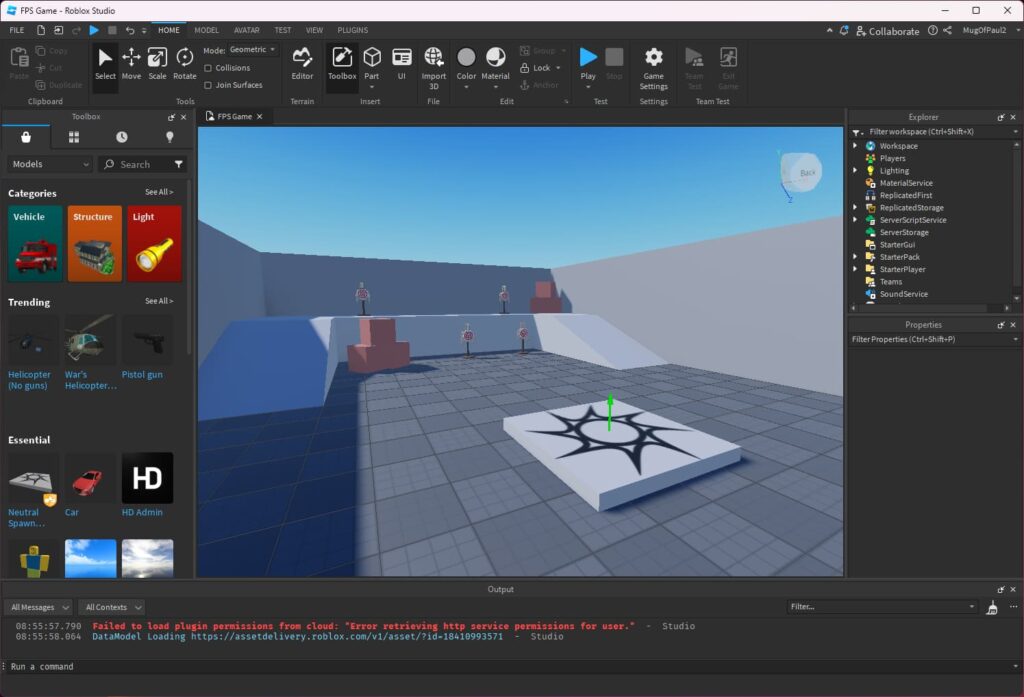
Once installed, studio PC gives you access to a powerful suite of game development tools. These features are designed for both beginners and experienced creators:
- Drag-and-drop editor with terrain tools, meshes, lighting, and materials.
- Lua scripting to bring advanced gameplay mechanics to life.
- Real-time collaboration with team members using Team Create.
- Built-in testing and simulation to preview your game in various device modes.
- One-click publishing directly to the Roblox platform.
Whether you’re designing obstacle courses, role-playing worlds, or entire game economies, this development environment has everything you need.
Tips to Improve Your Development Setup
While working with Roblox Studio, especially if your game involves large assets or multiplayer features, maintaining a stable and fast connection is critical. Here are a few extra tips:
- Use ExitLag to reduce jitter, ping spikes, and lag while testing your games.
- Keep your graphics drivers updated for better performance.
- Use a wired connection for more stability during online collaboration.
- Regularly back up your project files using Roblox’s cloud features or an external storage solution.
Final Thoughts: Ready to Create with Roblox Studio?
If you’re passionate about building games, mastering the download Roblox Studios process is your first big step. With its intuitive interface and robust features, Roblox Studio empowers you to turn ideas into playable, sharable realities.
Now that you know how to install the game Roblox Studio, you’re ready to dive into the world of development. Just remember whether you’re building solo or with a team, using a tool like ExitLag can give you that extra edge, especially in high-performance testing.So don’t wait to start your Roblox Studios download today and begin creating your dream game on the studio PC platform.
Got questions or want to connect with other players? Join the conversation at the ExitLag Forum!