Valheim comfort is one of the most useful survival mechanics in the game, yet it is easy to underestimate when you are focused on weapons, food, armor, bosses, and exploration. Comfort determines how long your Rested effect lasts, giving you more time with improved health regeneration, stamina regeneration, Eitr regeneration, and skill experience gains before you need to rest again.
Getting the most from Valheim comfort becomes especially valuable before difficult expeditions. If Yagluth is your next major objective, the complete Yagluth Valheim boss guide can help you prepare while a high Valheim comfort level ensures that your Rested effect lasts longer during the journey and fight.
Valheim comfort does not make the Rested bonuses stronger as your level rises. Instead, every additional point extends the duration of the same Rested effect, which means a properly designed base can give you considerably more exploration time before you need to return home or create another resting point.
What does comfort do in Valheim?
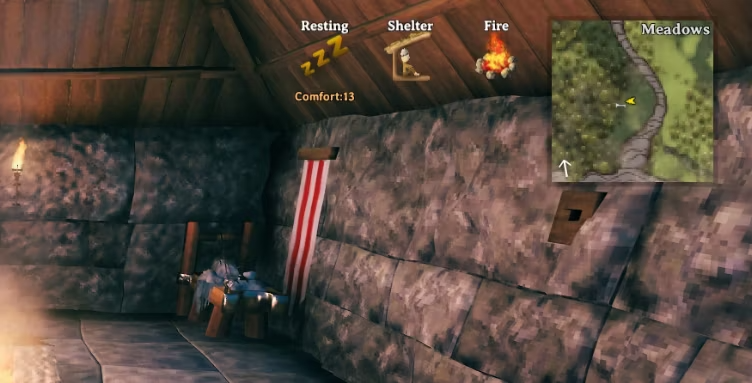
Comfort controls the duration of the Rested status effect. When you spend enough uninterrupted time resting under the correct conditions, the game converts the temporary Resting status into Rested.
This relationship is the core of the comfort Valheim system: furniture raises comfort, comfort extends Rested duration, and Rested improves several important regeneration and progression rates.
What bonuses does the Rested effect provide?
While Rested, your character receives several substantial bonuses:
- +50% health regeneration;
- +100% stamina regeneration;
- +100% Eitr regeneration;
- +50% skill experience earned.
Eitr regeneration is relevant once you reach the magical systems introduced through Mistlands progression. Earlier characters still benefit enormously from the health, stamina, and experience bonuses.
Most importantly, a higher Valheim comfort level does not increase these percentages.
Comfort 17 does not give better stamina regeneration than comfort 5. It simply lets you keep the Rested effect for longer.
That makes comfort a duration mechanic rather than a scaling regeneration multiplier.
The duration formula is simple:
Rested duration = 7 minutes + current comfort level
Therefore:
| Valheim comfort level | Rested duration |
| 1 | 8 minutes |
| 3 | 10 minutes |
| 5 | 12 minutes |
| 10 | 17 minutes |
| 15 | 22 minutes |
| 17 | 24 minutes |
| 19 | 26 minutes |
The difference adds up quickly during longer sessions.
A character leaving home with 24 or 26 minutes of Rested can spend much more time exploring before needing another stop.
How do you get the Rested buff?
Normally, you need to enter the Resting state first.
The easiest reliable method is to stand or sit in a sheltered area near an active fire. After approximately 20 uninterrupted seconds of Resting, you receive the Rested effect based on the comfort around your character.
Sleeping can also apply the effect without requiring the same waiting period.
Nearby enemies or unsuitable conditions can interfere with resting.
Fire management matters as well. If your fireplace cannot remain active because smoke is trapped or rain reaches the flames, your resting setup may stop working properly.
That is where a functional Valheim chimney becomes more than an aesthetic addition.
Players planning long-distance travel should make a habit of leaving home Rested. Whether you are sailing to a new continent or moving resources between bases, the extra stamina regeneration is extremely valuable. The Valheim boats and sailing guide can help you prepare for those longer expeditions once your resting area is ready.
How do you increase comfort in Valheim?
You increase Valheim comfort by placing qualifying furniture and building pieces close enough to the area where your character rests.
The key limitation is that most comfort pieces belong to categories. Items from the same category generally do not stack; only the highest-value eligible piece in that category contributes.
This is why filling a room with dozens of rugs does not automatically produce an enormous Valheim comfort level.
Which comfort items stack?
Think about furniture in categories rather than individual objects.
For example, several types of seating exist, but you generally receive only the strongest applicable seating bonus. The same principle applies to rugs, beds, tables, and fire sources.
A useful late-game breakdown includes:
| Category or item | Maximum useful comfort |
| Shelter/base condition | +2 |
| Hearth | +2 |
| Dragon Bed | +2 |
| Throne | +3 |
| Round Table or Long Heavy Table | +2 |
| Any qualifying rug | +1 |
| Any qualifying banner | +1 |
| Armor Stand | +1 |
| Heated Hot Tub | +2 |
| Lava Lantern | +1 |
| Maypole | +1 |
| Yule Tree | +1 |
The last two are special because they are seasonal comfort sources and can stack with the normal categories.
This also explains why guides that recommend placing a Deer Rug, Wolf Rug, Lox Rug, Hare Rug, and Asksvin Rug together for five separate points are outdated.
Rugs belong to the same comfort category. Only one applicable rug contributes.
The same issue appears with seating. A Black Marble Throne and another throne do not provide six comfort just because both individually have a value of three.
What does “black stacking” mean in Valheim?
Some searches connected with comfort use the phrase black stacking, but it is not a recognized name for a Valheim comfort mechanic.
Players may be referring to stacking black marble furniture, Mistlands building pieces, or simply trying to understand whether several visually different objects can contribute simultaneously.
Black marble furniture still follows normal comfort categories.
For example, a Black Marble Bench belongs to the seating category. A Black Marble Throne is also seating and provides a stronger comfort value.
Putting both beside your bed does not allow you to combine their values.
Similarly, a Black Marble Table belongs to the table category and cannot be stacked indefinitely with other tables for additional comfort.
Therefore, if black stacking is being used to describe placing several black marble comfort items of the same category together, it does not bypass the normal stacking rules.
You can absolutely use multiple black marble pieces for decoration. Just do not expect identical comfort categories to add together.
What is the max comfort in Valheim?
As of August 24, 2026, the standard maximum Valheim comfort available with normal progression is level 17.
That produces a 24-minute Rested effect.
The absolute vanilla maximum can reach level 19 when both the Maypole and Yule Tree are contributing, producing 26 minutes of Rested.
This distinction matters whenever you see guides discussing max comfort Valheim setups.
How do you reach comfort level 17?
A reliable late-game setup uses the strongest contribution from each normal category alongside standalone comfort pieces.
For a level 17 setup, you can combine:
- Shelter;
- A lit Hearth;
- Dragon Bed;
- A throne;
- Round Table or Long Heavy Table;
- One qualifying rug;
- One banner;
- Armor Stand;
- Heated Hot Tub;
- Lava Lantern.
All relevant items need to be close enough to the character when resting.
You do not need every variant of every furniture type.
For example, any throne capable of providing the maximum seating value works. Building multiple thrones does not increase Valheim comfort further.
Likewise, replacing one rug with another may fit your base design better, but rugs remain a single comfort category.
The Lava Lantern is what raises the normal Ashlands-era maximum from the earlier level 16 cap to 17.
That makes the Ashlands important even for players whose main interest is base optimization rather than combat gear.
If you are preparing to gather materials there, the Valheim Ashlands survival guide covers the biome in more detail. Reaching max comfort Valheim levels becomes much easier once your progression provides access to late-game building pieces.
Can you reach comfort level 19?
Yes, but this requires two special items in addition to the normal level 17 setup:
- Maypole: +1 comfort;
- Yule Tree: +1 comfort.
Together, they can take Valheim comfort from 17 to 19.
The resulting Rested duration becomes 26 minutes.
These items are unusual because their availability is tied to seasonal content.
Maypoles can also rarely appear naturally in Meadows locations, while seasonal building availability allows players to construct them during the appropriate event windows.
Existing seasonal items do not suddenly stop providing comfort simply because the event ends.
Therefore, a long-running world may have access to both.
When someone searches max comfort Valheim, it is useful to distinguish the standard progression maximum of 17 from the absolute seasonal maximum of 19.
That distinction prevents players from thinking their level 17 room is incorrectly built just because they saw a screenshot showing 19.
How do you build a Valheim chimney for maximum comfort?
A Valheim chimney does not directly provide comfort points.
Its purpose is to keep smoke moving away from your living area while allowing the fire sources required for a strong resting setup to continue functioning safely.
A poorly ventilated great hall can fill with smoke, damage players, and interfere with smoke-producing structures.
Why does smoke matter for comfort?
Fire sources need to remain active to provide their relevant benefits.
Campfires, Hearths, Bonfires, Braziers, and several other structures create smoke.
If that smoke cannot escape, it accumulates.
Characters standing inside smoke can take damage, while structures may stop functioning when smoke becomes too congested around their output.
This creates an obvious problem for Valheim comfort.
Your ideal resting room needs shelter and a fire, but completely sealing that fire inside a tiny building can make the space unusable.
A Valheim chimney solves the contradiction by keeping the building protected from weather while giving smoke a route upward and outside.
How should you design a chimney?
A basic chimney needs:
- A fire source at the bottom;
- Clear vertical space above the smoke source;
- Enough room for smoke to travel;
- An opening near the top;
- Roof protection that prevents rain from extinguishing the fire.
Do not simply place a roof tile directly over a narrow sealed shaft.
Instead, create a covered outlet with openings beneath or around the cap.
Smoke naturally wants to travel upward, so simple vertical designs are usually easier to manage than complicated horizontal channels.
Watch the fire after completing the build.
If it repeatedly goes out despite having fuel, inspect the chimney for blocked smoke.
Also check whether rain can reach the Hearth or Campfire.
A good Valheim chimney should solve both problems at once: smoke exits while rain stays out.
Hot Tubs also generate smoke while heated, so do not forget ventilation when incorporating one into a max comfort Valheim room.
Why is my Valheim comfort level not increasing?
Placing a new item does not guarantee another comfort point.
When a Valheim comfort level stops increasing, the cause is usually category overlap, distance, an inactive item, or an environmental requirement that is not being met.
Testing systematically is much faster than filling the room with more furniture.
You are stacking items from the same category
This is the most common problem.
Examples include:
- Multiple rugs;
- Multiple beds;
- Multiple tables;
- Multiple chairs or thrones;
- Multiple standard fire sources;
- Different furniture pieces that secretly share a category.
If a throne already provides the best seating bonus available to you, adding a bench does not increase the number.
This is why black stacking with Black Marble Bench, Black Marble Throne, and other same-category furniture does not create extra comfort simply because the objects have different names.
Upgrade the category rather than duplicating it.
Replace a weaker item with a stronger one when progression unlocks better furniture.
Your items are too far away or inactive
Comfort is calculated around your character.
A decorative item at the far end of a gigantic hall may not contribute to the chair where you actually rest.
For a reliable room, keep the essential comfort pieces reasonably close to a central resting point rather than spreading them throughout a massive base.
Active state also matters.
A Hearth must be lit.
A Hot Tub must be heated to provide its comfort contribution.
If smoke congestion makes an active source stop working, check the ventilation and your Valheim chimney.
The easiest diagnostic method is to stand at your intended resting position and inspect the comfort number displayed while Resting.
Then add or remove one category at a time.
This makes it much easier to find the missing point.
What comfort level should you aim for in each biome?
You do not need to wait until the late game to care about Valheim comfort.
The system is useful from the first few days of a new world because even basic shelter, fire, furniture, and decorations extend Rested duration.
Your maximum naturally grows alongside biome progression.
Early and mid-game comfort targets
A rough progression looks like this:
| Progression stage | Practical comfort ceiling |
| Meadows | Around 5 |
| Black Forest | Around 9 |
| Swamp | Around 12 |
| Mountains | Around 13 |
| Plains | Around 16 |
| Mistlands | Around 16 |
| Ashlands | 17 |
These are not biome bonuses.
Standing in the Plains does not automatically give more comfort than standing in the Meadows.
The progression reflects which materials and furniture recipes become available as you advance.
A Meadows base can eventually contain late-game furniture if you bring the resources home.
For players searching comfort Valheim progression guides, this distinction is important: the biome determines what you can reasonably unlock at that stage, not an invisible comfort multiplier attached to the location itself.
Build small Rested stations while exploring
You do not always need a giant luxury hall.
A temporary resting station can be enough to restore a shorter Rested effect while you are away from home.
Small outposts are particularly useful near:
- Mining areas;
- Boss altars;
- Portals;
- Farms;
- Dungeons;
- Distant harbors;
- Ashlands staging bases.
Even a modest Rested duration can be better than spending the next expedition without the buff.
This becomes increasingly valuable in hostile biomes where stamina management affects almost every decision.
For updated information about the game’s development, upcoming content, and major patches, the official Valheim website is useful because the game is approaching another major transition in 2026.
Valheim 1.0 and the Deep North are scheduled for September 9, 2026. Because that release is still upcoming as of August 24, any new Deep North furniture or changes to Valheim comfort should not be included in the current maximum until they are actually released.
Will Valheim 1.0 change max comfort?

It may, but any new comfort maximum associated with Deep North should remain unconfirmed until the update is publicly available.
Iron Gate has confirmed that Valheim 1.0 arrives on September 9, 2026 and includes the Deep North, but that does not justify inventing comfort values for unreleased furniture.
For now, max comfort Valheim remains based on the current Ashlands-era game.
Why the Deep North could affect comfort progression
Historically, new biomes have introduced new building materials, furniture, crafting stations, and decorations.
Ashlands added the Lava Lantern, which currently contributes another standalone comfort point and raised the normal maximum to 17.
It is therefore reasonable to consider the possibility that Deep North could introduce another comfort item.
However, possibility is not confirmation.
Until an item is released with an actual comfort value, the correct current numbers remain:
- Standard maximum: 17;
- Standard Rested duration: 24 minutes;
- Seasonal maximum with Maypole and Yule Tree: 19;
- Seasonal maximum Rested duration: 26 minutes.
This guide should therefore be updated again if Valheim 1.0 changes those values after September 9.
Check patch notes after major updates
Comfort is the type of mechanic that can change indirectly.
A patch might:
- Add furniture;
- Reclassify an existing item;
- Change an item’s comfort value;
- Modify seasonal availability;
- Adjust range;
- Change Rested behavior;
- Introduce another standalone comfort object.
For that reason, players optimizing a Valheim comfort level should check the official Valheim news and patch notes after major releases.
That is especially relevant around Valheim 1.0.
A base designed for the current maximum will continue to be an excellent foundation, but the exact max comfort Valheim value could change if Deep North introduces another qualifying item.
How can ExitLag help with Valheim multiplayer?
ExitLag does not increase Valheim comfort, extend the Rested buff, load furniture faster, prevent a comfort item from being detected, or solve smoke problems.
Those claims would confuse game mechanics with networking.
ExitLag is relevant when network routing contributes to instability during online multiplayer sessions.
Network optimization is separate from comfort mechanics
If your Valheim comfort level is lower than expected, check:
- Furniture categories;
- Item range;
- Shelter;
- Active fire;
- Heated Hot Tub;
- Chimney ventilation;
- Seasonal items.
ExitLag cannot change any of those systems.
Similarly, if smoke is filling your house, you need to redesign the Valheim chimney rather than optimize the internet connection.
In multiplayer, however, network conditions can influence your experience connecting to or playing on remote servers.
Traffic between you and a server can follow different routes depending on your ISP, location, congestion, and network infrastructure.
ExitLag can help optimize those routes for supported games and may improve connection stability when inefficient routing is contributing to the problem.
Results depend on the network and available routes.
When should you consider ExitLag?
Consider network troubleshooting when the actual symptoms involve online connectivity rather than base mechanics.
Examples can include:
- Unstable latency;
- Routing-related connection variation;
- Packet loss;
- Connection interruptions;
- Multiplayer instability that does not occur locally.
ExitLag does not guarantee lower latency or fix every multiplayer problem.
Server performance, local Wi-Fi, hardware performance, mods, world complexity, and game bugs can produce issues that route optimization cannot solve.
If network routing appears to be the cause, try ExitLag and compare your multiplayer connection across several sessions.
Frequently asked questions
Valheim comfort becomes much easier to manage once you understand categories, Rested duration, fire requirements, and the difference between the normal and seasonal maximums.
The answers below cover the most common questions players have when building a resting area.
The standard maximum is currently comfort level 17, which produces 24 minutes of Rested.
With both a Maypole and Yule Tree contributing, the absolute seasonal maximum reaches 19 for 26 minutes.
These values apply before the September 9, 2026 release of Valheim 1.0.
Twenty-four minutes.
The formula is seven base minutes plus one minute for every point of Valheim comfort.
No.
A higher comfort level extends the duration.
The Rested effect itself provides the same regeneration and experience multipliers regardless of whether you received it at comfort 5 or comfort 17.
No.
Different qualifying rugs belong to the same comfort category, so placing several together does not provide one point from each rug.
Use whichever rug you prefer visually.
No.
They share the seating category.
A throne can provide up to three comfort, making it more valuable than weaker seating options for maximizing your room.
No.
The current heated Hot Tub contributes two comfort.
It must be functioning and heated to provide the bonus.
Not as separate fire-category comfort bonuses.
For a high-level room, use the Hearth as the stronger fire option rather than expecting multiple fires to add their comfort values together.
Smoke may be unable to escape, or rain may be reaching the fire.
Build a proper Valheim chimney with a clear upward smoke path and a covered outlet that still leaves enough space for ventilation.
Black stacking is not an official Valheim comfort mechanic.
If the phrase refers to using several black marble furniture pieces, normal comfort categories still apply. A Black Marble Bench and Black Marble Throne do not stack as separate seating bonuses.
Yes, mods can alter comfort mechanics or introduce additional furniture.
Those values should not be confused with vanilla gameplay, where the current standard maximum is 17 and the seasonal maximum is 19.
That is not confirmed before release.
Valheim 1.0 and Deep North are scheduled for September 9, 2026. New furniture could potentially affect comfort, but any new maximum should be verified after the update becomes available.
No.
ExitLag cannot increase comfort points, extend Rested duration, activate furniture, or fix a blocked chimney.
It focuses on network routing and may help with multiplayer connection stability when routing conditions are contributing to the problem.
Building around Valheim comfort is one of the simplest ways to make every expedition more efficient. Aim for a high Valheim comfort level, use the strongest item from each category instead of stacking duplicates, keep your Hearth and Hot Tub functioning with proper ventilation, and add seasonal pieces when available. The current normal maximum is 17, while Maypole and Yule Tree can raise it to 19. With a well-designed base and a functional chimney, Valheim comfort gives you up to 26 minutes of Rested time before you need to recharge. If multiplayer routing is also affecting your sessions, try ExitLag to see whether an optimized network path can provide a more stable connection.
All game images used in this article belong to their respective owners. They are used for informational and educational purposes only and do not imply endorsement or affiliation with the rights holders.
Got questions or want to connect with other players? Join the conversation at the ExitLag Forum!