You run a speed test, everything looks perfect, yet your crosshair still jumps and your shots register late. This is the exact frustration behind Valorant Ping Spikes But Internet Is Fine, and it is far more common than most players realize.
The truth is that a clean speed test only measures your connection to a random server, not the actual path your packets take to Riot’s game servers. Therefore, your Wi-Fi bar showing full strength tells you almost nothing about what happens mid-match.
Valorant Ping Spikes But Internet Is Fine usually points to a routing problem between your ISP and Riot Direct, Riot’s private backbone network. In other words, the spikes are not lies your game is telling you, they are a symptom of a path issue that a standard speed test simply cannot detect.
This guide breaks down exactly what causes this, how to diagnose it properly, and what actually fixes it instead of just masking the symptom.
Why Valorant Ping Spikes But Internet Is Fine Happens
Riot Games does not host Valorant traffic like a typical website. Instead, it runs Riot Direct, a custom network built to carry game packets from ISP peering points straight to Riot’s data centers.
When that handoff between your ISP and Riot Direct is inefficient, your local internet stays perfectly healthy while your in-game ping still explodes. This is precisely why a browser speed test looks fine and Valorant does not.
The Hidden Point Where Spikes Actually Start
Several separate points in the chain can cause a spike, and only one of them is your home network. Consequently, blaming your router first often wastes time.
- Your PC’s own network stack and background processes
- Riot Vanguard’s kernel-level packet inspection, which some players report causing sudden spikes
- Your router’s NAT translation under load
- Your ISP’s internal routing tables during peak hours
- Backbone congestion between your ISP and Riot Direct
- Riot’s peering agreements with your specific ISP
- The Valorant game server itself during a regional load spike
How Riot Direct Routing Actually Works
Once your packet leaves your ISP, it enters Riot Direct at a specific point of presence. From there, Riot’s private cables carry it to the server, and the return trip always goes back through that same entry point.
As a result, if your ISP’s connection to that particular point of presence is congested or poorly peered, every match suffers, even though nothing on your side changed. This is a structural routing issue, not a signal quality issue.
Packet Loss, Jitter, and Ping Spikes: What Is Really Different
Most guides treat these three terms as interchangeable, but they are not, and understanding the difference actually helps you diagnose your own matches faster.
| Term | What It Means | How It Feels In Valorant |
|---|---|---|
| Ping | Round trip time for one packet | Consistently high ping feels slow but predictable |
| Jitter | How much that delay varies between packets | Choppy movement, warped hit registration, inconsistent peeks |
| Packet Loss | Data that never arrives at all | Rubberbanding, sudden teleports, missed shots that should have landed |
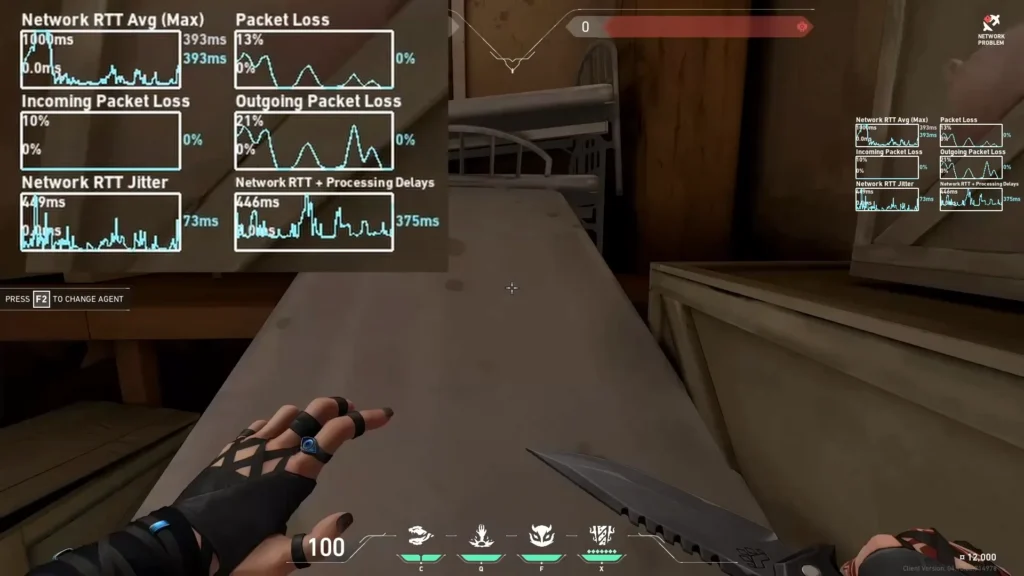
Notably, a stable 60ms connection is often more playable than one that swings between 20ms and 130ms. This fluctuation, not the average number, is what most players actually mean when they say the game “feels laggy.”
Packet loss is arguably the worst of the three because missing data means missing information entirely, not just delayed information. Even a small amount of consistent loss can break peeker duels and trading in Valorant.
Why This Distinction Matters For Your Fix
If you only watch your average ping number, you will miss the real problem. Instead, you need to watch how much that number moves and whether packets are dropping.
- Open the in-game network graph (Settings, then Video, then Stats) and watch packet loss percentage during a spike.
- Run a continuous background ping test to a stable target like 1.1.1.1 while you play.
- Compare the two: if the background ping stays flat but Valorant still spikes, the issue sits inside Riot’s network path, not your home connection.
- If both spike together, your local network or ISP link is the actual cause.
Is It My ISP Or Riot’s Servers Causing The Spikes?
This is the question every player eventually asks, and the answer depends entirely on where the spike originates. Fortunately, a simple traceroute can usually tell you.
A traceroute shows every hop your data takes from your PC to the Valorant server. If the delay jumps sharply at a hop still inside your ISP’s own network, that is a local routing problem your provider can sometimes fix.
However, if the jump happens further along, at a peering point between your ISP and Riot Direct, that is outside your control entirely. Your ISP simply does not have a strong enough connection to Riot’s network at that location.
What A Traceroute Actually Tells You
- Early hops with low, stable latency mean your home network is healthy
- A sudden large jump mid-route usually marks the exact peering point causing trouble
- Consistent latency all the way to the final hop suggests genuinely clean routing
- Timeouts on the final hops are often normal, since some servers do not reply to traceroute pings
Why Peering Problems Are So Common Right Now
ISPs constantly negotiate and renegotiate how they exchange traffic with other networks. As a result, a route that worked perfectly last month can become congested without any change on your end.
Furthermore, many regional ISPs simply do not have direct, efficient links to every Riot Direct point of presence. This means players in the same city on different providers can have completely different experiences in the exact same match.
Pro Tips: Diagnosing Valorant Ping Spikes But Internet Is Fine
- Test during your worst spike window: Run diagnostics right when the spikes happen, not five minutes later, because routing congestion is often time-based and disappears later in the evening.
- Compare against a second game: If another online game routed through a different network stays smooth, that strongly confirms the issue is specific to Riot’s routing path, not your hardware.
- Watch the packet loss graph, not just ping: A stable ping with rising packet loss is a completely different problem than a jittery ping with zero loss, and each needs a different fix.
- Check Riot’s server status first: Server-side issues can mimic routing problems perfectly, so ruling this out saves you from chasing a fix that was never needed.
- Restart your router between sessions: Routers accumulate connection tables and cached routes over time, and a clean restart occasionally resolves temporary NAT congestion.
Fixing Valorant Ping Spikes But Internet Is Fine For Good
Once you have confirmed the spike is routing-related, the fix is not to buy faster internet, since the problem is the path, not the pipe. Instead, you need control over which route your packets actually take.
This matters even more for a game like Valorant, where a single 100ms spike during a duel can be the difference between a kill and a death. Competitive FPS titles punish inconsistency far more harshly than casual games do.
Common Mistakes Players Make
- Upgrading their internet plan first: Paying for more bandwidth does nothing when the issue is a bad route to Riot Direct. Fix: run a traceroute before spending money on a faster plan.
- Assuming Wi-Fi is always the cause: Even players on a solid ethernet connection experience these spikes, since the problem often sits outside the home entirely. Fix: rule out routing before replacing cables or routers.
- Ignoring packet loss in favor of ping alone: A player fixated on shaving 10ms off their ping while ignoring 5% packet loss is solving the wrong problem. Fix: prioritize eliminating loss and jitter before chasing lower average ping.
- Restarting the game instead of the connection: Relaunching Valorant does not change your network path at all. Fix: address the actual route, not the client.
Should You Use a Route Optimizer for Valorant?
Once you know the spikes come from routing rather than your home setup, the most effective fix is choosing a better path to the server. This is exactly where a dedicated optimization tool becomes useful instead of guesswork.
ExitLag is not a VPN. It is a real-time connection optimizer that constantly analyzes multiple network paths and automatically selects the fastest, most stable route to the game server you are actually connecting to.
With Real-time Optimization, ExitLag actively reduces delay and packet loss along the way, which means your inputs register faster and more consistently during every duel. Its Multipath Technology sends your data through several routes simultaneously, so if one path becomes congested or fails, the others keep your connection alive without you noticing a drop.
This makes it particularly useful for diagnosing and resolving the exact intermittent spikes caused by poor ISP peering described earlier in this guide. Instead of hoping your provider fixes a peering issue they may never even acknowledge, you simply route around it.
ExitLag currently supports over 4,000 games, with more than 1,500 servers spread across 190+ countries, and it is trusted by over 30 million users who rely on it for more than 18 million route optimizations every week. It does not modify game files, does not inject code, and does not interfere with Riot Vanguard in any way, making it fully safe to use alongside Valorant’s anti-cheat.
One important note: never run ExitLag alongside a traditional VPN, since the two will compete for the same traffic and reduce effectiveness. If you are ready to stop guessing and actually fix your routing, you can grab the ExitLag Download and test it during your very next match.
Final Thoughts on Valorant Ping Spikes But Internet Is Fine
Valorant Ping Spikes But Internet Is Fine is rarely a mystery once you know where to look. It almost always comes down to routing between your ISP and Riot Direct, not your local bandwidth or signal strength.
By separating ping, jitter, and packet loss, running a proper traceroute, and choosing a route optimizer built for real-time gaming, you can turn an inconsistent connection into a reliable one. The spikes were never really about your internet speed, they were about the path your packets had no choice but to take.
All game images used in this blog post belong to Riot Games. They are used for informational and educational purposes only and do not imply endorsement or affiliation with the rights holders.
Got questions or want to connect with other players? Join the conversation at the ExitLag Forum!