The auto crafter minecraft feature has completely changed how automation works in survival worlds. With the arrival of Minecraft 1.21, players can finally craft items automatically without manual interaction.
The auto crafter minecraft block introduces true automation into the game, allowing redstone-powered crafting systems to run entirely on their own. This means fewer manual steps, faster production chains, and more efficient farms in both singleplayer and multiplayer worlds.
What is the auto crafter minecraft? It is a redstone-powered block added in Minecraft 1.21 that crafts items automatically when it receives a redstone signal, using a locked crafting grid configured by the player.
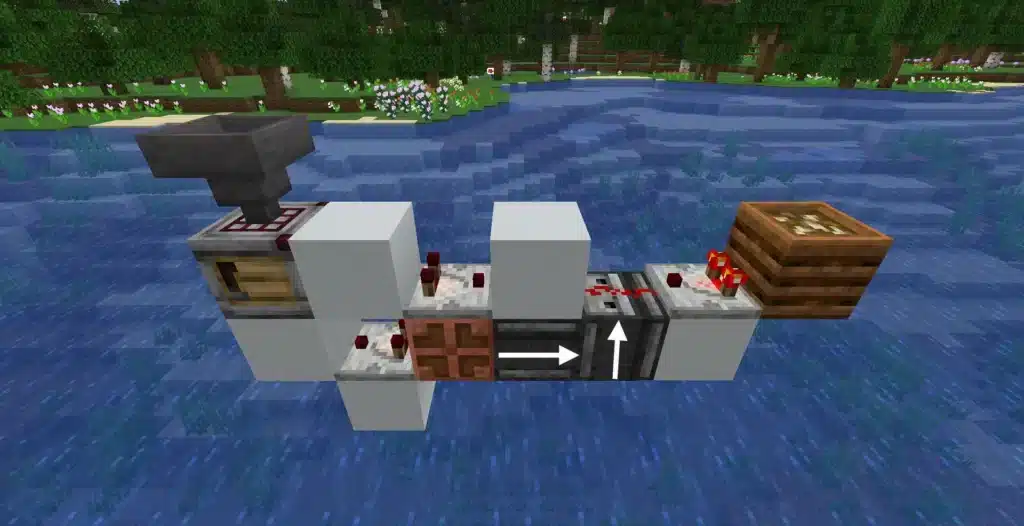
Unlike traditional crafting tables, this new block integrates directly with hoppers, droppers, comparators, and observers. As a result, players can now design fully AFK production systems that craft resources automatically while they explore, mine, or fight mobs.
Whether you play Java or Bedrock Edition, this block is available in version 1.21 and above, making automation more accessible than ever.

Auto Crafter Minecraft: What Is the New Crafter Block?
The auto crafter minecraft block is the first official automated crafting system introduced by Mojang. It behaves similarly to a crafting table but with redstone integration.
What Does the Crafter Do?
The Crafter crafts items automatically whenever it receives a redstone pulse.
It uses a 3×3 crafting grid just like a standard crafting table.
However, each slot can be toggled on or off. This locking system ensures only the intended recipe is crafted.
When powered, the block crafts the recipe instantly and pushes the result out to an attached container.
This makes minecraft auto crafter systems ideal for large farms and resource processing facilities.
How It Changes Automation in Minecraft
Before 1.21, players had to rely on complex dropper loops or manual crafting for bulk processing.
Now, auto crafting minecraft builds can be fully automated.
You can connect:
- Hoppers for item input
- Redstone clocks for timing
- Observers for smart activation
- Comparators for output detection
Because of this, industrial-scale builds are now much simpler and more efficient.
Auto Crafter Minecraft Recipe: How to Craft It
If you are wondering about the auto crafter minecraft recipe, here is everything you need.
Auto Crafter Minecraft Recipe Ingredients
To craft one Crafter block, you will need:
| Ingredient | Quantity |
| Iron Ingots | 5 |
| Redstone Dust | 2 |
| Crafting Table | 1 |
| Dropper | 1 |
This auto crafter recipe minecraft combination reflects the block’s automation purpose, combining redstone components with crafting functionality.
Minecraft Auto Crafter Recipe Layout
To place the items correctly:
- Crafting Table in the center
- Dropper beneath it
- Iron Ingots around the top and sides
- Redstone Dust on the remaining slots
The minecraft auto crafter recipe works the same in both Java and auto crafter minecraft bedrock editions.
How to Make an Auto Crafter in Minecraft (Step-by-Step)
Many players search for how to make an auto crafter in minecraft or how to make auto crafter minecraft. Follow this simple process.
Step 1: Craft the Crafter Block
Gather iron, redstone, a crafting table, and a dropper.
Use the crafting grid layout described above.
Place the Crafter in your world.
Step 2: Configure the Crafting Grid
Right-click the block to open its interface.
Insert the recipe pattern manually.
Disable unused slots to prevent incorrect recipes.
This is essential when learning how to make a auto crafter in minecraft efficiently.
Step 3: Connect Redstone Power
Attach a lever, button, or redstone clock.
Each pulse triggers one crafting action.
For automated systems, use observers connected to hopper lines.
Complete Setup Checklist
- Place the Crafter block
- Insert the desired recipe
- Lock unused crafting slots
- Connect hopper input
- Attach output chest
- Add redstone activation
Once configured, the system will craft automatically whenever items fill the grid.
How to Use Auto Crafter Minecraft for Automated Farms
Learning how to use auto crafter minecraft properly unlocks massive automation potential.
Iron Farm Automation
Iron farms produce iron golems that drop iron ingots.
You can route nuggets into the Crafter to automatically convert them into ingots.
This prevents storage overflow and maximizes efficiency.
Crop & Food Automation
Wheat farms can feed into a Crafter to produce bread automatically.
Sugar cane farms can convert sugar cane into paper.
Gold farms can turn nuggets into ingots instantly.
Best items for automation:
- Iron Ingots
- Gold Ingots
- Bread
- Paper
- Blaze Powder
With minecraft auto crafter, multi-stage systems become simple to manage.
Auto Crafter Minecraft Bedrock vs Java Differences
Players often ask about differences between Java and auto crafter minecraft bedrock.
Is the Crafter Available in Bedrock?
Yes. The Crafter block is fully implemented in Bedrock 1.21.
Feature parity ensures the same crafting mechanics.
Redstone Timing Differences
Minor redstone timing differences may exist due to engine variations.
However, crafting behavior remains consistent.
For multiplayer servers, stable tick timing is essential for hopper-fed systems.
Why Auto Crafter Minecraft Is a Game-Changer for Automation
The auto crafter minecraft system transforms survival into an industrial experience.
Industrial-Level Production
You can now design:
- Fully AFK farms
- Massive storage processors
- Multi-step crafting factories
- Automatic fuel production lines
This reduces manual labor and increases scalability.
Multiplayer Performance Considerations
Large redstone builds increase entity counts and hopper activity.
On multiplayer servers, unstable connections can delay redstone pulses or hopper transfers.
That is where ExitLag becomes important.
ExitLag optimizes your routing path, stabilizes packet delivery, and reduces ping fluctuations. When running heavy automation builds, especially in competitive SMP servers, connection stability ensures redstone timing remains consistent and farms operate without interruption.
If you want maximum efficiency while running large automation systems powered by the auto crafter minecraft, using ExitLag helps maintain smooth gameplay, stable performance, and consistent server synchronization.
The future of survival automation is here, and auto crafter minecraft is leading the way.
Advanced Auto Crafter Minecraft Redstone Systems
Taking automation further requires deeper redstone knowledge. Advanced systems allow precise timing, conditional activation, and large-scale factory efficiency.
Redstone Clock Designs for Auto Crafting Minecraft
Redstone clocks determine how frequently the Crafter activates.
Common designs include:
- Comparator clocks for adjustable pulse speed
- Observer pulse loops for compact builds
- Repeater chains for delayed activation
- Etho hopper clocks for longer intervals
Pulse timing directly affects crafting speed. Since Minecraft runs at 20 ticks per second, triggering too quickly can overwhelm hopper inputs or cause item desynchronization.
Balanced systems avoid constant spam pulses. Instead, they activate only when materials are available.
Smart Activation Using Observers and Comparators
Observers detect block updates such as hopper transfers.
Comparators read container fullness.
By combining both, you can create smart systems that:
- Craft only when the grid is full
- Prevent ingredient waste
- Avoid partial recipes
- Shut down automatically when storage fills
This level of precision makes auto crafting minecraft builds far more efficient in large survival bases.
Scaling Auto Crafter Minecraft for Industrial Factories
Once basic automation works, scaling becomes the next challenge.
Multi-Stage Crafting Chains
The Crafter enables layered production systems.
Examples include:
- Bamboo → Planks → Sticks
- Iron Nuggets → Ingots → Blocks
- Blaze Rods → Blaze Powder
- Wheat → Bread
Instead of manual processing, minecraft auto crafter chains handle every stage automatically.
Vertical stacking saves space, while horizontal arrays increase throughput. Hopper distribution ensures equal material flow across multiple units.
Storage Integration & Sorting Systems
Industrial factories require clean storage logic.
Key components include:
- Item filters using comparators
- Overflow protection systems
- Bulk chest arrays
- Automatic shulker loaders
Improper storage causes item backup. Backup increases hopper activity, which can raise server load in multiplayer worlds.
For best results, connect output directly into filtered storage before routing items to secondary crafting stages.
Auto Crafter Minecraft Optimization & Tick Efficiency
Automation is powerful, but efficiency determines long-term performance.
Understanding Game Ticks and Crafting Speed
Minecraft processes 20 ticks per second.
Hoppers transfer items every 8 game ticks.
If your redstone clock runs faster than hopper cooldown, crafting attempts may fail or stall.
Efficient designs synchronize hopper timing with crafting pulses.
This prevents desync and guarantees stable production output.
Preventing Lag in Large Automation Builds
Massive builds introduce several risks:
- Excessive redstone clocks
- Continuous hopper loops
- Entity buildup from dropped items
- Chunk border splitting
To optimize performance:
- Use comparator-based activation instead of constant clocks
- Slow down pulse timing
- Batch item inputs
- Keep builds inside single chunk zones
- Add overflow kill-switch systems
These improvements reduce server stress while maintaining productivity.
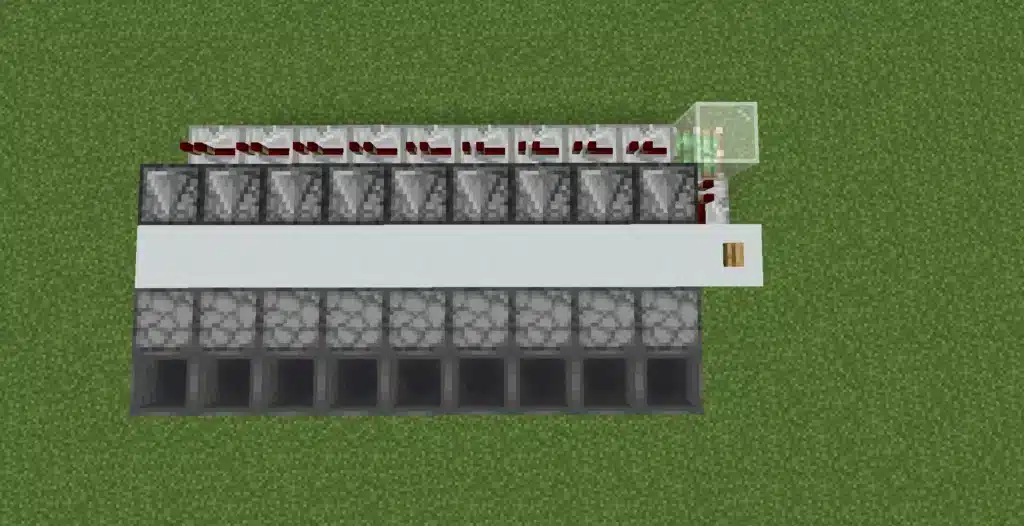
Auto Crafter Minecraft Bedrock Advanced Differences
While parity exists between editions, redstone behavior can differ slightly.
Redstone Parity Differences
Bedrock does not support quasi-connectivity.
Update order can vary.
Certain 1-tick pulse builds may fail in Bedrock but work in Java.
Testing in Creative Mode first is strongly recommended.
Best Practices for Bedrock Players
- Avoid ultra-fast clock circuits
- Use longer repeater chains
- Keep builds compact
- Monitor chunk loading distance
When designing large auto crafter minecraft bedrock systems, stability matters more than speed.
Best Auto Crafter Minecraft Designs for Survival Worlds
Choosing the right design depends on your progression stage.
Beginner-Friendly Designs
Simple setups include:
- Single Crafter with lever activation
- Bread auto-crafting station
- Gold nugget converter
- Paper production module
These systems require minimal redstone and are perfect for early survival.
Advanced Mega Base Factory Layout
Mega bases benefit from centralized crafting hubs.
A strong layout includes:
- Centralized item input bus
- Distributed Crafter array
- Storage tower output
- Redstone backbone line
- Overflow fail-safes
Large-scale factories transform survival worlds into industrial powerhouses.
Auto Crafter Minecraft Factory Comparison
| Design Type | Complexity | Redstone Load | Best For | Performance Impact |
| Single Unit | Low | Minimal | Small farms | Very Low |
| Hopper-Fed Chain | Medium | Moderate | Iron farms | Low |
| Multi-Stage Factory | High | Heavy | Mega bases | Medium |
| Redstone Clock Array | Advanced | Very High | Industrial builds | High |
Understanding scale helps prevent overbuilding early in survival.
Common Mistakes When Using Auto Crafter Minecraft
- Forgetting to lock crafting slots
- Using clocks that are too fast
- Ignoring storage overflow
- Building across chunk borders
- Creating infinite hopper feedback loops
Avoiding these mistakes keeps systems efficient and stable.
Multiplayer Performance and Connection Stability
Large redstone factories increase server processing load. In multiplayer environments, unstable routing can delay redstone pulses or hopper transfers.
High ping affects synchronization between client and server, especially in SMP worlds with heavy automation.
ExitLag improves route optimization, stabilizes packet delivery, and reduces latency spikes. When managing advanced factory systems powered by auto crafter minecraft, stable routing ensures your builds run smoothly without desync or interruption.
For players operating industrial-scale automation in competitive or public servers, connection stability becomes as important as redstone design.
Mastering advanced systems, scaling intelligently, and optimizing performance ensures your auto crafter minecraft factories operate at peak efficiency.
All game images used in this blog belong to Mojang Studios. They are used for informational/educational purposes only and do not imply endorsement or affiliation with the rights holders.
Got questions or want to connect with other players? Join the conversation at the ExitLag Forum!