The Beacon Minecraft players seek is more than a glowing monument—it’s a strategic powerhouse that provides game-changing buffs. Whether exploring survival mode or showcasing creativity in building, Beacons turn your base into a stronghold of power and functionality.
Few items in Minecraft combine power, visual flair, and utility like Beacon Minecraft. They’re not just endgame trophies but vital tools that can significantly boost mining, combat, and movement efficiency. To fully leverage a Beacon, players must master both its crafting and the construction of its Beacon pyramid, as each step directly influences its effectiveness.
What is a Beacon in Minecraft?
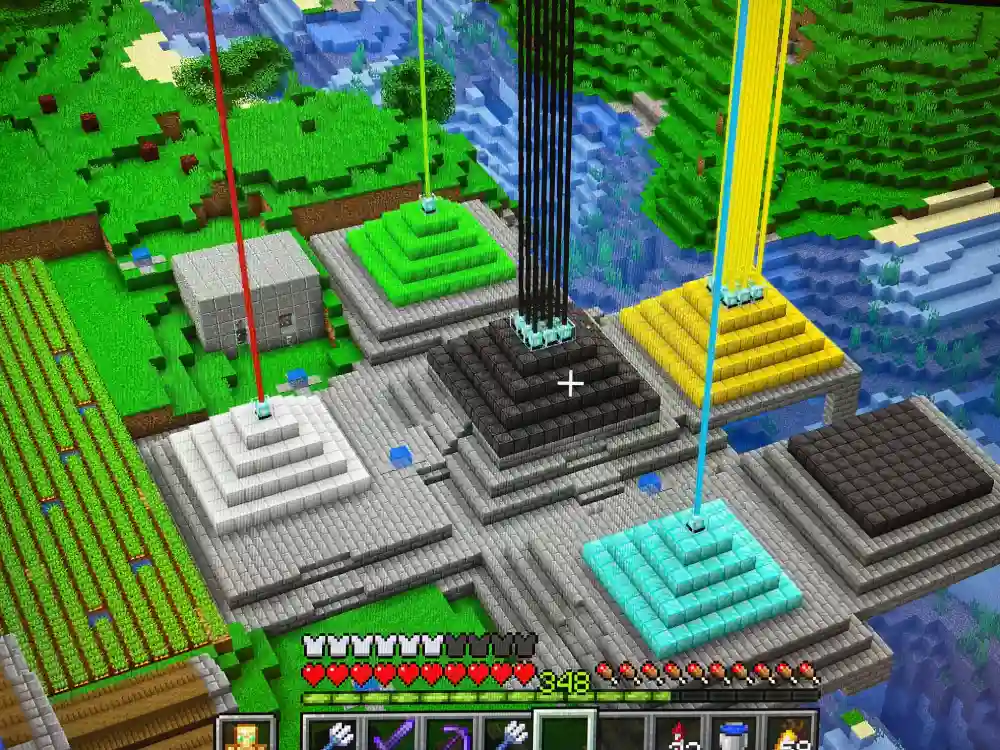
Beacon Minecraft is a powerful block that grants status effects such as Speed, Haste, Regeneration, and more to nearby players. Activated using the Nether Star, which drops from the Wither, it functions as a personal buff station and a visual marker visible across great distances.
Beacon Purpose and Benefits
Beacons serve multiple functions:
- Enhance combat with Strength and Regeneration
- Accelerate mining and construction with Haste and Speed
- Survive hostile environments with Resistance and Fire Resistance
- Act as teleportation hubs or checkpoints via their visible light beams
- Decorate bases with customizable colored beams
Effects only apply within the Beacon’s range, making placement strategy essential.
| Functionality | Game Mode | Benefit Description |
| Combat Buff | Survival/PvP | Boosts attack and healing for mobs or player fights |
| Mobility Upgrade | Creative/Build | Enhances movement and reach for construction projects |
| Mining Hub | Survival | Doubles efficiency for strip or quarry mining |
| Aesthetic Landmark | Any | Creates thematic towers with colored beams |
When to Use a Beacon
Players should aim to build a Beacon after acquiring diamond gear and a secure base. Having enchanted weapons and potions simplifies Wither fights and Wither Skeleton skull farming, making this an ideal point to pursue Beacon Minecraft construction.
How to Make Beacon in Minecraft
Crafting a Beacon requires rare materials and careful preparation.
Required Materials
| Ingredient | Quantity | How to Get |
| Glass | 5 | Smelt sand in a furnace |
| Obsidian | 3 | Mine using a diamond pick, formed by lava + water |
| Nether Star | 1 | Dropped by the Wither after defeat |
Crafting Steps
- Open the crafting table.
- Place 3 Glass in the top row.
- Place Glass, Nether Star, Glass in the middle row.
- Place 3 Obsidian in the bottom row.
Pro Tips
- Use Fortune III to efficiently gather obsidian.
- Set up a Nether Fortress farm for faster Wither Skeleton skull collection.
- Carry fire resistance potions when farming in the Nether.
How to Activate and Use a Beacon
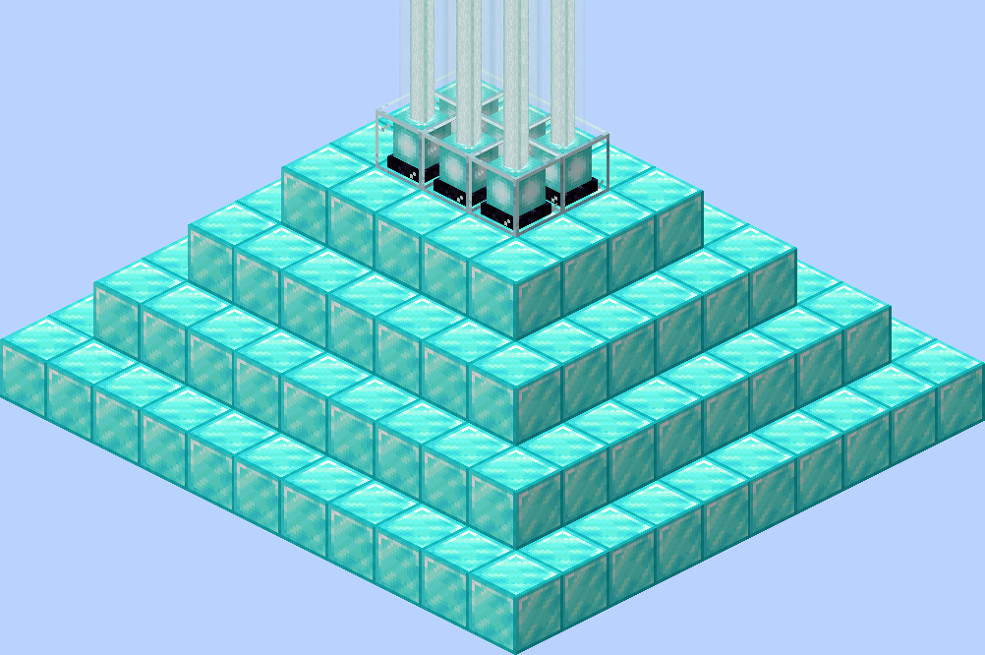
Activation requires a pyramid made of iron, gold, emerald, diamond, or netherite blocks. The pyramid determines the range and strength of effects.
Pyramid Construction
| Layer | Size | Total Blocks | Required Material |
| 1 | 3×3 | 9 | Iron/Gold/Emerald/Diamond/Netherite |
| 2 | 5×5 | 25 | Same as above |
| 3 | 7×7 | 49 | Same as above |
| 4 | 9×9 | 81 | Same as above |
Total blocks for full pyramid: 164
Materials can be mixed across layers as long as they are valid.
Available Beacon Effects
Primary Effects
- Speed – Move faster
- Haste – Mine faster
- Resistance – Take less damage
- Jump Boost – Jump higher
- Strength – Deal more damage
Secondary Effects (full pyramid only)
- Regeneration – Heal over time
- Level II Primary Effects – Enhanced version of primary effect
Players can select one primary and one secondary effect per Beacon.
Customizing Beacon Colors
Place stained glass blocks above the Beacon to change the beam color without affecting functionality.
Quick-Reference Steps
- Defeat the Wither and collect a Nether Star.
- Craft the Beacon.
- Gather 164 blocks for a full pyramid.
- Build a 4-layer pyramid.
- Place the Beacon at the center top.
- Insert a resource and select an effect.
- Enjoy buffs within a 50-block radius.
Using Beacons in Survival and PvP
Survival Strategies
- Mining hubs: Stack Haste and Speed.
- Defense: Use Resistance and Regeneration in mob farms.
- Mobility: Combine Speed and Jump Boost for farming and building efficiency.
- Protect pyramids underground to prevent mob or player interference.
PvP Strategies
- Place Beacons centrally for maximum coverage.
- Combine Speed and Strength for close combat dominance.
- Assign players to manage Beacon effects in group raids.
- Use connection optimization tools to reduce lag in large multiplayer servers.
Optimizing Your Beacon Setup
- Use iron blocks for affordability.
- Centralize Beacon placement for maximum coverage.
- Stack multiple Beacons to unlock all effects.
Best Combinations
- Speed + Haste: Efficient for mining and resource collection.
- Strength + Regeneration: Ideal for boss fights.
- Jump Boost + Resistance: Useful for parkour challenges and exploration.
Beacon Range by Pyramid Level
| Pyramid Layers | Effect Tier | Max Range | Power Strength |
| 1 | Tier I | 20 blocks | Basic |
| 2 | Tier I | 30 blocks | Basic |
| 3 | Tier I | 40 blocks | Basic |
| 4 | Tier II | 50 blocks | Enhanced |
Extend range by building taller pyramids or multiple Beacons.
Advanced Beacon Minecraft Strategies
Linking Beacons for Combo Buffs
- Align multiple Beacons for overlapping effect coverage.
- Combine primary and secondary effects strategically for survival expeditions.
- Use in combination with enchanted gear for maximal advantage.
Strategic Placement
- Key bases: Centralized placement ensures all players benefit.
- Mining sites: Position to cover large excavation areas.
- PvP arenas: Use Beacons to maintain continuous combat buffs.
Advanced Visual Techniques
- Colored beams as navigation markers.
- Creative designs using stained glass layers for aesthetic appeal.
- Integration with building themes to enhance the visual appeal of your world.
Maintenance Tips
- Protect pyramids from mob interference.
- Replace blocks if partially destroyed.
- Regularly check and replenish nearby Beacon power materials.
Conclusion About Beacon Minecraft
The Beacon Minecraft provides functional upgrades and visual appeal. Buffs enhance mining speed, healing, mobility, and combat effectiveness. Strategic placement maximizes survival and PvP efficiency. Tools like ExitLag further enhance multiplayer experiences, reducing lag and stabilizing gameplay.
Minecraft Beacon FAQ
Craft it with 5 glass, 3 obsidian, and 1 Nether Star on a crafting table.
Build a pyramid of valid blocks, place the Beacon on top, insert a resource, and select an effect.
Activate it to gain buffs like Speed, Haste, Strength, and Regeneration. Position strategically for mining, combat, or exploration.
Grants status effects to nearby players, serves as a visible landmark, and enhances base functionality.
Create a 3×3 to 9×9 pyramid up to 4 layers, place the Beacon on top, insert a resource, and select the desired effect.
Got questions or want to connect with other players? Join the conversation at the ExitLag Forum!