If you’ve recently explored newer updates in Minecraft, you may have noticed something different, a slower, more detailed way to interact with the world.
Instead of breaking blocks instantly, you now have the option to carefully uncover hidden items. That’s where the brush Minecraft mechanic comes in.
Brush Minecraft introduces a completely new gameplay layer focused on archaeology, exploration, and patience, something very different from the traditional fast-paced mining style.
So, what does brush Minecraft do? It allows players to gently clear specific blocks like suspicious sand and gravel, revealing hidden items such as pottery shards, tools, and rare resources.
In this guide, you’ll learn how to craft, use, and fully take advantage of the brush tool in Minecraft.
Brush Minecraft: what does the brush do in Minecraft?
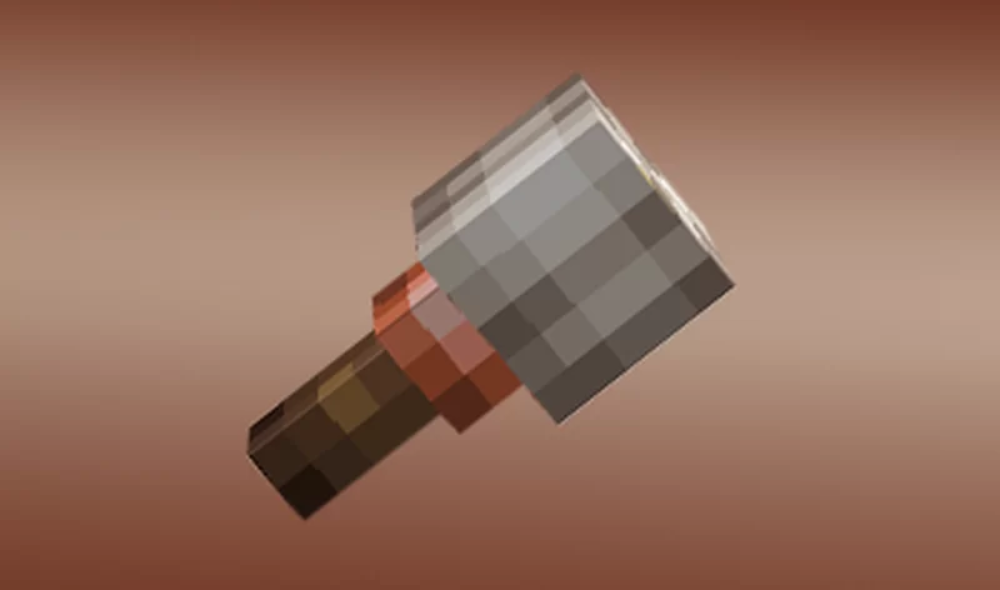
Before using it, you need to understand its purpose. Because the brush isn’t just another tool, it changes how you interact with the environment.
What does brush do in Minecraft
The main function of the brush tool Minecraft is to uncover hidden items inside special blocks.
Unlike breaking blocks, brushing allows you to extract items safely without destroying them.
This mechanic is tied directly to archaeology. When you use the brush, you slowly remove layers of sand or gravel, revealing items hidden inside.
This is exactly what makes Minecraft archaeology brush gameplay unique.
Why the brush is important for archaeology
The introduction of archaeology adds a new dimension to exploration. Instead of rushing through caves or biomes, you now need to slow down and observe your surroundings. With the brush, you can:
- Discover pottery shards;
- Find ancient items;
- Learn more about Minecraft’s lore;
- Explore structures in a more immersive way.
This is why many players search for what does brush do in Minecraft, because it’s not immediately obvious at first.
How to use brush in Minecraft effectively
Now that you understand its purpose, let’s talk about how to actually use it. Because using it correctly makes all the difference.
Step-by-step: how to use brush in Minecraft
If you’re wondering how to use brush in Minecraft, here’s the process:
- Equip the brush in your hand;
- Find suspicious sand or gravel;
- Hold the use button (right-click or tap);
- Wait as the block is slowly brushed;
- Collect the revealed item.
The key here is patience. Unlike mining, brushing takes time, and stopping midway resets progress.
Brush suspicious sand and gravel explained
Two specific blocks are essential for this mechanic:
- Brush suspicious sand Minecraft;
- Brush suspicious gravel Minecraft.
These blocks look slightly different from normal ones, often found in structures like desert temples or ruins.
When brushed correctly, they reveal hidden items without destroying them. This makes exploration much more rewarding.
Brush crafting Minecraft: how to craft the brush
Before you can use the tool, you need to craft it. Fortunately, the recipe is simple, but still requires specific materials.
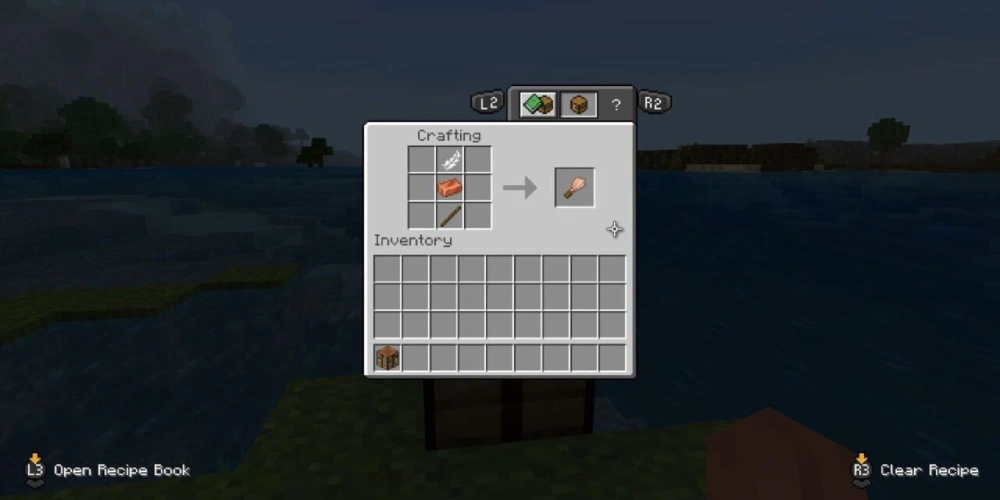
Brush crafting Minecraft recipe
To complete brush crafting Minecraft, you’ll need:
- 1 feather;
- 1 stick;
- 1 copper ingot.
Once you have these items, place them vertically in the crafting table. That’s it, your brush is ready.
Where to find brush materials
Now, let’s make it practical.
You can find materials here:
- Feathers from chickens;
- Sticks from wood;
- Copper from mining underground.
Since copper is required, early-game players may need to explore a bit before crafting their first brush.
Brush vs traditional mining
To better understand how different this tool is, let’s compare it with standard mining.
| Feature | Brush Tool | Traditional Mining |
| Speed | Slow | Fast |
| Purpose | Extraction | Destruction |
| Precision | High | Low |
| Risk of losing items | Low | High |
| Gameplay style | Exploration | Resource gathering |
Now let’s walk through this together. At first, mining is about speed and efficiency.
You break blocks quickly and collect resources. But the brush Minecraft mechanic introduces something new.
Why brush gameplay feels different
Brushing is slower, and that’s intentional. It forces you to pay attention, observe details, and interact with the world differently. This creates a more immersive experience.
When to use brush instead of mining
You should use the brush when:
- You find suspicious blocks;
- You want to preserve hidden items;
- You’re exploring ancient structures.
In these situations, mining would destroy the opportunity.
Brush Minecraft: tips for better archaeology exploration
Once you understand the basics of brush Minecraft, the next step is to refine your approach.
Because here’s the truth: archaeology in Minecraft isn’t about luck — it’s about observation, patience, and strategy.
At first, you might randomly find a suspicious block or two. But over time, if you know what to look for, your efficiency increases dramatically.
And that’s exactly where most players evolve from beginners to more advanced explorers.
How to find suspicious blocks faster
If you want to fully take advantage of the Minecraft archaeology brush, you need to know where to look.
Not all areas in the game will reward you equally. In fact, most of the valuable finds are concentrated in specific structures.
So instead of wandering aimlessly, focus your exploration on high-probability locations.
The best places to search include:
- Desert temples, where brush suspicious sand Minecraft is commonly found;
- Ocean or land ruins, which often contain hidden archaeological elements;
- Trail ruins, one of the most reliable sources for rare discoveries.
Now, here’s something important to keep in mind.
Suspicious blocks don’t always stand out immediately. Sometimes, the difference is subtle — slightly different textures, small visual changes, or unusual placement.
That’s why slowing down your gameplay is essential. If you rush, you’ll miss them.
But if you pay attention, you’ll start spotting patterns, and that’s when the brush tool Minecraft becomes truly powerful.
Mistakes to avoid when using the brush
Now let’s talk about something just as important: what not to do.
Because many players understand how to use brush in Minecraft, but still make mistakes that cost them valuable items.
And the biggest problem? Most of these mistakes happen because of habit.
Minecraft teaches you to break blocks quickly, but archaeology requires the opposite mindset.
Here are the most common errors you should avoid:
- Breaking suspicious blocks instead of using the brush tool Minecraft;
- Interrupting the brushing process before it finishes;
- Ignoring visual clues that indicate brush suspicious gravel Minecraft or sand;
- Treating archaeology like regular mining instead of a careful extraction process.
When you break a suspicious block, the item inside is lost forever.
There’s no second chance.
And that’s why understanding what does brush do in Minecraft is so important, it’s not just a tool, it’s a different way of interacting with the world.
FAQ
It allows you to uncover hidden items inside suspicious sand and gravel.
Hold the use button on suspicious blocks until items appear.
Use a feather, stick, and copper ingot in a vertical recipe.
In desert temples and archaeological sites.
Yes, if interrupted or done incorrectly, items may be lost.
Improve your Minecraft experience with ExitLag
Exploring mechanics like brush Minecraft is all about precision, timing, and attention to detail. Unlike traditional gameplay, where speed often defines your progress, archaeology introduces a slower and more careful interaction with the world, and that makes every action matter even more.
However, even when you fully understand how to use brush in Minecraft, your experience can still be affected by something outside the game itself: your connection.
Small delays, lag spikes, or unstable performance can interrupt the brushing process, causing you to lose progress or miss valuable items hidden inside suspicious blocks. And since brushing requires continuous interaction, even a minor interruption can break the flow of your exploration.
That’s exactly where ExitLag makes a difference.
By optimizing your connection routes in real time, ExitLag ensures smoother gameplay, faster response times, and more stable performance while you explore, interact, and uncover hidden treasures across the world.
Try ExitLag now and experience Minecraft with maximum stability and precision!
Got questions or want to connect with other players? Join the conversation at the ExitLag Forum!