If you have spent time exploring, mining, fighting mobs, or collecting loot, you already know how important gear management is. That is exactly where grindstone Minecraft becomes useful. This simple utility block helps you repair worn tools, remove unwanted enchantments, and keep your inventory more efficient.
Grindstone Minecraft is not just another crafting station. It gives players a practical way to reset enchanted items, combine damaged gear, and recover a bit of experience from enchantments they no longer want. For survival players, that can save resources and reduce waste.
The best part is that grindstone Minecraft is easy to craft early in the game. Once you understand the grindstone recipe, the grindstone use Minecraft players rely on becomes simple: fix gear, clean bad enchantments, and prepare items for a better setup.
Whether you are building your first base or optimizing a long-term survival world, the grindstone deserves a permanent spot near your crafting table, anvil, and storage area.
What does a grindstone do in Minecraft?
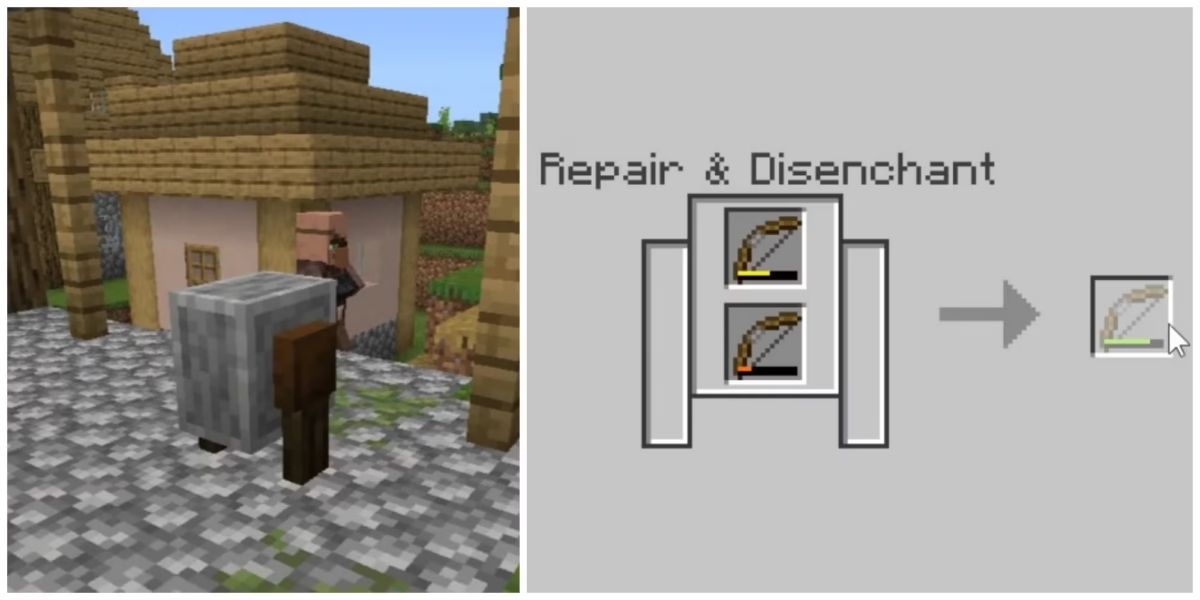
The grindstone is a utility block focused on two main actions: repairing items and removing enchantments. It is especially useful when you have damaged tools, weapons, or armor pieces that are no longer worth keeping separately.
In practical terms, grindstone Minecraft helps you clean up old gear. Instead of throwing away two damaged swords, you can combine them into one item with higher durability. Instead of keeping a badly enchanted pickaxe, you can remove the enchantment and start again.
This makes the grindstone useful in several situations:
| Situation | What the grindstone does |
| Two damaged tools | Combines them into one repaired item |
| Bad enchantment | Removes the enchantment |
| Old enchanted loot | Converts it into clean gear |
| Extra enchanted drops | Gives back some XP |
| Early survival gear | Helps save materials |
The grindstone is not a replacement for every other tool. However, for quick repairs and enchantment resets, it is one of the most efficient blocks in the game.
Repairing items without extra materials
One major benefit of grindstone Minecraft is that it lets you repair items without spending diamonds, iron, gold, or other crafting materials.
To repair items, place two damaged items of the same type into the grindstone interface. For example, you can combine two damaged iron swords, two damaged bows, or two damaged pickaxes. The output will be a single repaired item.
This is especially useful when you want to repair items Minecraft gives you through combat, mining, fishing, or mob drops.
For example:
- Two damaged iron swords can become one stronger iron sword.
- Two damaged bows can become one more durable bow.
- Two damaged stone pickaxes can help you keep mining longer.
- Two damaged armor pieces can reduce inventory clutter.
However, there is one important detail. If the items are enchanted, the grindstone removes most enchantments during the process. That is helpful when you want a clean item, but not ideal when you want to preserve valuable enchantments.
Removing unwanted enchantments and gaining XP
The other key function of grindstone Minecraft is disenchanting. If you place an enchanted item into the grindstone, the block removes the enchantments and returns a clean version of the item.
This is useful when an enchantment is bad, weak, or not part of your plan. For example, maybe you enchanted a sword and got a low-level enchantment. Or maybe you found armor with enchantments you do not want.
The grindstone gives you a way to reset the item instead of wasting it.
It can help with:
- Removing weak enchantments.
- Preparing gear for better enchanting.
- Cleaning loot from mobs or chests.
- Getting a small amount of XP back.
- Making storage easier.
However, the grindstone does not remove curse enchantments. Curses like Curse of Binding or Curse of Vanishing cannot be removed through normal grindstone use.
That limitation matters. If an item has a curse, you should think carefully before using or equipping it.
How do you make a grindstone in Minecraft?
Learning how to make grindstone Minecraft players can use early is simple because the materials are easy to find. You do not need rare ores, Nether resources, or advanced crafting stations.
You only need basic wood materials and one stone slab. Because of that, the grindstone can be crafted very early in a survival world.
Before starting Minecraft grindstone crafting, make sure you have access to a crafting table. The grindstone requires the full 3×3 crafting grid, so the basic 2×2 inventory grid is not enough.
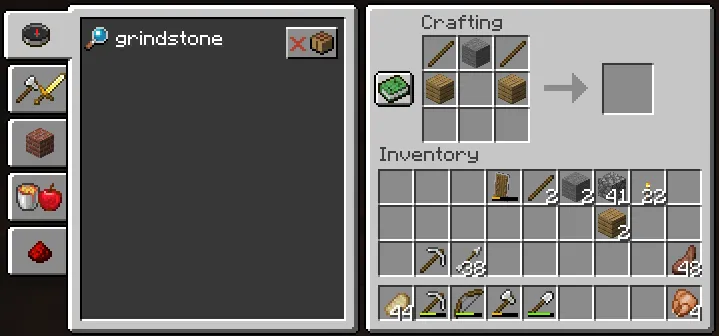
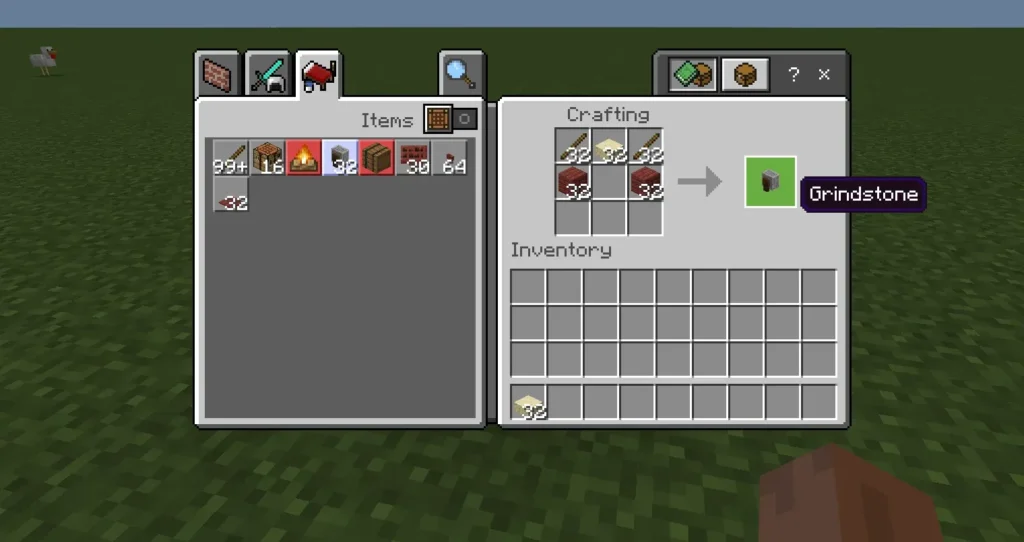
The standard grindstone recipe includes:
| Item | Quantity |
| Stick | 2 |
| Stone slab | 1 |
| Wooden planks | 2 |
You can use any wooden planks. Oak, spruce, birch, jungle, acacia, dark oak, mangrove, cherry, crimson, or warped planks can all work depending on your version and available materials.
Grindstone recipe materials
To craft grindstone Minecraft properly, start by collecting wood. Break logs, turn them into planks, and use some of those planks to make sticks.
Next, you need stone. To get regular stone, smelt cobblestone in a furnace. Then place three stone blocks in a row on the crafting table to create stone slabs.
Here is a simple material checklist:
- Chop at least one log.
- Convert logs into wooden planks.
- Craft sticks from planks.
- Mine cobblestone.
- Smelt cobblestone into stone.
- Craft stone slabs.
- Open a crafting table.
- Follow the grindstone recipe layout.
This process makes Minecraft grindstone crafting accessible even before you have strong armor or enchanted tools.
Minecraft grindstone crafting steps
Once you have the materials, open your crafting table and use the 3×3 grid.
Place the items like this:
| Crafting slot | Item |
| Top-left | Stick |
| Top-center | Stone slab |
| Top-right | Stick |
| Middle-left | Wooden plank |
| Middle-center | Empty |
| Middle-right | Wooden plank |
| Bottom row | Empty |
After placing the materials correctly, the grindstone appears as the output item. Drag it into your inventory.
Then place it somewhere useful in your base. A good setup is near your anvil, enchanting table, bookshelves, and storage chests. That way, your repair and enchantment workflow stays organized.
This is the easiest way to handle how to make grindstone Minecraft players need for survival, especially during early or mid-game progression.
How do you use a grindstone in Minecraft?
The grindstone use Minecraft players need most often comes down to two workflows: repairing and disenchanting. Both are simple, but they serve different goals.
When you interact with a grindstone, the interface shows two input slots and one output slot. You can place two compatible damaged items into the input slots to repair them. You can also place one enchanted item into an input slot to remove its enchantments.
That makes grindstone Minecraft easy to understand, even for new players. There are no complicated menus, no fuel requirements, and no material cost after the block is crafted.
Still, using it at the right time matters. The grindstone is excellent when you want to reset gear. It is not the best option when you want to preserve enchantments.
Using the grindstone interface
To use the grindstone, right-click it or use the interact button on your platform.
For repairs:
- Open the grindstone.
- Place one damaged item in the first slot.
- Place a second damaged item of the same type in the second slot.
- Check the repaired output.
- Take the repaired item.
For disenchanting:
- Open the grindstone.
- Place one enchanted item in an input slot.
- Check the clean output item.
- Take the item.
- Collect the XP returned.
This is the most common grindstone use Minecraft players rely on after mining sessions, mob farming, or loot collection.
It also helps when your inventory gets full of damaged enchanted gear. Instead of keeping everything, you can clean and combine items into a more useful set.
Before and after using a grindstone
Imagine you have two damaged iron swords. One has low durability, and the other is almost broken. If neither sword has an enchantment worth saving, grindstone Minecraft gives you an easy fix.
Before:
- Iron Sword 1: damaged.
- Iron Sword 2: damaged.
- Inventory: cluttered.
- Materials needed: none.
After:
- One repaired iron sword.
- Less inventory clutter.
- No new iron spent.
- Better durability.
Now imagine you have a pickaxe with an enchantment you do not want. Maybe you were trying to get Efficiency but received something weak instead.
Before:
- One enchanted pickaxe.
- Bad enchantment.
- Not worth using long term.
After:
- One clean pickaxe.
- Enchantment removed.
- Some XP returned.
- Ready for another enchantment attempt.
That is why the grindstone is valuable. It gives you control over old gear instead of forcing you to waste resources.
Is a grindstone better than an anvil in Minecraft?
A grindstone and an anvil are both used for gear management, but they are not the same. Each one solves a different problem.
Grindstone Minecraft is better when you want to remove enchantments, combine damaged items without spending XP, or reset gear. The anvil is better when you want to preserve enchantments, combine enchanted books, rename items, or repair gear with materials.
So, the best choice depends on your goal.
Use a grindstone when you want a clean reset. Use an anvil when you want to protect or improve a valuable item.
For example, if you have a diamond sword with Sharpness V, you probably do not want to place it in a grindstone. That would remove the enchantment. But if you have a random gold sword with a weak enchantment, the grindstone is a great way to recover value.
Grindstone vs. anvil
The anvil is more advanced, but it comes with XP costs. Every time you repair, rename, or combine enchanted gear, you spend experience levels.
That cost can increase over time.
The grindstone works differently. It does not combine enchantments, and it does not rename items. However, it removes enchantments and can return some XP.
Here is a quick comparison:
| Feature | Grindstone | Anvil |
| Repairs items | Yes | Yes |
| Removes enchantments | Yes | No |
| Keeps enchantments during repair | No | Yes |
| Combines enchantments | No | Yes |
| Renames items | No | Yes |
| Costs XP to use | No | Usually yes |
| Gives XP back | Sometimes | No |
If your goal is to repair items Minecraft style without protecting enchantments, the grindstone is efficient. If your goal is to build powerful gear, use the anvil.
Grindstone vs. smithing
The smithing table has a different purpose. It is not mainly used for repairing or disenchanting. Instead, it is used for upgrades, especially when working with diamond and netherite gear.
That means the smithing table does not replace the grindstone.
Use each block like this:
- Use the grindstone to repair or disenchant.
- Use the anvil to combine, rename, or preserve enchantments.
- Use the smithing table to upgrade gear.
- Use the enchanting table to create enchanted items.
Together, these blocks create a complete gear system.
A strong base often includes all of them. Place them near each other so you can move from enchanting to repairing, upgrading, and organizing your items without wasting time.
When should you use grindstone Minecraft in survival mode?
Survival mode is where grindstone Minecraft becomes especially useful. Resources matter more, inventory space matters more, and gear durability can affect how long you survive.
In early game, you may not have enough iron, diamonds, or enchanted books to replace tools all the time. The grindstone helps extend the life of basic gear.
In mid-game, it becomes useful for cleaning bad enchantments and organizing loot. In late game, it still helps when processing mob drops, fishing loot, and extra enchanted items.
The grindstone is not flashy, but it is practical.
Best moments to use a grindstone
Use grindstone Minecraft when:
- You have two damaged items of the same type.
- You found enchanted loot with bad enchantments.
- You want to reset an item before enchanting again.
- You need quick repairs without spending XP.
- You want to recover some XP from old enchanted gear.
- You are cleaning items from farms or chests.
- You want fewer almost-broken tools in storage.
This makes grindstone use Minecraft players should learn early. It saves space and helps you make better decisions with gear.
For example, after a long mining trip, you may return with several damaged pickaxes. Combining them can reduce clutter and keep you ready for the next trip.
After fighting mobs, you may collect enchanted bows, swords, or armor. Disenchanting them can give you clean items and XP.
Mistakes to avoid with grindstone use
The biggest mistake is using a grindstone on gear with enchantments you want to keep.
Before placing any enchanted item into the grindstone, check the enchantments carefully. If the item has Mending, Fortune, Silk Touch, Protection, Sharpness, or another valuable enchantment, you may want to use an anvil instead.
Avoid these mistakes:
- Do not disenchant valuable gear by accident.
- Do not expect curses to disappear.
- Do not use the grindstone to combine enchantments.
- Do not use it when you need to rename an item.
- Do not repair enchanted gear with it unless you are okay losing enchantments.
The grindstone is powerful because it resets items. But that same power can become a problem if you use it too quickly.
How can ExitLag improve Minecraft multiplayer gameplay?
ExitLag does not change how grindstone Minecraft works inside the game. It does not alter crafting, durability, enchantments, or the grindstone recipe. However, it can improve the online experience around your Minecraft gameplay.
That matters because Minecraft multiplayer can be affected by lag, unstable routing, packet loss, and high ping. When you are mining, fighting, trading, or managing gear on a server, connection problems can make every action feel delayed.
If you play on international servers, minigame networks, survival multiplayer worlds, or modded servers, a smoother connection can make your gameplay feel more responsive.
Why connection stability matters in Minecraft
Minecraft may look simple, but multiplayer timing matters.
Lag can affect:
- Combat against players or mobs.
- Block breaking response.
- Inventory actions.
- Server movement.
- Chest interactions.
- Tool switching.
- Crafting and repair workflows.
- Exploration and Elytra flight.
Even basic actions can feel frustrating when the connection is unstable. Opening a grindstone, moving items, or repairing tools should feel instant. When there is delay, the game becomes less comfortable.
That is where ExitLag can help. It optimizes your connection route to the game server, helping reduce instability and improve responsiveness during online sessions.
Using ExitLag with Minecraft servers
ExitLag is useful for players who join servers far from their physical location or experience inconsistent routing from their internet provider.
For example, you may have a strong internet plan but still experience lag because your traffic takes an inefficient path to the server. ExitLag helps by finding optimized routes and reducing connection problems that affect gameplay.
This can be especially helpful for:
- Multiplayer survival servers.
- PvP servers.
- Modded Minecraft servers.
- International servers.
- Large community servers.
- Minigame networks.
- Long sessions with friends.
So, while grindstone Minecraft helps you manage your gear, ExitLag helps you manage your connection. Together, they support a smoother experience: better equipment control in-game and better stability online.
FAQ
Here are the most common questions players ask about grindstone Minecraft, crafting, repairs, and enchantment removal.
To make a grindstone, use two sticks, one stone slab, and two wooden planks in a crafting table. This Minecraft grindstone crafting process requires the 3×3 grid, so you need a crafting table.
The basic layout is simple: sticks on the top-left and top-right, a stone slab in the top-center, and wooden planks on the middle-left and middle-right.
That is the standard grindstone recipe for most players.
The main grindstone use Minecraft players need is repairing damaged items and removing enchantments.
You can place two damaged items of the same type into the grindstone to create one repaired item. You can also place an enchanted item into the grindstone to remove its enchantments and receive some XP.
It is useful for cleaning gear, saving resources, and preparing items for new enchantments.
No. A grindstone cannot remove curse enchantments.
That means Curse of Binding and Curse of Vanishing stay on the item. If you find gear with a curse, be careful before using it.
The grindstone can remove most regular enchantments, but curses are an exception.
No. If you repair enchanted gear with a grindstone, most enchantments are removed.
If you want to keep enchantments while repairing gear, use an anvil instead. The anvil costs XP, but it preserves enchantments and allows you to combine enchanted items or enchanted books.
Use grindstone Minecraft for resets. Use the anvil for upgrades.
Keep your gear sharp with grindstone Minecraft
The grindstone is one of the most useful utility blocks in Minecraft because it solves simple problems quickly. It helps repair damaged items, remove unwanted enchantments, recover some XP, and keep your inventory cleaner.
Once you know how to make grindstone Minecraft players can rely on, the block becomes part of your normal survival routine. The materials are easy to collect, the grindstone recipe is simple, and the benefits are immediate.
Use it when you want to reset gear. Use it when you want to clean up old loot. Use it when you need quick repairs without spending extra materials.
However, remember its limits. It does not combine enchantments, it does not rename items, and it does not remove curses. For valuable enchanted gear, the anvil is usually the safer choice.
Grindstone Minecraft keeps your equipment organized, but your connection matters too. If you play on multiplayer servers and want smoother sessions, try ExitLag to reduce lag, improve routing, and make your Minecraft experience more stable from the moment you join.
Got questions or want to connect with other players? Join the conversation at the ExitLag Forum!