Lodestone Minecraft opens powerful navigation possibilities for players across every dimension. First of all, this unique block transforms regular compasses into reliable orientation tools solving major challenges.
Whether exploring the Overworld, venturing into the Nether, or delving deep into the End, Minecraft Lodestone offers unmatched utility. However, many players don’t understand how to optimize Minecraft performance while using navigation tools.
Moreover, understanding what is Lodestone Minecraft helps players master dimension travel efficiently. This specialized block creates Lodestone-linked compasses that always point toward specific locations permanently.
What is Lodestone Minecraft and why use it?
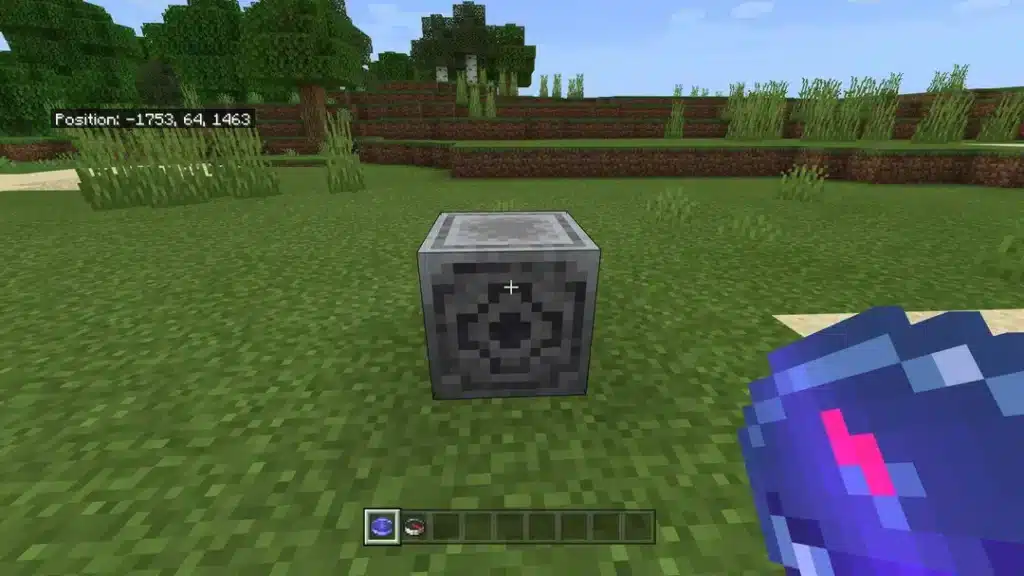
Above all, Lodestone Minecraft is a crafted block permanently linking with compasses. In the same way that beacons provide buffs, Lodestones provide directional stability.
Understanding Lodestone core features
Minecraft Lodestone solves a major problem: regular compasses don’t work in Nether or End. Once linked, compasses track Lodestone locations rather than world spawn consistently.
Key Lodestone features:
- Creates permanent compass connection
- Works in all three dimensions
- Provides stable navigation markers
- Helps locate bases and portals
- Improves SMP server organization
- Enables structured exploration safely
Consequently, players traveling far distances rely on Lodestones for orientation. Moreover, this makes Minecraft gameplay significantly more organized.
Why players depend on Lodestones
Lodestone Minecraft became essential for survival and multiplayer worlds immediately. Therefore, dedicated players use them to mark central hubs and simplify travel.
Navigation benefits:
- Mark pathways to important builds
- Establish safe routes in Nether
- Track remote farms or bunkers
- Anchor navigation in cave systems
- Guide new players on servers
- Organize large build colonies
Similarly, multiplayer servers use compass networks connecting entire communities. As a result, getting lost becomes nearly impossible with proper setup.
How to craft Lodestone Minecraft step-by-step?
Before using Lodestone Minecraft, understanding crafting requirements helps players prepare properly. In that regard, this requires Nether resources making it mid-to-late game.
Official Lodestone recipe
Firstly, crafting Minecraft Lodestone requires specific materials gathered from dangerous locations. Therefore, prepare adequately before attempting collection missions.
Required materials:
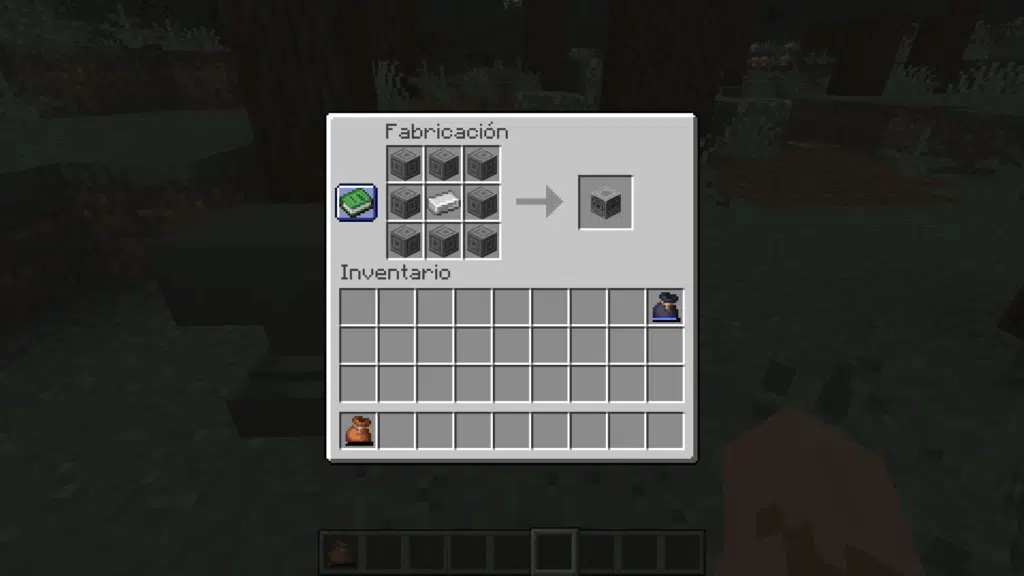
- 1 Netherite Ingot (center position)
- 8 Chiseled Stone Bricks (surrounding)
Crafting Chiseled Stone Bricks:
- Smelt cobblestone into stone
- Craft stone into stone bricks
- Craft stone bricks into slabs
- Combine slabs into chiseled bricks
Gathering Netherite efficiently
Lodestone Minecraft requires Netherite making it valuable investment. Consequently, obtaining this material demands Nether exploration and Ancient Debris mining.
Netherite acquisition steps:
- Mine Ancient Debris at Y-level 8-22
- Smelt Ancient Debris into Netherite Scrap
- Combine 4 scraps with 4 gold ingots
- Craft Netherite Ingot for Lodestone
Additionally, ensure proper equipment before Nether mining expeditions. Moreover, fire resistance potions prevent lava-related deaths.
Crafting table layout
Place Netherite Ingot in center slot of crafting table. Then, surround it completely with eight Chiseled Stone Bricks forming square pattern.
As a result, you receive one Lodestone block ready for placement. Therefore, choose placement locations strategically before crafting multiple blocks.
How to use Lodestone Minecraft for navigation?
Understanding how to use Lodestone transforms navigation across all dimensions. In other words, proper usage requires knowing linking mechanics and compass behavior.
Creating Lodestone compass
Firstly, Lodestone compass creation is straightforward but permanent once completed. Therefore, choose Lodestone locations carefully before linking compasses.
Compass linking process:
- Craft or obtain regular compass
- Place Lodestone at desired location
- Equip compass in hand
- Right-click (Java) or tap (Bedrock) on Lodestone
- Compass gains glowing enchanted appearance
- Now permanently points to that Lodestone
Consequently, linked compasses work in all dimensions unlike regular compasses. Moreover, they maintain connection even after player death.
Important Lodestone mechanics
Minecraft Lodestone has specific behaviors players must understand for effective use. Additionally, these mechanics affect long-term navigation strategies significantly.
Critical mechanics:
- Breaking Lodestone causes linked compasses to spin erratically
- Multiple Lodestones create navigation networks
- Compasses can be renamed via anvil for organization
- Distance doesn’t affect compass functionality
- Dimension-specific: only works in same dimension as Lodestone
- Cannot be pushed by pistons
Similarly, maintaining Lodestone integrity prevents navigation system failures. Therefore, protect important Lodestones with secure structures.
Practical navigation applications
How to use Lodestone effectively depends on specific gameplay needs and world size. Consequently, different situations require different strategic approaches.
Common use cases:
- Main base location marking
- Nether hub coordination
- Portal return points
- End gateway tracking
- Farm location markers
- Mega-project organization
As a result, organized players maintain multiple labeled compasses. Moreover, this system scales perfectly for massive worlds.
Best Lodestone placement by dimension
Before placing Lodestone Minecraft, understanding dimensional strategies maximizes effectiveness. In that regard, each dimension has unique navigation challenges.
Overworld placement strategies
Minecraft Lodestone in Overworld marks permanent structures and important locations. Therefore, use them for bases, villages, and major projects.
Recommended Overworld locations:
- Main base entrance or center
- Large project perimeters
- Village trading halls
- Rail system intersections
- Biome border markers
- Secondary base outposts
Similarly, spacing Lodestones evenly creates comprehensive coverage. Moreover, this prevents navigation dead zones.
Nether placement strategies
The Nether requires Lodestone Minecraft most because regular compasses fail completely. Consequently, Lodestones provide only reliable directional reference here.
Essential Nether placements:
- Nether hub central location
- Bastion fortress entrances
- Fortress pathways
- Safe tunnel networks
- Portal return coordinates
- Blaze farm locations
Additionally, place Nether Lodestones on non-flammable blocks for safety. Moreover, secure them in reinforced structures preventing accidental destruction.
End placement strategies
How to use Lodestone in the End solves unique navigation challenges. Therefore, strategic placement enables safe exploration and resource gathering.
Critical End locations:
- Main island base
- Return gateway portal
- End city exploration routes
- End ship coordinates
- Elytra launch points
- Shulker farm markers
As a result, End navigation becomes manageable instead of disorienting. Moreover, this prevents losing valuable elytra during flights.
Lodestone vs regular compass comparison
| Feature | Regular Compass | Lodestone Compass |
| Works in Overworld | Yes | Yes |
| Works in Nether | No | Yes |
| Works in End | No | Yes |
| Points to spawn | Yes | No |
| Points to Lodestone | No | Yes |
| Customizable names | Yes | Yes |
| Requires crafting | Simple | Complex (Netherite) |
| Multiple targets | No | Yes (via multiple) |
Building multi-Lodestone navigation networks
Advanced Minecraft Lodestone guide strategies involve creating comprehensive systems. In the same way that rail networks connect locations, compass networks provide instant orientation.
Organizing compass room systems
Firstly, central navigation hubs streamline travel for entire communities. Therefore, dedicated compass rooms become essential infrastructure.
Navigation hub components:
- Item frames holding labeled compasses
- Color-coded geographical markers
- Dimension-specific sections organized
- Backup compasses for emergencies
- Coordinate reference charts
- Portal access nearby
Consequently, players access any location instantly via appropriate compass. Moreover, this system scales infinitely as worlds expand.
Compass naming conventions
Lodestone Minecraft networks require clear naming for organization. Additionally, consistent naming prevents confusion during emergencies.
Effective naming examples:
- “Main Base South Gate”
- “Nether Hub Level 2”
- “Ancient Debris Mine 4”
- “End City Loop East”
- “Blaze Farm Central”
- “Iron Farm Overworld”
Similarly, color-coding regions using banners enhances visual organization. Therefore, combine naming with visual cues.
SMP server navigation tips
Minecraft Lodestone guide for multiplayer differs from single-player significantly. Consequently, server administrators must plan comprehensive systems.
Server navigation strategies:
- Provide personalized Lodestone compasses
- Maintain dedicated dimensional hubs
- Keep emergency compasses accessible
- Create starter kits with compasses
- Establish regroup points
- Coordinate group expeditions
As a result, new players integrate smoothly into communities. Moreover, veteran players navigate efficiently across massive worlds.
Advanced Lodestone strategies for survival
Beyond basic navigation, Lodestone Minecraft enables sophisticated world organization. In other words, professional players use them as infrastructure foundation.
Resource network planning
How to use Lodestone for farm coordination maximizes efficiency dramatically. Therefore, marking all major farms creates comprehensive resource maps.
Farm marking system:
- Iron farm coordinates
- Gold farm (Nether)
- Raid farm locations
- Mob grinder positions
- Crop farm clusters
- Animal breeding areas
Additionally, this prevents accidental farm destruction during exploration. Moreover, it facilitates maintenance schedules.
Mega-project organization
Large builds benefit enormously from Lodestone compass networks. Consequently, builders mark project sections for easy access.
Project management uses:
- Perimeter mine corners
- Monument drain sections
- Nether roof transportation grids
- Build perimeter markers
- Material storage locations
- Construction staging areas
Similarly, this reduces time wasted finding specific locations. Therefore, productivity increases significantly.
Hardcore mode applications
Minecraft Lodestone becomes life-saving in hardcore worlds where death is permanent. Additionally, reducing navigation errors prevents tragic losses.
Hardcore survival tactics:
- Mark multiple emergency bases
- Create escape route compasses
- Establish safe zone networks
- Track dangerous area boundaries
- Maintain backup shelter coordinates
- Plan exploration systematically
As a result, hardcore players survive longer through better preparation. Moreover, death from getting lost becomes avoidable.
Optimizing Minecraft performance with Lodestones
While Lodestone Minecraft improves navigation, connection stability matters equally. In that regard, lag during portal transitions or chunk loading affects gameplay.
Performance optimization tips
Before extensive exploration using Lodestone compass systems, optimize game performance. Therefore, combine navigation tools with FPS improvements for best experience.
Optimization steps:
- Update graphics drivers regularly
- Allocate sufficient RAM to Minecraft
- Close unnecessary background applications
- Use performance-enhancing mods carefully
- Optimize render distance settings
- Clear cache periodically
Additionally, ensure proper Minecraft installation prevents technical issues. Moreover, stable connections prevent compass desyncing.
Multiplayer connection stability
Minecraft Lodestone guide for servers requires stable connections preventing navigation errors. Consequently, using connection optimization tools enhances multiplayer experiences.
Connection improvements:
- Use wired ethernet connections
- Optimize router settings
- Select geographically closer servers
- Use connection enhancement tools
- Monitor ping during exploration
- Avoid peak server hours
As a result, portal transitions become seamless. Moreover, chunk loading occurs faster preventing disorientation.
FAQ: Lodestone Minecraft questions answered
Common questions about Lodestone Minecraft deserve clear, direct answers. Therefore, this section addresses frequently asked queries.
Lodestone Minecraft is a crafted block that permanently links with compasses, making them point to that specific Lodestone location across all dimensions.
Craft Minecraft Lodestone using 1 Netherite Ingot surrounded by 8 Chiseled Stone Bricks in crafting table.
Create Lodestone compass by right-clicking (or tapping) regular compass on placed Lodestone block. Compass gains enchanted glow and permanently tracks that Lodestone.
Yes, Lodestone Minecraft works in all dimensions including Nether and End where regular compasses fail completely.
No, Minecraft Lodestone cannot be moved with pistons. Breaking it causes linked compasses to spin randomly losing functionality.
Unlimited Lodestone Minecraft blocks can be crafted. Create comprehensive navigation networks using multiple Lodestones throughout your world.
Master navigation with Lodestone Minecraft
Lodestone Minecraft remains one of the most reliable navigation tools ever introduced. From basic compass linking to sophisticated multi-dimensional networks, mastering Lodestones transforms gameplay.
Whether following this Minecraft Lodestone guide for beginners or implementing advanced strategies, proper usage prevents getting lost. Moreover, organized navigation enables confident exploration across all dimensions.
For optimal multiplayer experiences using Lodestone compass systems, stable connections prevent technical issues. Combining navigation mastery with performance optimization ensures smooth gameplay.
Download your free Lodestone placement guide with dimensional strategies and naming conventions. Master how to use Lodestone today with expert recommendations.
Ready for lag-free Minecraft exploration? Optimize your connection for smooth dimensional travel and portal transitions. Try ExitLag free trial and navigate Lodestone Minecraft worlds perfectly. Visit official Minecraft site for latest updates.
Got questions or want to connect with other players? Join the conversation at the ExitLag Forum!