Every Minecraft world is packed with creatures that shape how you play, fight, and build. Understanding Minecraft Mobs is the difference between a survival world that thrives and one that ends in an untimely death. Whether you are farming resources or exploring caves, mob knowledge is essential.
This guide breaks down every category of Minecraft Mobs, from passive animals to the toughest hostile threats. Furthermore, we cover farm designs, grinder mechanics, and the newest baby mob changes currently rolling out across Java and Bedrock editions.
So, what exactly counts as a mob in Minecraft? A mob is any living, moving entity in the game, including animals, monsters, villagers, and bosses, and each one follows specific spawning, behavior, and combat rules that experienced players learn to exploit.
Notably, this article goes beyond a simple mob list. We will show you how to make a mob farm in Minecraft, explain the current best mob grinder designs, and share pro tips that most beginners never discover. Let’s dive into the world of Minecraft Mobs.
Understanding Minecraft Mobs: The Three Core Categories
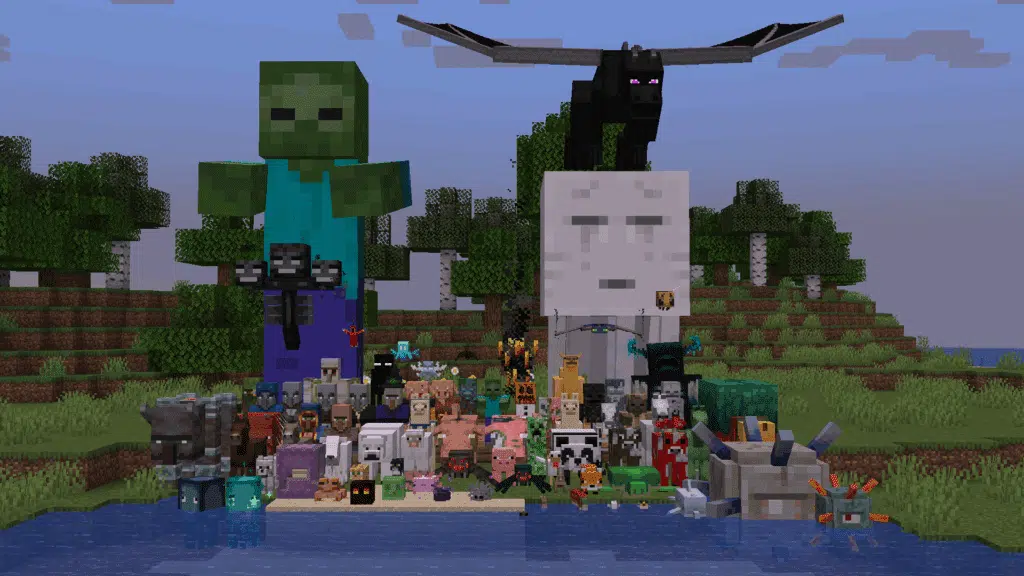
Before building anything, you need to understand how Minecraft Mob behavior actually works. Every creature in the game falls into one of three behavioral groups.
Therefore, knowing which category a mob belongs to determines how you should approach it in combat, breeding, or farming setups. This foundation is critical for later sections on farms and grinders.
What Are Passive Mobs?
Passive mobs never attack the player, even when provoked. Consequently, they are the easiest targets for beginner farms and food production.
- Cows, Pigs, and Sheep: Reliable food and material sources, easy to breed in enclosed pens.
- Chickens: Drop feathers and eggs, and hatch naturally from thrown eggs.
- Villagers: Passive traders that offer emeralds for goods, essential for long term economy building.
- Axolotls and Turtles: Aquatic passive mobs useful for underwater exploration buffs.
- Rabbits and Foxes: Fast, small mobs that are part of the newest visual overhaul.
What Are Neutral and Hostile Mobs?
Neutral mobs, such as wolves, bees, and llamas, only attack if provoked first. However, once angered, some neutral mobs can be extremely dangerous in groups.
Hostile mobs, on the other hand, attack on sight and are the primary target of any minecraft mob farm. These include zombies, skeletons, creepers, and spiders.
- Zombies and husks deal steady melee damage and burn in daylight.
- Skeletons shoot arrows from range and are dangerous near ledges.
- Creepers explode on contact, damaging both players and terrain.
- Spiders climb walls and become fully hostile in low light.
- Endermen teleport unpredictably and should never be looked at directly.
How To Make A Mob Farm In Minecraft
Learning how to make a mob farm in minecraft is one of the most valuable skills in the game. A good farm delivers experience points, rare drops, and resources without constant manual grinding.
The core idea behind any mob farm minecraft build is simple: create a dark, enclosed space where mobs spawn naturally, then funnel them toward a collection or kill point. Light control is the single biggest factor in success.
Choosing The Right Location
Location matters more than most players realize. Building high above the ground reduces competition from cave spawns below.
- Height matters: Build your platform above Y=200 so hostile mobs cannot spawn in nearby caves and steal your spawn cap.
- Clear the surroundings: Light up any caves or dark spots within 128 blocks, since mobs will spawn there instead of your farm.
- Water biomes help: Building over ocean or void areas reduces natural land spawns competing with your farm.
- AFK spot placement: Position your AFK platform close enough to trigger the mob cap but far enough to stay safe.
Building The Spawning Platform
Once the location is chosen, the actual mob farm minecraft structure needs a spawning platform and a way to move mobs downward.
Most designs use multiple stacked dark floors. Mobs spawn on each layer and then fall or get pushed toward a central collection shaft.
| Farm Component | Purpose | Recommended Material |
|---|---|---|
| Spawning Floor | Where mobs generate in darkness | Any solid opaque block |
| Water Stream | Moves mobs toward the drop point | Water source blocks |
| Collection Funnel | Guides mobs to the kill zone | Signs, trapdoors, or slabs |
| Kill Chamber | Where damage is applied | Pistons, lava, or fall height |
| Item Collector | Gathers drops automatically | Hoppers and chests |
Mob Grinder Minecraft: Turning Spawns Into Loot
A mob grinder minecraft setup is the finishing piece of any farm. While the spawning platform generates mobs, the grinder is what actually eliminates them efficiently.
There are several proven grinder types, each with different pros and cons depending on your redstone knowledge and available resources.
Which Mob Grinder Design Works Best?
Suffocation grinders using pistons are currently among the most reliable kill methods. They deal consistent, near instant damage without needing potions or complex timing.
- Piston Suffocation Grinder: Pistons push mobs into a solid block, dealing crushing damage instantly. This works reliably at any difficulty.
- Fall Damage Grinder: Mobs drop a set height (usually 23+ blocks) before landing on a half slab, taking heavy fall damage without dying instantly, leaving them at one health for easy finishing.
- Lava Blade Grinder: A thin layer of lava kills mobs as they pass through a narrow corridor, though it destroys some drops.
- Zombified Piglin Grinder: A minecart-trapped piglin gets pelted by snow golem snowballs, generating gold consistently, though this does not work well in deserts or the Nether.
How Do You Maximize Mob Grinder Output?
To maximize output, always pair your grinder with looting enchanted weapons where manual finishing is involved. Additionally, hopper minecart systems collect drops faster than standalone hoppers.
Therefore, combining a fall damage system with a final suffocation finisher often produces the best balance of speed and safety. This hybrid setup is popular among long term survival players.
How To Kill All Mobs In Minecraft Efficiently
Many players search for how to kill all mobs in minecraft when working toward advancement challenges or simply want a complete combat record. This requires facing categories many players never encounter in normal play.
Notably, some mobs only spawn under rare conditions, such as specific biomes, structures, or events, which makes tracking them down part of the challenge itself.
What Mobs Are Hardest To Find And Kill?
Certain mobs require specific triggers. The Warden, for example, only spawns after repeated sculk sensor activations in deep dark biomes and hits extremely hard.
- The Warden: Spawns from sculk shriekers, deals massive blind damage, and should be avoided rather than fought directly.
- The Ender Dragon: Requires reaching the End dimension and destroying crystals before engaging.
- The Wither: Summoned manually using soul sand and wither skeleton skulls, dealing area damage.
- Elder Guardian: Found only in ocean monuments, applies mining fatigue to nearby players.
- Ravager: Spawns during raids triggered by villages with a Bad Omen effect active.
Do You Need Special Gear For Boss Mobs?
Yes, boss level mobs require preparation beyond standard armor. Milk cures mining fatigue from guardians, while ranged weapons help against the Wither’s projectile attacks.
Furthermore, bringing golden apples and healing potions is standard practice before engaging the Ender Dragon or Wither in any serious attempt.
New Baby Mobs Minecraft: What Changed Recently
The new baby mobs minecraft update, known as Tiny Takeover, overhauled how baby animals look and sound across the game. This is currently one of the most talked about visual changes in years.
Instead of simply scaled down adult models, baby mobs now have unique proportions, single pixel eyes, and entirely new sound sets matching their smaller size.
Which Mobs Got The New Baby Treatment?
The update initially covered eight core mobs before expanding further. Additional animals continue receiving the same overhaul across subsequent patches.
- Pigs, cows, chickens, and sheep received redesigned baby models.
- Wolves, cats, and ocelots now look noticeably different as babies.
- Foxes, turtles, axolotls, and polar bears joined the expanded rollout.
- Camels, bees, mountain goats, llamas, and armadillos also received updated baby designs.
Is There A Way To Keep Mobs Young Forever?
Yes, the golden dandelion item now allows players to prevent a baby mob from growing into an adult. Players unlock its crafting recipe after breeding their first animal.
Crafting requires eight golden nuggets combined with one dandelion, making it an accessible early game item for dedicated animal collectors.
All Minecraft Mobs: Building Your Knowledge Base
Understanding all minecraft mobs helps with everything from farm efficiency to advancement completion. Categorizing mobs by dimension is a useful mental model for experienced players.
The Overworld holds the widest variety, but the Nether and the End each bring unique threats that behave completely differently from surface mobs.
How Many Mob Categories Should You Track?
Beyond hostile, neutral, and passive, mobs also split by dimension and by whether they are farmable, tamable, or boss tier. Tracking these overlapping categories helps prioritize what to build first.
| Category | Example Mobs | Best Use Case |
|---|---|---|
| Farmable Hostile | Zombie, Skeleton, Spider | XP and loot farms |
| Tamable Passive | Wolf, Cat, Horse | Combat companions and transport |
| Nether Exclusive | Piglin, Blaze, Ghast | Gold, blaze rods, and gunpowder |
| Boss Tier | Wither, Ender Dragon | End game challenges |
| Raid Exclusive | Pillager, Vindicator, Evoker | Totems and emerald farming |
Minecraft Farm Mob Strategies For Multiplayer Servers
Running a minecraft farm mob setup changes significantly once other players are involved. Shared servers mean shared mob caps, which directly affects your farm’s output.
On busy multiplayer worlds, mob caps are calculated per player rather than globally, but nearby farms can still compete with each other for the same spawn budget.
How Does Multiplayer Affect Mob Farm Output?
Because caps are distributed, having many players active near a farm can reduce individual output. Consequently, coordinating farm locations with your server community avoids wasted redstone builds.
Additionally, network stability becomes far more important during heavy combat sessions. A dropped connection during a grinder fight or raid can mean lost loot or worse, character death.
Pro Tips: Minecraft Mobs
- Torch Placement Precision: Even a single torch reduces spawn rates dramatically. Keep your farming platform completely dark and check every block with an F3 light overlay.
- AFK Positioning: Stand at the correct height and distance from your farm so mobs count toward the cap without despawning too early.
- Looting Enchantment Priority: Always finish mobs manually with a Looting III sword when farming for rare drops like enchanted books or specific gear.
- Hopper Minecart Systems: These collect items faster than static hoppers alone, especially in high volume grinders processing dozens of mobs per minute.
- Biome Awareness: Certain grinder designs, like zombified piglin traps, fail in deserts and badlands, so always confirm your farm’s biome before building.
Common Mistakes Minecraft Mobs Players Make
- Building Farms Too Close To The Surface: Many players place farms near ground level, allowing natural cave spawns to compete for the mob cap. Fix: build platforms above Y=200 or in the far end areas where competition is minimal.
- Ignoring Nearby Light Sources: A single lit torch or glowing block near the farm can silently cut spawn rates in half. Fix: audit the entire spawning radius and remove or cover every light source.
- Skipping Water Flow Testing: Poorly angled water streams cause mobs to get stuck instead of reaching the grinder. Fix: test water currents with dropped items before committing to permanent blocks.
- Overcomplicating The First Build: Beginners often attempt advanced redstone grinders before understanding basic mechanics. Fix: start with a simple fall damage design, then upgrade once the fundamentals are clear.
Why Connection Stability Matters For Minecraft Mobs
Fighting through a mob grinder session or defending a base during a raid demands precise, split second reactions. On multiplayer servers, any lag spike during combat can turn a clean kill into a lost fight.
This is where ExitLag becomes genuinely useful for dedicated Minecraft Mobs players. ExitLag is not a VPN. It analyzes multiple network routes in real time and automatically selects the fastest, most stable path to your Minecraft server.
Many multiplayer survival servers run overseas or on distant hosting regions, which means players often face unstable routing without realizing it. ExitLag’s Multipath Technology sends data through several routes simultaneously, so if one path degrades, others keep your connection alive.
- Real-time Optimization reduces delay during intense mob grinder sessions, keeping your hits and movements responsive.
- Multi-Internet support lets you combine up to four connections, useful if your home internet occasionally drops during long farming sessions.
- AI-powered routing automatically finds the fastest path to your server with a single click, no manual configuration required.
Importantly, ExitLag does not modify game files, inject code, or interact with anti-cheat systems in any way. It simply optimizes the route your data travels.
If you regularly farm mobs or raid bosses on multiplayer servers, grabbing the ExitLag Download is a smart move before your next session. Just remember not to run it alongside a VPN, since that reduces its effectiveness.
Final Thoughts On Mastering Minecraft Mobs
Mastering Minecraft Mobs takes more than memorizing a spawn list. It requires understanding light mechanics, farm design, grinder efficiency, and how connection quality affects multiplayer combat.
Whether you are chasing every achievement tied to killing all mobs or simply building your first automatic farm, the fundamentals covered here apply to every stage of survival play.
Ultimately, Minecraft Mobs will always be central to how the game evolves, from the newest baby animal redesigns to the toughest end game bosses waiting in the dark.
All game images used in this blog post belong to Mojang Studios / Microsoft. They are used for informational and educational purposes only and do not imply endorsement or affiliation with the rights holders.
Got questions or want to connect with other players? Join the conversation at the ExitLag Forum!